تعارف
The Amazon Echo Show 5 (2nd Gen, 2021 release) is a smart display designed to simplify your daily routines and enhance your connected home experience. This certified refurbished device has been tested and certified to function like new, offering all the features of a new unit.
With Alexa built-in, you can manage your day, stay entertained, and connect with others using just your voice. The compact 5.5-inch screen provides visual feedback for alarms, timers, news, video calls, and more.

Image: The Echo Show 5 on a nightstand, illustrating its use as a smart display for time and daily information.
سيٽ اپ ڪريو
Setting up your Echo Show 5 is a straightforward process. The device is designed for simple setup, allowing you to connect to your Wi-Fi network with ease.
دٻي ۾ ڇا آهي:
- ايڪو شو 5 ڊوائيس
- Glacier White power adapter (15W) with cable (4.9 ft.)
- تڪڙو شروع ھدايت
شروعاتي سيٽ اپ قدم:
- پلگ ان: پاور اڊاپٽر کي پنهنجي ايڪو شو 5 سان ڳنڍيو ۽ ان کي وال آئوٽليٽ ۾ لڳايو.
- اسڪرين تي ڏنل هدايتن تي عمل ڪريو: The device will power on and guide you through the initial setup process on its touch screen.
- وائي فائي سان ڳنڍيو: Select your Wi-Fi network from the list and enter the password. The Echo Show 5 supports dual-band 802.11a/b/g/n/ac Wi-Fi networks.
- Sign In to Amazon Account: پنهنجي Amazon اڪائونٽ جي سند سان لاگ ان ٿيو.
- ذاتي سيٽنگون: Customize settings such as time zone, device name, and privacy preferences.
- Alexa ايپ ڊائون لوڊ ڪريو: For full functionality and advanced controls, download the Alexa app on your Fire OS, Android, or iOS device. The app is also accessible via a web برائوزر.
Amazon's Wi-Fi simple setup technology helps streamline the connection process, making it easier to get your device up and running quickly.
توهان جي ايڪو شو 5 کي هلائڻ
The Echo Show 5 offers a wide range of functionalities, primarily controlled by voice commands to Alexa and through its interactive touch screen.
Daily Assistance:
- الارم ۽ ٽائمر: Set alarms and timers with voice commands.
- Calendar & News: Check your calendar, get news updates, and view موسم جي اڳڪٿي.
- معمولات: Create routines to automate actions, such as gradually turning on compatible lights in the morning.
سمارٽ گهر ڪنٽرول:
Manage compatible smart home devices using the interactive display, your voice, or motion detection.
- تعمير ٿيل ڪئميرا: Use the 2 MP camera to look in on your home when you're away.
- ڊوائيس ڪنٽرول: Control lights, cameras, and other smart devices.

Image: A man carrying a laundry basket, with an Echo Show 5 in the foreground, demonstrating how the device can be used to control smart home devices, possibly through motion detection.
ڪميونيڪيشن:
- وڊيو ڪالنگ: Make video calls to friends and family who have the Alexa app or an Echo device with a screen using the 2 MP camera.
- اعلان: Send announcements to other compatible devices in your home.

Image: The Echo Show 5 displaying an active video call, highlighting its communication capabilities.
وندر:
- وهڪرو: Play TV shows and movies from services like Prime Video and Netflix on the 5.5-inch screen.
- موسيقي ۽ آڊيو: Stream music from Amazon Music, Apple Music, Spotify, and others.
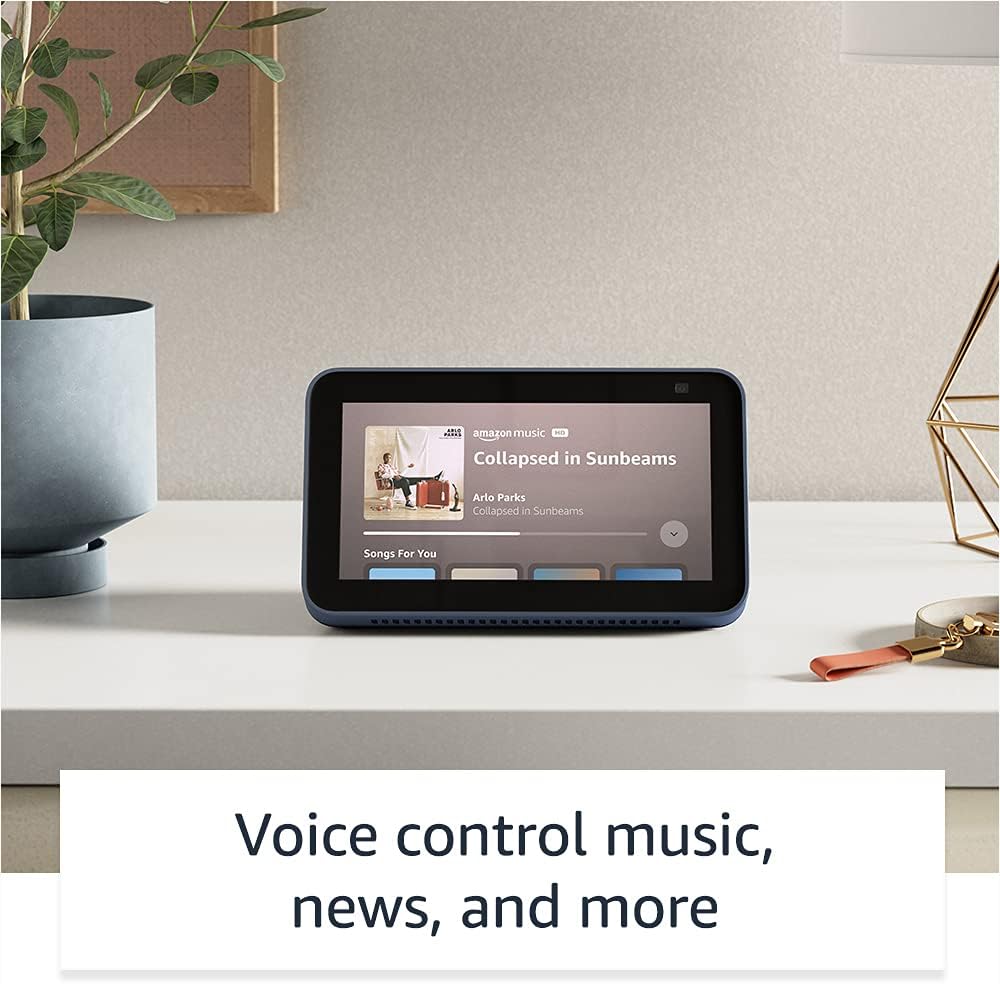
Image: The Echo Show 5 displaying a music playback screen, demonstrating its entertainment features.
ذاتي ڪرڻ:
- ڊجيٽل فوٽو فريم: Use Amazon Photos to turn your home screen into a digital photo frame.

Image: The Echo Show 5 displaying a personal photo, illustrating its use as a digital photo frame.
رازداري خاصيتون:
ايڪو شو 5 رازداري ڪنٽرول جي ڪيترن ئي پرتن سان ٺهيل آهي:
- مائيڪ/ڪئميرا بند بٽڻ: مائڪروفون ۽ ڪئميرا کي اليڪٽرانڪ طور تي ڊسڪنيڪٽ ڪرڻ لاءِ هڪ جسماني بٽڻ.
- بلٽ ان ڪئميرا شٽر: A physical shutter to cover the camera lens.
- Voice Recording Controls: ڪرڻ جي صلاحيت view ۽ پنهنجيون آواز جون رڪارڊنگون ختم ڪريو.
- ويڪ ورڊ ٽيڪنالاجي: The device only begins listening after detecting your chosen wake word.
- اسٽريمنگ اشارا: بصري اشارا ڏيکارين ٿا جڏهن آڊيو يا وڊيو ڪلائوڊ تي اسٽريم ٿي رهي آهي.

تصوير: هڪ ويجهو تصوير view of the Echo Show 5's top, highlighting the physical camera shutter button for privacy control.
رسائي خاصيتون:
ايڪو شو 5 ۾ Alexa کي توهان جي صلاحيتن مطابق ذاتي بڻائڻ لاءِ مختلف رسائي جون خاصيتون شامل آهن. انهن تائين رسائي حاصل ڪري سگهجي ٿي سيٽنگون → رسائي توهان جي ڊوائيس تي.
- Alexa ڏانهن ٽيپ ڪريو: اسڪرين ٽائلس يا ڪي بورڊ ذريعي ٽچ ذريعي Alexa سان رابطو ڪريو.
- موافق ٻڌڻ: Alexa جي جواب ڏيڻ کان اڳ ڳالهائڻ ختم ڪرڻ لاءِ وڌيڪ وقت فراهم ڪري ٿو.
- ترجيحي ڳالهائڻ جي شرح: ڪنٽرول ڪريو ته Alexa ڪيترو تيز يا سست ڳالهائي ٿو.
- ڪيپشننگ: Alexa ڪيپشننگ، ڪال ڪيپشننگ، ۽ بند ڪيل ڪيپشننگ سپورٽ ٿيل مواد لاءِ ٽيڪسٽ مهيا ڪن ٿا.
- ڏيکاريو ۽ ٻڌايو: نابين يا بصارت کان محروم استعمال ڪندڙن لاءِ شين جي سڃاڻپ ۾ مدد ڪري ٿو.
- آوازView اسڪرين ريڊر: Enables access for blind or visually impaired users.
- اسڪرين ميگنيفائر: زوم ان/آئوٽ ڪريو ۽ اسڪرين جي چوڌاري گھمايو.
- ويجهو هجڻ تي اطلاع ڏيو: جڏهن ڊوائيس جي ويجهو معلوم ٿئي ٿو ته اطلاع جا آواز وڄائي ٿو.
- ڪِنڊل زور سان پڙهو: اليڪسا توهان جون ڪِنڊل ڪتابون زور سان پڙهي سگهي ٿي.
- اصل وقت جو متن: وڊيو ڪال دوران لائيو ٽيڪسٽ ٽائيپ ڪريو.
- رنگ جي ڦيرڦار، رنگ جي اصلاح، آواز جي درخواست، ۽ وڌيڪ لاءِ اضافي سيٽنگون.
سار سنڀال
The Certified Refurbished Echo Show 5 has undergone rigorous testing and certification to ensure it looks and works like new. Regular maintenance is minimal.
- صفائي: Gently wipe the screen and device exterior with a soft, lint-free cloth. Avoid abrasive cleaners or sprays.
- سافٽ ويئر اپڊيٽ: Ensure your device is connected to Wi-Fi to receive automatic software security updates, which are guaranteed for at least four years after the device is last available for purchase as a new unit.
مشڪلاتون
If you encounter issues with your Echo Show 5, consider the following general troubleshooting steps:
- پاور سائيڪل: Unplug the device from the power outlet, wait for 30 seconds, and then plug it back in.
- وائي فائي ڪنيڪشن چيڪ ڪريو: Ensure your Wi-Fi network is active and the device is connected. You can check network status in the device settings.
- Verify Internet Connectivity: Confirm your internet service is working by testing other devices on the same network.
- Check Microphone/Camera: Ensure the mic/camera off button is not activated and the camera shutter is open if you are trying to use these features.
- Alexa ايپ: Use the Alexa app on your smartphone or tablet to manage device settings, check for updates, and access further support resources.
- وائس حڪم: Speak clearly and ensure you are within range of the device's microphones.
For more detailed troubleshooting or specific issues, refer to the help section within the Alexa app or visit the official Amazon support webسائيٽ.
وضاحتون
| خاصيت | تفصيل |
|---|---|
| ماپ | 5.8 "x 3.4" x 2.9" (148mm x 86mm x 73mm) |
| وزن | 14.5 اوز (410 گرام) |
| ڏيکاريو | 5.5 "ٽچ اسڪرين |
| ڪئميرا | بلٽ ان شٽر سان 2 ايم پي ڪيمرا |
| وائي فائي رابطو | Dual-band wifi (802.11a/b/g/n/ac). Does not support ad-hoc networks. |
| بلوٽوت ڪنيڪشن | A2DP support for audio streaming; AVRCP for voice control of connected mobile devices. PIN-code speakers not supported. |
| آڊيو | مڪمل رينج 1.65 انچ بلٽ ان اسپيڪر |
| پروسيسر | MediaTek MT 8163 |
| نسل | Echo Show 5 (2nd Gen) - 2021 release |
| ٻولي | اليڪسا انگريزي ۽ اسپيني ڳالهائي ٿي. |
وارنٽي ۽ سپورٽ
Your Certified Refurbished Echo Show 5 comes with the same limited warranty as a new device. For specific details regarding your warranty, please refer to the documentation included with your device or visit the official Amazon website for Certified Refurbished Amazon devices.
For customer support, troubleshooting, and to manage your device settings, utilize the Alexa app on your compatible smartphone or tablet. You can also find extensive support resources and FAQs on the Amazon support webسائيٽ.
سافٽ ويئر سيڪيورٽي اپڊيٽس: هي ڊوائيس Amazon تي نئين يونٽ جي طور تي خريداري لاءِ دستياب ٿيڻ کان گهٽ ۾ گهٽ چار سالن تائين گارنٽيڊ سافٽ ويئر سيڪيورٽي اپڊيٽ حاصل ڪندو. webسائيٽون.
لاڳاپيل دستاويز - ايڪو شو 5 (2nd Gen، 2021 رليز)
 |
ايميزون ايڪو شو 8 (ٻي نسل) تڪڙي شروعات گائيڊ توهان جي Amazon Echo Show 8 (2nd Gen) سان شروع ڪرڻ لاءِ هڪ گائيڊ، سيٽ اپ، خاصيتون، ۽ رازداري کي ڍڪيندي. |
 |
ايميزون ايڪو شو 8 (ٻي نسل) يوزر گائيڊ Amazon Echo Show 8 (2nd Gen) لاءِ هڪ جامع صارف گائيڊ، سيٽ اپ، رازداري خاصيتون، وائس ڪمانڊ، ۽ Alexa استعمال ڪرڻ لاءِ صلاحون تفصيل سان. |
 |
ٻاهرين ڀائيوارن لاءِ Amazon Echo ۽ Alexa برانڊ استعمال جون هدايتون ايميزون ايڪو ۽ اليڪسا برانڊ اثاثن جي صحيح استعمال تي ٻاهرين ڀائيوارن لاءِ سرڪاري هدايتون، جن ۾ لوگو، ٽائپوگرافي، رنگ، ۽ مارڪيٽنگ مواد ۾ نمائندگي شامل آهن. برانڊ جي مستقل مزاجي ۽ سالميت کي يقيني بڻايو وڃي. |
 |
ايميزون ايڪو شو 8 (ٻي نسل) تڪڙي شروعات گائيڊ: سيٽ اپ ۽ خاصيتون سکو ته ڪيئن پنهنجو Amazon Echo Show 8 (2nd Generation) سيٽ اپ ڪجي ۽ استعمال ڪجي. هي گائيڊ روزاني ڪمن لاءِ ڊوائيس جون خاصيتون، رازداري ڪنٽرول، ۽ ضروري Alexa ڪمانڊ شامل ڪري ٿو. |
 |
ايميزون ايڪو شو 5 (ٻي نسل) تڪڙي شروعات گائيڊ Amazon Echo Show 5 (ٻي نسل) لاءِ هڪ تڪڙي شروعاتي گائيڊ، سيٽ اپ، رازداري خاصيتون، ۽ Alexa سان بنيادي استعمال کي ڍڪيندي. |
 |
ايميزون ايڪو شو 8 (ٽيون نسل) سيٽ اپ ۽ يوزر گائيڊ توهان جي Amazon Echo Show 8 (3rd Generation) کي سيٽ اپ ڪرڻ ۽ استعمال ڪرڻ لاءِ هڪ جامع گائيڊ، جنهن ۾ خاصيتون، رازداري ڪنٽرول، ۽ سمارٽ هوم انٽيگريشن شامل آهن. |