تعارف
The DOOGEE S40 Pro is a rugged smartphone designed for durability and performance in challenging environments. It features a 5.45-inch display, Android 10, a 4650mAh battery, and dual rear cameras. This manual provides essential information for setting up, operating, maintaining, and troubleshooting your device.

تصوير: اڳيان ۽ پوئتي view of the DOOGEE S40 Pro rugged phone, showcasing its robust design and camera module.
1. سيٽ اپ
1.1 انباڪسنگ ۽ پيڪيج جو مواد
Carefully unbox your DOOGEE S40 Pro. Verify that all standard accessories are included in the package.

Image: Contents of the DOOGEE S40 Pro package, including the phone, power adapter, USB cable, user manual, and warranty information.
- DOOGEE S40 Pro Smartphone
- پاور اڊاپٽر
- USB ڪيبل
- استعمال ڪندڙ دستي
- وارنٽي ڪارڊ
1.2 SIM Card and SD Card Installation
The DOOGEE S40 Pro supports dual SIM cards and an expandable SD card for additional storage. Locate the SIM tray on the side of the device.
- Use the provided SIM ejector tool to open the SIM card tray.
- Carefully place your Nano-SIM cards and/or microSD card into the designated slots on the tray. Ensure the gold contacts are facing down.
- نرميءَ سان ٽري کي فون ۾ واپس دٻايو جيستائين اهو ڊوائيس جي جسم سان فلش نه ٿئي.
1.3 شروعاتي چارجنگ
پهرين استعمال کان اڳ، ڊوائيس کي مڪمل طور تي چارج ڪرڻ جي صلاح ڏني وئي آهي.
- USB ڪيبل کي پاور اڊاپٽر سان ڳنڍيو.
- Plug the USB cable into the charging port of the phone.
- پاور اڊاپٽر کي وال آئوٽليٽ ۾ لڳايو.
- چارجنگ انڊيڪيٽر اسڪرين تي ظاهر ٿيندو. فون کي چارج ٿيڻ ڏيو جيستائين بيٽري آئڪن مڪمل نه ٿئي.
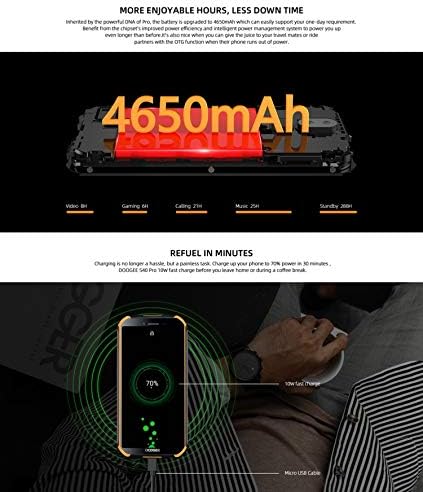
Image: The DOOGEE S40 Pro connected to a charger, showing the charging animation and battery percentage.
1.4 پاور آن/آف
- پاور آن ڪرڻ: Press and hold the Power button (located on the right side) until the DOOGEE logo appears.
- پاور آف ڪرڻ: پاور بٽڻ کي دٻايو ۽ رکو جيستائين پاور آپشن مينيو ظاهر نه ٿئي. "پاور آف" چونڊيو ۽ تصديق ڪريو.
- ٻيهر شروع ڪرڻ لاء: پاور آپشن مينيو مان، "ٻيهر شروع ڪريو" چونڊيو ۽ تصديق ڪريو.
2. آپريٽنگ هدايتون
2.1 بنيادي نيويگيشن
The DOOGEE S40 Pro operates on Android 10.0 and uses a touchscreen for navigation.
- ٽيپ ڪريو: ڪا شيءِ چونڊڻ يا ايپليڪيشن کولڻ لاءِ هڪ ڀيرو اسڪرين کي ڇهو.
- سوائپ صفحن يا فهرستن ذريعي اسڪرول ڪرڻ لاءِ پنهنجي آڱر کي اسڪرين تي ڇڪيو.
- زوم ڪرڻ لاءِ پنچ: اسڪرين تي ٻه آڱريون رکو ۽ انهن کي الڳ يا گڏ ڪريو زوم ان يا آئوٽ ڪرڻ لاءِ.
- ڊگهي پريس: Press and hold an item to access additional options or move icons.
2.2 ڪال ۽ پيغام
- ڪال ڪرڻ: فون ايپ کوليو، نمبر داخل ڪريو، ۽ ڪال آئڪن تي ٽيپ ڪريو.
- ڪال وصول ڪرڻ: Swipe up to answer or down to decline an incoming call.
- پيغام موڪلڻ: Open the Messages app, tap the new message icon, enter the recipient and message, then tap send.
2.3 ڪئميرا جو استعمال
The S40 Pro features dual rear cameras (13MP Sony primary sensor + 2MP portrait camera) and a front camera for selfies.

Image: Diagram highlighting the AI Rear Dual Camera setup on the DOOGEE S40 Pro, showing the 13MP Sony sensor and 2MP portrait camera, along with exampتصويرون.
- پنهنجي هوم اسڪرين يا ايپ ڊراور مان ڪئميرا ايپ کوليو.
- ڪئميرا سوئچ آئڪن استعمال ڪندي اڳيان ۽ پوئين ڪئميرا جي وچ ۾ سوئچ ڪريو.
- تصوير ڪڍڻ لاءِ شٽر بٽڻ کي دٻايو.
- Explore different modes like Portrait, Video, and Panorama.
2.4 Fingerprint Unlock
The device includes a rear-mounted fingerprint sensor for quick and secure unlocking.

Image: Illustration of the fingerprint unlock feature on the DOOGEE S40 Pro, showing a finger interacting with the rear-mounted sensor.
- ڏانهن وڃو سيٽنگون > سيڪيورٽي ۽ مقام > آڱر جو نشان.
- پنھنجي فنگر پرنٽ کي رجسٽر ڪرڻ لاءِ آن-اسڪرين ھدايتن تي عمل ڪريو.
- Once registered, simply place your finger on the sensor to unlock the phone.
2.5 اين ايف سي ۽ گوگل پي
The DOOGEE S40 Pro supports NFC (Near Field Communication) for convenient data transmission and mobile payments like Google Pay.

Image: Visual representation of NFC functionality for Google Pay and data transmission, and the 3.5mm headphone jack on the DOOGEE S40 Pro.
- To enable NFC: ڏانهن وڃو سيٽنگون > ڳنڍيل ڊوائيسز > اين ايف سي ۽ ان کي ٽوگل آن ڪريو.
- گوگل پي: Ensure Google Pay is set up with your payment methods. Tap your phone to compatible terminals for contactless payments.
2.6 ڪنيڪشن
- وائي فائي: وائرليس نيٽ ورڪن سان ڳنڍيو ذريعي سيٽنگون > نيٽ ورڪ ۽ انٽرنيٽ > وائي فائي.
- بلوٽوٿ: بلوٽوٿ ڊوائيسز سان جوڙو ٺاهيو ذريعي سيٽنگون > ڳنڍيل ڊوائيسز > بلوٽوٿ.
- USB: Connect to a computer using the provided USB cable for file منتقلي يا چارج ڪرڻ.
- 3.5mm هيڊ فون جڪ: Plug in wired headphones for audio.
3. سار سنڀال
3.1 Rugged Features and Durability
The DOOGEE S40 Pro is built to withstand harsh conditions, featuring IP68 water and dust resistance and MIL-STD-810G certification for drops and extreme temperatures.

Image: The DOOGEE S40 Pro submerged in water, dropped onto concrete, and surviving a fall, illustrating its IP68 and MIL-STD-810G durability.
- پاڻي جي مزاحمت (IP68): Can withstand submersion up to 1.5 meters for 30 minutes. Ensure all port covers are securely closed before exposure to water.
- Dust Resistance (IP68): مڪمل طور تي مٽي داخل ٿيڻ جي خلاف محفوظ.
- Drop Resistance (MIL-STD-810G): Designed to survive drops from up to 1.2 meters onto hard surfaces.
- حرارت جي مزاحمت: Operates in extreme temperatures from -55°C to 70°C.

Image: The DOOGEE S40 Pro shown in extreme cold (-55°C) and hot (70°C) environments, highlighting its robust temperature tolerance.
3.2 توهان جي ڊوائيس کي صاف ڪرڻ
To clean your DOOGEE S40 Pro:
- اسڪرين ۽ جسم کي نرم، لِنٽ فري ڪپڙي سان صاف ڪريو.
- ضد گندگي لاء، ڊيampen the cloth slightly with water. Avoid harsh chemicals or abrasive materials.
- If the device has been exposed to saltwater, rinse it thoroughly with fresh water and dry it completely before charging.
3.3 سافٽ ويئر اپڊيٽ
Regularly check for software updates to ensure optimal performance and security.
- ڏانهن وڃو سيٽنگون > سسٽم > سسٽم اپڊيٽ.
- Follow the on-screen prompts to download and install any available updates. Ensure your device has sufficient battery and a stable internet connection during updates.
4. مسئلا حل ڪرڻ
| مسئلو | ممڪن حل |
|---|---|
| ڊوائيس تي طاقت نه آهي. | Ensure the battery is charged. Connect to a charger and wait a few minutes before attempting to power on again. If unresponsive, try a forced restart by holding the Power button for 10-15 seconds. |
| بيٽري جلدي ختم ٿئي ٿي. | Check for background apps consuming power. Reduce screen brightness. Disable Wi-Fi, Bluetooth, or GPS when not in use. Perform a software update. |
| وائي فائي سان ڳنڍجي نٿو سگھي. | پڪ ڪريو ته وائي فائي فعال آهي. پنهنجو روٽر ۽ فون ٻيهر شروع ڪريو. نيٽ ورڪ وساريو ۽ ٻيهر ڪنيڪٽ ڪريو. |
| Phone is slow or unresponsive. | Close unnecessary background apps. Clear cache. Restart the device. If issues persist, consider a factory reset (back up data first). |
| ڪئميرا ڪم نه ڪري رهيو آهي. | Restart the phone. Clear the Camera app's cache and data in Settings > Apps. Ensure no other app is using the camera. |
5. وضاحتون
Key technical specifications for the DOOGEE S40 Pro:
- ماڊل نالو: S40 پرو
- آپريٽنگ سسٽم: Android 10.0
- ڏيکاريو: 5.45 inches, LCD, 1440 x 720 resolution
- رام: 4 جي بي
- اندروني اسٽوريج: 64 جي بي (مائڪرو ايس ڊي ذريعي وڌائي سگهجي ٿو)
- بيٽري: 4650mAh
- پوئتي ڪئميرا: Dual Back Cameras (13MP Sony primary + 2MP portrait)
- سامهون ڪئميرا: ها
- پروسيسر: Octa Core (CPU speed: 1.8 GHz, CPU model: Snapdragon)
- رابطي: 4G Cellular, Wi-Fi, Bluetooth, USB, GPS, NFC
- خاص خاصيتون: Touchscreen, Fingerprint Sensor, 3.5mm Headphone Jack
- استحڪام: IP68 Water & Dust Resistant, MIL-STD-810G Drop Resistant
- رنگ: ڪارو
- دٻي ۾ ڇا آهي: اڊاپٽر، USB ڪيبل
6. وارنٽي ۽ سپورٽ
For warranty information and customer support, please refer to the warranty card included in your product package or visit the official DOOGEE webسائيٽ. وارنٽي دعوائن لاءِ خريداري جو ثبوت رکو.
- سرڪاري Webسائيٽ: www.doogee.cc (مهرباني ڪري نوٽ ڪريو: هي هڪ جڳهه رکندڙ آهي URL, refer to your product's specific documentation for the correct support webسائيٽ.)
- ڪسٽمر سروس: Contact details may be found on the official webسائيٽ يا توهان جو وارنٽي ڪارڊ.


