1. تعارف
خريد ڪرڻ لاءِ مهربانيasing the SHARP XL-B512 Stereo Sound System. This micro sound system offers a rich 45-watt sound experience with versatile connectivity options including Bluetooth, CD player, USB, and FM radio. Its elegant design with a wooden speaker housing and LED display complements any living space. This manual provides essential information for setting up, operating, and maintaining your device to ensure optimal performance and longevity.
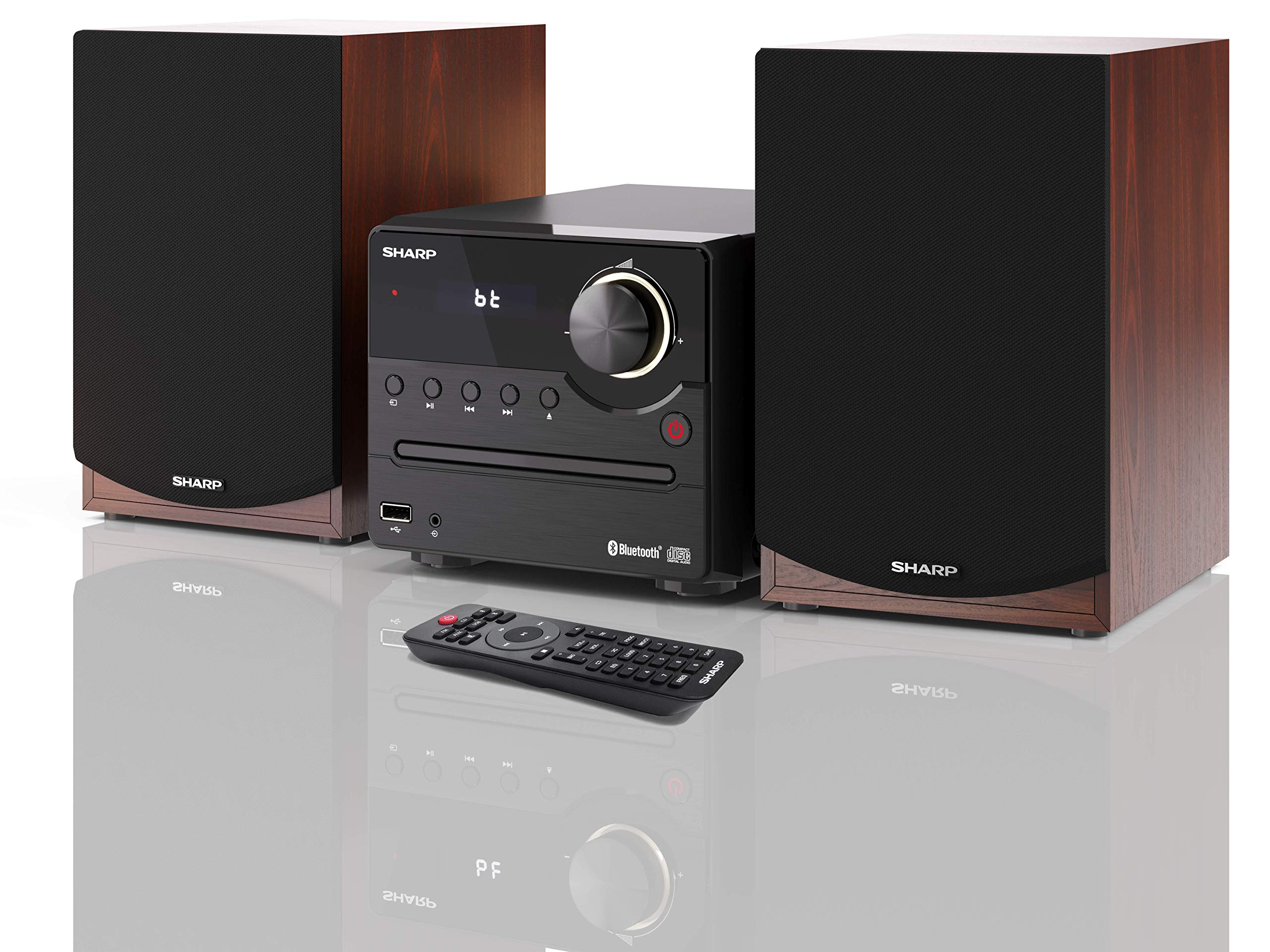
شڪل 1: SHARP XL-B512 Stereo Sound System. This image shows the central unit flanked by two wooden-cased speakers, reflecting on a polished surface.
2. حفاظت جي ڄاڻ
مھرباني ڪري پراڊڪٽ استعمال ڪرڻ کان پھريان سڀ حفاظتي ھدايتون احتياط سان پڙھو. مستقبل جي حوالي لاءِ ھي دستوري رکو.
- طاقت جو ذريعو: صرف مخصوص پاور سپلاءِ استعمال ڪريو. پڪ ڪريو ته وولٽيجtage توهان جي مقامي پاور سپلائي سان ملندو آهي.
- وينٽيليشن: ڪنهن به وينٽيليشن جي سوراخن کي نه روڪيو. مناسب هوا جي وهڪري لاءِ يونٽ جي چوڌاري مناسب جاءِ ڏيو.
- پاڻي ۽ نمي: يونٽ کي مينهن، نمي، يا ٽِپڻ/ ڦُلندڙ مائع جي سامهون نه رکو. مائع سان ڀريل شيون، جهڙوڪ گلدان، ڊوائيس تي نه رکو.
- گرمي: يونٽ کي گرمي جي ذريعن جهڙوڪ ريڊيئيٽر، گرمي رجسٽر، اسٽو، يا ٻين سامان کان پري رکو (بشمول ampلائفائرز) جيڪي گرمي پيدا ڪن ٿا.
- صفائي: صفائي ڪرڻ کان اڳ يونٽ کي ڀت جي آئوٽليٽ مان ڪڍو. صرف سڪل ڪپڙو استعمال ڪريو.
- خدمت ڪرڻ: ھن پراڊڪٽ کي پنھنجي خدمت ڪرڻ جي ڪوشش نه ڪريو. س servني خدمتن جو حوالو ڏيو قابل سروس اهلڪارن کي.
3. پيڪيج مواد
پڪ ڪريو ته هيٺ ڏنل سڀئي شيون توهان جي پيڪيج ۾ شامل آهن:
- SHARP XL-B512 Micro Sound System (Main Unit)
- Two Speakers (with wooden housing)
- پاور ڪيبل
- ريموٽ ڪنٽرول (بيٽرين سان)
- هدايت نامو (هي دستاويز)
- تڪڙو شروع ھدايت
4. سيٽ اپ
4.1 اسپيڪر ڪنيڪشن
Connect the two speakers to the main unit using the provided speaker cables. Ensure correct polarity (positive to positive, negative to negative) for optimal sound quality.
4.2 پاور ڪنيڪشن
Connect the power cable to the AC IN port on the rear of the main unit, then plug it into a wall outlet.

شڪل 2: Rear panel connections. This image displays the back of the central unit with ports for speaker wires and the AC power input, alongside the rear of the two speakers.
4.3 شروعاتي پاور آن
Press the Power button on the main unit or the remote control to turn on the system. The LCD display will illuminate.
5. آپريٽنگ هدايتون
5.1 فرنٽ پينل ڪنٽرول

شڪل 3: Front panel controls. This close-up shows the central unit's display, volume knob, and various control buttons for playback and source selection.
- پاور بٽڻ: يونٽ کي آن يا بند ڪري ٿو.
- ذريعو بٽن: Cycles through available input sources (CD, FM, Bluetooth, USB, AUX).
- حجم نوب: ماسٽر حجم جي سطح کي ترتيب ڏئي ٿو.
- پلے بیک ڪنٽرول: Play/Pause, Stop, Skip Forward/Backward for CD and USB modes.
- USB پورٽ: For connecting USB storage devices for music playback.
- AUX ان پٽ: ٻاهرين آڊيو ڊوائيسز کي ڳنڍڻ لاءِ 3.5 ايم ايم جيڪ.
5.2 سي ڊي پلے بیک
- کي دٻايو ذريعو button to select 'CD' mode.
- Open the CD tray by pressing the Eject button.
- Place a CD (CD/CD-R/CD-RW/MP3 format) with the label side up into the tray.
- Close the CD tray. The system will read the disc and begin playback automatically or display track information.
- Use the playback controls (Play/Pause, Stop, Skip) to manage your music.
5.3 ايف ايم ريڊيو
- کي دٻايو ذريعو 'FM' موڊ چونڊڻ لاءِ بٽڻ دٻايو.
- The system will automatically search for available stations or you can manually tune.
- To save a station as a preset, tune to the desired station, then press and hold the اڳواٽ button (if available on remote) or follow on-screen instructions. The system supports 40 preset memories.
- استعمال ڪريو اڳواٽ مٿي / هيٺ محفوظ ٿيل اسٽيشنن ذريعي وڃي وڃڻ لاءِ بٽڻَ.
5.4 بلوٽوٽ جوڙي
- کي دٻايو ذريعو button to select 'Bluetooth' mode. The display will show 'bt' and flash, indicating it's in pairing mode.
- توهان جي موبائل ڊوائيس تي، بلوٽوت کي فعال ڪريو ۽ دستياب ڊوائيسز لاء ڳولا ڪريو.
- Select 'SHARP XL-B512' from the list of devices.
- Once paired, the 'bt' indicator on the system's display will stop flashing. You can now stream audio from your device.
5.5 USB پلے بیک
- Insert a USB storage device into the USB port on the front panel.
- کي دٻايو ذريعو 'USB' موڊ چونڊڻ لاءِ بٽڻ دٻايو.
- سسٽم خودڪار طريقي سان مطابقت رکندڙ آڊيو کي ڳوليندو ۽ هلائيندو. files (MP3).
- Use the playback controls to navigate tracks.
5.6 AUX ان پٽ
- Connect an external audio device (e.g., smartphone, MP3 player) to the AUX IN jack on the front panel using a 3.5mm audio cable (not supplied).
- کي دٻايو ذريعو 'AUX' موڊ چونڊڻ لاءِ بٽڻ دٻايو.
- Play audio from your connected device. The sound will be output through the SHARP XL-B512 system.
5.7 برابر ڪندڙ سيٽنگون
The system features 6 preset equalizers with independent treble and depth control. Use the EQ button on the remote control or main unit to cycle through the presets and adjust sound to your preference.
6. سار سنڀال
6.1 يونٽ جي صفائي
Wipe the unit with a soft, dry cloth. Do not use abrasive cleaners, waxes, or solvents as they may damage the finish. Ensure the unit is unplugged before cleaning.
6.2 سي ڊي ڪيئر
Handle CDs by their edges. Keep them clean and free of scratches. Store CDs in their cases when not in use.
6.3 Speaker Care
The wooden speaker housing can be cleaned with a soft, dry cloth. Avoid placing heavy objects on the speakers or exposing them to direct sunlight or extreme temperatures.
7. مسئلا حل ڪرڻ
If you encounter any issues with your SHARP XL-B512 system, refer to the following table for common problems and solutions.
| مسئلو | ممڪن سبب | حل |
|---|---|---|
| طاقت نه آهي | Power cable not connected securely; Power outlet not active. | پاور ڪيبل ڪنيڪشن چيڪ ڪريو؛ هڪ مختلف پاور آئوٽليٽ آزمايو. |
| آواز ڪونهي | Volume too low; Incorrect source selected; Speaker cables disconnected. | حجم وڌايو؛ صحيح ان پٽ سورس چونڊيو؛ اسپيڪر ڪيبل ڪنيڪشن چيڪ ڪريو. |
| بلوٽوٿ جوڙو ناهي | System not in pairing mode; Device too far; Bluetooth disabled on device. | Ensure system is in Bluetooth pairing mode; Move device closer; Enable Bluetooth on your device. |
| سي ڊي نه پئي هلي. | CD inserted incorrectly; CD is dirty or scratched; Incorrect format. | Reinsert CD correctly; Clean CD; Ensure CD is a supported format (CD/CD-R/CD-RW/MP3). |
| ريموٽ ڪنٽرول ڪم نه ڪري رهيو آهي | بيٽريون ختم ٿي ويون آهن يا غلط طريقي سان لڳايون ويون آهن؛ ريموٽ ۽ يونٽ جي وچ ۾ رڪاوٽ. | Replace batteries; Ensure correct battery polarity; Remove any obstructions. |
جيڪڏهن انهن حلن جي ڪوشش ڪرڻ کان پوءِ به مسئلو برقرار رهي، مهرباني ڪري ڪسٽمر سپورٽ سان رابطو ڪريو.
8. وضاحتون
Below are the technical specifications for the SHARP XL-B512 Stereo Sound System:
- ماڊل: XL-B512
- ڪل ٻاڦ پاور: 45 واٽ
- آڊيو آئوٽ موڊ: اسٽيريو
- Speaker Output Channel Quantity: 2
- سپورٽ ٿيل آڊيو فارميٽ: MP3, CD, CD-R, CD-RW
- ٽونر ٽيڪنالاجي: FM PLL Tuner
- ايف ايم فريسيسيسي رينج: 87.5 کان 108 MHz
- FM Preset Memory: 40 اسٽيشنون
- رابطي: بلوٽوٿ، يو ايس بي، معاون (3.5 ايم ايم)
- خاص خاصيتون: 6 Preset Equalizers, LCD Display with white backlight
- Sound System Dimensions (W x H x D): 17 x 22 x 15 سينٽي
- Speaker Dimensions (W x H x D): 14.5 x 17.7 x 22.3 سينٽي ميٽر (هر هڪ)
- شيء جو وزن: 4 ڪلو
- طاقت جو ذريعو: تار ٿيل برقي
- ريموٽ ڪنٽرول: ها (بيٽريون شامل آهن)
9. وارنٽي ۽ سپورٽ
Your SHARP XL-B512 Stereo Sound System comes with a standard manufacturer's warranty. Please refer to the warranty card included in your package for specific terms and conditions, including the warranty period and coverage details.
For technical support, service inquiries, or further assistance, please contact your local SHARP customer service center. Contact information can typically be found on the manufacturer's webسائيٽ يا وارنٽي دستاويزن ۾.


