1. پراڊڪٽ ختمview
The Ewin Keyboard Case with Trackpad is designed to enhance your tablet experience by providing a physical keyboard and a multi-touch trackpad, transforming your tablet into a versatile productivity tool. It features a durable protective cover and smart functions for efficient use.

Image 1.1: Ewin Keyboard Case with Trackpad, showcasing the integrated keyboard and trackpad with a tablet in stand mode.
2. مطابقت
This keyboard case is compatible with various iPad models. Please verify your iPad's model number to ensure proper fit and function.
- iPad Air 4 10.9 inch 2020: Model Numbers A2072, A2316, A2324, A2325
- iPad Pro 11 inch 3rd Gen 2021: Model Numbers A2301, A2459, A2460
- iPad Pro 11 inch 2nd Generation 2020: Model Numbers A2228, A2068, A2230, A2231
- iPad Pro 11 inch 1st Generation 2018: Model Numbers A1980, A2013, A1934

Image 2.1: Visual guide for iPad model compatibility, including iPad Pro 11-inch (2019), iPad Air 4 10.9-inch (2020), and iPad Pro 11-inch (2020).
3. پيڪيج مواد
پيڪيج کولڻ تي، پڪ ڪريو ته هيٺ ڏنل سڀئي شيون موجود آهن:
- 1 x Ewin Keyboard Case
- 1 x ٽائپ-سي چارجنگ ڪيبل
- 1 x استعمال ڪندڙ دستياب
Note: iPad is not included.

Image 3.1: Contents of the Ewin Keyboard Case package, including the case, charging cable, and manual.
4. سيٽ اپ
4.1 ڪي بورڊ کي چارج ڪرڻ
Before first use, fully charge the keyboard. Connect the provided Type-C charging cable to the keyboard's charging port and a USB power source. The charging indicator light will show the charging status.
- چارج ڪرڻ وقت: تقريبن 2 ڪلاڪ
- Usage Time: 100+ hours
- Standby Time: 130+ days
4.2 بلوٽوٽ جوڙي
- پڪ ڪريو ته ڪيبورڊ چارج ٿيل آهي.
- Turn on the keyboard by sliding the power switch. The Bluetooth indicator light will begin to flash, indicating it's in pairing mode.
- پنهنجي iPad تي، وڃو سيٽنگون > بلوٽوٿ.
- بلوٽوٿ آن ڪريو. توهان جو iPad موجود ڊوائيسز جي ڳولا ڪندو.
- Select "Magnetic Keyboard 5.1 V81" (or similar name) from the list of "OTHER DEVICES".
- Once connected, the Bluetooth indicator light on the keyboard will stop flashing. The keyboard will automatically reconnect to your iPad in the future after the initial pairing.
4.3 Inserting the iPad
Carefully align your iPad with the case and gently press it into place. Ensure all edges are securely seated within the protective frame of the case.

تصوير 4.1: تفصيلي view of the iPad Keyboard Case, illustrating its key features including the gestures touchpad, Bluetooth connectivity, ergonomic design, Type-C port, and integrated pencil holder.
5. آپريٽنگ هدايتون
5.1 Keyboard Functions and Shortcuts
The keyboard provides a comfortable typing experience with industry-leading design and 22 kinds of shortcuts for increased productivity.
Familiarize yourself with standard keyboard shortcuts for your iPadOS. Common shortcuts include:
- Command + H: گھر جي اسڪرين ڏانھن وڃو
- Command + Space: کوليو ڳولا
- Command + Tab: کليل ائپس جي وچ ۾ تبديل ڪريو
- Command + C / Command + V: ڪاپي / پيسٽ ڪريو
- ايف اين + اسپيس بار: Toggle Trackpad On/Off
5.2 Smart Trackpad Gestures
The integrated smart touchpad supports 9 kinds of practical laptop gestures, allowing for precise navigation and control. Ensure "AssistiveTouch" is enabled in your iPad settings if you wish to use advanced touch features.

Image 5.1: Close-up of the Smart Touchpad, illustrating its functionality for precise control.
5.3 آٽو سليپ/ويڪ فنڪشن
The case features an auto sleep/wake function to conserve battery life. Closing the case will put your iPad to sleep, and opening it will wake it up.
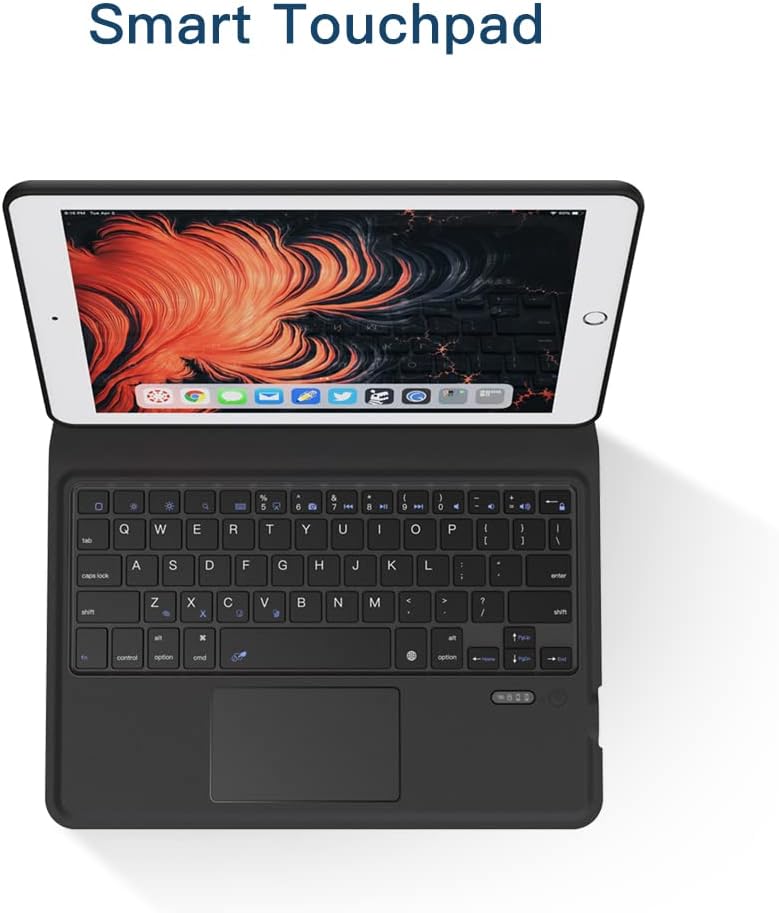
Image 5.2: Illustration of the Auto Sleep feature, which reduces battery consumption when the case is closed.
5.4 اسٽينڊ فنڪشن
The case is designed to automatically convert into a stable stand for comfortable viewing and typing. Fold the buckle along the crease and allow the magnets to secure the stand position.

Image 5.3: Demonstration of the iPad Keyboard Case's stand function, showing how it folds and magnetically secures into a viewپوزيشن.
6. سار سنڀال
6.1 صفائي
To clean the keyboard case, gently wipe the exterior with a soft, damp cloth. Avoid using harsh chemicals or abrasive materials. For the keyboard keys, use a soft brush or compressed air to remove dust and debris.
6.2 بيٽري جي سنڀال
To prolong battery life, avoid fully discharging the keyboard frequently. Charge it regularly, even if not in constant use. Store the device in a cool, dry place when not in use for extended periods.
7. مسئلا حل ڪرڻ
| مسئلو | ممڪن سبب | حل |
|---|---|---|
| ڪي بورڊ بلوٽوٿ ذريعي ڳنڍي نه رهيو آهي. | Low battery; Bluetooth not enabled on iPad; keyboard not in pairing mode; interference. | Charge the keyboard. Ensure Bluetooth is on in iPad settings. Turn keyboard off and on to re-enter pairing mode. Move closer to iPad. |
| Trackpad not responding. | Trackpad disabled; software glitch; dirty surface. | دٻايو Fn + اسپيس بار to enable/disable trackpad. Restart iPad and keyboard. Clean trackpad surface. |
| چاٻيون جواب نه ڏئي رهيا آهن. | Low battery; connection issue. | Charge the keyboard. Re-pair the Bluetooth connection. |
| iPad does not go to sleep/wake automatically. | iPad settings; case not properly closed. | Ensure "Lock/Unlock" is enabled in iPad settings (Settings > Display & Brightness > Lock/Unlock). Ensure the case is fully closed. |
8. وضاحتون
| خاصيت | تفصيل |
|---|---|
| برانڊ | Ewin |
| ماڊل نمبر | EWIN-KEYBOARD |
| مطابقت رکندڙ ڊوائيسز | iPad Air 4 10.9 inch (2020), iPad Pro 11 inch (2018/2020/2021) |
| رابطي | Bluetooth وائرليس |
| خاص خصوصيت | Integrated Trackpad, Pencil Holder, Auto Sleep/Wake, Stand Function |
| شيل جو قسم | سخت ڪيس |
| Max. Compatible Device Size | 10.9 انچ |
| شيءِ جو وزن | 1.48 پائونڊ (تقريبن 0.67 ڪلوگرام) |
| پيڪيج جي ماپ | 11.34 x 7.99 x 1.3 انچ (تقريبن 28.8 x 20.3 x 3.3 سينٽي ميٽر) |

Image 8.1: Illustration of the Scissor Switch Keycap mechanism, indicating responsive and comfortable typing.

Image 8.2: Detail of the Honeycomb Case design, promoting heat dissipation for the tablet.

Image 8.3: Visual representation of the case's shockproof design, offering enhanced protection against drops.
9. وارنٽي ۽ سپورٽ
Ewin products are manufactured with high-quality standards. For warranty information or technical support, please refer to the contact details provided on the product packaging or the official Ewin webسائيٽ. وارنٽي جي دعوي لاء توهان جي خريداري جي رسيد رکو.


