1. تعارف
The OttLite Entertain LED Speaker Lamp (Model S83WGW) is a versatile lighting and audio solution designed for various indoor environments. This device integrates an LED lamp with adjustable brightness and color modes, a Bluetooth speaker for wireless audio streaming, and a detachable emergency light feature. This manual provides detailed instructions for the proper setup, operation, and maintenance of your lamp.

Image 1.1: The OttLite Entertain LED Speaker Lamp، شوڪasing ان جي مربوط ڊيزائن.
2. پيڪيج مواد
پڪ ڪريو ته سڀئي شيون پيڪيج ۾ موجود آهن:
- OttLite Entertain LED Speaker Lamp (S83WGW)
- پاور ڪيبل
3. سيٽ اپ
- پيڪنگ کولڻ: احتياط سان پيڪنگنگ مان سڀني اجزاء کي هٽايو.
- لڳائڻ: ايل کي جاء ڏيوamp هڪ مستحڪم، لوڻ واري سطح تي.
- پاور ڪنيڪشن: Connect the provided power cable to the lamp's power input port and then plug it into a standard 120V AC wall outlet. The lamp's internal battery will begin charging automatically.
4. آپريٽنگ هدايتون
4.1. روشني جا ڪم
آيلamp features touch-activated controls located on the top of the shade for easy adjustment of light settings.
- پاور آن / آف: Lightly touch the metallic button on the top center of the lamp shade to turn the light on or off.
- روشني کي ترتيب ڏيو: With the light on, repeatedly touch the metallic button to cycle through three brightness levels.
- رنگ موڊ تبديل ڪريو: Press and hold the metallic button for approximately 2 seconds to switch between the three color temperature modes: warm white, bright white, and natural daylight. Release the button when the desired mode is active.
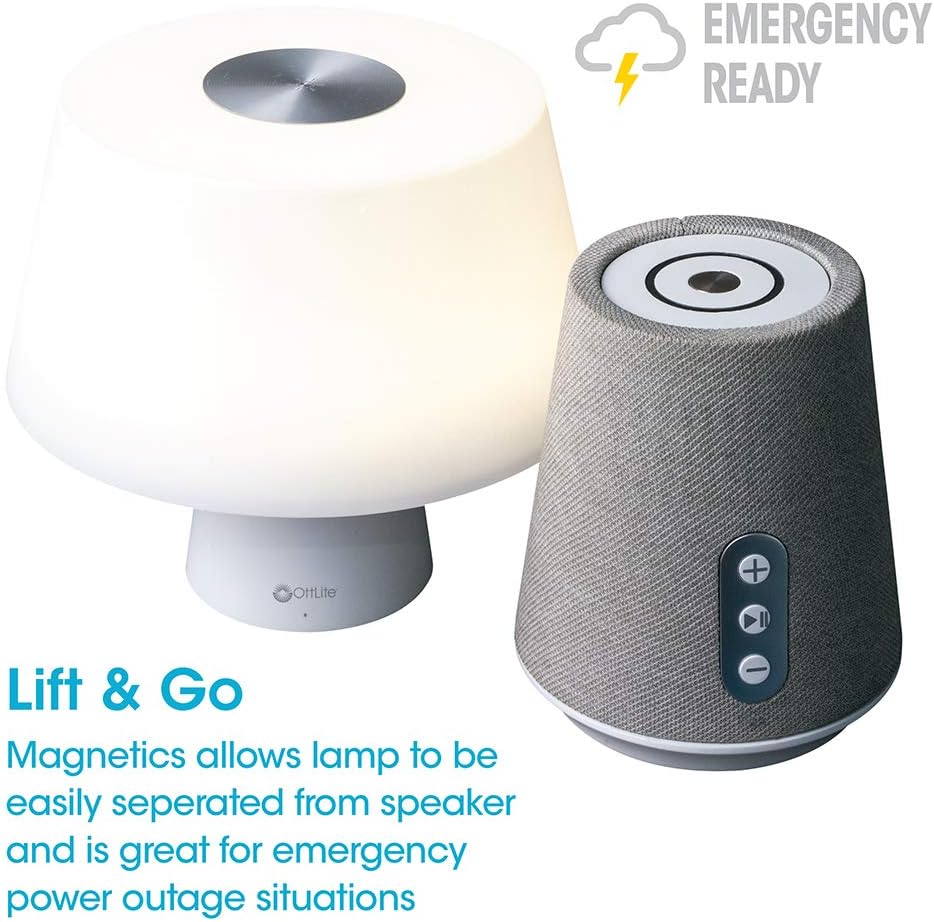
Image 4.1: Activating the lamp's light functions via the touch control on top of the shade.

تصوير 4.2: ايلamp offers three distinct color temperature modes for varied lighting needs.
4.2. بلوٽوٿ اسپيڪر
The integrated Bluetooth speaker allows for wireless audio playback from compatible devices.
- Power On Speaker: Press the Play/Pause button on the front of the speaker base to turn the speaker on. A tone will indicate it is ready for pairing.
- جوڙڻ: On your audio device (e.g., smartphone, tablet), enable Bluetooth and search for available devices. Select "OttLite Entertain" from the list. A confirmation tone will sound upon successful pairing.
- آڊيو ڪنٽرول:
- کي دٻايو + حجم وڌائڻ لاءِ بٽڻ.
- کي دٻايو - حجم گھٽائڻ لاءِ بٽڻ.
- کي دٻايو راند/روڪ آڊيو کي هلائڻ يا روڪڻ لاءِ بٽڻ.
- Power Off Speaker: Press and hold the Play/Pause button for approximately 3 seconds to turn the speaker off.

Image 4.3: The speaker base with clearly labeled controls for volume and playback.

Image 4.4: The speaker base highlights its Bluetooth connectivity feature.
4.3. Emergency Light Feature (Lift & Go)
آيلamp portion can be detached from the speaker base to function as a portable emergency light.
- Detaching the Light: نرميءَ سان ايل کي اٿاريوamp shade portion straight up from the speaker base. It is held in place by magnets.
- Using the Emergency Light: The detached light will operate on its internal rechargeable battery. Use the touch control on top of the shade to turn it on/off and adjust brightness as described in Section 4.1. The light can provide illumination for 5 to 30+ hours depending on the brightness setting.
- ري چارجنگ: To recharge the emergency light, simply place it back onto the speaker base. Ensure it is properly seated for charging to commence.

Image 4.5: The 'Lift & Go' feature allows the lamp to be used as a portable emergency light.
5. سار سنڀال
To ensure the longevity and optimal performance of your OttLite Entertain LED Speaker Lamp، انهن سار سنڀال جي هدايتن تي عمل ڪريو:
- صفائي: ايل کان ڌار ڪريوamp from the power source before cleaning. Use a soft, dry cloth to wipe down the exterior surfaces. Do not use abrasive cleaners, solvents, or harsh chemicals, as these may damage the finish.
- اسٽوريج: جڏهن ڊگهي عرصي تائين استعمال ۾ نه هجي، ته l کي ذخيرو ڪريوamp هڪ ٿڌي، سڪل جڳهه ۾ سڌو سورج جي روشني ۽ انتهائي گرمي کان پري.
- بيٽري جي سنڀال: For the internal rechargeable battery, avoid fully discharging it frequently. Recharge the lamp regularly, even if not in constant use, to maintain battery health.
6. مسئلا حل ڪرڻ
جيڪڏهن توهان کي پنهنجي ايل سان مسئلا درپيش اچن ٿاampهيٺ ڏنل مشڪلاتن کي حل ڪرڻ واري مرحلن ڏانهن رجوع ڪريو:
| مسئلو | ممڪن سبب | حل |
|---|---|---|
| Lamp روشني نه ٿي. | پلگ ان ٿيل ناهي؛ پاور او يوtage; internal battery depleted; faulty connection. | Ensure power cable is securely plugged in. Check power outlet. Recharge the lamp by placing it on the base. |
| Bluetooth speaker does not connect. | Speaker not in pairing mode; device Bluetooth off; already connected to another device. | Ensure speaker is on and in pairing mode. Turn Bluetooth on your device. Disconnect from other devices. |
| Emergency light does not work when detached. | Internal battery depleted. | Place the light back on the speaker base to recharge its internal battery. |
| Poor audio quality from speaker. | Device too far from speaker; interference; low battery. | Move device closer to speaker. Avoid obstacles. Ensure speaker is charged. |
7. وضاحتون
| خاصيت | تفصيل |
|---|---|
| ماڊل نمبر | S83WGW |
| برانڊ | اوائليٽ |
| پيداوار جي ماپ | 3.12"ڊي x 3.12"ڊي x 10.87"ايڇ |
| شيءِ جو وزن | 2.6 پائونڊ |
| روشني جو ذريعو قسم | ايل اي ڊي |
| واتtage | 3 واٽ |
| روشني | 337 ليمن |
| رنگ جي درجه حرارت | 5000 ڪيلون (ڏينهن جي روشني) |
| ڪنٽرول جو طريقو | ڇڪڻ |
| طاقت جو ذريعو | Corded Electric (with rechargeable battery for emergency light) |
| بيٽريون | 1 ليتيم آئن بيٽري (شامل) |
| مواد | پلاسٽڪ |
| يو پي سي | 761712019116 |
8. وارنٽي ۽ سپورٽ
For warranty information or technical support, please refer to the official OttLite webسائيٽ تي وڃو يا انهن جي ڪسٽمر سروس ڊپارٽمينٽ سان رابطو ڪريو. ڪنهن به وارنٽي دعوائن لاءِ خريداري جي ثبوت طور پنهنجي خريداري جي رسيد رکو.
رابطي جي ڄاڻ: مهرباني ڪري دورو ڪريو OttLite's official store page for current support options and contact details.