1. تعارف
This user manual provides comprehensive instructions for the installation, operation, and maintenance of the Hanwha Techwin XRN-2010A Network Video Recorder (NVR). The XRN-2010A is a high-performance 32-channel 4K NVR designed for professional surveillance applications, supporting up to 8 internal HDDs for extensive storage.
مھرباني ڪري پراڊڪٽ استعمال ڪرڻ کان پھريائين ھن دستوري کي چڱي طرح پڙھو ته جيئن صحيح ۽ محفوظ آپريشن کي يقيني بڻائي سگھجي.
2. حفاظت جي ڄاڻ
Always adhere to the following safety precautions to prevent damage to the product or injury to yourself and others:
- Ensure the NVR is connected to a grounded power outlet.
- Do not expose the NVR to water or moisture.
- Do not open the NVR casing. سڀني خدمتن کي قابل اهلڪارن جي حوالي ڪريو.
- Place the NVR in a well-ventilated area to prevent overheating.
- Use only specified power adapters and accessories.
3. مصنوعات جون خاصيتون
The Hanwha Techwin XRN-2010A NVR offers a robust set of features for advanced video surveillance:
- 32 channel network video recorder, supporting up to 12 MP resolution per channel.
- Supports H.265/H.264/MJPEG video compression formats.
- Maximum 8 internal HDDs for storage, with a total capacity of up to 48TB.
- HDMI/VGA local dual monitor output, with HDMI supporting up to UHD (4K) resolution.
- iSCSI storage supported for expanded storage capabilities.
- ONVIF camera compliant for broad compatibility with IP cameras.
- Includes QR code for easy mobile app access and setup.
- Features ARB & failover (N+1) for enhanced reliability.
- Incorporates WiseStream compression technology for efficient bandwidth and storage usage.
- Supports fisheye dewarping on web and CMS.
4. جسماني تفصيل
Familiarize yourself with the front and rear panels of the XRN-2010A NVR.
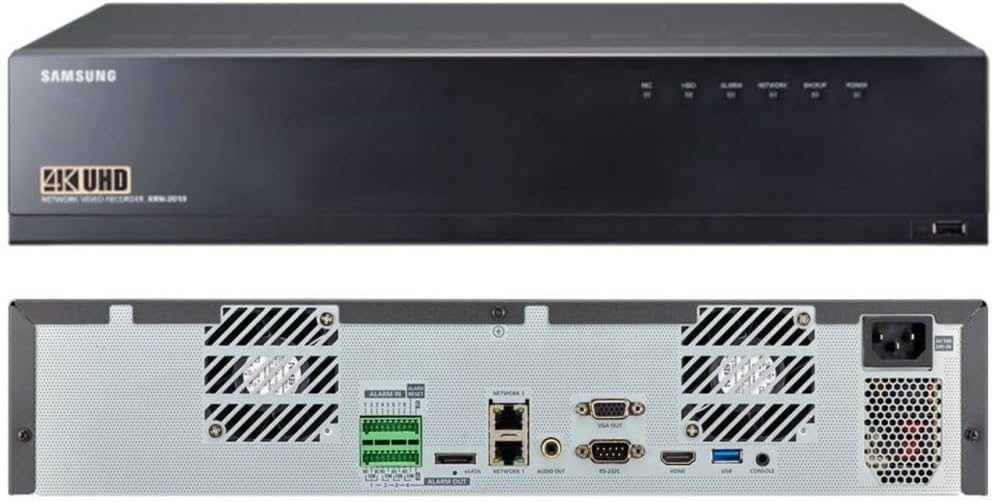
Figure 4.1: Front and Rear Panels of the XRN-2010A NVR. The top image shows the front panel with the Samsung logo (note: product is Hanwha Techwin, branding may vary), 4K UHD designation, and status indicators. The bottom image displays the rear panel with various input/output ports including alarm terminals, network ports, video outputs (VGA, HDMI), USB, and power input.
4.1 فرنٽ پينل
- حيثيت جا اشارو: LEDs for HDD activity, Recording, Alarm, Network status, Backup, and Power.
- USB پورٽ: For connecting external devices such as a mouse or USB storage for backup.
4.2 ريئر پينل
- Alarm In/Out: Terminals for connecting external alarm sensors and alarm output devices.
- Network Ports (NETWORK 1, NETWORK 2): RJ45 ports for connecting to the local area network (LAN).
- اي ايسٽا پورٽ: For connecting external SATA storage devices.
- آڊيو آئوٽ: For connecting to an audio output device.
- وي جي اي آئوٽ: Video output port for connecting to a VGA monitor.
- RS-232C: Serial port for communication with other devices.
- HDMI Outاهر: High-Definition Multimedia Interface output for connecting to an HDMI monitor, supporting up to 4K resolution.
- USB بندرگاهن: پردي جي سامان لاءِ اضافي USB پورٽ.
- ڪنسول پورٽ: For system console access.
- پاور ان پٽ: AC power input for the NVR.
5. سيٽ اپ گائيڊ
Follow these steps to set up your XRN-2010A NVR:
- کوليو ۽ چڪاس ڪريو: Carefully remove the NVR from its packaging and inspect for any signs of damage.
- Install HDDs (if not pre-installed): If HDDs are not included or pre-installed, refer to the separate HDD installation guide for your model.
- مانيٽر ڳنڍيو: HDMI يا VGA پورٽ استعمال ڪندي مانيٽر کي NVR سان ڳنڍيو.
- ماؤس ڳنڍيو: Connect a USB mouse to one of the USB ports on the NVR.
- نيٽ ورڪ سان نيو: Connect the NVR to your network router or switch using an Ethernet cable plugged into a Network port.
- پاور Connectنيو: Connect the power cord to the NVR's power input and then to a grounded electrical outlet.
- پاور آن: Press the power button on the NVR. The system will boot up.
- شروعاتي تشڪيل: Follow the on-screen wizard for initial setup, including setting up administrator password, network settings, date/time, and adding IP cameras.
6. آپريٽنگ هدايتون
This section covers basic operation of the XRN-2010A NVR.
6.1 زنده View
لاگ ان ٿيڻ کان پوءِ، NVR لائيو ڏيکاريندو view of connected cameras. You can switch between different camera layouts and views using the on-screen controls.
6.2 رڪارڊنگ
The NVR is configured to record based on your settings (continuous, motion detection, alarm event). Recording status can be monitored via the front panel LED indicators and the on-screen display.
- رڪارڊنگ شيڊول: Configure recording schedules for each camera through the NVR's menu system.
- واقعي جي رڪارڊنگ: Set up motion detection or alarm input triggers for event-based recording.
6.3 پلے بیک
Toيهر ڪرڻview رڪارڊ ٿيل footage:
- Access the Playback menu from the main interface.
- Select the camera(s) and the date/time range for playback.
- فو ذريعي نيويگيٽ ڪرڻ لاءِ پلے بیک ڪنٽرولز (کيڏڻ، روڪيو، تيز اڳتي، پوئتي) استعمال ڪريو.tage.
6.4 ريموٽ رسائي ۽ موبائل ايپ
The XRN-2010A supports remote access via web browser and a dedicated mobile application. Use the QR code provided with the product or found in the NVR's system information to easily download and configure the mobile app for remote viewing ۽ ڪنٽرول.
For detailed instructions on remote access setup, refer to the NVR's on-screen help or the Hanwha Techwin support webسائيٽ.
7. سار سنڀال
Regular maintenance ensures optimal performance and longevity of your NVR.
- صفائي: Periodically clean the exterior of the NVR with a soft, dry cloth. Ensure ventilation openings are free from dust and obstructions.
- فرم ويئر اپڊيٽس: Check the Hanwha Techwin website regularly for firmware updates. Keeping your NVR's firmware up-to-date ensures access to the latest features and security patches.
- ڊيٽا بيڪ اپ: اهم رڪارڊ ٿيل فو جو باقاعدي بيڪ اپ وٺو.tagڊيٽا جي نقصان کي روڪڻ لاءِ ٻاهرين اسٽوريج ڊوائيسز (مثال طور، USB ڊرائيو، نيٽ ورڪ اسٽوريج) ڏانهن.
- HDD صحت جي چڪاس: Monitor the health status of your installed HDDs through the NVR's system menu. Replace failing drives promptly.
8. مسئلا حل ڪرڻ
هي حصو انهن عام مسئلن جو حل فراهم ڪري ٿو جيڪي توهان کي درپيش اچي سگهن ٿا.
| مسئلو | ممڪن سبب | حل |
|---|---|---|
| ڪابه طاقت | Power cord disconnected; Power outlet faulty; NVR power supply issue. | Check power cord connection; Test power outlet; Contact technical support if issue persists. |
| ويڊيو جو نتيجو ناهي | Monitor cable loose/faulty; Incorrect video output selected; Monitor input not set correctly. | Check HDMI/VGA cable connections; Ensure monitor is on correct input; Restart NVR. |
| Cannot Access NVR via Network | Network cable disconnected; Incorrect IP address; Firewall blocking connection. | Verify network cable connection; Check NVR's IP address and network settings; Disable firewall temporarily for testing. |
| ڪابه رڪارڊنگ | HDDs not installed/initialized; Recording schedule not set; Camera not connected/configured. | Check HDD status; Configure recording schedule; Ensure cameras are properly added and online. |
For more complex issues, please refer to the detailed troubleshooting guide available on the Hanwha Techwin support webسائيٽ تي وڃو يا انهن جي ٽيڪنيڪل سپورٽ سان رابطو ڪريو.
9. وضاحتون
Key technical specifications for the Hanwha Techwin XRN-2010A NVR:
| خاصيت | تفصيل |
|---|---|
| ماڊل | XRN-2010A |
| چينل | 32 چينل |
| وڌ ۾ وڌ ريڪارڊ | Up to 12 MP per channel |
| وڊيو ڪمپريشن | H.265 ، H.264 ، MJPEG |
| Max Recording Bandwidth | 256 ايم بي پي ايس |
| Internal HDD Bays | 8 (Max 48TB total) |
| خارجي اسٽوريج | eSATA, iSCSI |
| وڊيو آئوٽ | HDMI (up to 4K UHD), VGA |
| رابطي | Ethernet (2x RJ45), USB, RS-232C |
| طول و عرض | 22 x 20 x 8 انچ (پيڪيج) |
| وزن | 18 پائونڊ (شيون) |
| ٺاهيندڙ | حنيوه ٽيڪون |
10. وارنٽي ۽ سپورٽ
For detailed warranty information, please refer to the official Hanwha Techwin webسائيٽ يا توهان جي پراڊڪٽ سان گڏ وارنٽي ڪارڊ. وارنٽي جون شرطون ۽ ضابطا علائقي ۽ پرچون ڪندڙ جي لحاظ کان مختلف ٿي سگهن ٿا.
For technical support, product registration, or to download the latest software and documentation, please visit the official Hanwha Techwin support portal:


