1. تعارف
خريد ڪرڻ لاءِ مهربانيasing the JOYTRIP Auto Tracking Phone Holder, Model T2. This device is designed to enhance your video recording experience by automatically tracking your face or body, providing stable and dynamic footage without the need for manual adjustment or additional applications. It is ideal for video calls, live streaming, vlogging, and other hands-free video activities. Please read this manual thoroughly before use to ensure proper operation and maintenance.
2. پراڊڪٽ ختمview
2.1 اهم خاصيتون
- Automatic Tracking: Recognizes and tracks faces or bodies with 360° rotation.
- ڪابه ايپ گهربل ناهي: Features a built-in camera system for intelligent tracking, eliminating the need for external applications.
- ورسٽائل گردش: Offers 360° horizontal rotation and adjustable clip for various angles.
- Rechargeable بيٽري: Integrated 2200 mAh lithium battery provides 6-8 hours of continuous operation.
- ٽرپڊ مطابقت: Equipped with a standard 1/4" screw thread for mounting on tripods.
- پورٽبل ڊيزائن: Compact and detachable for easy transport.
2.2 پيڪيج مواد
مھرباني ڪري ھيٺ ڏنل شين لاءِ پيڪيج چيڪ ڪريو:
- JOYTRIP Auto Tracking Phone Holder (Model T2)
- USB Charging Cable (Type-C, inferred)
- استعمال ڪندڙ جو دستياب (ھي دستاويز)

Image 2.1: The JOYTRIP Auto Tracking Phone Holder with a smartphone mounted, showing a family video call. The device is black with a silver band.

Image 2.2: An illustration detailing the key functions of the phone holder, such as 360° rotation, face/body tracking, and tripod compatibility.
3. سيٽ اپ
3.1 ڊوائيس چارج ڪرڻ
- Locate the charging port on the device (usually at the back or side).
- Connect the provided USB charging cable to the device and a suitable USB power adapter (not included).
- The charging indicator light will illuminate (e.g., red) during charging and turn off or change color (e.g., green) when fully charged.
- A full charge typically takes approximately 3-4 hours and provides 6-8 hours of usage.
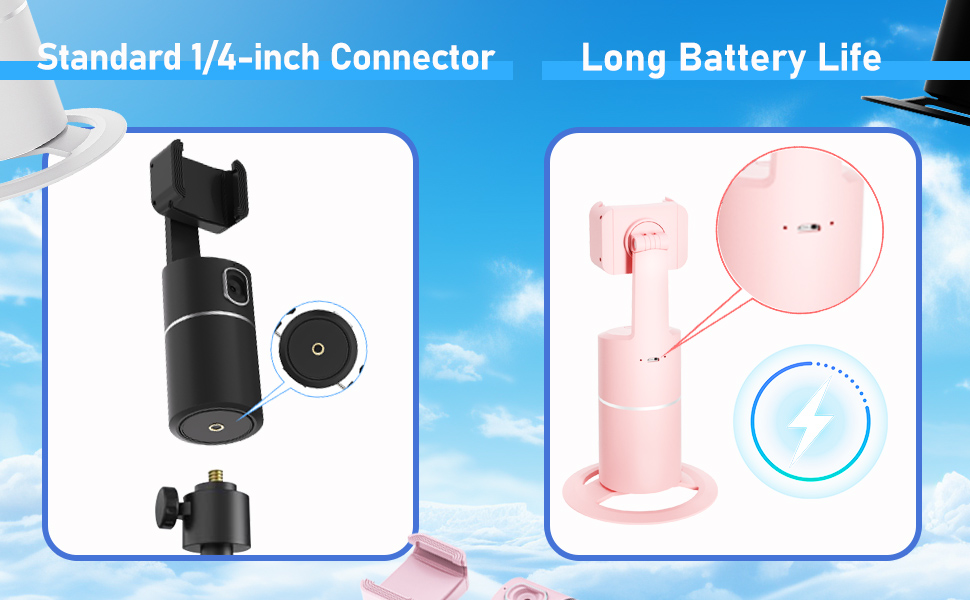
Image 3.1: Detail of the charging port and battery life indicator on the device.
3.2 توهان جي اسمارٽ فون کي لڳائڻ
- Gently pull open the phone clip on the top of the holder.
- Place your smartphone into the clip, ensuring it is securely held. The clip supports phones between 2 to 3.2 inches in width.
- Adjust the phone's position within the clip for optimal balance and camera alignment.

Image 3.2: Dimensions of the phone holder and how to adjust the phone clip.
3.3 پاور آن/آف
- To power on: Press and hold the power button (usually located on the front or top of the base) for a few seconds until the indicator light illuminates.
- To power off: Press and hold the power button again until the indicator light turns off.
4. آپريٽنگ هدايتون
4.1 خودڪار ٽريڪنگ
- Ensure the device is powered on and your phone is securely mounted.
- Position yourself in front of the device's built-in camera. The device will automatically detect and begin tracking your face or body.
- The holder will rotate 360° horizontally to follow your movements.
- The device operates independently of your phone's camera or any specific app, allowing you to use any application for video calls, streaming, or recording.

Image 4.1: The phone holder automatically tracking a person during an exercise session.
4.2 Switching Between Horizontal and Vertical Modes
The phone holder allows for easy switching between horizontal (landscape) and vertical (portrait) orientations. Simply rotate your phone within the clip to the desired orientation. The device will continue to track.

Image 4.2: Demonstrates the phone holder supporting both horizontal and vertical phone orientations.
4.3 Tripod Mounting
The base of the JOYTRIP Auto Tracking Phone Holder features a standard 1/4-inch screw thread. This allows you to mount the device onto most tripods or stands for increased height and stability.
- Locate the 1/4-inch screw thread at the bottom of the device.
- Screw the device onto your tripod's mounting plate until secure.
- Ensure the device is stable before mounting your phone.

Image 4.3: Detail of the 1/4-inch screw thread for tripod compatibility.
5. سار سنڀال
5.1 صفائي
- ڊيوائس کي نرم ، سڪل ڪپڙي سان مسح ڪريو.
- Do not use abrasive cleaners, solvents, or strong chemicals, as these may damage the surface or internal components.
- Keep the camera lens clean for optimal tracking performance.
5.2 بيٽري جي سنڀال
- بيٽري جي زندگي کي وڌائڻ لاءِ، بيٽري کي بار بار مڪمل طور تي چارج ڪرڻ کان پاسو ڪريو.
- Charge the device regularly, even if not in use for extended periods (e.g., once every 3 months).
- ڊوائيس کي سڌي سج جي روشني ۽ انتهائي گرمي پد کان پري ٿڌي، سڪل جاءِ تي رکو.
6. مسئلا حل ڪرڻ
| مسئلو | ممڪن سبب | حل |
|---|---|---|
| ڊوائيس تي طاقت نه آهي. | گھٽ بيٽري. | مهيا ڪيل USB ڪيبل استعمال ڪندي ڊوائيس کي مڪمل طور تي چارج ڪريو. |
| ٽريڪنگ غير مطابقت رکندڙ آهي يا بند ٿي وڃي ٿي. |
|
|
| فون محفوظ طور تي نه رکيو ويو آهي. | Phone width exceeds clip capacity or is too small. | Ensure your phone's width is between 2 and 3.2 inches. Adjust the phone carefully within the clip. |
| Device does not rotate. | Tracking not activated or device malfunction. | Ensure the device is powered on and a subject is clearly in view of the camera. If the issue persists, contact customer support. |
7. وضاحتون
| خاصيت | تفصيل |
|---|---|
| ماڊل نمبر | T2 |
| برانڊ | جيو ٽرپ |
| پيداوار جي ماپ | 3.93 x 3.93 x 7.75 انچ (10 x 10 x 19.7 سينٽي) |
| شيءِ جو وزن | 6.6 آونس (187 گرام) |
| بيٽري | 2200 mAh ليٿيم آئن (شامل) |
| بيٽري جي زندگي | 6-8 ڪلاڪ (مسلسل استعمال) |
| گردش زاويه | ايڪس ايڪس ايڪس افقي |
| جو ميدان View (لينس) | 105° |
| گردش جي رفتار | 42 ° في سيڪنڊ |
| مطابقت رکندڙ فون ويڪر | 2 - 3.2 inches (approx. 5 - 8.1 cm) |
| ٽرپوڊ سلسلو | Standard 1/4-inch screw thread |
| يو پي سي | 797550711288 |
8. وارنٽي ۽ سپورٽ
For information regarding warranty coverage, please refer to the warranty card included with your purchase or contact the retailer where the product was acquired.
If you encounter any issues or have questions about your JOYTRIP Auto Tracking Phone Holder, please contact JOYTRIP customer support through their official webسائيٽ يا توهان جي پراڊڪٽ پيڪنگنگ سان مهيا ڪيل رابطي جي معلومات.


