1. تعارف
Thank you for choosing the Hama BB/CATV Amplifier 00205234. This device is designed to amplify antenna signals for both cable television (CATV) and satellite antenna systems, ensuring a clear and stable signal reception. With its adjustable gain of up to 25 dB, you can fine-tune the signal strength to suit your specific needs. Please read this manual carefully before installation and use to ensure proper operation and safety.
2. حفاظتي هدايتون
- هي ڊوائيس صرف اندروني استعمال لاءِ آهي. ان کي نمي، مينهن، يا انتهائي گرمي پد جي سامهون نه آڻيو.
- ڊوائيس نه کوليو casing. سروس صرف قابل اهلڪارن پاران ڪئي وڃي.
- Ensure the power outlet is easily accessible and properly grounded.
- Disconnect the device from the power supply before cleaning or if it will not be used for an extended period.
- ڊوائيس کي گرمي ذريعن جي ويجهو يا سڌي سج جي روشني ۾ رکڻ کان پاسو ڪريو.
3. پيڪيج مواد
مھرباني ڪري چيڪ ڪريو ته سڀ شيون موجود آھن ۽ سٺي حالت ۾ آھن:
- Hama BB/CATV Amplifier 00205234 (Main Unit)
4. پراڊڪٽ ختمview
Familiarize yourself with the components of your Hama BB/CATV Ampزنده:
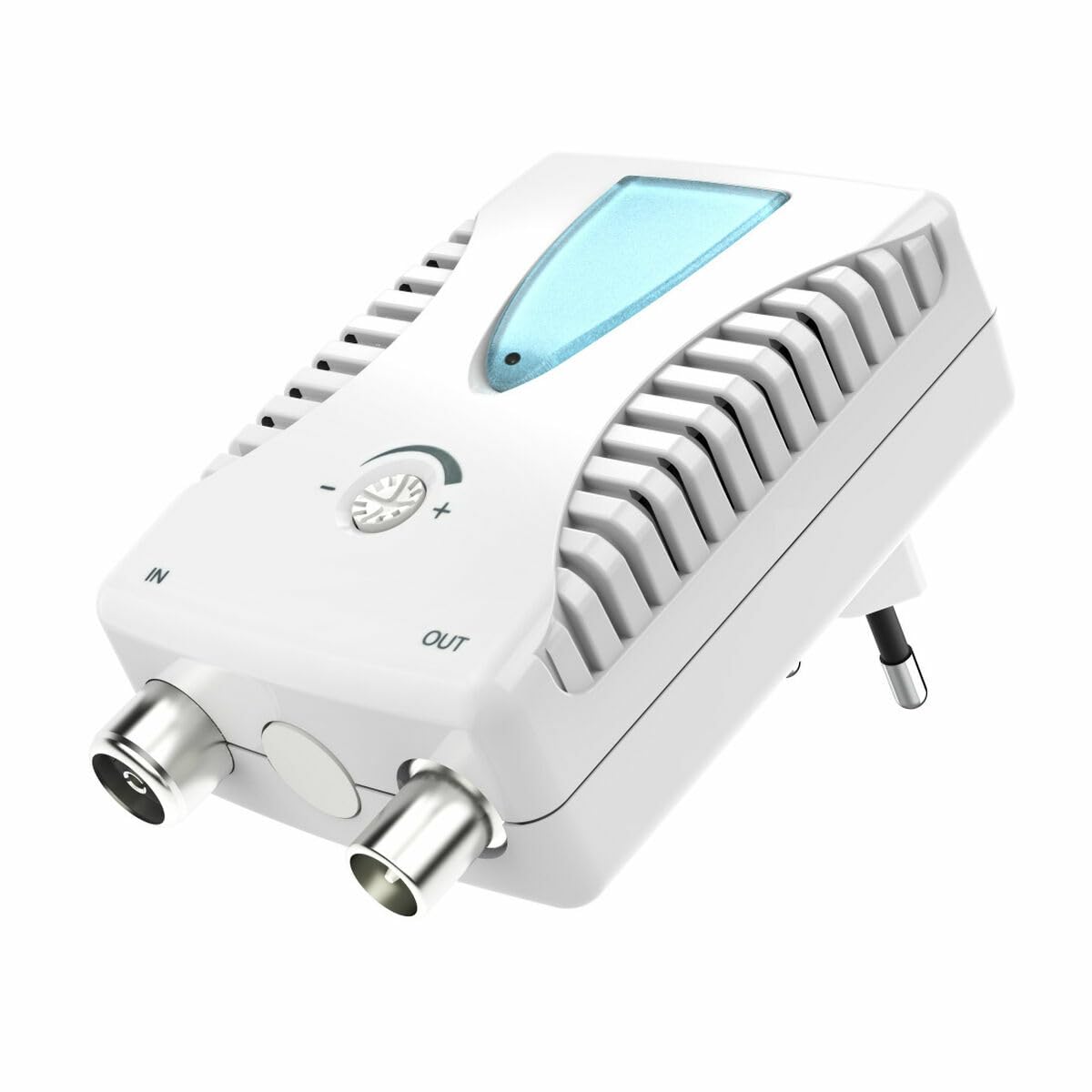
شڪل 1: سامهون view of the Hama BB/CATV Amplifier 00205234. It features an "IN" port for the incoming antenna signal, an "OUT" port for the amplified signal to your television or receiver, a rotary knob for signal gain adjustment, a blue LED indicator, and an integrated power plug.
- پورٽ ۾: Connects to the incoming antenna cable (from wall outlet or satellite dish).
- ٻاهر پورٽ: Connects to your television, receiver, or distribution system.
- ترتيب ڏيڻ وارو نوب: ڪنٽرول ڪرڻ لاء استعمال ڪيو ويو amplification level (gain).
- LED اشارو: جڏهن ڊوائيس آن ٿيندي آهي ته روشني ٿيندي آهي.
- Integrated Power Plug: For connecting to a standard electrical outlet.
5. سيٽ اپ ۽ تنصيب
Follow these steps to install your Hama BB/CATV Ampزنده:
- ڪنيڪشن پوائنٽس جي سڃاڻپ ڪريو: Locate the antenna cable coming from your wall outlet or satellite dish (this will be your input signal) and the input port on your television or receiver (this will be your output destination).
- ان پٽ ڪيبل ڳنڍيو: Connect the incoming antenna cable to the IN port on the Hama amplifier. Ensure the connection is secure.
- Connect Output Cable: Use a suitable coaxial cable (not included) to connect the ٻاهر port of the Hama amplifier to the antenna input on your television or receiver. Ensure the connection is secure.
- پاور ڪنيڪشن: Plug the integrated power plug of the amplifier into a standard electrical wall outlet. The blue LED indicator on the amplifier should illuminate, indicating that the device is powered on.
- شروعاتي ترتيب: Turn the adjustment knob to its minimum setting (usually fully counter-clockwise) before turning on your television.
نوٽ: For optimal performance, ensure all coaxial cable connections are tight and free from damage.
6. هلائڻ Ampزندگي گذاريندڙ
The Hama BB/CATV Amplifier features an adjustable gain control to optimize your signal strength.
- پاور آن: کي يقيني بڻايو amplifier is plugged into a power outlet and the blue LED is lit.
- Turn on TV/Receiver: Switch on your television or receiver and select the appropriate input source (e.g., "Antenna" or "Cable").
- حاصلات کي ترتيب ڏيو: Slowly turn the adjustment knob clockwise to increase the amplification. Observe your television screen for signal quality.
- If the picture is pixelated or distorted, the signal might be too weak or too strong.
- Adjust the knob until you achieve the clearest possible picture and sound.
- مٿان-amplification can lead to signal distortion, so avoid setting the gain higher than necessary.
- Scan Channels (if necessary): After adjusting the gain, you may need to perform a channel scan on your television or receiver to detect new or improved channels. Refer to your TV's manual for instructions on how to perform a channel scan.
7. سار سنڀال ۽ سنڀال
- صفائي: ڊسڪ ڪيو amplifier from the power outlet before cleaning. Use a soft, dry, lint-free cloth to wipe the exterior. Do not use liquid cleaners or abrasive materials.
- اسٽوريج: If storing the device for an extended period, unplug it and keep it in a cool, dry place away from direct sunlight and moisture.
- ڪيبل ڪنيڪشن: وقتي طور تي سڀني ڪيبل ڪنيڪشنن کي چيڪ ڪريو ته جيئن پڪ ڪري سگهجي ته اهي محفوظ آهن ۽ سنکنرن يا نقصان کان پاڪ آهن.
8. مسئلا حل ڪرڻ
| مسئلو | ممڪن سبب | حل |
|---|---|---|
| No picture or poor signal quality. |
|
|
| Blue LED not illuminated. |
|
|
| Picture is distorted or over-saturated. |
|
|
9. ٽيڪنيڪل وضاحتون
| ماڊل نمبر: | 00205234 |
| برانڊ: | هاما |
| Amplification (Gain): | Up to 25 dB (adjustable) |
| تعدد جي حد: | 862 MHz |
| ڪنيڪٽر جو قسم: | Auxiliary (Coaxial F-type) |
| مطابقت رکندڙ ڊوائيسز: | Satellite Antenna, Television |
| استعمال جو ماحول: | اندريون |
| شيء جو وزن: | 0.19 ڪلوگرام |
10. وارنٽي ۽ سپورٽ
Hama products are subject to strict quality controls. Should you nevertheless experience a problem with this product, please contact your retailer or the Hama service department. Please retain your proof of purchase for any warranty claims. For detailed warranty terms and conditions, please refer to the official Hama webسائيٽ يا انهن جي گراهڪ سپورٽ سان رابطو ڪريو.


