1. تعارف
Thank you for choosing the Hama 186369 Weather Forecast Center. This device provides comprehensive weather data, including satellite-based forecasts, indoor and outdoor temperature/humidity, and more. This manual will guide you through the setup, operation, and maintenance of your weather station to ensure optimal performance.
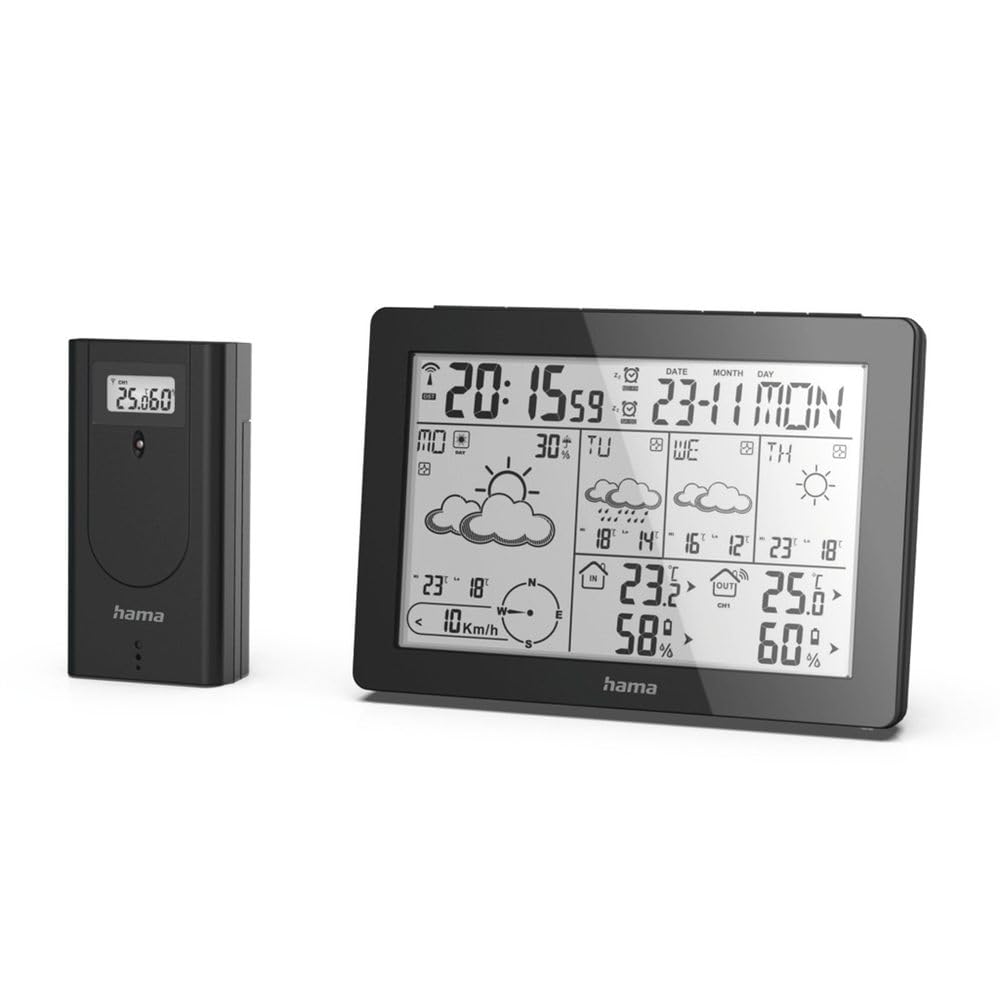
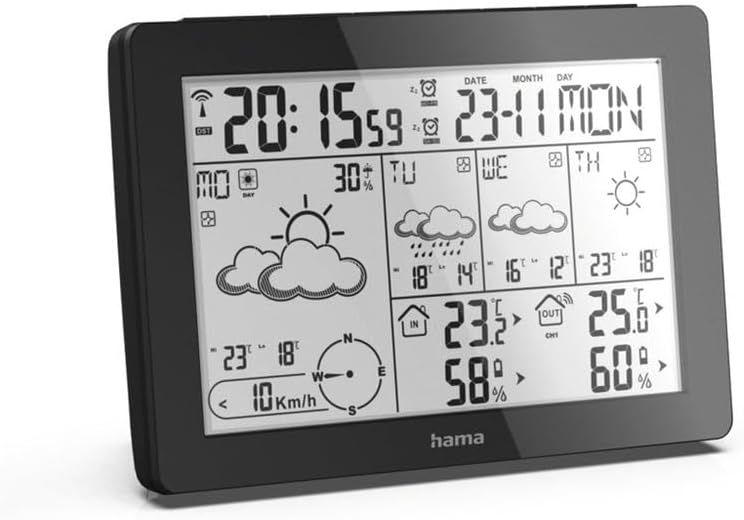
The Hama 186369 Weather Forecast Center main unit, showcasing its digital display with various weather parameters.
2. پيڪيج مواد
مھرباني ڪري چيڪ ڪريو ته ھيٺ ڏنل سڀ شيون موجود آھن ۽ سٺي حالت ۾ آھن:
- Hama 186369 Weather Forecast Center (Base Station)
- وائرليس آئوٽ ڊور سينسر
- 4 x AA Batteries (for both units)
- هي هدايت نامو

The complete set, including the base station and the wireless outdoor sensor.
3. حفاظتي هدايتون
- Do not open the device. Improper repair can lead to considerable hazards for the user.
- Do not expose the product to direct sunlight, extreme temperatures, or high humidity.
- هن پراڊڪٽ کي، سڀني برقي شين وانگر، ٻارن جي پهچ کان ٻاهر رکو.
- پيداوار کي گندگي، نمي، ۽ وڌيڪ گرم ڪرڻ کان بچايو.
- صرف پراڊڪٽ کي ان جي گهربل مقصد لاء استعمال ڪريو.
- مصنوعات کي استعمال نه ڪريو علائقن ۾ جتي اليڪٽرانڪ شين جي اجازت نه آهي.
- When inserting batteries, note the correct polarity (+ and - markings) and insert the batteries accordingly. Otherwise, the batteries could leak or explode.
- Replace all batteries of a set at the same time. Do not mix old and new batteries or batteries of different types.
4. سيٽ اپ
4.1 بيٽريون داخل ڪرڻ
The Hama 186369 Weather Forecast Center and its outdoor sensor require AA batteries for operation.
- Open the battery compartment cover on the back of both the base station and the outdoor sensor.
- Insert the AA batteries, ensuring correct polarity (+ and -). The base station requires 2x AA batteries, and the outdoor sensor requires 2x AA batteries.
- بيٽري جي ڪمري کي محفوظ طور تي بند ڪريو.
Inserting batteries into the base station. Ensure correct polarity.

The wireless outdoor sensor, which also requires batteries.
4.2 Initial Operation and Signal Reception
After inserting the batteries, the base station will automatically search for the DCF-77 signal and connect to the outdoor sensor.
- Place the base station and the outdoor sensor close to each other during initial setup.
- The DCF-77 radio signal for time and date synchronization will be automatically received. This process may take several minutes.
- The outdoor sensor will transmit temperature and humidity data to the base station. Ensure they are within range (up to 30 meters in open areas).

مٿانview of the weather station's features and components, including the outdoor sensor and base station display.
5. Operating the Weather Forecast Center
5.1 ڊسپلي اوورview
The main display shows various information at a glance:
- وقت ۽ تاريخ: Synchronized via DCF-77 signal.
- Indoor Temperature and Humidity: Measured by the base station.
- Outdoor Temperature and Humidity: Received from the wireless outdoor sensor.
- موسمي اڳڪٿي: Satellite-based 4-day forecast for 60 regions/30 regions in Europe, updated daily.
- Rain Probability: Indication of precipitation likelihood.
- هوا جي رفتار ۽ هدايت: Displayed graphically.
- ٿڌ جو الارم: Activates when temperatures drop to a critical level.
5.2 بٽڻ جا ڪم
The buttons on the top of the base station allow you to adjust settings and view different information.

مٿو view of the base station showing the control buttons.
- طرفن: Switches between display modes (e.g., time, alarm setting).
- چئنل: Selects different outdoor sensor channels if multiple sensors are used.
- DAY/NIGHT/SNOOZE+LIGHT: Activates backlight, snooze function for alarm, or switches between day/night display.
- ٽيسٽ: Initiates a test of the sensor connection.
- لاهيون چاڙهيون: Adjusts values during settings or navigates through forecast data.
5.3 وقت ۽ تاريخ مقرر ڪرڻ (دستي ترتيب)
While the time and date are usually set automatically via the DCF-77 signal, you can manually adjust them if needed.
- کي دٻايو ۽ رکو موڊ بٽڻ دٻايو جيستائين وقت جي ڊسپلي چمڪائڻ شروع نه ٿئي.
- استعمال ڪريو UP ۽ هيٺ ڪلاڪ کي ترتيب ڏيڻ لاءِ بٽڻ، پوءِ دٻايو موڊ تصديق ڪرڻ ۽ منٽن ۾ منتقل ڪرڻ لاءِ.
- منٽن، سال، مهيني ۽ ڏينهن لاءِ ورجايو.
- دٻايو موڊ سيٽنگ موڊ مان نڪرڻ لاءِ ٻيهر.
5.4 الارم فنڪشن
The weather station includes an alarm function.
- کي دٻايو موڊ button repeatedly until the alarm time is displayed.
- دٻايو ۽ رکو موڊ الارم جي ترتيب واري موڊ ۾ داخل ٿيڻ لاءِ.
- استعمال ڪريو UP ۽ هيٺ گهربل الارم وقت مقرر ڪرڻ لاء.
- دٻايو موڊ هر سيٽنگ جي تصديق ڪرڻ.
- الارم کي چالو/غير فعال ڪرڻ لاءِ، دٻايو UP button when the alarm time is displayed. An alarm icon will appear/disappear.
6. سار سنڀال
6.1 صفائي
- صرف هن پيداوار کي ٿوري ڊي سان صاف ڪريوamp, lint-free ڪپڙو ۽ جارحتي صفائي ايجنٽ استعمال نه ڪريو.
- Ensure that no water gets into the device.
6.2 بيٽري مٽائڻ
When the battery indicator appears on the display, replace all batteries in the respective unit (base station or outdoor sensor).
- Follow the steps in section 4.1 "Inserting Batteries".
- مقامي ضابطن جي مطابق استعمال ٿيل بيٽرين کي ختم ڪريو.
7. مسئلا حل ڪرڻ
| مسئلو | ممڪن سبب | حل |
|---|---|---|
| No display / Weak display | Batteries are empty or incorrectly inserted. | بيٽريون تبديل ڪريو، صحيح پولارٽي کي يقيني بڻايو. |
| ڪابه ٻاهرين گرمي پد / نمي جي پڙهائي ناهي | Outdoor sensor not connected or out of range. |
|
| غلط وقت/تاريخ | DCF-77 signal not received or interference. |
|
| غلط موسم جي اڳڪٿي | Incorrect region setting or temporary signal issue. |
|
8. وضاحتون
| خاصيت | تفصيل |
|---|---|
| ماڊل نمبر | 186369 |
| Dimensions (Base Station) | 3 x 15.3 x 10.5 سينٽي |
| وزن | 510 جي |
| مواد | اکري |
| طاقت جو ذريعو | Battery-powered (4 AA batteries required, included) |
| رابطي | Wireless (for outdoor sensor) |
| خاص خاصيتون | Alarm, Wireless Outdoor Sensor, Frost Alarm, DCF-77 Radio Clock |
| موسم جي اڳڪٿي | Satellite-based 4-day forecast for 60 regions/30 regions in Europe, daily updated data for 611 locations. |
| سفارش ٿيل استعمال | Temperature measurement, hobby, private, business. |
9. وارنٽي ۽ سپورٽ
Hama GmbH & Co KG ڪابه ذميواري نٿي م andي ۽ نقصان جي ڪا به وارنٽي نه ٿو ڏئي نتيجي ۾ نا مناسب انسٽاليشن/ماونٽنگ ، پراڊڪٽ جو غلط استعمال ، يا آپريٽنگ هدايتون ۽/يا حفاظتي نوٽس ڏسڻ ۾ ناڪامي.
For technical support or warranty claims, please contact your retailer or visit the official Hama webوڌيڪ مدد لاء سائيٽ.

Hama: Experience and competence since 1923.