1. تعارف
This manual provides instructions for the installation, operation, and maintenance of the Grandstream GRP2604 IP Phone. The GRP2604 is a 3-line, 6-SIP account IP phone designed for ease of use and advanced functionality, featuring a 2.7-inch LCD display and dual-port Gigabit Ethernet.
2. حفاظت جي ڄاڻ
- صرف فون سان گڏ فراهم ڪيل پاور اڊاپٽر استعمال ڪريو.
- ڊوائيس کي پاڻي يا نمي کي ظاهر نه ڪريو.
- فون کي گرمي جي ذريعن يا سڌي سج جي روشنيءَ جي ويجهو رکڻ کان پاسو ڪريو.
- پاڻ ڊوائيس کي کولڻ يا مرمت ڪرڻ جي ڪوشش نه ڪريو. سڀني سروسنگ کي قابل اهلڪارن جي حوالي ڪريو.
- فون جي چوڌاري مناسب هوا جي وهڪري کي يقيني بڻايو.
3. پيڪيج مواد
تصديق ڪريو ته توھان جي پيڪيج ۾ ھيٺيون شيون شامل آھن:
- GRP2604 IP فون يونٽ
- ڪنڊ سان هينڊ سيٽ
- فون اسٽينڊ
- Ethernet ڪيبل
- پاور اڊاپٽر
- Quick Installation Guide (this manual serves as the full guide)
4. پراڊڪٽ ختمview
4.1. فون لي آئوٽ

شڪل 4.1: سامهون view of the Grandstream GRP2604 IP Phone. This image displays the phone's main body, handset, 2.7-inch LCD display, numeric keypad, function keys, and programmable line keys.
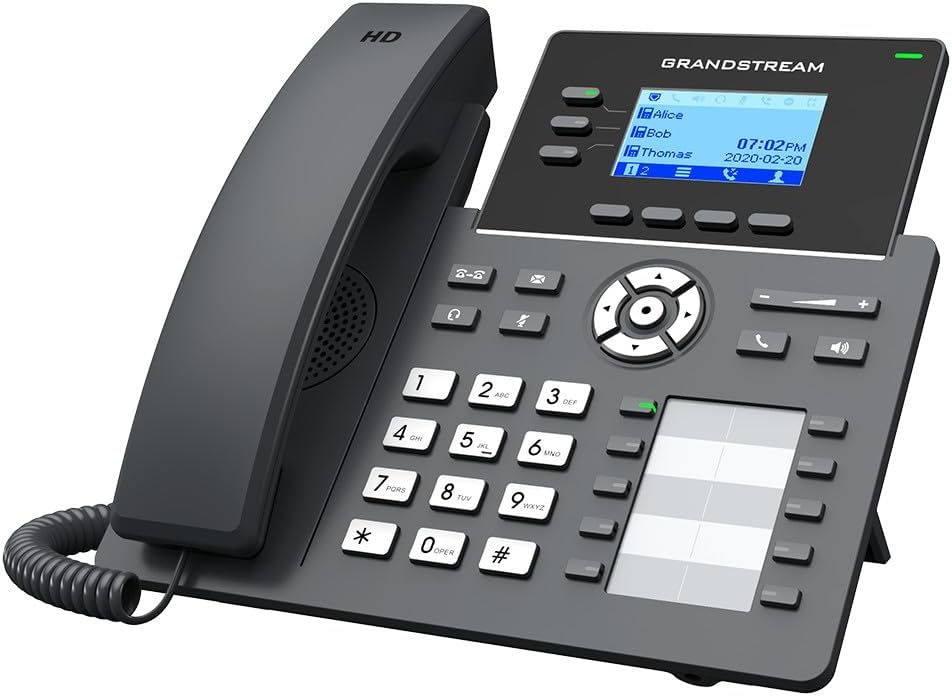
شڪل 4.2: زاويه view of the Grandstream GRP2604 IP Phone. This perspective highlights the ergonomic design of the handset and the slight tilt of the main unit, providing a clearer view of the display and keypad.

شڪل 4.3: پاسي view of the Grandstream GRP2604 IP Phone with its stand attached. This image illustrates how the phone is positioned for desktop use, showing the angle provided by the stand.
4.2. Rear Panel and Ports

شڪل 4.4: ريڙهه view of the Grandstream GRP2604 IP Phone, showing the various ports and connections. From left to right, these include the handset port, headset port, two Gigabit Ethernet ports (LAN and PC), and the DC 5V power input.
The rear panel of the GRP2604 features essential connection ports:
- هينڊ سيٽ پورٽ: ڪوئل ٿيل هينڊ سيٽ جي تار کي ڳنڍي ٿو.
- هيڊ سيٽ پورٽ: For connecting a wired headset.
- PC Port (LAN Out): Connects to a computer or other network device.
- LAN Port (Network In): Connects to your network switch or router.
- ڊي سي 5V پاور ان پٽ: پاور اڊاپٽر کي ڳنڍي ٿو.
5. سيٽ اپ
- فون اسٽينڊ ڳنڍيو: Align the stand with the slots on the back of the phone and slide it into place until it clicks securely.
- هينڊ سيٽ ڳنڍيو: Plug one end of the coiled handset cord into the handset and the other end into the handset port on the rear of the phone.
- نيٽ ورڪ سان نيو:
- Connect one end of the Ethernet cable to the LAN port on the phone.
- Ethernet ڪيبل جي ٻئي پڇاڙي کي نيٽ ورڪ سوئچ يا روٽر سان ڳنڍيو.
- If connecting a computer, use another Ethernet cable to connect the PC port on the phone to your computer.
- پاور Connectنيو: Plug the DC 5V power adapter into the power input port on the phone, then plug the adapter into a power outlet. The phone will automatically power on and begin the boot-up sequence.
- شروعاتي تشڪيل: Once the phone boots up, it will attempt to obtain an IP address via DHCP. You may need to access the phone's web interface for further SIP account configuration, as instructed by your VoIP service provider or network administrator.
6. آپريٽنگ هدايتون
6.1. ڪال ڪرڻ
- Off-hook Dialing: هٿ کي کڻي يا پريس کي اسپيڪر فون button. Dial the number and press the ڊائل soft key or wait a few seconds.
- On-hook Dialing: Dial the number first, then pick up the handset or press the اسپيڪر فون بٽڻ
- لائن ڪيز استعمال ڪندي: Press an available line key, dial the number, and press the ڊائل نرم چاٻي
6.2. ڪالون وصول ڪرڻ
- Answer with Handset: هٿ کڻو.
- Answer with Speakerphone: کي دٻايو اسپيڪر فون بٽڻ
- Answer with Headset: کي دٻايو هيڊ سيٽ button (if a headset is connected).
6.3. ڪال خاصيتون
- رکو: فعال ڪال دوران، دٻايو رکو button. Press it again to resume the call.
- منتقلي فعال ڪال دوران، دٻايو منتقلي button. Dial the transfer destination number and press the منتقلي soft key again (attended transfer) or hang up (blind transfer).
- ڪانفرنس: فعال ڪال دوران، دٻايو ڪانفرنس button. Dial the second party's number and press the ڪانفرنس soft key to join all parties. The GRP2604 supports 5-way voice conferencing.
- وائس ميل: کي دٻايو نياپو button to access your voicemail.
6.4. حجم کي ترتيب ڏيڻ
استعمال ڪريو حجم +/- buttons located on the phone to adjust the ringer volume when idle, or the handset/speaker/headset volume during a call.
7. سار سنڀال
- صفائي: Use a soft, dry cloth to clean the phone's surface. Do not use liquid cleaners or aerosol sprays.
- اسٽوريج: If storing the phone for an extended period, disconnect it from power and network, and store it in a cool, dry place.
- فرم ويئر اپڊيٽس: گرينڊ اسٽريم کي باقاعدي طور تي چيڪ ڪريو webبهترين ڪارڪردگي ۽ سيڪيورٽي کي يقيني بڻائڻ لاءِ فرم ويئر اپڊيٽس لاءِ سائيٽ.
8. مسئلا حل ڪرڻ
| مسئلو | ممڪن حل |
|---|---|
| فون آن نٿو ٿئي. |
|
| ڪوبه ڊائل ٽون. |
|
| ڪالون نه ٿو ڪري سگھجي ۽ نه ئي وصول ڪري سگھجي ٿو. |
|
| ڊسپلي خالي يا منجهيل آهي. |
|
9. وضاحتون
- ماڊل: جي آر پي 2604
- لائنون: 3
- SIP اڪائونٽس: 6
- ڏيکاريو: 2.7-inch (132x48) LCD
- Ethernet بندرگاهن: ٻٽي بندرگاهه گيگابٽ ايٿنيٽ
- Voice Conferencing: 5-رستو
- طول و عرض (L x W x H): 3.94 x 3.94 x 3.94 انچ
- شيء جو وزن: 1.1 پائونڊ (500 گرام)
- مواد: پلاسٽڪ
- طاقت جو ذريعو: تار وارو اليڪٽرڪ (ڊي سي 5 وي)
- رنگ: ڪارو
10. وارنٽي ۽ سپورٽ
The Grandstream GRP2604 IP Phone comes with a manufacturer's warranty. For detailed warranty information, please refer to the warranty card included with your product or visit the official Grandstream website. For technical support, product inquiries, or service, please contact Grandstream customer support through their official channels.
Grandstream Networks Inc.
www.grandstream.com


