1. تعارف ۽ اوورview
The Logitech K380 Multi-Device Wireless Bluetooth Keyboard is a compact, minimalist keyboard designed for seamless multitasking across multiple devices. Its slim profile and lightweight design make it highly portable, ideal for use at home, in the office, or on the go. The keyboard features an Apple-specific layout, ensuring full compatibility and intuitive use with macOS, iOS, and iPadOS devices. Enjoy comfortable and quiet typing with its scooped, low-profile scissor keys, providing a fluid and familiar laptop-like typing experience.

Figure 1.1: Logitech K380 Multi-Device Wireless Bluetooth Keyboard in Off-white.
2. دٻي ۾ ڇا آهي
Upon unboxing your Logitech K380 keyboard, you should find the following items:
- Logitech K380 Multi-Device Wireless Bluetooth Keyboard
- 2 x AAA Alkaline Batteries (pre-installed)
- Quick Start Guide / User Documentation

Figure 2.1: Contents of the Logitech K380 retail packaging.
3. سيٽ اپ
3.1. بيٽري لڳائڻ
The Logitech K380 keyboard comes with two AAA alkaline batteries pre-installed. To access the battery compartment, slide open the cover on the underside of the keyboard. Ensure the batteries are correctly oriented according to the polarity markings (+/-). Close the cover securely.

Figure 3.1: The Logitech K380 offers up to 24 months of battery life.
3.2. پاور آن ۽ بلوٽوٿ پيئرنگ
To power on the keyboard, locate the ON/OFF switch on the left side of the keyboard and slide it to the ON position. A small LED indicator will light up briefly.
The K380 can pair with up to three Bluetooth-enabled devices. Follow these steps to pair your keyboard:
- ON/OFF سوئچ استعمال ڪندي ڪيبورڊ آن ڪريو.
- Press and hold one of the Easy-Switch keys (F1, F2, or F3) for three seconds until the LED light above the key starts blinking rapidly. This indicates the keyboard is in pairing mode.
- On your device (Mac, iPad, iPhone, etc.), go to Bluetooth settings and select "Logitech K380" from the list of available devices.
- Follow the on-screen prompts to complete the pairing process. You may be asked to type a code on the K380 keyboard and press Enter.
- Once successfully paired, the LED light on the Easy-Switch key will glow solid for a few seconds and then turn off.

Figure 3.2: Easily pair and switch between up to three devices.
4. آپريٽنگ هدايتون
4.1. ڊوائيسز جي وچ ۾ سوئچنگ
After pairing your keyboard with multiple devices, you can effortlessly switch between them by simply pressing the corresponding Easy-Switch key (F1, F2, or F3). The keyboard will automatically connect to the selected device.
4.2. ٽائيپنگ جو تجربو
The Logitech K380 is designed for comfortable and quiet typing. Its round, scooped keys provide a satisfying tactile response while minimizing typing noise, making it suitable for various environments.

Figure 4.1: Experience comfortable and quiet typing with the K380.
4.3. Media and Shortcut Keys
The keyboard features dedicated media and shortcut keys along the top row (F4-F12) for quick access to functions like volume control, media playback, and more. These keys are optimized for macOS, iOS, and iPadOS environments.

Figure 4.2: US layout with convenient media keys.
5. سار سنڀال
To ensure the longevity and optimal performance of your Logitech K380 keyboard, regular maintenance is recommended:
- صفائي: نرم، لِنٽ کان خالي ڪپڙو استعمال ڪريو ٿورڙو ڊيampened with water or a mild cleaning solution to wipe down the keys and surface. Avoid excessive moisture.
- مٽي هٽائڻ: Use compressed air to clear any dust or debris that may accumulate between the keys.
- بيٽري مٽائڻ: When the battery indicator light (located near the ON/OFF switch) turns red, it's time to replace the batteries. Slide open the battery compartment cover on the underside of the keyboard and replace the two AAA batteries.
6. مسئلا حل ڪرڻ
6.1. ڪنيڪشن جا مسئلا
- ڪي بورڊ ڳنڍجي نه رهيو آهي: Ensure the keyboard is powered on and within range (up to 10 meters or 33 feet). Check your device's Bluetooth settings to confirm Bluetooth is enabled.
- ٻيهر جوڙيو: If connection is lost, try re-pairing the keyboard by putting it into pairing mode (hold F1/F2/F3 for 3 seconds) and re-selecting it on your device.
- مداخلت: ڪيبورڊ کي پنهنجي ڊوائيس جي ويجهو ۽ ٻين وائرليس ڊوائيسز کان پري ڪريو جيڪي مداخلت جو سبب بڻجي سگهن ٿيون.
6.2. Typing Problems
- چاٻيون جواب نه ڏئي رهيون آهن: بيٽري جي سطح چيڪ ڪريو. جيڪڏهن بيٽري گهٽ آهي ته ان کي تبديل ڪريو.
- Incorrect Characters: Ensure the correct keyboard layout is selected on your operating system.
7. وضاحتون
| خاصيت | تفصيل |
|---|---|
| برانڊ | Logitech |
| ماڊل نمبر | ڪي 380 |
| رابطي ٽيڪنالاجي | بلوٽوٿ |
| مطابقت رکندڙ ڊوائيسز | Mac, iPad, iPhone, Bluetooth wireless devices with external keyboard support |
| طاقت جو ذريعو | 2 x AAA بيٽريون |
| بيٽري جي زندگي | Up to 24 months (typical usage) |
| طول و عرض (L x W x H) | 10.9 x 4.9 x 0.6 انچ |
| شيءِ جو وزن | 14.1 اونس |
| رنگ | اڇو |
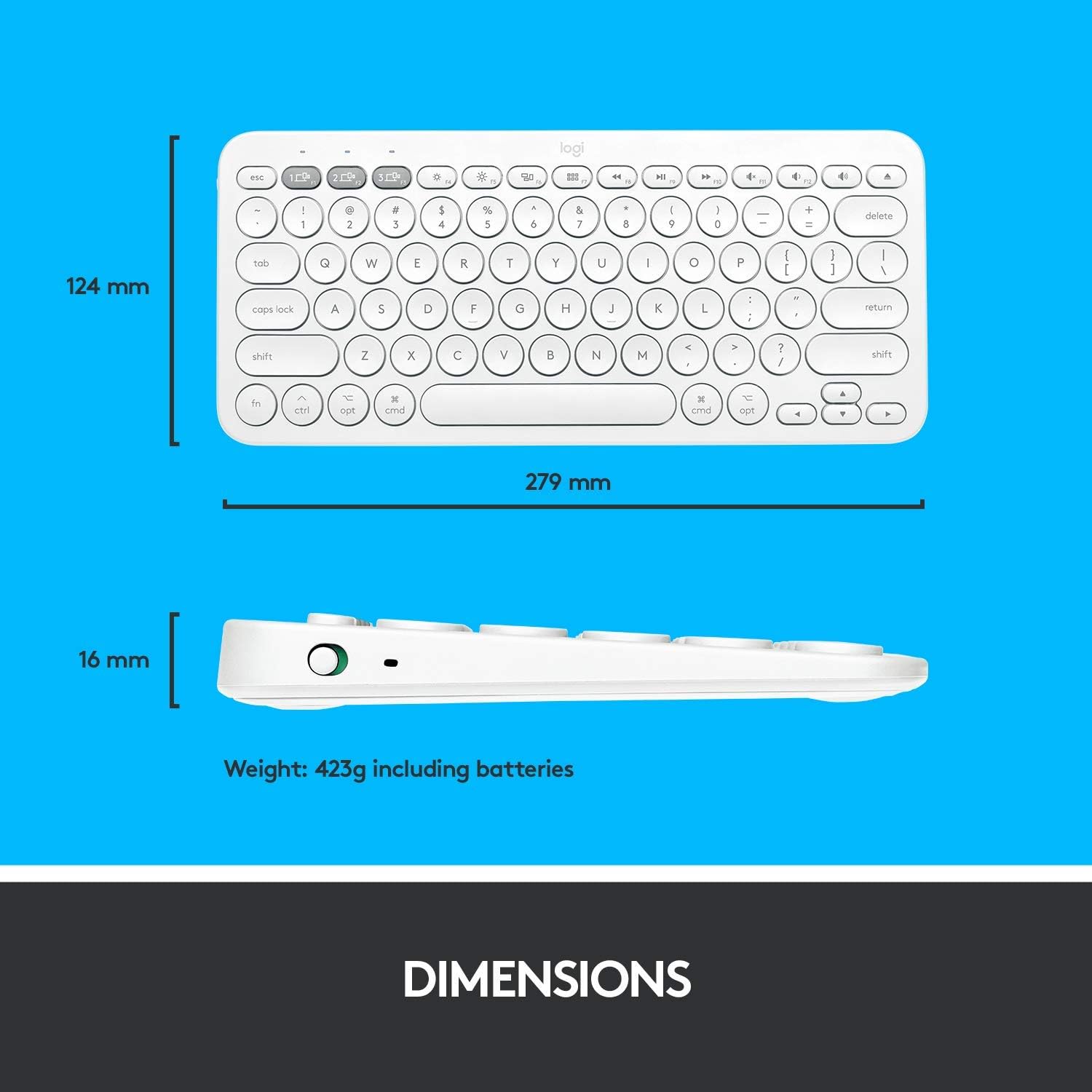
Figure 7.1: Physical dimensions and weight of the Logitech K380 keyboard.
8. وارنٽي ۽ سپورٽ
وارنٽي جي معلومات ۽ ٽيڪنيڪل سپورٽ لاءِ، مھرباني ڪري سرڪاري Logitech جو حوالو ڏيو website or contact Logitech customer service directly. Keep your purchase receipt as proof of purchase.
- آن لائن سپورٽ: گهمڻ www.logitech.com/support/k380 اڪثر پڇيا ويندڙ سوالن، مسئلن جي حل جي رهنمائي، ۽ سافٽ ويئر ڊائون لوڊ لاءِ.
- رابطي جي حمايت: Find regional contact information on the Logitech support webسائيٽ.


