تعارف
The Nixplay 10.1 inch Smart Digital Photo Frame (W10F) provides a modern way to display and share your cherished memories. This Wi-Fi enabled frame allows you to instantly share photos and videos with family and friends via email or the Nixplay app, no matter where they are. Designed for ease of use, it features automatic content rotation, a smart sensor to conserve energy, and intelligent face framing for optimal display.
This manual provides comprehensive instructions for setting up, operating, maintaining, and troubleshooting your Nixplay Smart Digital Photo Frame.
پيڪيج مواد
مھرباني ڪري تصديق ڪريو ته ھيٺ ڏنل سڀ شيون توھان جي پيڪيج ۾ شامل آھن:
- Nixplay 10.1 inch Smart Digital Photo Frame (W10F)
- پاور اڊاپٽر
- ريموٽ ڪنٽرول
- ڀت تي چڙهڻ وارو گائيڊ
- وال ماونٽنگ اسڪرو

Figure 1: Contents of the Nixplay Smart Digital Photo Frame package.
سيٽ اپ ڪريو
1. انباڪسنگ ۽ پليسمينٽ
Carefully remove the frame and all accessories from the packaging. The Nixplay frame can be positioned in either portrait or landscape orientation, and is suitable for both tabletop display and wall mounting. The content displayed on the frame will automatically rotate to match its orientation.
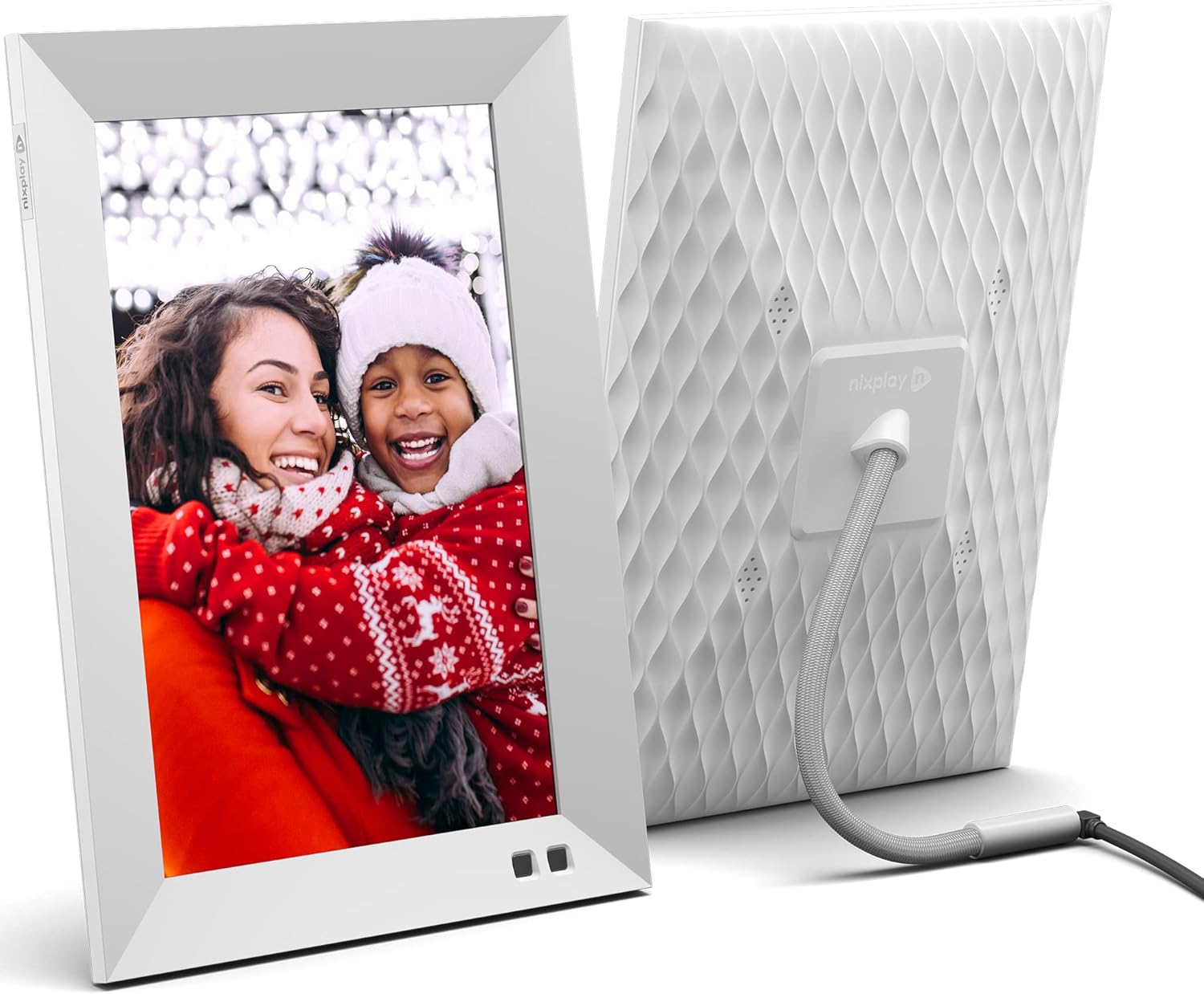
شڪل 2: اڳيان ۽ پوئين view of the Nixplay Smart Digital Photo Frame.
2. پاورنگ آن
Connect the provided power adapter to the frame's power port and then plug it into a wall outlet. The frame will automatically power on.
3. نيٽ ورڪ ڪنيڪشن
Follow the on-screen prompts to connect your Nixplay frame to your Wi-Fi network. A stable internet connection is required for full functionality, including receiving new photos and videos.
4. Account Creation and Content Upload
To manage your frame and upload content, download the Nixplay mobile app (available for iOS and Android) or visit the Nixplay web app on your computer. Create a Nixplay account or log in if you already have one. From the app, you can:
- Link your frame to your account.
- Create and manage playlists.
- Upload photos and videos directly from your device.
- Import photos from cloud services like Google Photos, Facebook, and Instagرام.
- Invite family and friends to contribute to your frame's playlists via email.

Figure 3: Sharing photos and videos instantly via the Nixplay app or email.
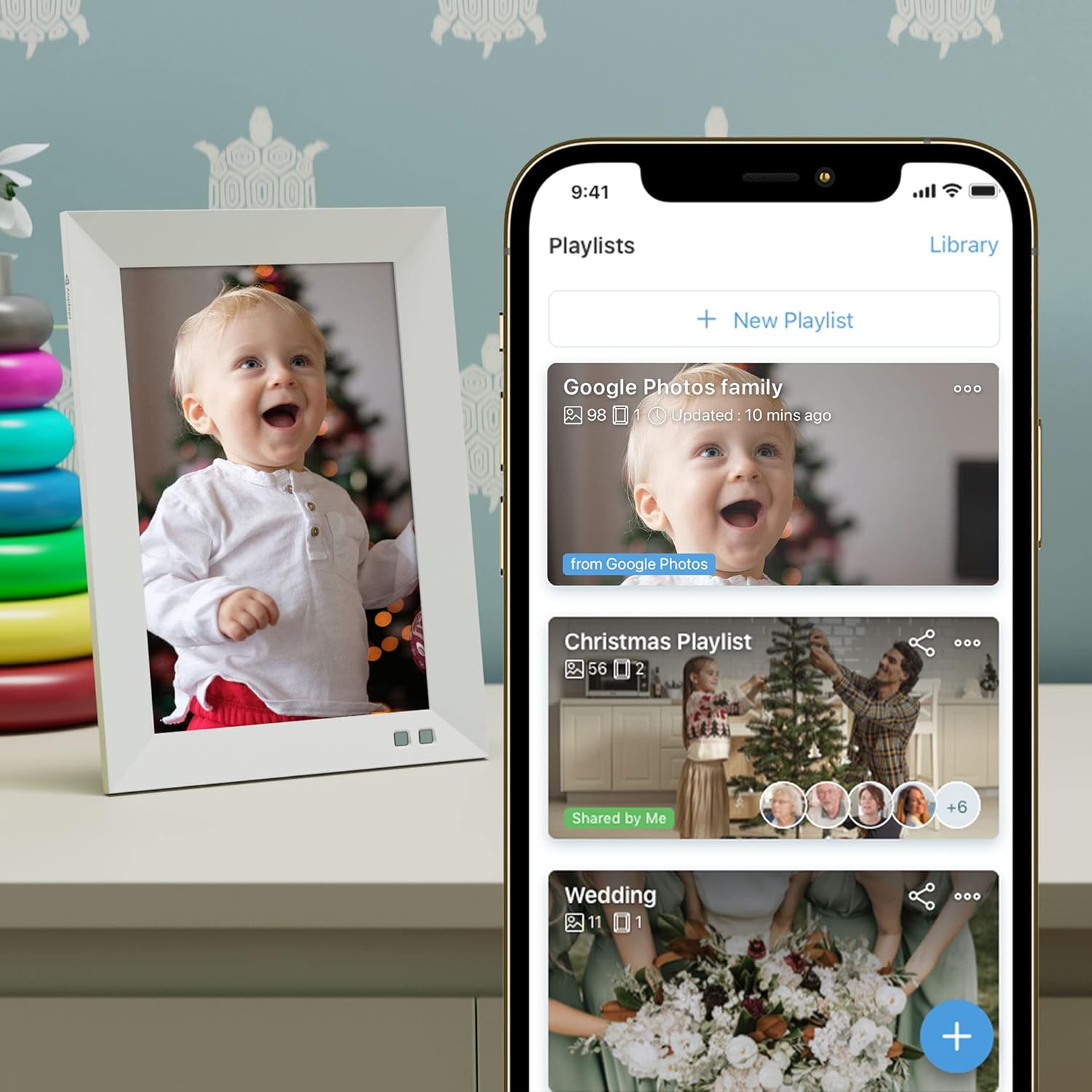
Figure 4: Managing playlists and content through the Nixplay mobile application.
فريم کي هلائڻ
ريموٽ ڪنٽرول افعال
Use the included remote control to navigate menus, adjust settings, and control playback on your frame. Point the remote directly at the frame's sensor for optimal response.
ڊسپلي سيٽنگون
- روشني: Adjust the screen brightness to suit your environment.
- niX-SenseMe Smart Sensor: This sensor detects motion and presence. The frame will automatically wake up when you enter the room and go to sleep when no motion is detected, saving energy.
- واقفيت: The frame automatically detects its orientation (portrait or landscape) and adjusts the display accordingly.
مواد پلے بیک
- پلي لسٽون: Content is organized into playlists. You can switch between playlists using the remote or the Nixplay app.
- niX-SmartFace Framing: Proprietary software uses Artificial Intelligence to automatically position people closer to the center of the frame for an enhanced viewتجربو.
- وڊيو پلے بیک: The frame supports video clips. Note that videos may be automatically trimmed to a certain length for optimal playback.
Voice Control (Amazon Alexa)
The Nixplay Smart Digital Photo Frame is compatible with Amazon Alexa. You can use voice commands to control your frame, such as asking it to play a specific playlist.
سار سنڀال
فريم جي صفائي
اسڪرين کي صاف ڪرڻ لاءِ، نرم، لِنٽ فري ڪپڙي سان نرميءَ سان صاف ڪريو. ضدي داغن لاءِ، ٿورو ڊيampen the cloth with water. Avoid using harsh chemicals or abrasive materials. Clean the frame's body with a dry, soft cloth.
سافٽ ويئر اپڊيٽس
Nixplay regularly releases software updates to improve performance and add new features. Ensure your frame is connected to Wi-Fi to receive automatic updates. You can also manually check for updates through the frame's settings menu or the Nixplay app.
Cloud Storage
Your photos and videos are stored securely on Nixplay's cloud servers. This allows you to access and manage your content from anywhere and ensures your frame can display content even if your local network is temporarily unavailable.
مشڪلاتون
| مسئلو | ممڪن سبب | حل |
|---|---|---|
| فريم آن نٿو ٿئي. | پاور اڊاپٽر ڳنڍيل نه آهي يا آئوٽ ليٽ خراب آهي. | پڪ ڪريو ته پاور اڊاپٽر فريم ۽ ڪم ڪندڙ بجلي جي آئوٽليٽ سان محفوظ طور تي ڳنڍيل آهي. هڪ مختلف آئوٽليٽ آزمايو. |
| وائي فائي سان ڳنڍجي نٿو سگھي. | Incorrect Wi-Fi password, weak signal, or router issue. | Double-check the Wi-Fi password. Move the frame closer to the router. Restart your Wi-Fi router. |
| Photos/Videos not appearing on frame. | Content not uploaded, not assigned to a playlist, or frame not connected to internet. | Verify content is uploaded and assigned to an active playlist in the Nixplay app. Ensure the frame has a stable internet connection. |
| فريم غير جوابده آهي. | عارضي سافٽ ويئر جي خرابي. | پاور اڊاپٽر کي فريم مان ڪڍو، 10 سيڪنڊ انتظار ڪريو، پوءِ ڊوائيس کي ٻيهر شروع ڪرڻ لاءِ ان کي واپس پلگ ان ڪريو. |
| Image quality appears poor. | Low resolution source image or display settings. | Ensure you are uploading high-resolution images. Check the frame's brightness settings. The frame features an HD IPS display for crisp visuals. |
وضاحتون
| خاصيت | تفصيل |
|---|---|
| ماڊل نمبر | W10F - White |
| اسڪرين جي ماپ | 10.1 انچ |
| قرارداد | WXGA |
| پيداوار جي ماپ | 7.36 x 1.22 x 10.55 انچ |
| شيءِ جو وزن | 2.99 پائونڊ |
| رابطي | وائي فائي |
| مطابقت رکندڙ ڊوائيسز | Smartphone (iOS/Android), Web ايپ |
| طاقت جو ذريعو | AC اڊاپٽر (شامل) |
| خاص خاصيتون | niX-SenseMe Smart Sensor, niX-SmartFace Framing, Automatic Orientation, Cloud Storage |
وارنٽي ۽ سپورٽ
Nixplay is committed to providing excellent customer service. If you encounter any issues or have questions regarding your Nixplay Smart Digital Photo Frame, please contact our customer support team.
Support is available via phone, email, or chat. Please refer to the Nixplay official webسائيٽ (www.nixplay.com/support) for the most up-to-date contact information and support resources.


