1. پراڊڪٽ ختمview
The Logitech MK295 Silent Wireless Keyboard & Mouse Combo is designed for comfort, precision, and quiet operation. It features Logitech's SilentTouch technology, significantly reducing typing and clicking noises. This combo connects wirelessly via a tiny USB Nano receiver, offering a reliable connection and extended battery life for both the keyboard and mouse.
اهم خاصيتون
- Innovative SilentTouch technology for same typing and clicking feel with 90% less noise.
- Full-size keyboard with 8 convenient shortcuts and a full numpad for efficient data entry and easier navigation.
- Contoured and portable mouse with smooth, precise clicking and pointing on most surfaces.
- Strong, reliable 2.4 GHz wireless connection with a 10-meter range and a tiny USB receiver.
- Compatible with Windows or Chrome OS for plug-and-play simplicity.
- Spill-proof keyboard design, durable keys, and sturdy tilt legs with adjustable height.
- Extended battery life: up to 36 months for the keyboard and 18 months for the mouse, with on/off switches.
- One-touch access to media controls (play/pause, volume, mute) and internet.
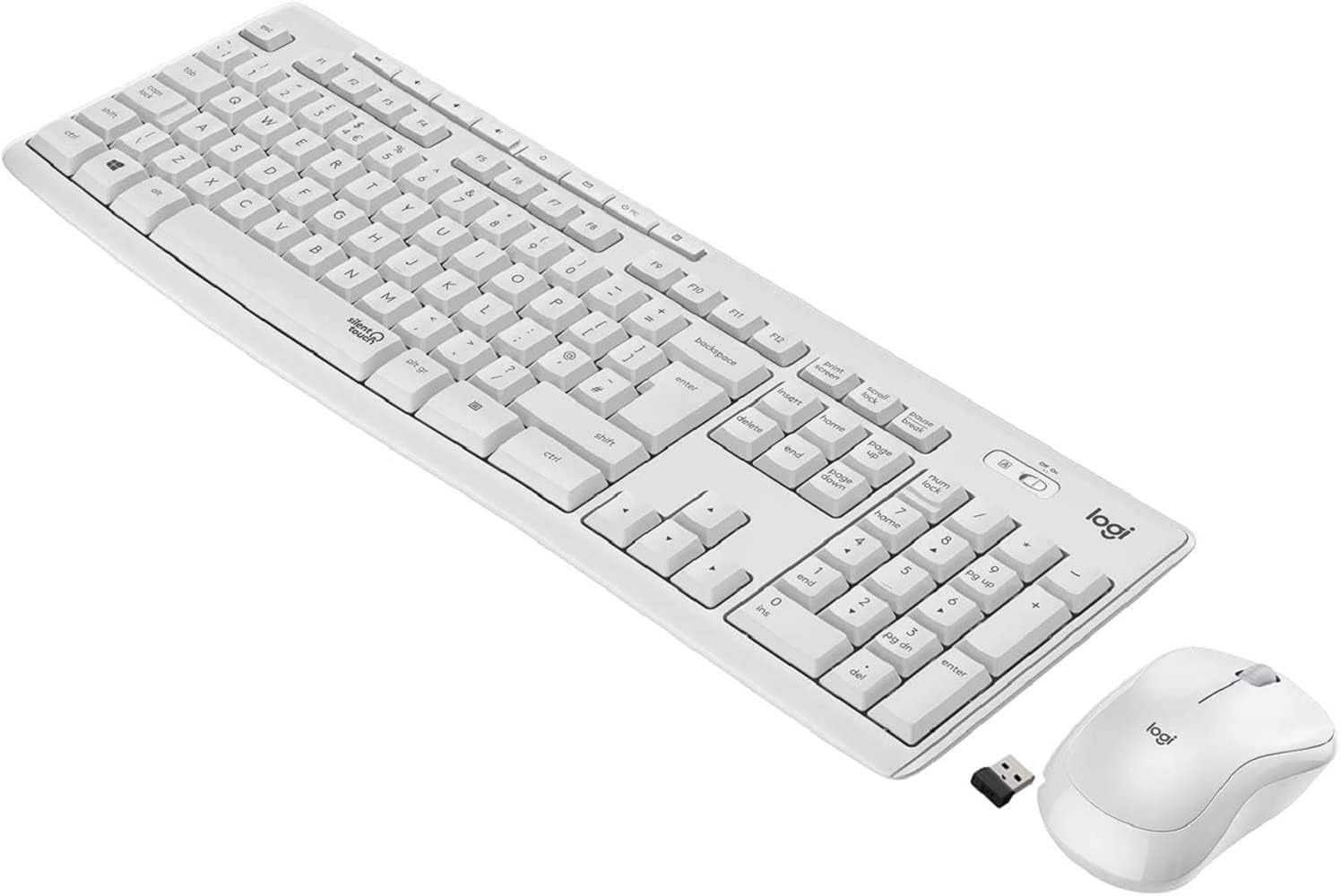
Figure 1.1: The Logitech MK295 Wireless Keyboard and Mouse Combo, including the USB receiver.
2. سيٽ اپ گائيڊ
2.1 پيڪيج مواد
- Logitech MK295 Wireless Keyboard
- Logitech MK295 Wireless Mouse
- يو ايس بي نانو رسيور
- 2 AAA بيٽريون (ڪي بورڊ ۾ اڳ ۾ نصب ٿيل)
- 1 AA بيٽري (ماؤس ۾ اڳ ۾ نصب ٿيل)
- استعمال ڪندڙ دستاويز (هي دستورالعمل)
2.2 بيٽري لڳائڻ
The keyboard requires two AAA batteries, and the mouse requires one AA battery. Batteries are typically pre-installed. If replacement is needed:
- ڪيبورڊ ۽ مائوس جي هيٺئين پاسي بيٽري جي خاني کي ڳوليو.
- سلائيڊ کوليو بيٽري جي ڪمري جو .ڪ.
- Insert the batteries, ensuring correct polarity (+ and - ends).
- بيٽري جي ڪمري واري ڍڪ کي محفوظ طور تي بند ڪريو.
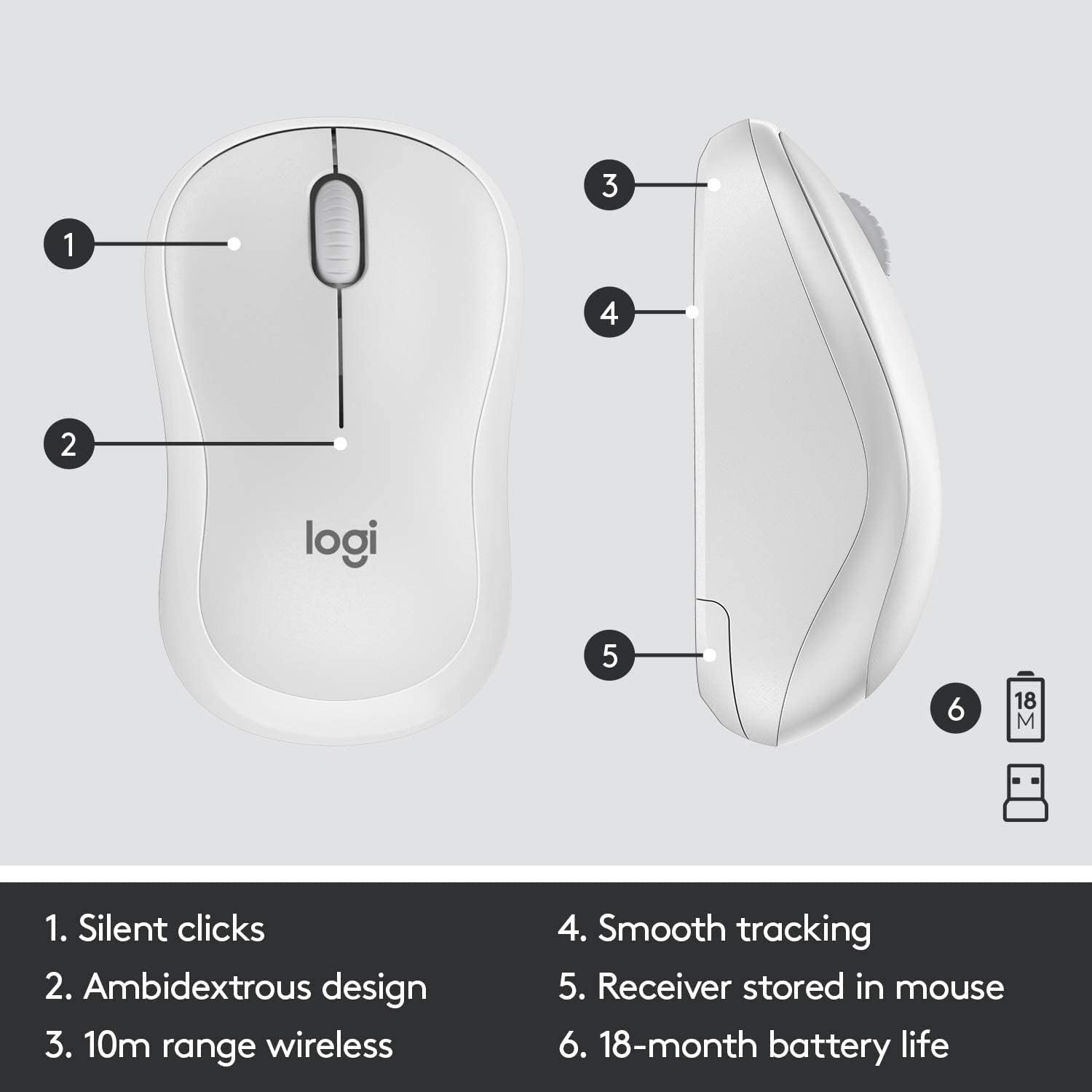
Figure 2.1: The underside of the mouse, showing the battery compartment and the storage slot for the USB receiver.
2.3 ڊوائيسز کي ڳنڍڻ
The keyboard and mouse connect to your computer using a single USB Nano receiver.
- Remove the USB Nano receiver from its storage slot in the mouse (if stored there).
- Plug the USB Nano receiver into an available USB port on your computer.
- Turn on the keyboard and mouse using their respective On/Off switches. The switches are located on the top right of the keyboard and the underside of the mouse.
- Your computer should automatically detect and install the necessary drivers. The devices are ready for use once detected.

Figure 2.2: The keyboard's On/Off switch, located above the numpad, and an indicator for its 10m (33ft) wireless range.
3. Operating Your MK295 Combo
3.1 ڪي بورڊ جا ڪم
The MK295 keyboard features a full-size layout for comfortable typing, including a dedicated numeric keypad for efficient data entry. It also includes several convenient shortcut keys:
- ميڊيا ڪنٽرول: Play/Pause, Volume Up, Volume Down, Mute.
- Application Shortcuts: Home, Mail, Calculator, PC Sleep.
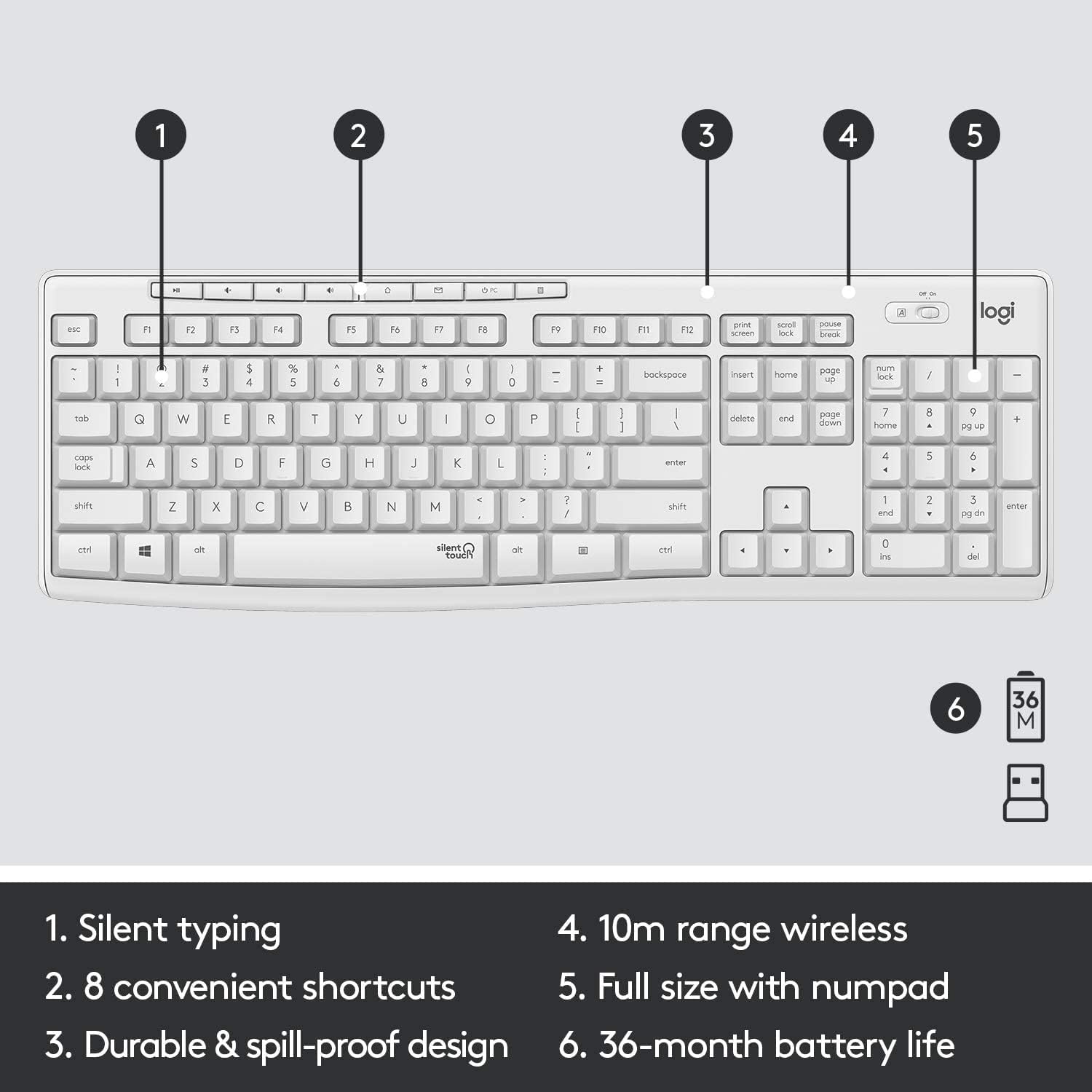
Figure 3.1: Key features of the MK295 keyboard, including its full-size layout with numpad and shortcut keys.
3.2 مائوس جا ڪم
The MK295 mouse is designed with a comfortable, contoured shape that fits well in either hand (ambidextrous design). It provides smooth and precise tracking on most surfaces, making navigation effortless.

Figure 3.2: The comfortable and compact design of the MK295 mouse in use.
3.3 SilentTouch Technology
Logitech's SilentTouch technology significantly reduces the noise from keyboard typing and mouse clicks by over 90% compared to traditional Logitech keyboards and mice. This allows for a quieter work environment without compromising the familiar typing and clicking feel.

Figure 3.3: SilentTouch technology provides a quiet user experience with 90% less noise from typing and clicking.
4. سنڀال ۽ سار سنڀال
- صفائي: نرم استعمال ڪريو، ڊيamp cloth to clean the surfaces of the keyboard and mouse. Avoid harsh chemicals or abrasive materials.
- ڦُلڻ جي مزاحمت: The keyboard features a spill-resistant design. In case of accidental spills, quickly wipe off the liquid. Do not immerse the keyboard in water.
- بيٽري جي بچت: Utilize the On/Off switches on both the keyboard and mouse when not in use for extended periods to conserve battery life.
- اسٽوريج: When transporting or storing the combo, you can store the USB Nano receiver inside the mouse's battery compartment to prevent loss.
5. عام مسئلن کي حل ڪرڻ
- ڪوبه ڪنيڪشن/لئگ ناهي:
- پڪ ڪريو ته USB نانو رسيور محفوظ طور تي توهان جي ڪمپيوٽر تي ڪم ڪندڙ USB پورٽ ۾ پلگ ان ٿيل آهي.
- Verify that both the keyboard and mouse are turned On.
- Check the battery levels and replace them if necessary.
- ڪيبورڊ ۽ مائوس کي USB رسيور جي ويجهو منتقل ڪريو ته جيئن پڪ ٿئي ته اهي 10 ميٽر وائرليس رينج اندر آهن.
- رسيور کي ٻين اليڪٽرانڪ ڊوائيسز جي ويجهو رکڻ کان پاسو ڪريو جيڪي مداخلت جو سبب بڻجي سگهن ٿا (مثال طور، وائي فائي روٽر، ڪارڊ لیس فون).
- Keys Not Responding/Mouse Not Tracking:
- Replace the batteries in the affected device.
- USB رسيور کي پنهنجي ڪمپيوٽر تي ڪنهن ٻئي USB پورٽ ۾ لڳائڻ جي ڪوشش ڪريو.
- پنهنجي ڪمپيوٽر کي ٻيهر شروع ڪريو.
- غير متوقع رويو:
- If the keyboard or mouse behaves erratically, try turning it Off and On again.
- Ensure your operating system (Windows or Chrome OS) is up to date.
6. ٽيڪنيڪل وضاحتون
| خاصيت | تفصيل |
|---|---|
| پيداوار جي ماپ | 20.08 x 6.22 x 1.81 انچ |
| شيءِ جو وزن | 2.05 پائونڊ |
| ٺاهيندڙ | Logitech |
| ASIN | B08V5LPFLZ |
| تاريخ پهرين دستياب | جنوري 27، 2021 |
| رنگ | اڇو اڇو |
| رابطي ٽيڪنالاجي | USB (2.4 GHz wireless via Nano receiver) |
| خاص خصوصيت | Portable, SilentTouch Technology, Spill-resistant keyboard |
| مطابقت رکندڙ ڊوائيسز | Personal Computer (Windows, Chrome OS) |
| ڪي بورڊ جي بيٽري جي زندگي | 36 مهينن تائين (2 AAA بيٽريون) |
| مائوس جي بيٽري جي زندگي | Up to 18 months (1 AA battery) |
| وائرلیس رينج | 10 ميٽر (33 فوٽ) |
7. وارنٽي ڄاڻ
Logitech products typically come with a limited hardware warranty. For specific warranty terms and conditions applicable to your MK295 combo, please refer to the warranty card included with your product or visit the official Logitech webسائيٽ. وارنٽي دعوائن لاءِ خريداري جو ثبوت رکو.
8. ڪسٽمر سپورٽ
For further assistance, technical support, or to download the latest software and drivers for your Logitech MK295 Wireless Keyboard and Mouse Combo, please visit the official Logitech support webسائيٽ:
You may also find helpful FAQs and community forums on the support site.


