1. تعارف
Thank you for choosing the HOCO ES43 Bluetooth 5.0 Wireless Stereo Earphones. This manual will guide you through the features, setup, and operation of your new earphones to ensure an optimal audio experience. Please read these instructions carefully before use and retain them for future reference.
2. پراڊڪٽ ختمview
The HOCO ES43 earphones offer a seamless wireless audio experience with Bluetooth 5.0 connectivity and a built-in microphone for calls. The compact charging case provides extended battery life, making them ideal for on-the-go use.
اهم خاصيتون:
- Bluetooth Version 5.0 for stable and efficient connection.
- JL AC6976 Chipset for reliable performance.
- Integrated microphone for hands-free calling.
- Supports master-slave switching for flexible use of single or dual earbuds.
- پورٽيبلٽي لاءِ ڪمپيڪٽ ۽ ٿلهي ڊيزائن.
پيڪيج مواد:
- HOCO ES43 Wireless Stereo Earphones (Left and Right)
- چارج ڪيس
- چارج ڪيبل
- استعمال ڪندڙ دستي

Image: The retail packaging for the HOCO ES43 earphones, showing the product and key features on the box.
3. سيٽ اپ
3.1 ائرفون ۽ ڪيس کي چارج ڪرڻ
پهرين استعمال کان اڳ، ائرفون ۽ چارجنگ ڪيس کي مڪمل طور تي چارج ڪريو.
- Place the earphones into the charging case. Ensure they are correctly seated in their respective slots.
- چارجنگ ڪيبل کي ڪيس تي چارجنگ پورٽ ۽ USB پاور سورس سان ڳنڍيو.
- The charging case has a battery capacity of 400 mAh, and each earphone has a 40 mAh battery.
- Charging time for the case is approximately 1.5 hours. Earphones take approximately 2 hours to fully charge inside the case.
- Indicator lights on the case and/or earphones will show charging status and turn off or change color when fully charged.
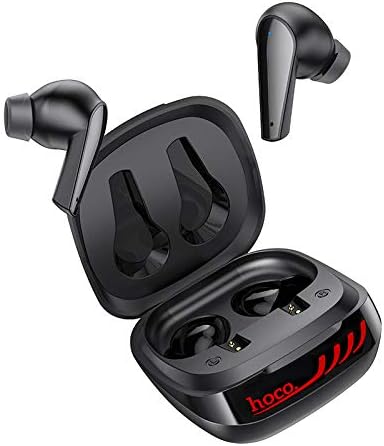
Image: The HOCO ES43 earphones placed inside their open charging case, showing the charging contacts.
3.2 بلوٽوٽ جوڙي
پنهنجا ائرفون ڪنهن ڊوائيس سان ڳنڍڻ لاءِ:
- پڪ ڪريو ته ائرفون چارج ٿيل آهن.
- چارجنگ ڪيس کوليو. ائرفون پاڻمرادو پاور آن ٿيندا ۽ پيئرنگ موڊ ۾ داخل ٿيندا (ايئربڊس تي ايل اي ڊي لائيٽون چمڪائڻ سان ظاهر ٿئي ٿو).
- پنهنجي ڊوائيس (اسمارٽ فون، ٽيبليٽ، وغيره) تي، بلوٽوٿ کي فعال ڪريو.
- ڳولھيو available Bluetooth devices and select "HOCO ES43" from the list.
- Once connected, the earphone indicator lights will stop flashing or change to a solid color.
- The earphones support master-slave switching, allowing you to use either earbud independently after initial pairing.
4. آپريٽنگ هدايتون
The HOCO ES43 earphones feature touch controls for easy management of music and calls.
4.1 پاور آن/آف
- پاور آن: Open the charging case, and the earphones will automatically power on. Alternatively, press and hold the touch area on both earbuds for a few seconds.
- بجلي بند: Place the earphones back into the charging case and close the lid. Alternatively, disconnect Bluetooth and the earphones will power off automatically after a few minutes, or press and hold the touch area on both earbuds for a few seconds.
4.2 ميوزڪ پلے بیک
- راند/روڪ: ٻنهي ائربڊ تي ٽچ ايريا تي هڪ ڀيرو ٽيپ ڪريو.
- اڳيون ٽريڪ: ساڄي ائربڊ تي ٽچ واري علائقي کي ٻٽي ٽيپ ڪريو.
- پويون ٽريڪ: کاٻي ائربڊ تي ٽچ واري علائقي کي ٻٽي ٽيپ ڪريو.
4.3 ڪال مئنيجمينٽ
- جواب/آخر ڪال: ٻنهي ائربڊ تي ٽچ ايريا تي هڪ ڀيرو ٽيپ ڪريو.
- ڪال رد ڪريو: ٻنهي ائربڊ تي ٽچ ايريا کي 2 سيڪنڊن لاءِ دٻايو ۽ رکو.
4.4 وائس اسسٽنٽ
- وائس اسسٽنٽ کي فعال ڪريو. Triple-tap the touch area on either earbud.

Image: A person wearing the HOCO ES43 earphones, demonstrating typical usage during an activity.
5. سار سنڀال
Proper maintenance ensures the longevity and optimal performance of your HOCO ES43 earphones.
- صفائي: ائرفون ۽ چارجنگ ڪيس کي باقاعدي طور تي نرم، سڪل، لِنٽ فري ڪپڙي سان صاف ڪريو. سخت ڪيميڪل يا رگڙيندڙ مواد استعمال نه ڪريو.
- رابطا چارج ڪرڻ: Ensure the charging contacts on both the earphones and the case are clean and free of debris to maintain proper charging.
- اسٽوريج: جڏهن استعمال ۾ نه هجي، ته ائرفون کي مٽي ۽ نقصان کان بچائڻ لاءِ انهن جي چارجنگ ڪيس ۾ رکو. ٿڌي، سڪل جاءِ تي رکو.
- پاڻي کان بچاء: These earphones are not waterproof. Avoid exposure to water, moisture, or extreme temperatures.
- بيٽري جي سنڀال: بيٽري جي زندگي بچائڻ لاءِ، ائرفون ۽ چارجنگ ڪيس کي بار بار مڪمل طور تي ڊسچارج ڪرڻ کان پاسو ڪريو. انهن کي باقاعدي طور تي چارج ڪريو، جيتوڻيڪ مسلسل استعمال ۾ نه هجي.
6. مسئلا حل ڪرڻ
If you encounter issues with your HOCO ES43 earphones, refer to the following common solutions:
- ائرفون ڊوائيس سان نه جوڙي رهيا آهن:
- پڪ ڪريو ته توهان جي ڊوائيس تي بلوٽوت فعال آهي.
- Make sure the earphones are charged and out of the charging case.
- Forget/delete "HOCO ES43" from your device's Bluetooth list and try pairing again.
- پنهنجي ڊوائيس ۽ ائرفون کي ٻيهر شروع ڪريو.
- صرف هڪ ائرفون ڪم ڪري رهيو آهي:
- Place both earphones back into the charging case, close the lid, wait a few seconds, then open it again to allow them to re-sync.
- پڪ ڪريو ته ٻئي ائرفون چارج ٿيل آهن.
- ائرفون ري سيٽ ڪرڻ جي ڪوشش ڪريو (ٺاهيندڙ جي حوالي ڪريو) webجيڪڏهن ضرورت هجي ته مخصوص ري سيٽ هدايتن لاءِ سائيٽ).
- ڪابه آواز يا گهٽ آواز:
- پنهنجي ڊوائيس ۽ ائرفون ٻنهي تي حجم جي سطح چيڪ ڪريو.
- پڪ ڪريو ته ائرفون توهان جي ڊوائيس سان صحيح طرح سان ڳنڍيل آهن.
- Clean any debris from the earphone speaker grilles.
- چارج ڪرڻ جا مسئلا:
- پڪ ڪريو ته چارجنگ ڪيبل ڪيس ۽ پاور سورس ٻنهي سان محفوظ طور تي ڳنڍيل آهي.
- Verify that the power source is working.
- ائرفون ۽ ڪيس جي اندر چارجنگ ڪانٽيڪٽس کي صاف ڪريو.
- ڪا ٻي چارجنگ ڪيبل يا پاور اڊاپٽر آزمايو.
7. وضاحتون
| بلوٽوت ورزن | 5.0 |
| بلوٽوت چپ | جي ايل AC6976 |
| چارج ڪيس جي بيٽري جي گنجائش | 400 mAh |
| Earphone جي بيٽري جي گنجائش | 40 mAh (هر هڪ) |
| چارج ڪرڻ وقت (ڪيس) | لڳ ڀڳ. 1.5 ڪلاڪ |
| چارج ڪرڻ جو وقت (ائرفون) | لڳ ڀڳ. 2 ڪلاڪ |
| موسيقي / ڳالهائڻ جو وقت | لڳ ڀڳ. 4 ڪلاڪ |
| اسٽينڊ بائي ٽائيم | لڳ ڀڳ. 200 ڪلاڪ |
| ڪل وزن | 48 گرام |
| هيڊ فون فارم فيڪٽر | ڪن ۾ |
| رابطي ٽيڪنالاجي | وائرليس (بلوٽوت) |
| ڪنٽرول قسم | ڪال ڪنٽرول، ٽچ ڪنٽرول |
| ماڊل نمبر | ES43 |
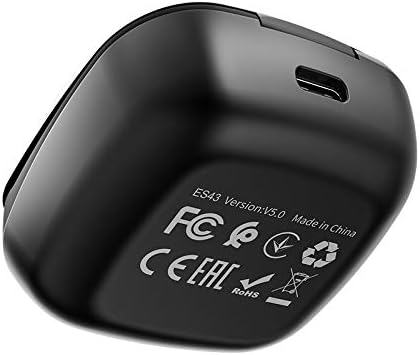
Image: The underside of the HOCO ES43 charging case, displaying model number, Bluetooth version, and compliance markings.
8. حفاظت جي ڄاڻ
مھرباني ڪري ھيٺ ڏنل حفاظتي ھدايتن تي عمل ڪريو:
- مصنوعات کي جدا نه ڪريو، مرمت ڪريو، يا تبديل ڪريو.
- ائرفون ۽ چارجنگ ڪيس کي انتهائي گرمي پد، سڌي سج جي روشني ۽ کليل باهه کان پري رکو.
- پراڊڪٽ کي پاڻي يا ٻين مايعات کي ظاهر ڪرڻ کان پاسو ڪريو.
- ٻڌڻ جي نقصان کي روڪڻ لاءِ پراڊڪٽ کي گهڻي وقت تائين وڏي مقدار ۾ استعمال نه ڪريو.
- ٻارن ۽ پالتو جانورن جي پهچ کان پري رکو.
- مقامي ضابطن جي مطابق ذميواري سان پيداوار کي ختم ڪريو.
9. وارنٽي ۽ سپورٽ
For warranty information and customer support, please refer to the documentation provided at the time of purchase or contact your retailer. HOCO is committed to providing quality products and support.