1. تعارف
Thank you for choosing the Lenco SCD-720 Boombox. This versatile audio system offers a wide range of playback options, including DAB+ and FM radio, Bluetooth 5.0 connectivity, a CD/MP3 player, a cassette player, and a USB port for digital audio files. It features 2 x 6W RMS audio output with Bass Reflex for enhanced sound and comes with a remote control for convenient operation. This manual provides essential information for setting up, operating, and maintaining your device.
2. اهم حفاظتي ڄاڻ
- ڊوائيس استعمال ڪرڻ کان پهريان سڀ هدايتون احتياط سان پڙهو.
- مستقبل جي حوالي لاءِ هي دستياب رکو.
- باهه يا بجليءَ جي جھٽڪي کان بچڻ لاءِ يونٽ کي مينهن يا نمي جي سامهون نه رکو.
- مناسب وينٽيليشن کي يقيني بڻايو. ڪنهن به وينٽيليشن جي سوراخن کي بند نه ڪريو.
- يونٽ کي گرمي جي ذريعن جهڙوڪ ريڊيئيٽر، گرمي رجسٽر، اسٽو، يا ٻيو سامان (بشمول ampلائفائرز) جيڪي گرمي پيدا ڪن ٿا.
- بجليءَ جي تار کي هلڻ يا پنچ ٿيڻ کان بچايو، خاص طور تي پلگ، سهولتن جي رسيپٽيڪل ۽ ان نقطي تي جتي اهي سامان مان نڪرندا آهن.
- صرف ٺاھيندڙ طرفان بيان ڪيل منسلڪ / لوازمات استعمال ڪريو.
- بجليءَ جي طوفانن دوران يا ڊگھي عرصي لاءِ غير استعمال ٿيل ھجڻ دوران ھن ڊوائيس کي ان پلگ ڪريو.
- سڀني خدمتن جو حوالو ڏيو قابل خدمت اهلڪارن ڏانهن. خدمت ڪرڻ جي ضرورت پوندي آهي جڏهن سامان ڪنهن به طريقي سان خراب ٿي ويو آهي، جهڙوڪ پاور سپلائي ڪنڊ يا پلگ خراب ٿي ويو آهي، مائع ڦوڪيو ويو آهي يا شيون اپريٽس ۾ گر ٿي ويا آهن، سامان مينهن يا نمي جي سامهون آيو آهي، عام طور تي ڪم نٿو ڪري. ، يا ڇڏيو ويو آهي.
3. پراڊڪٽ ختمview
Familiarize yourself with the main components and controls of your Lenco SCD-720 Boombox.
سامهون View USB پورٽ سان

This image shows the front of the Lenco SCD-720 Boombox, highlighting the main control panel, speakers, and a USB stick inserted into the USB port on the top left.
سامهون View with CD Compartment Open

This image displays the Lenco SCD-720 Boombox from the front, with the top-loading CD compartment lid open, ready for CD insertion.
ريڙهه View
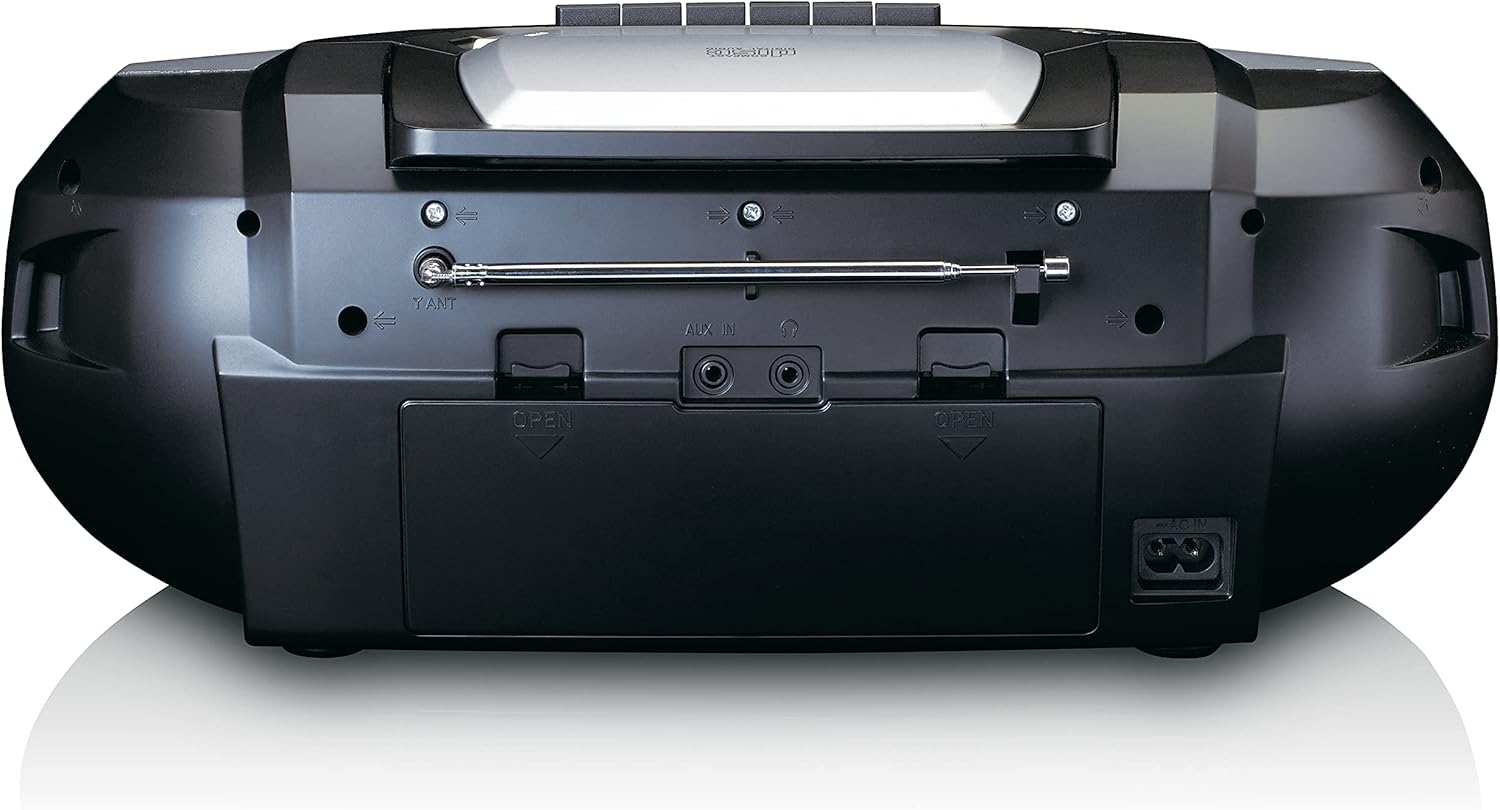
This image shows the back of the Lenco SCD-720 Boombox, featuring the telescopic antenna, AUX input, headphone jack, and the AC power input socket.
Control Panel Close-up

هڪ تفصيلي view of the Lenco SCD-720 Boombox's central control panel, including the digital display, source selection buttons, tuning/navigation buttons, and the illuminated volume knob.
Boombox with Remote Control
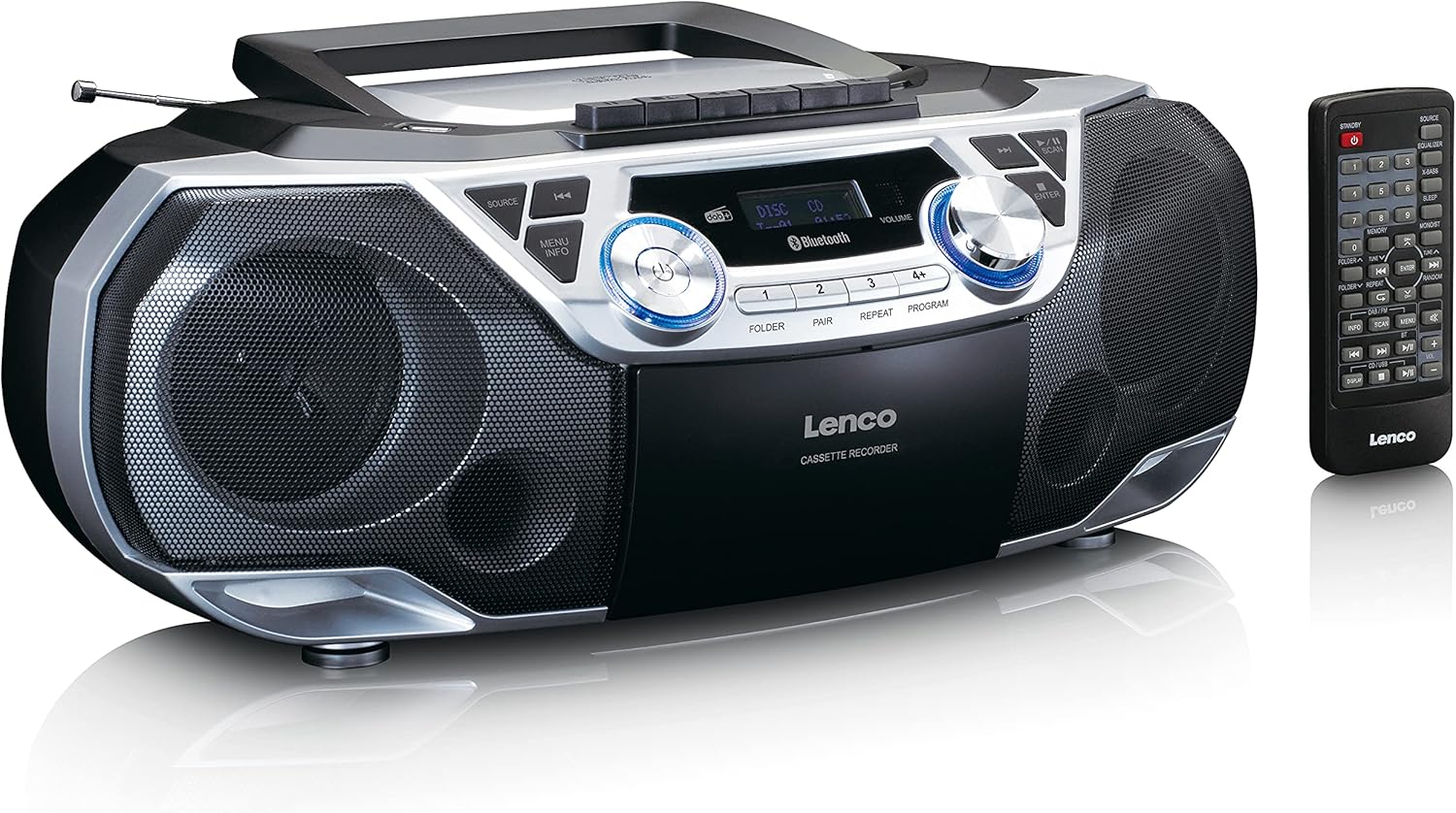
The Lenco SCD-720 Boombox is displayed next to its included remote control, illustrating the complete package.
ريموٽ ڪنٽرول ترتيب

A close-up image of the remote control for the Lenco SCD-720 Boombox, showing all buttons for power, source selection, playback, tuning, and other functions.
4. سيٽ اپ
4.1 پاور ڪنيڪشن
The Lenco SCD-720 Boombox can be powered by AC mains or batteries.
- اي سي پاور: Connect the supplied AC power cord to the AC IN socket on the rear of the unit and then to a standard wall outlet.
- بيٽري آپريشن: For portable use, open the battery compartment on the rear of the unit and insert 8 x 'C' type batteries (not included), ensuring correct polarity. Close the compartment securely.
4.2 اينٽينا ايڊجسٽمينٽ
For optimal radio reception, extend the telescopic antenna fully. Adjust its position and angle to achieve the best signal quality for both DAB+ and FM broadcasts.
4.3 شروعاتي پاور آن
کي دٻايو پاور button on the unit or remote control to turn on the boombox. The display will light up, and the unit will typically start in the last used mode.
5. آپريٽنگ هدايتون
5.1 عام ڪنٽرول
- پاور آن / آف: کي دٻايو پاور بٽڻ
- حجم ڪنٽرول: گھمايو حجم knob on the unit or use the جلد + / - ريموٽ ڪنٽرول تي بٽڻ.
- ذريعو چونڊ: کي دٻايو ذريعو button on the unit or the dedicated source buttons (DAB/FM, CD/USB, BT) on the remote to switch between modes (DAB+, FM, CD, USB, Bluetooth, AUX).
5.2 Radio Operation (DAB+/FM)
- موڊ چونڊيو: کي دٻايو ذريعو button until DAB+ or FM mode is selected.
- خودڪار اسڪين: In DAB+ or FM mode, press the اسڪين button to automatically search for and store available stations.
- دستي ترتيب استعمال ڪريو TUNE < / > دستي طور تي تعدد کي ترتيب ڏيڻ لاءِ بٽڻ.
- اڳواٽ اسٽيشنون: The unit allows you to save your favorite stations. Press and hold one of the numbered preset buttons (1-4) to store the current station. Briefly press a preset button to recall a stored station.
- DAB+ Information: DAB + موڊ ۾، دٻايو ڄاڻ button to cycle through various information such as program type, signal strength, time, and date.
5.3 سي ڊي/ايم پي 3 پلے بیک
- Load CD: Open the CD compartment lid by pressing the کوليو button. Place a CD or MP3 CD with the label side facing up. Close the lid securely.
- پلے بیک: The CD will start playing automatically. If not, press the راند/روڪ بٽڻ
- ڪنٽرول: استعمال ڪريو SKIP << / >> buttons to skip tracks. Press and hold to fast forward/rewind.
- ورجائي: دٻايو ورجائي موجوده ٽريڪ يا سڀني ٽريڪن کي ورجائڻ لاءِ.
- پروگرام: دٻايو پروگرام to create a custom playback order for tracks.
5.4 ڪيسٽ پلے بیک ۽ رڪارڊنگ
- Load Cassette: Open the cassette compartment. Insert a cassette tape.
- پلے بیک: کي دٻايو راند ڪريو بٽڻ
- رڪارڊنگ: To record from Radio, CD, USB, or AUX, select the desired source. Insert a blank cassette. Press the رڪارڊ button (usually red) along with the راند ڪريو ساڳئي وقت بٽڻ.
- ڪنٽرول: استعمال ڪريو فاسٽ فارورڊ ۽ REWIND بٽڻ. دٻايو اسٽاپ/EJECT پلے بیک کي روڪڻ ۽ ڪمپارٽمينٽ کولڻ لاءِ.
5.5 بلوٽوٿ 5.0 ڪنيڪٽوٽي
- بلوٽوٿ موڊ داخل ڪريو: کي دٻايو ذريعو button until 'BT' or 'Bluetooth' appears on the display. The unit will enter pairing mode, indicated by a flashing Bluetooth icon.
- جوڙڻ: On your smartphone or tablet, enable Bluetooth and search for available devices. Select 'Lenco SCD-720' from the list. Once paired, the Bluetooth icon will stop flashing.
- پلے بیک: Start playing audio on your connected device. The sound will be streamed to the boombox.
5.6 USB پلے بیک
- USB داخل ڪريو: MP3 تي مشتمل USB فليش ڊرائيو داخل ڪريو files USB پورٽ ۾.
- USB موڊ چونڊيو: کي دٻايو ذريعو button until 'USB' appears. The unit will automatically scan and begin playing MP3 files.
- ڪنٽرول: پلے بیک ڪنٽرول بٽڻ استعمال ڪريو (PLAY/PAUSE, SKIP << / >>) پنهنجي موسيقي کي منظم ڪرڻ لاءِ.
5.7 AUX ان پٽ
Connect external audio devices (e.g., MP3 players, smartphones without Bluetooth) to the AUX اندر jack on the rear of the unit using a 3.5mm audio cable (not included). Select AUX mode via the ذريعو بٽڻ
5.8 هيڊ فون آئوٽ
For private listening, connect headphones to the هيڊ فون jack on the rear of the unit. The main speakers will be muted automatically.
5.9 ريموٽ ڪنٽرول
The included remote control provides full functionality for the boombox, allowing you to control power, source, volume, playback, tuning, and other settings from a distance. Ensure the remote has working batteries and is pointed towards the front of the boombox.
6. سار سنڀال
6.1 يونٽ جي صفائي
Wipe the exterior of the boombox with a soft, dry cloth. Do not use abrasive cleaners, waxes, or solvents as they may damage the finish. For stubborn stains, a slightly damp ڪپڙو استعمال ڪري سگھجي ٿو، ان کان پوءِ سڪل ڪپڙو.
6.2 سي ڊي لينس ڪيئر
If CD playback becomes erratic, the CD lens may need cleaning. Use a commercially available CD lens cleaner disc. Do not touch the lens directly.
6.3 ڪيسٽ هيڊ جي صفائي
ڪيسٽ هيڊز، پنچ رولرز، ۽ ڪيپسٽن کي باقاعدي طور تي ڪپهه جي سواب سان صاف ڪريو جنهن کي آئسوپروپيل الڪوحل سان هلڪو نم ڪيو وڃي ته جيئن آواز جي معيار کي يقيني بڻائي سگهجي ۽ ٽيپ جي نقصان کي روڪي سگهجي.
6.4 بيٽري مٽائڻ
If the unit is powered by batteries and performance degrades, replace all 8 'C' type batteries with new ones, ensuring correct polarity. Do not mix old and new batteries or different types of batteries.
7. مسئلا حل ڪرڻ
| مسئلو | ممڪن سبب | حل |
|---|---|---|
| طاقت نه آهي | بجلي جي تار ڳنڍيل نه آهي؛ بيٽريون ختم ٿي ويون آهن يا غلط طور تي داخل ڪيون ويون آهن. | اي سي ڪنڊ ڪنيڪشن چيڪ ڪريو؛ بيٽريون تبديل ڪريو، صحيح پولارٽي کي يقيني بڻايو. |
| آواز ڪونهي | Volume too low; Incorrect source selected; Headphones connected. | Increase volume; Select correct source; Disconnect headphones. |
| ناقص ريڊيو استقبال | اينٽينا صحيح طرح سان نه وڌايو ويو آهي يا پوزيشن ۾ نه آهي؛ ڪمزور سگنل. | Extend and adjust the telescopic antenna; Try moving the unit to a different location. |
| سي ڊي/يو ايس بي نه هلي رهي آهي | Disc dirty/scratched; USB format not supported; Incorrect mode. | Clean or replace disc; Ensure USB contains MP3 files; Select CD or USB mode. |
| بلوٽوٿ جوڙڻ ناڪام ٿيو | Boombox not in pairing mode; Device too far; Bluetooth off on device. | Ensure boombox is in BT pairing mode; Move device closer; Enable Bluetooth on your device. |
| Cassette recording issues | Incorrect source selected; Cassette write-protect tab engaged. | Select the desired recording source; Ensure the write-protect tab on the cassette is not broken off. |
8. وضاحتون
- ماڊل: SCD-720SI
- برانڊ: لينڪو
- رابطي: DAB+, FM Radio, Bluetooth 5.0, CD/MP3 Player, Cassette Player, USB Playback, AUX Input, Headphone Output
- آڊيو آئوٽ: 2 X 6W آر ايم ايس
- طاقت جو ذريعو: AC 230V ~ 50Hz or 8 x 'C' type batteries (DC 12V)
- سپورٽ ٿيل آڊيو فارميٽ: CD, CD-R/RW, MP3 (from CD/USB)
- خاص خاصيتون: Bass Reflex, Remote Control
- طول و عرض (L x W x H): تقريبن 38.5 سينٽي ميٽر x 23.5 سينٽي ميٽر x 14.5 سينٽي ميٽر
- رنگ: چاندي
- ٺاهيندڙ: Lenco GmbH
- اصليت جو ملڪ: چين
9. وارنٽي ۽ سپورٽ
Lenco products are covered by a warranty in accordance with European law. For specific warranty terms and conditions, please refer to the warranty card included with your product or visit the official Lenco website. For technical support, service, or spare parts information, please contact Lenco customer service or your local dealer. Please have your model number (SCD-720SI) and purchase details ready when contacting support.
Information regarding software updates and spare parts availability is not provided at this time.


