پيداوار ختمview
The Hoco ES41 TWS (True Wireless Stereo) Bluetooth Headset provides a wireless audio experience with clear sound. This manual will guide you through the setup, operation, and maintenance of your ES41 headset.
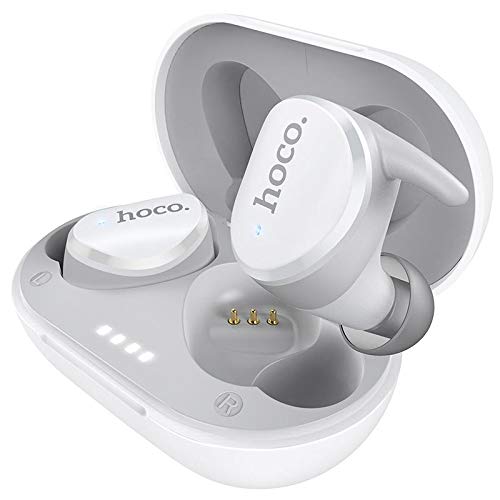
Image: The Hoco ES41 TWS Bluetooth Wireless Headset, showing both earbuds and the charging case in white.
پيڪيج مواد
مھرباني ڪري ھيٺ ڏنل شين لاءِ پيڪيج چيڪ ڪريو:
- Hoco ES41 TWS Wireless Earbuds (Left and Right)
- وائرليس چارجنگ ڪيس
- USB چارجنگ ڪيبل (مائڪرو USB)
- استعمال ڪندڙ دستي

تصوير: اڳيان ۽ پوئتي view of the Hoco ES41 retail packaging, displaying the product and key features.
سيٽ اپ ڪريو
1. هيڊ سيٽ ۽ ڪيس کي چارج ڪرڻ
پهرين استعمال کان اڳ، چارجنگ ڪيس ۽ ائربڊس کي مڪمل طور تي چارج ڪريو.
- Connect the provided USB charging cable to the charging port on the case and to a USB power source.
- چارجنگ ڪيس تي اشاري جون بتيون چارجنگ اسٽيٽس ڏيکارڻ لاءِ روشن ٿينديون.
- ائربڊس کي چارجنگ ڪيس ۾ رکو. پڪ ڪريو ته اهي صحيح طرح سان ويٺا آهن؛ ائربڊس پاڻمرادو چارج ٿيڻ شروع ٿي ويندا.
- Charging time for the headset is approximately 1 hour. The charging case takes approximately 2.5 hours to fully charge.

Image: The Hoco ES41 earbuds placed inside the open charging case, showing the LED indicator lights for battery status.
2. بلوٽوٿ ڊيوائس سان جوڙڻ
The ES41 headset uses Bluetooth 5.0 for a stable connection.
- شروعاتي جوڙ:
- چارجنگ ڪيس کوليو. ائربڊس پاڻمرادو آن ٿيندا ۽ پيئرنگ موڊ ۾ داخل ٿيندا.
- پنهنجي ڊوائيس (اسمارٽ فون، ٽيبليٽ، وغيره) تي، بلوٽوٿ کي فعال ڪريو.
- ڳولھيو Bluetooth devices and select "Hoco ES41" from the list.
- هڪ ڀيرو ڳنڍجي وڃڻ کان پوءِ، توهان کي تصديق جو آواز ٻڌڻ ۾ ايندو، ۽ ائربڊس جون اشاري جون بتيون تبديل ٿي وينديون.
- ٻيهر ڪنيڪشن:
- After initial pairing, the earbuds will automatically connect to the last paired device when removed from the charging case and Bluetooth is enabled on the device.
آپريٽنگ هدايتون
پاور آن / آف
- پاور آن: Open the charging case, or long-press the touch area on both earbuds for approximately 3 seconds.
- بجلي بند: Place the earbuds back into the charging case and close the lid, or long-press the touch area on both earbuds for approximately 5 seconds.
موسيقي پلے بیک
- راند/روڪ: ٻنهي ائربڊ تي ٽچ ايريا تي هڪ ڀيرو ٽيپ ڪريو.
- اڳيون ٽريڪ: ساڄي ائربڊ تي ٽچ واري علائقي کي ٻٽي ٽيپ ڪريو.
- پويون ٽريڪ: کاٻي ائربڊ تي ٽچ واري علائقي کي ٻٽي ٽيپ ڪريو.
ڪال انتظام
- جواب/آخر ڪال: ٻنهي ائربڊ تي ٽچ ايريا تي هڪ ڀيرو ٽيپ ڪريو.
- ڪال رد ڪريو: Long-press the touch area on either earbud for 2 seconds.
وائس اسسٽنٽ
- وائس اسسٽنٽ کي فعال ڪريو. Triple-tap the touch area on either earbud.
سار سنڀال
- صفائي: ائربڊس ۽ چارجنگ ڪيس کي صاف ڪرڻ لاءِ نرم، سڪل ڪپڙو استعمال ڪريو. سخت ڪيميڪل يا رگڙيندڙ مواد استعمال نه ڪريو.
- اسٽوريج: جڏهن استعمال ۾ نه هجي، ته ائربڊس کي انهن جي چارجنگ ڪيس ۾ محفوظ ڪريو ته جيئن انهن کي محفوظ رکي سگهجي ۽ انهن کي چارج رکيو وڃي. سڌي سج جي روشني ۽ انتهائي گرمي پد کان پري ٿڌي، سڪل جاءِ تي ذخيرو ڪريو.
- پاڻي جي مزاحمت: ائربڊس پاڻي کان بچاءُ وارا نه آهن. پاڻي، پسڻ، يا تيز نمي جي سامهون اچڻ کان پاسو ڪريو.
مشڪلاتون
- ائربڊس هڪ ٻئي سان نه جوڙي رهيا آهن:
Place both earbuds back into the charging case, close the lid, then open it again. This should reset their connection.
- ائربڊس ڊوائيس سان نه ڳنڍجي رهيا آهن:
Ensure Bluetooth is enabled on your device. Forget "Hoco ES41" from your device's Bluetooth settings and attempt to pair again.
- هڪ ائربڊ مان آواز نه ٿو اچي:
Check if both earbuds are charged. Try placing them back in the case and taking them out again. If the issue persists, try resetting the earbuds (refer to the full manual if available for specific reset instructions).
- چارج ڪرڻ جا مسئلا:
Ensure the charging cable is securely connected and the power source is active. Clean the charging contacts on both the earbuds and the case with a dry cotton swab.
وضاحتون
| خاصيت | تفصيل |
|---|---|
| ماڊل نالو | ES41 |
| بلوٽوت ورزن | 5.0 |
| بلوٽوت چپ | جي ايل 6936 ڊي |
| چارج ڪيس جي بيٽري جي گنجائش | 400mAh |
| Single Headset Battery Capacity | 40mAh |
| گفتگو / موسيقي جو وقت | 5 ڪلاڪ |
| اسٽينڊ بائي ٽائيم | 200 ڪلاڪ |
| هيڊسيٽ چارج ڪرڻ وقت | 1 ڪلاڪ |
| چارج ڪيس جي چارج ڪرڻ وقت | 2.5 ڪلاڪ |
| ڪل وزن | 37 جي |
| Single Headset Weight | 4g |
| ڪنٽرول جو طريقو | ڇڪڻ |
| رابطي ٽيڪنالاجي | وائرليس |
| هيڊفون فارم فيڪٽر | ڪن ۾ |
| مواد | پلاسٽڪ |
| مطابقت رکندڙ ڊوائيسز | سيل فون |
وارنٽي ۽ سپورٽ
For warranty information and technical support, please refer to the documentation provided with your purchase or contact HOCO customer service. Keep your proof of purchase for warranty claims.


