1. تعارف
This manual provides instructions for the Sharp Digital Alarm Clock, Model SPC547AJAMZ. This device features an easy-to-read LED display, a high-speed USB charging port, and essential alarm functions. Please read this manual thoroughly before use to ensure proper operation and to maximize the product's lifespan.

Figure 1: Sharp Digital Alarm Clock (Model SPC547AJAMZ) front view.
2. مصنوعات جون خاصيتون
The Sharp Digital Alarm Clock offers the following key features:
- پڙهڻ ۾ آسان ڊسپلي: Large, clear green LED digits for visibility from a distance.
- High-Speed USB Charging Port: هڪ 2 AMP USB port for rapid charging of compatible devices such as smartphones and tablets.
- ترتيب ڏيڻ وارو الارم حجم: Select between high and low alarm volume settings.
- سادي آپريشن: Intuitive button controls for setting time and alarm.
- بيٽري جو بيڪ اپ: پاور آئوٽ دوران وقت ۽ الارم سيٽنگون برقرار رکي ٿوtages (requires 2 AAA batteries, not included). The display will be blank during battery backup mode, but the internal clock will continue to run, and the alarm will sound at the set time.

Figure 2: Alarm clock with a smartphone connected to the USB charging port.
3. پيڪيج مواد
پڪ ڪريو ته سڀئي شيون پيڪيج ۾ موجود آهن:
- Sharp Digital Alarm Clock (Model SPC547AJAMZ)
- اي سي پاور ايڊاپٽر
- استعمال ڪندڙ جو دستياب (ھي دستاويز)
Note: 2 AAA batteries for backup are not included and must be purchased separately.
4. حفاظت جي ڄاڻ
مھرباني ڪري ھيٺين حفاظتي احتياطن تي عمل ڪريو:
- يونٽ کي پاڻي يا گهڻي نمي جي سامهون نه آڻيو.
- يونٽ کي گرمي جي ذريعن جي ويجهو يا سڌي سج جي روشني ۾ رکڻ کان پاسو ڪريو.
- Use only the provided AC power adapter.
- يونٽ کي جدا ڪرڻ يا تبديل ڪرڻ جي ڪوشش نه ڪريو.
- ٻارن جي پهچ کان پري رکو.
- يونٽ جي چوڌاري مناسب وائيٽليشن کي يقيني بڻائي.
5. سيٽ اپ
5.1 پاور ڪنيڪشن
- Plug the AC power adapter into the DC IN jack located on the back of the alarm clock.
- AC پاور اڊاپٽر جي ٻئي ڇيڙي کي معياري وال آئوٽليٽ (120V AC، 60Hz) ۾ لڳايو.
- The display will illuminate, and the clock will be ready for time setting.
5.2 بيٽري بيڪ اپ جي انسٽاليشن
To ensure time and alarm settings are retained during a power outage:
- يونٽ جي تري ۾ بيٽري جي خاني کي ڳوليو.
- بيٽري جي ڪمري واري ڍڪ کي کوليو.
- Insert two (2) new AAA batteries, observing the correct polarity (+ and -) as indicated inside the compartment.
- بيٽري جي ڪمري واري ڍڪ کي محفوظ طور تي بند ڪريو.
Note: Batteries are for backup only. The clock display will not be lit during a power outage when operating on battery backup, but the internal clock will continue to run, and the alarm will sound at the set time.
6. آپريٽنگ هدايتون
Familiarize yourself with the control buttons located on the top of the unit:
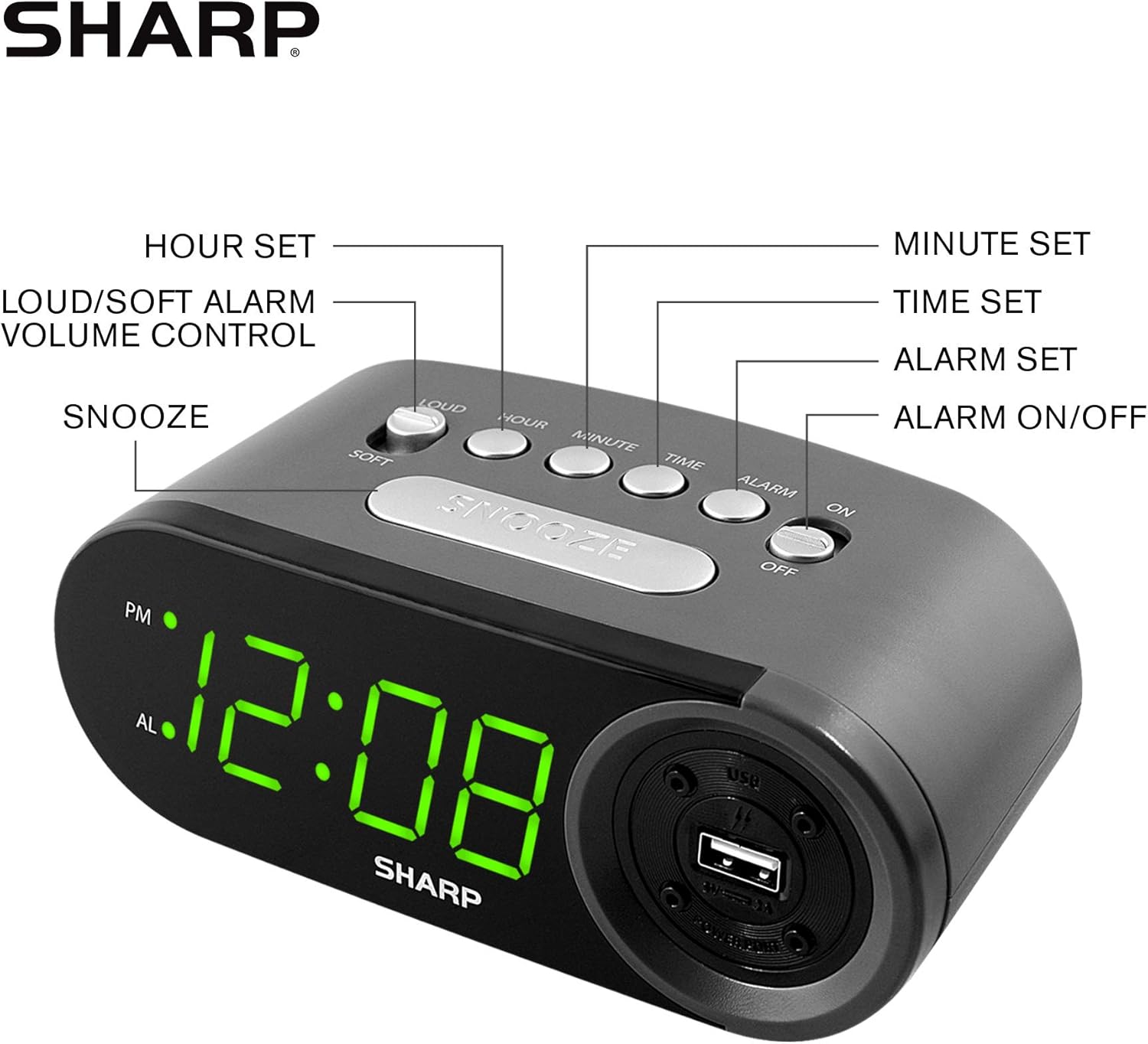
Figure 3: Top panel controls and their functions.
6.1 موجوده وقت مقرر ڪرڻ
- کي دٻايو ۽ رکو ٽائيم button until the display begins to flash.
- کي دٻايو ڪلاڪ ڪلاڪ مقرر ڪرڻ لاءِ بار بار بٽڻ دٻايو. منجهند جي ڪلاڪن لاءِ PM اشاري کي ڏسو.
- کي دٻايو منٽ منٽ سيٽ ڪرڻ لاءِ بار بار بٽڻ دٻايو.
- Once the desired time is set, press the ٽائيم وقت سيٽنگ موڊ جي تصديق ۽ نڪرڻ لاءِ ٻيهر بٽڻ دٻايو.
6.2 Setting the Alarm Time
- کي دٻايو ۽ رکو الارم button until the alarm time display begins to flash. The "AL" indicator will also flash.
- کي دٻايو ڪلاڪ button repeatedly to set the alarm hour. Observe the PM indicator.
- کي دٻايو منٽ button repeatedly to set the alarm minutes.
- Once the desired alarm time is set, press the الارم الارم سيٽنگ موڊ جي تصديق ڪرڻ ۽ نڪرڻ لاءِ ٻيهر بٽڻ دٻايو.
6.3 Activating/Deactivating the Alarm
- الارم کي ڦيرائڻ لاءِ ON، سلائيڊ ڪريو الارم آن / بند switch to the "ON" position. The "AL" indicator will appear on the display.
- الارم کي ڦيرائڻ لاءِ بند، سلائيڊ ڪريو الارم آن / بند switch to the "OFF" position. The "AL" indicator will disappear.
6.4 اسنوز فنڪشن
جڏهن الارم وڄي، وڏو دٻايو سنيوز بٽڻ. الارم عارضي طور تي بند ٿي ويندو ۽ تقريباً 9 منٽن کان پوءِ ٻيهر وڄندو.
6.5 Stopping the Alarm
To stop the alarm completely after it sounds (without using snooze), slide the الارم آن / بند switch to the "OFF" position. The alarm will reset for the next day if the switch is moved back to "ON".
6.6 Adjusting Alarm Volume
کي دٻايو LOUD/SOFT button to toggle between high and low alarm volume settings.
6.7 Using the USB Charging Port
2 AMP USB charging port is located on the right side of the unit.
- Connect your device's USB charging cable (not included) to the USB port on the alarm clock.
- Connect the other end of the cable to your smartphone, tablet, or other compatible USB-powered device.
- Ensure the alarm clock is connected to AC power for the USB port to function.
Note: Charging speed may vary depending on your device and cable.
7. سار سنڀال
To keep your alarm clock in optimal condition:
- صفائي: يونٽ کي نرم، سڪل ڪپڙي سان صاف ڪريو. گھڙڻ وارا صاف ڪندڙ يا محلول استعمال نه ڪريو.
- بيٽري مٽائڻ: Replace AAA backup batteries annually or when the battery low indicator (if present) appears, to ensure reliable backup functionality.
- اسٽوريج: If storing the unit for an extended period, remove the backup batteries to prevent leakage.
8. مسئلا حل ڪرڻ
| مسئلو | ممڪن سبب | حل |
|---|---|---|
| گھڙيال جو ڊسپلي خالي آهي. | No AC power; power outage; unit unplugged. | Ensure AC adapter is securely plugged into the unit and a working wall outlet. Check for power outages. |
| الارم نٿو وڄي. | Alarm is not activated; alarm time is incorrect; volume is too low. | Slide ALARM ON/OFF switch to "ON". Verify alarm time is set correctly. Adjust alarm volume using the LOUD/SOFT button. |
| USB چارجنگ پورٽ ڪم نه ڪري رهيو آهي. | Clock not connected to AC power; device not compatible; faulty cable. | Ensure the clock is plugged into AC power. Try a different USB cable or device to confirm compatibility. |
| پاور آئوٽ ٿيڻ کان پوءِ وقت/الارم سيٽنگون گم ٿي ويون.tage. | بيڪ اپ بيٽريون ختم ٿي ويون آهن يا انسٽال ٿيل نه آهن. | Install two fresh AAA batteries in the battery compartment, ensuring correct polarity. |
9. وضاحتون
- برانڊ: تيز
- ماڊل: SPC547AJAMZ
- ڊسپلي جو قسم: ڊجيٽل ايل اي ڊي (سائو)
- طاقت جو ذريعو: Corded Electric (AC 120V, 60Hz)
- بيٽري جو بيڪ اپ: 2 x AAA بيٽريون (شامل نه آهن)
- USB چارجنگ پورٽ: 2 AMP (5 وي)
- پيداوار جي ماپ: تقريبن 6.2" W x 2.3" H x 3.25" D
- شيء جو وزن: تقريبن 9.6 آونس
- مواد: پلاسٽڪ
- UPC: 049353006000

شڪل 4: پيداوار جا طول و عرض.
10. وارنٽي ۽ سپورٽ
10.1 وارنٽي ڄاڻ
This Sharp product is covered by a limited manufacturer's warranty. For specific warranty terms and conditions, please refer to the warranty card included with your purchase or visit the official Sharp webسائيٽ. خريداري جي ثبوت طور پنهنجي خريداري جي رسيد رکو.
10.2 ڪسٽمر سپورٽ
If you have any questions, require assistance, or need to report an issue with your Sharp Digital Alarm Clock, please contact Sharp customer support. Contact details can typically be found on the official Sharp webسائيٽ تي يا پراڊڪٽ پيڪنگنگ تي.
وڌيڪ معلومات لاء، جو دورو ڪريو ايميزون تي شارپ اسٽور.


