1. تعارف
This instruction manual provides essential information for the safe and effective use of your Osaki OS-Pro 3D Otamic LE Full Body Massage Chair. Please read this manual thoroughly before assembly, operation, or maintenance to ensure proper function and to prevent injury or damage. Keep this manual for future reference.
2. حفاظت جي ڄاڻ
خبردار:
- This product requires careful assembly. Ensure all parts are securely fastened before use.
- Do not exceed the maximum weight capacity of 260 pounds (approximately 118 kg).
- Exercise caution when using the gliding base to prevent falls or injuries.
- Always consult a physician before using a massage chair if you have pre-existing medical conditions, are pregnant, or have a pacemaker.
- Keep children and pets away from the chair, especially during operation.
- Do not operate the chair if it has a damaged cord or plug, or if it is not working properly.
3. پراڊڪٽ ختمview
The Osaki OS-Pro 3D Otamic LE is a full-body massage chair designed to provide a comprehensive massage experience. It incorporates advanced features such as 3D massage rollers, an SL-Track system, zero gravity reclining, lumbar heating, and Bluetooth connectivity.

Figure 3.1: Osaki OS-Pro 3D Otamic LE Massage Chair (Taupe)
اهم خاصيتون:
- Zero-Gravity Reclining: The chair reclines to a zero-gravity position, distributing your body weight evenly and reducing pressure on the spine, which enhances massage intensity.
- 3D مساج رولر: Equipped with 5 levels of 3D massage rollers, offering adjustable depth, strength, and speed to customize the massage experience.
- SL-Track Roller System: The SL-track system guides the massage rollers from the neck down to the glutes and upper hamstrings, conforming to the natural curvature of the spine.
- مڪمل جسم جي هوائي مساج: Features 30 streamlined airbags strategically placed throughout the chair to provide compression massage for various body parts.
- لمبر گرم ڪرڻ: Integrated heating elements in the lower back area and footrest provide soothing warmth.
- خودڪار جسم اسڪين: The chair performs an automatic body scan to detect individual body curves and adjust the massage rollers for a personalized massage.
- بلوٽوٽ akالهائيندڙ: High-quality speakers integrated into the headrest allow for audio playback via Bluetooth connection.
- Auto Extendable Footrest: The footrest can extend up to 6 inches to accommodate users of different heights.

Figure 3.2: Advanced 3D Massage Mechanism

Figure 3.3: Ergonomic 3D SL-Track Massage
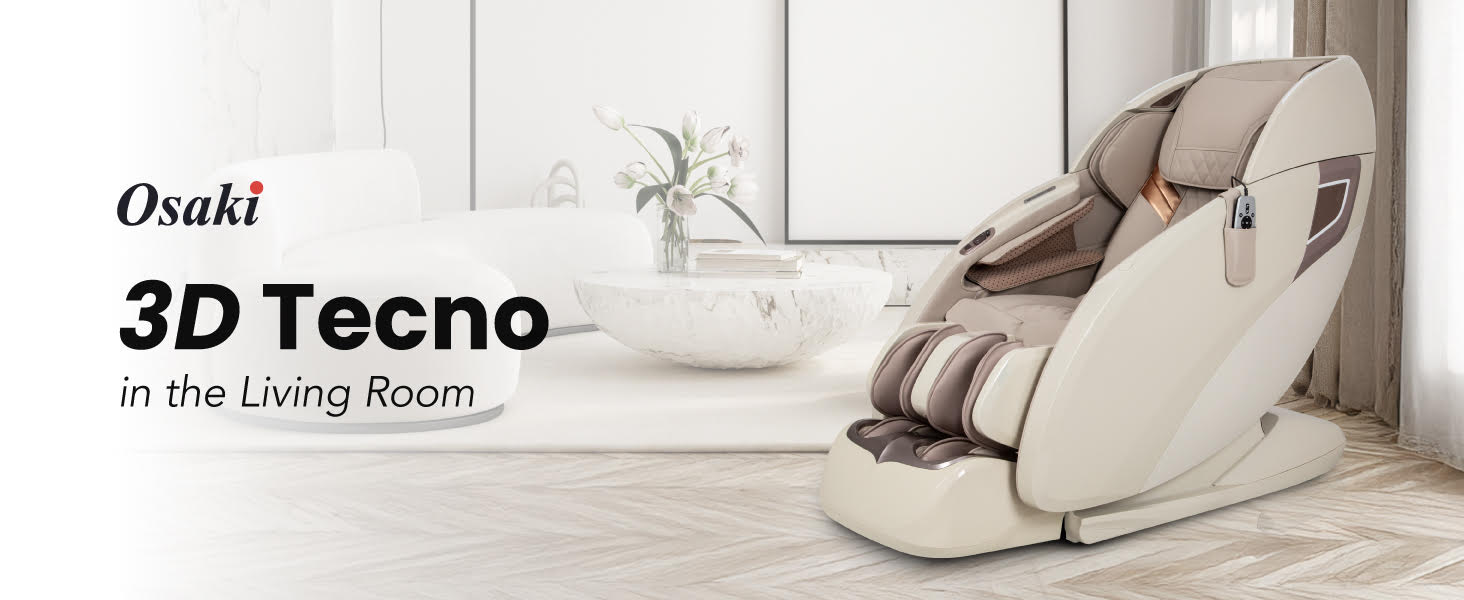
Figure 3.4: Full Body Airbag Coverage with Heat
4. سيٽ اپ جون هدايتون
4.1 Unpacking ۽ لڳائڻ
The massage chair is delivered in a large, heavy box. It is recommended to have assistance for moving and unpacking. Ensure the chosen location has sufficient space for the chair, especially when fully reclined.
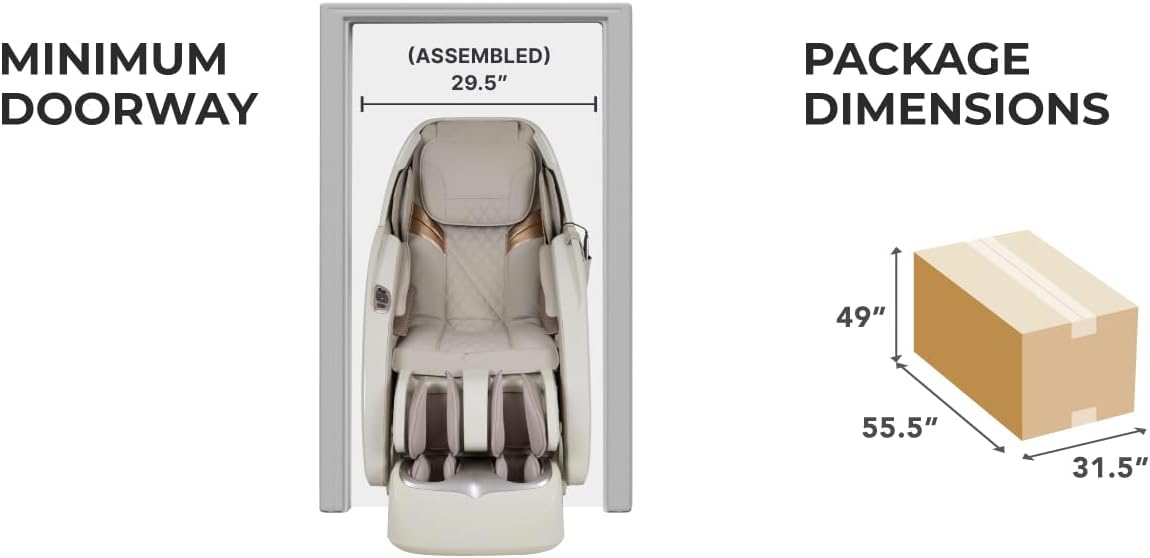
Figure 4.1: Minimum Doorway and Package Dimensions
The assembled chair requires a minimum doorway width of 29.5 inches for passage. The package dimensions are approximately 55.5 inches (L) x 31.5 inches (W) x 49 inches (H).
4.2 اسيمبلي
Assembly is required for this product. Follow the detailed instructions provided in the separate assembly guide included with your purchase. Ensure all components are securely fastened before connecting the chair to a power source and initial use. If you encounter any difficulties, refer to the troubleshooting section or contact customer support.
5. آپريٽنگ هدايتون
5.1 پاور آن/آف
Locate the main power switch, typically at the rear or side of the chair. Flip the switch to the 'ON' position. Use the power button on the remote control to turn the chair on or off for daily use.
5.2 Remote Control and Auto Programs
The chair is operated via a wired remote control. It features various buttons for power, navigation, and program selection.

Figure 5.1: Remote Control and Auto Programs
The remote allows selection from 9 pre-programmed automatic massage routines, including:
- وصولي
- عميق ٽشو
- چيني
- Midday Nap
- ٿائي ٻولي
- وري جوان ڪرڻ
- آرام ڪرڻ
- ڪنck/ڪلهي
- مضبوط ڪرڻ
Select a program using the navigation buttons and confirm with the 'OK' button.
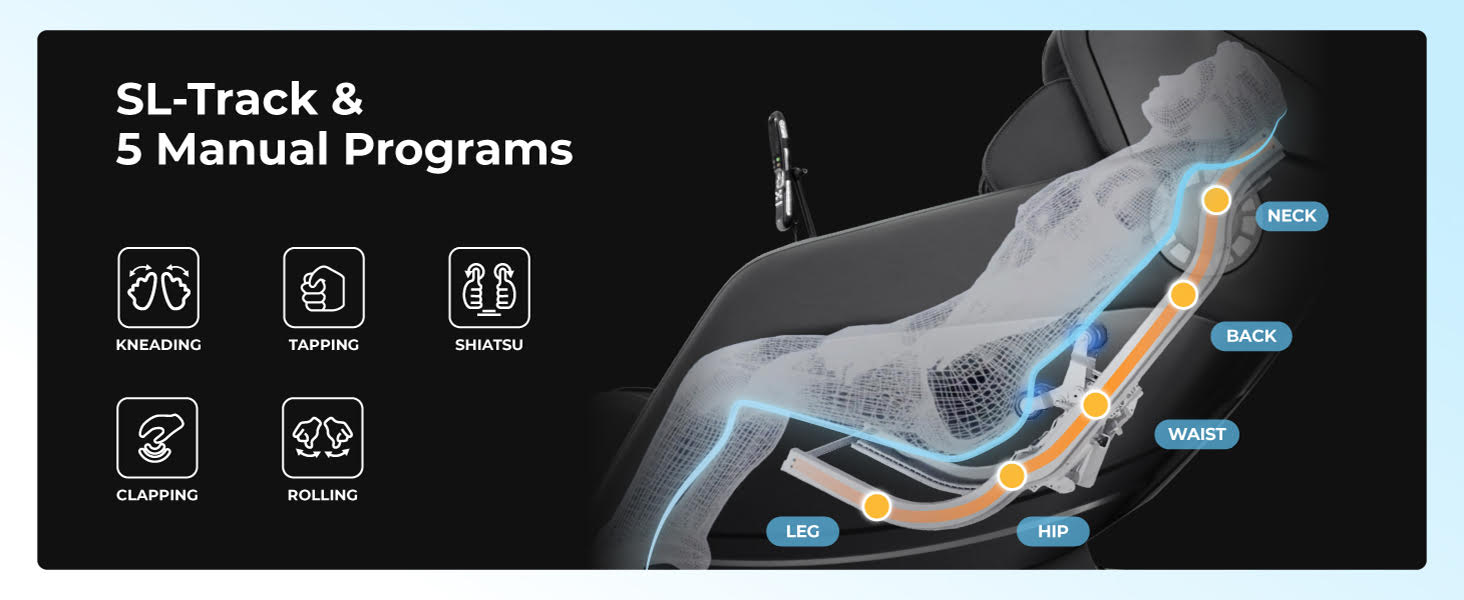
Figure 5.2: 3D Massage Mechanism and Auto Programs with Body Scan
5.3 Zero Gravity Reclining
The chair offers a two-stage zero gravity recline. Use the dedicated buttons on the remote or side panel controller to adjust the recline position. This feature elevates your legs above your heart, reducing gravitational pressure on your spine.

شڪل 5.3: ٻه-ايسtage Zero Gravity Recline
5.4 Manual Massage Techniques and Adjustments
Beyond auto programs, you can select specific manual massage techniques and adjust settings:
- ٽيڪنڪ: Kneading, Tapping, Shiatsu, Clapping, Rolling.
- 3D ترتيب: Control the protrusion of the massage rollers (5 levels).
- Strength/Intensity: Adjust the intensity of the massage (5 levels).
- رفتار: Control the speed of the massage rollers (5 levels).
- لمبر گرم ڪرڻ: Activate or deactivate the heating function for the lower back and footrest.
Figure 5.4: SL-Track and Manual Programs
5.5 Bluetooth Speaker Operation
To connect your device to the chair's Bluetooth speakers:
- Ensure the massage chair is powered on.
- پنهنجي موبائل ڊوائيس تي بلوٽوت کي فعال ڪريو.
- ڳولھيو available devices and select the chair's Bluetooth name (refer to the chair's display or a separate Bluetooth guide if available).
- Once paired, audio from your device will play through the chair's speakers.

Figure 5.5: Integrated Features: Zero Gravity, SL-Track, Side Panel, Bluetooth
5.6 Footrest Extension
The footrest can be extended automatically to accommodate users of varying heights, up to 6 inches. Use the footrest adjustment buttons on the remote control to find a comfortable position.

Figure 5.6: Auto Extendable Footrest

Figure 5.7: Foot Massage Features
6. سار سنڀال
6.1 صفائي
- Always unplug the chair before cleaning.
- ڪرسي جي مٿاڇري کي نرم، ڊي سان صاف ڪريوamp cloth. Avoid using abrasive cleaners, solvents, or harsh chemicals, as these can damage the upholstery.
- ڪپڙي جي علائقن لاءِ، جيڪڏهن ضروري هجي ته هڪ هلڪو فرنيچر ڪلينر استعمال ڪريو، پهرين ڪنهن غير واضح علائقي تي جانچ ڪريو.
- پڪ ڪريو ته ڪو به مائع اندروني حصن ۾ داخل نه ٿئي.
6.2 اسٽوريج
If storing the chair for an extended period, ensure it is clean, dry, and unplugged. Store it in a cool, dry place away from direct sunlight and extreme temperatures.
7. مسئلا حل ڪرڻ
If you experience issues with your Osaki OS-Pro 3D Otamic LE massage chair, refer to the following common troubleshooting steps:
- ڪرسي آن نه ٿي: Check if the main power switch is in the 'ON' position and if the power cord is securely plugged into both the chair and a working electrical outlet.
- مساج رولر حرڪت نه ٿا ڪن: Ensure an auto program or manual massage mode is selected. The chair may also perform an initial body scan before starting the massage.
- گرمي ناهي: Verify that the lumbar heating function is activated via the remote control. Allow a few minutes for the heating elements to warm up.
- بلوٽوٿ ڪنيڪشن جا مسئلا: Ensure Bluetooth is enabled on your device and the chair. Try unpairing and re-pairing the device. Move closer to the chair to ensure a strong signal.
- غير معمولي آواز: Minor operational sounds are normal. If you hear loud or unusual noises, power off the chair and contact customer support.
مسلسل مسئلن يا مسئلن لاءِ جيڪي هتي درج نه آهن، مهرباني ڪري اوساڪي ڪسٽمر سپورٽ سان رابطو ڪريو.
8. وضاحتون
The following table outlines the key specifications for the Osaki OS-Pro 3D Otamic LE Full Body Massage Chair:
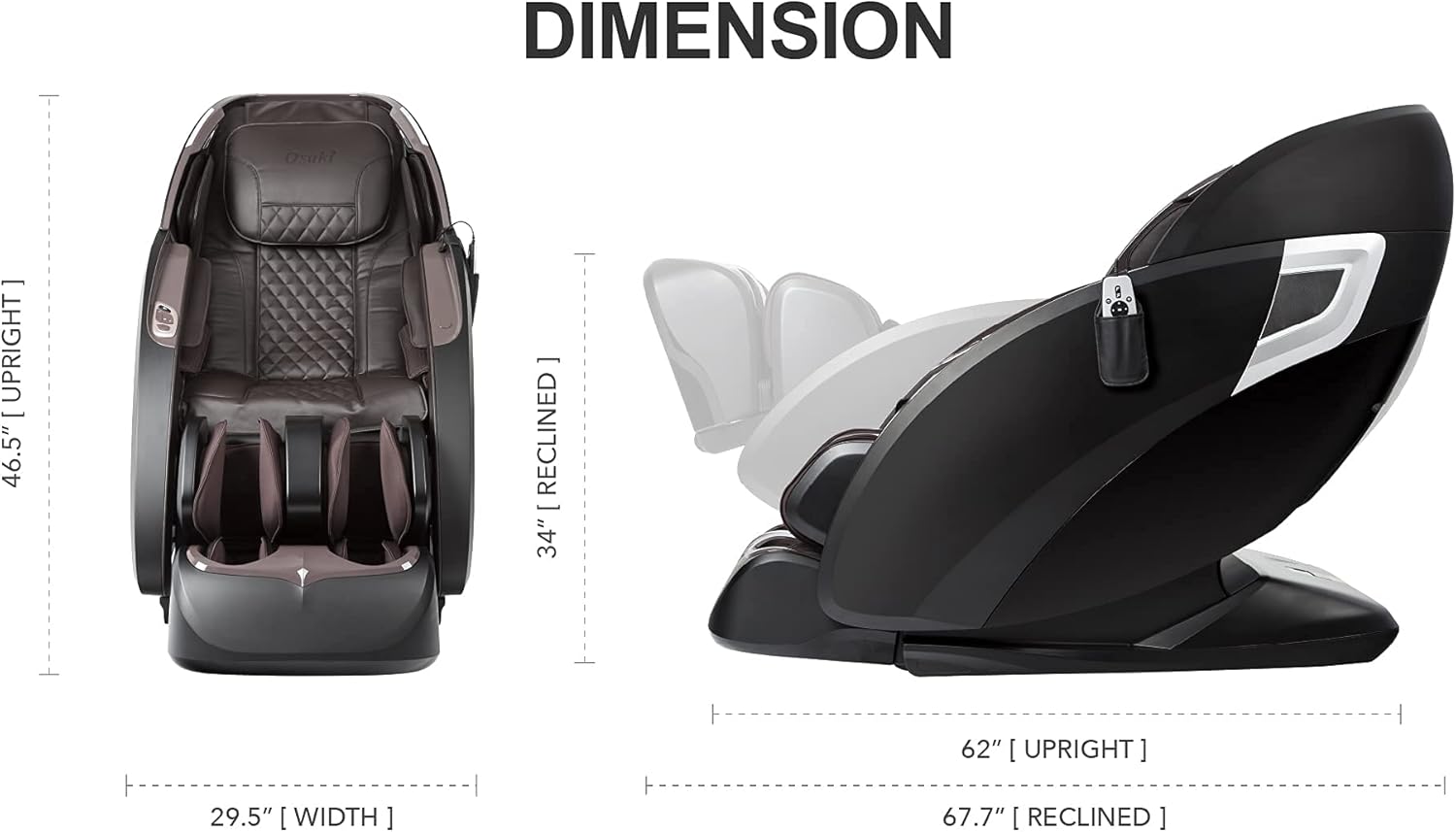
Figure 8.1: Chair Dimensions (Upright and Reclined)
| خاصيت | تفصيل |
|---|---|
| برانڊ | اوڪيڪي |
| ماڊل نالو | Osaki OS-Pro 3D Tecno (Note: Product title refers to Otamic LE) |
| رنگ | ٽوپي |
| پيداوار جا طول و عرض (سڌو) | 29.5"ڊي x 46.5"ڊي x 46.5"ايڇ |
| پيداوار جا طول و عرض (مرڪب) | 67.7"ليٽر x 29.5"ڊبليو x 34"ايڇ |
| شيءِ جو وزن | 220 پائونڊ (تقريبن 99.8 ڪلوگرام) |
| وڌ ۾ وڌ وزن جي سفارش | 260 پائونڊ (تقريبن 118 ڪلوگرام) |
| يو پي سي | 812512037487 |
| اسيمبلي | اسيمبلي گهربل |
| خاص خاصيتون | Arm Rest, Cushion Availability |
9. وارنٽي ۽ سپورٽ
9.1 پروڊڪٽ وارنٽي
Osaki massage chairs come with a comprehensive 1-year warranty covering parts and labor. An optional extension up to 3 years for parts may be available. Please refer to your warranty card or contact Osaki customer service for detailed terms and conditions.
9.2 ڪسٽمر سپورٽ
For any questions, technical assistance, or warranty claims, please contact Osaki customer support. U.S.-based assistance is available via live phone and email service. Contact information can typically be found on the Osaki official webسائيٽ يا توهان جي پراڊڪٽ پيڪنگنگ ۾.


