تعارف
This user manual provides comprehensive instructions for the Easytry123 Replacement Remote Control, designed for various JVC LCD HDTV and TV models. Please ensure your original remote matches the appearance of this replacement remote for full compatibility. This manual covers setup, operation, maintenance, and troubleshooting to help you maximize your remote's functionality.
پيداوار ختمview
The Easytry123 Replacement Remote Control is an infrared (IR) device designed to operate compatible JVC televisions. It features a standard layout with dedicated buttons for power, channel, volume, input selection, and various playback controls.

This image displays the Easytry123 replacement remote control from an angled perspective, highlighting its ergonomic design and the arrangement of all primary function buttons, including numerical keys, navigation, volume, and channel controls.
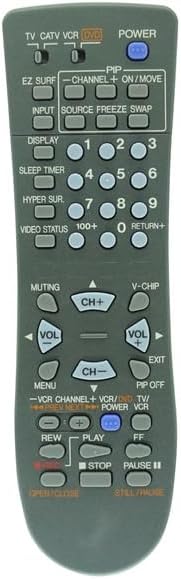
هي تصوير هڪ سڌو سامهون پيش ڪري ٿي view of the Easytry123 replacement remote control, offering a clear look at each button and its label, essential for identifying specific functions like power, input, channel, and volume.
سيٽ اپ ڪريو
بيٽري لڳائڻ
The remote control requires two (2) AA batteries for operation. Follow these steps to install the batteries:
- ريموٽ ڪنٽرول جي پٺي تي بيٽري جي خاني کي ڳوليو.
- ليچ کي دٻايو ۽ ان کي کولڻ لاءِ بيٽري جي ڍڪ کي هيٺ سلائڊ ڪريو.
- ٻہ AA بيٽريون داخل ڪريو، پڪ ڪريو ته مثبت (+) ۽ منفي (-) ٽرمينل صحيح طرح سان ڪمري اندر نشانن سان ترتيب ڏين.
- بيٽري جي ڍڪ کي واپس جاء تي سلائيڊ ڪريو جيستائين اهو محفوظ طور تي ڪلڪ ڪري.
نوٽ: هميشه ٻنهي بيٽرين کي هڪ ئي وقت تبديل ڪريو. پراڻيون ۽ نيون بيٽريون، يا مختلف قسمن جون بيٽريون نه ملايو. جيڪڏهن ريموٽ ڊگهي عرصي تائين استعمال نه ٿيندو ته بيٽريون ڪڍي ڇڏيون.
آپريٽنگ هدايتون
Point the remote control directly at the infrared sensor on your JVC television. Ensure there are no obstructions between the remote and the TV.
بنيادي ڪم
- طاقت: ٽي وي کي کولڻ يا بند ڪرڻ جي لاءِ دٻايو.
- داخل: Cycles through available input sources (e.g., TV, AV, HDMI).
- CH + / CH-: چينل کي مٿي يا ھيٺ تبديل ڪري ٿو.
- VOL+ / VOL-: حجم وڌائي يا گھٽائي ٿو.
- خاموش ڪرڻ: ٽي وي آڊيو کي خاموش يا خاموش ڪري ٿو.
- Numerical Buttons (0-9): سڌو سنئون چينل نمبر داخل ڪريو.
- RETURN+: پوئين چينل ڏانهن واپسي.
ترقي يافته افعال
- مينيو Accesses the TV's on-screen menu. Use navigation buttons (if present) to move through options.
- ڏيکار Shows current channel information or other on-screen display data.
- سمهڻ جو ٽائيم: ٽي وي کي خودڪار طريقي سان بند ڪرڻ لاءِ ٽائمر سيٽ ڪري ٿو.
- EZ SURF: (Functionality may vary by TV model)
- PIP / ON/MOVE / SOURCE / FREEZE / SWAP: These buttons are typically for Picture-in-Picture functions. Their exact operation depends on your TV's capabilities. Refer to your TV's original manual for detailed use of these features.
- V-CHIP: Accesses V-Chip parental control settings.
- VCR/DVD/TV Controls: Buttons like PLAY, STOP, PAUSE, REW, FF, OPEN/CLOSE are for controlling connected VCRs or DVD players if your TV supports integrated control or if the remote is programmed for such devices.
سنڀال ۽ سار سنڀال
- صفائي: ريموٽ کي نرم، سڪل ڪپڙي سان صاف ڪريو. مائع صاف ڪندڙ يا رگڙيندڙ مواد استعمال نه ڪريو.
- اسٽوريج: ريموٽ کي سڌي سج جي روشني ۽ انتهائي گرمي پد کان پري ٿڌي، سڪل جاءِ تي رکو.
- بيٽري جي زندگي: جڏهن ريموٽ جو جواب سست يا غير مستقل ٿي وڃي ته بيٽريون تبديل ڪريو.
- قطرن کان پاسو ڪريو: ريموٽ کي جسماني جھٽڪن ۽ ڦڙن کان بچايو، جيڪي اندروني حصن کي نقصان پهچائي سگهن ٿا.
مشڪلاتون
| مسئلو | ممڪن سبب / حل |
|---|---|
| ريموٽ ڪم نه ڪري رهيو آهي. |
|
| ڪجھ بٽڻ ڪم نه ڪندا آھن. |
|
| TV responds intermittently. |
|
وضاحتون
- برانڊ: ايزيٽري 123
- مطابقت رکندڙ ڊوائيسز: JVC LCD HDTV TV models (RM-C15G, RM-C15G-1H, HD-52Z575, HD-61Z585, HD-61Z575, RM-C18G, AV-35850, HD527BP7, HD52FA97, AV-32F702, AV-32F802)
- رابطي ٽيڪنالاجي: انفراريڊ (IR)
- طاقت جو ذريعو: 2 x AA بيٽريون (شامل نه آھن)
- خاص خصوصيت: Ergonomic, Replacement remote
- سپورٽ ٿيل ڊوائيسز جو وڌ ۾ وڌ تعداد: 1 (ٽيليويزن)
سپورٽ ڄاڻ
For further assistance or inquiries regarding your Easytry123 Replacement Remote Control, please contact the manufacturer or seller directly through your purchase platform. Ensure you have your product details and model numbers ready when seeking support.
ٺاهيندڙ: ايزيٽري 123
تاريخ پهرين دستياب: ڊسمبر 10، 2019


