تعارف
Thank you for choosing the Opal Selfie Stick OP-Sel-BT-01. This manual provides essential information for the safe and effective use of your device. Please read it thoroughly before operation and retain it for future reference.
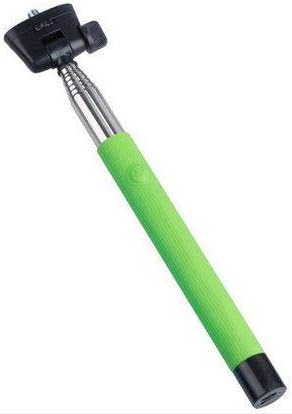
شڪل 1: The Opal Selfie Stick OP-Sel-BT-01 in green, showing its extendable arm, phone holder, and comfortable grip.
پيداوار جون خاصيتون
- رنگ: سائو
- مکيه مواد: اسٽيل
- وڌ ۾ وڌ لوڊ گنجائش: 500 جي
- رابطي: وائرليس (بلوٽوت)
- مطابقت رکندڙ نظام: Android 3.0 ۽ مٿي، iOS 4.0 ۽ مٿي
سيٽ اپ ڪريو
- Unfold the Selfie Stick: Gently pull the phone holder section upwards to extend the stick.
- Adjust Phone Holder: فون کوليو clamp and securely place your smartphone within it. Ensure the phone is centered and stable. The clamp is designed to hold various phone sizes.
- پاور آن: Locate the power button (if applicable, usually on the handle) and press it to turn on the selfie stick. An indicator light may illuminate.
آپريٽنگ هدايتون
بلوٽوٽ جوئر
- Ensure the selfie stick is powered on and in pairing mode (indicator light may flash rapidly).
- On your smartphone, go to سيٽنگون > بلوٽوٿ.
- بلوٽوٿ آن ڪريو ۽ موجود ڊوائيسز جي ڳولا ڪريو.
- Select "Opal OP-Sel-BT-01" or a similar name from the list of devices.
- Once paired, the indicator light on the selfie stick may turn solid or turn off, indicating a successful connection.
تصويرون / وڊيوز وٺڻ
- پنهنجي اسمارٽ فون جي ڪئميرا ايپليڪيشن کوليو.
- سيلفي اسٽڪ کي پنهنجي گهربل ڊيگهه تائين وڌايو.
- Position your phone for the desired shot.
- Press the shutter button on the selfie stick handle to capture a photo or start/stop video recording.
سار سنڀال
- صفائي: Wipe the selfie stick with a soft, dry cloth. Do not use abrasive cleaners or solvents.
- اسٽوريج: Store the device in a cool, dry place away from direct sunlight and extreme temperatures. Retract the stick fully before storage.
- بيٽري جي سنڀال: If the selfie stick has a rechargeable battery, ensure it is charged periodically even when not in use to maintain battery health.
مشڪلاتون
| مسئلو | ممڪن سبب | حل |
|---|---|---|
| فون سان جوڙو نه ٿو ٺاهي سگهجي | Selfie stick not in pairing mode; Bluetooth off on phone; battery low. | Ensure stick is on and in pairing mode. Turn phone's Bluetooth off/on. Charge the selfie stick. |
| Shutter button not working | Not paired; camera app settings. | Verify successful Bluetooth pairing. Check camera app settings for volume button shutter control. |
| Phone not stable in clamp | Phone not centered; clamp not fully secured. | Re-position phone to be centered. Ensure clamp is firmly gripping the phone. |
وضاحتون
- ماڊل: OP-Sel-BT-01
- برانڊ: اوپل
- رنگ: سائو
- مکيه مواد: اسٽيل
- وڌ ۾ وڌ لوڊ گنجائش: 500 جي
- رابطي: وائرليس (بلوٽوت)
- سپورٽ ٿيل آپريٽنگ سسٽم: Android 3.0+، iOS 4.0+
- ASIN: B091DBB122
- پهرين دستياب تاريخ: 30 مارچ 2021
وارنٽي ۽ سپورٽ
For information regarding warranty coverage or technical support, please refer to the documentation included with your purchase or visit the official Opal webسائيٽ. مخصوص وارنٽي جون شرطون علائقي ۽ پرچون ڪندڙ جي لحاظ کان مختلف ٿي سگهن ٿيون.
حفاظت جي ڄاڻ
- Do not expose the device to extreme temperatures, moisture, or direct sunlight for prolonged periods.
- ٻارن جي پهچ کان پري رکو.
- Do not attempt to disassemble or modify the device. This may void the warranty and cause damage.
- Ensure your phone is securely fastened in the clamp before extending the stick.


