1. کانview
The Tack GPS tracker is a compact, versatile, and reliable personal tracking device designed for a wide range of applications, including monitoring children, pets, elderly family members, vehicles, and valuable assets. Unlike traditional Bluetooth trackers, the Tack GPS operates independently with its own internet connection, providing global coverage and detailed location history. Its advanced technology ensures accurate positioning both indoors and outdoors, offering peace of mind through smart features like Safe Zones and emergency alerts.

Figure 1.1: Tack GPS device and companion mobile application interface.
اهم خاصيتون:
- الٽرا ڊگھي بيٽري جي زندگي: Up to 30 days on a single charge in Standard Mode, powered by Smart A.I. and advanced movement detection algorithms.
- آزاد آپريشن: Works indoors and outdoors without relying on a mobile phone's Bluetooth connection.
- Hybrid Positioning: Utilizes GPS satellites, cellular tower triangulation, and Wi-Fi positioning for enhanced accuracy.
- محفوظ علائقو: Receive automatic arrival and departure notifications when the device enters or leaves pre-set geofenced areas.
- One-Click Alert: A dedicated button for sending emergency notifications.
- عالمي ڪوريج: Unlimited free roaming data in over 30 countries, including USA, Canada, Mexico, and major EU countries.
- FCC تصديق ٿيل: Tested to comply with stringent US Federal Communications Commission standards.

Figure 1.2: Comparison of Tack GPS capabilities versus standard Bluetooth trackers.
2. دٻي ۾ ڇا آهي
Upon unboxing your Tack GPS tracker, please ensure all the following components are present:
- Tack GPS Device
- SIM Card (pre-installed)
- Lithium Polymer Battery (internal)
- چارجنگ ڪيبل (USB-C)
- تڪڙو شروع ھدايت
3. سيٽ اپ گائيڊ
Setting up your Tack GPS tracker is a quick and straightforward process. Follow these steps to get your device ready for tracking:
- ڊوائيس چارج ڪريو: Before initial use, fully charge your Tack GPS device using the provided USB-C charging cable. Connect the cable to the device's charging port and a standard USB power adapter (not included). The indicator light will show charging status.
- Download the OurSphere App: ڳولھيو "OurSphere" in the Google Play Store (for Android devices) or the Apple App Store (for iOS devices) and download the official application.
- اڪائونٽ ٺاهيو: Open the OurSphere app and follow the on-screen instructions to create a new user account.
- پنھنجي ڊوائيس شامل ڪريو: In the OurSphere app, select the option to add a new device. You will be prompted to scan the QR code located on your Tack GPS device. Alternatively, you may manually enter the device ID.
- Activate Subscription: The Tack GPS comes with a complimentary 30-day subscription. Follow the in-app instructions to activate this trial period. Information on continuing your subscription will be available within the app after the trial.
- ڊوائيس سيٽنگون ترتيب ڏيو: Once connected, you can name your device (e.g., "Buddy's Tracker," "Car GPS"), assign an avatar, and configure initial tracking preferences within the app.
Your Tack GPS tracker is now ready for use. Ensure the device has a clear view of the sky for optimal GPS signal acquisition when used outdoors.
4. Operating the Tack GPS
The Tack GPS tracker offers various functionalities accessible through the OurSphere mobile application. Below are the primary operating features:
4.1 Tracking Modes
The device supports different tracking modes to balance location update frequency and battery life:
- معياري موڊ: Provides location updates at regular intervals, optimized for maximum battery life (up to 30 days).
- فعال موڊ: Increases the frequency of location updates for more dynamic tracking when needed.
- ايمرجنسي موڊ: Offers the most frequent updates for critical situations, consuming more battery.
You can switch between these modes directly within the OurSphere app based on your tracking requirements.
4.2 Safe Zones (Geofencing)
Set up virtual boundaries, known as Safe Zones, to receive automated alerts when the tracker enters or exits a designated area. This feature is ideal for monitoring entry and exit from home, school, or other important locations.
- To create a Safe Zone: Navigate to the "Zones" section in the OurSphere app.
- Define the area: Use the map interface to draw a custom geofence around your desired location.
- Receive notifications: The app will automatically send notifications to your registered device when the Tack GPS crosses the defined boundary.
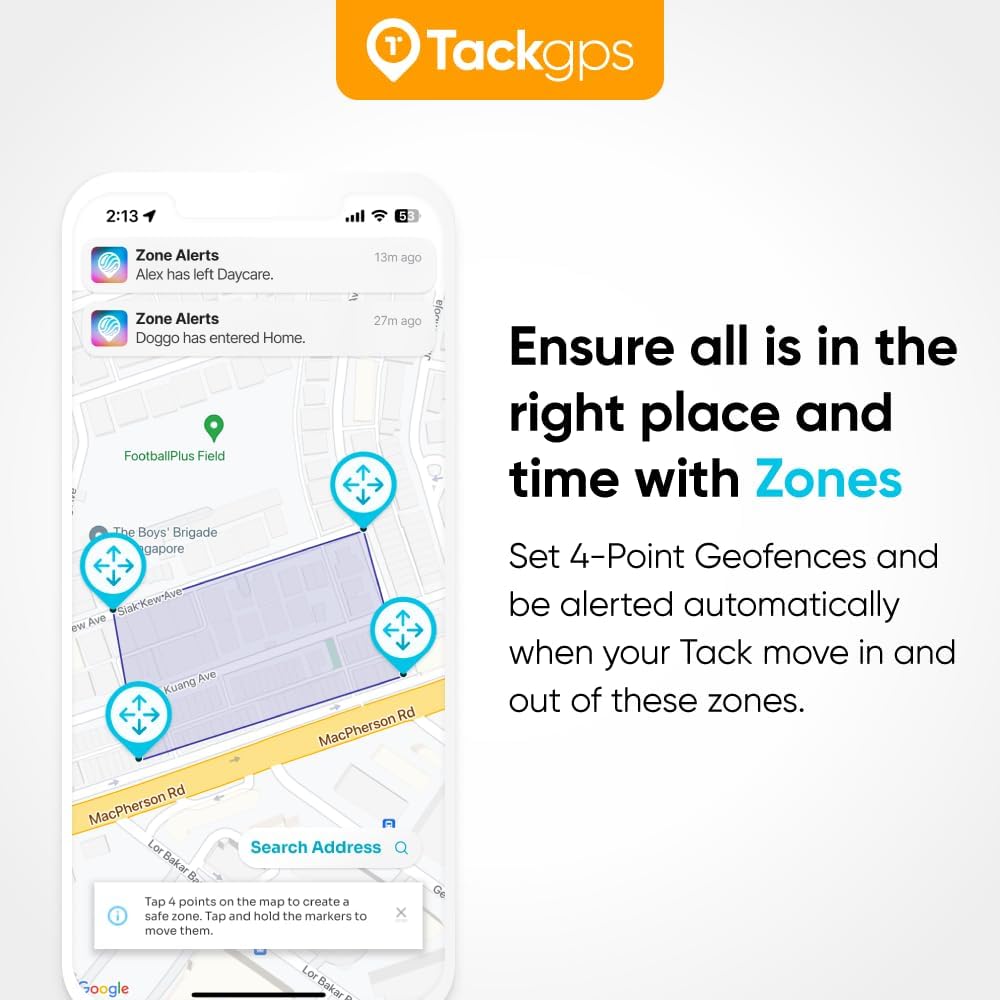
Figure 4.1: Setting up and receiving alerts from Safe Zones in the OurSphere app.
4.3 One-Click Emergency Alert
The Tack GPS device features a dedicated button for sending immediate emergency alerts. In a critical situation, the wearer can press this button to notify pre-selected contacts through the OurSphere app.
- To activate: Press and hold the emergency button on the Tack GPS device.
- Notification: An alert will be sent to designated contacts via the OurSphere app, indicating that attention is needed.

Figure 4.2: Initiating and receiving a One-Click Alert.
4.4 جڳھ جي تاريخ
The OurSphere app stores a detailed history of the tracker's movements, allowing you to review past locations and travel paths. This feature is invaluable for understanding movement patterns and retracing steps.
- Access history: Navigate to the specific device's profile in the OurSphere app.
- View timeline: A map will display the device's historical locations over a selected period.

شڪل 4.3: Viewing location history within the OurSphere app.
4.5 Global Coverage
The Tack GPS tracker provides seamless tracking across more than 30 countries worldwide, including the USA, Canada, Mexico, and all major EU countries, thanks to its included SIM card and unlimited free roaming data. This ensures continuous monitoring whether the device is used locally or during international travel.

Figure 4.4: Tack GPS offers global tracking capabilities.
5. بيٽري جي زندگي ۽ چارجنگ
The Tack GPS tracker is engineered for extended use, offering an impressive battery life of up to 30 days on a single charge when operating in Standard Mode. Actual battery performance may vary based on usage patterns, tracking mode, signal strength, and environmental factors.

Figure 5.1: The Tack GPS boasts up to 30 days of battery life.
چارج ڪرڻ جون هدايتون:
- Connect the provided USB-C charging cable to the charging port on the Tack GPS device.
- Plug the other end of the cable into a compatible USB power source (e.g., computer USB port, wall adapter, power bank).
- The device's indicator light will illuminate to show that it is charging. Refer to the Quick Start Guide for specific light indications.
- A full charge typically takes a few hours. Once fully charged, the indicator light will change, and the device is ready for another extended period of use.
To maximize battery life, consider using the Standard Mode for everyday tracking and switching to more frequent update modes only when necessary.
6. وضاحتون
Detailed technical specifications for the Tack GPS tracker:
| خاصيت | تفصيل |
|---|---|
| ماڊل نمبر | ٽيڪ GPS |
| پيداوار جي ماپ | 1.85 x 1.46 x 0.67 انچ (47 x 37 x 17 ملي ميٽر) |
| شيءِ جو وزن | 1.06 آونس (30 گرام) |
| بيٽري جو قسم | 1 ليتيم پوليمر بيٽري (شامل) |
| رابطي ٽيڪنالاجي | سيلولر |
| خاص خاصيتون | GPS Satellites, Cell Tower Triangulation, Wi-Fi Positioning System |
| سپورٽ ٿيل ايپليڪيشن | GPS (OurSphere App) |
| رنگ | اڇو |
| مواد | پلاسٽڪ |
| ٺاهيندڙ | Tack One Pte Ltd |
| اصل جو ملڪ | سينگاپور |

Figure 6.1: Compact design of the Tack GPS tracker.
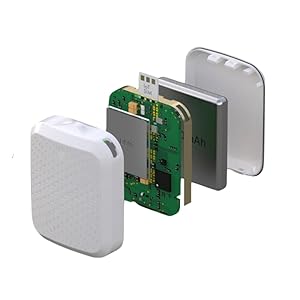
Figure 6.2: Internal components of the Tack GPS.
7. سپورٽ ۽ وارنٽي
For comprehensive support and warranty information regarding your Tack GPS tracker, please refer to the official resources provided by Tack One Pte Ltd.
7.1 يوزر مينوئل (PDF)
A detailed PDF user manual is available for download, offering in-depth instructions and troubleshooting tips:
يوزر مينوئل (PDF) ڊائون لوڊ ڪريو
7.2 آن لائن سپورٽ
Visit the official Tack GPS support website for FAQs, troubleshooting guides, and contact information:
7.3 وارنٽي ڄاڻ
Information regarding the product warranty, including coverage details and claims procedures, can be found in the full user manual or on the official Tack GPS support webسائيٽ. مھرباني ڪري وارنٽي جي مقصدن لاءِ خريداري جو ثبوت رکو.


