1. تعارف
Welcome to your JBL J777 Wireless In-Ear Headphones. This manual provides detailed instructions to help you get the most out of your device, ensuring proper setup, operation, and maintenance. Please read this manual thoroughly before using your headphones.
2. پراڊڪٽ ختمview
The JBL J777 headphones are designed for wireless audio playback and hands-free calling, offering convenience and quality sound.
2.1 اجزاء
- In-ear earbuds with silicone tips
- Flexible neckband cable
- Inline remote control with integrated microphone
- USB charging port (typically located on the remote)
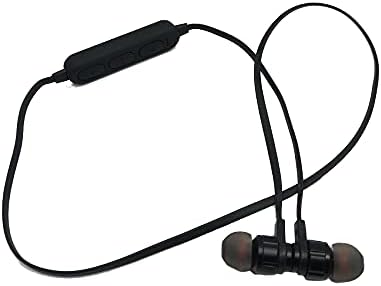
This image displays the complete JBL J777 wireless in-ear headphones. It features two black earbuds connected by a flexible cable, with an inline remote control positioned on the cable. The design is intended for comfortable wear around the neck.
2.2 ڪنٽرول
The inline remote control provides easy access to various functions:
- پاور/ملٽي فنڪشن بٽڻ: Used for powering on/off, play/pause music, and answering/ending calls.
- حجم اپ بٽڻ: Increases volume, also used for skipping to the next track.
- حجم گھٽائڻ جو بٽڻ: Decreases volume, also used for skipping to the previous track.

هڪ تفصيلي view of the inline remote control for the JBL J777 headphones. It shows three distinct buttons for power/multi-function, volume up, and volume down, along with a small microphone opening for hands-free calls.
3. سيٽ اپ
3.1 هيڊفون چارج ڪرڻ
- Connect the micro-USB charging cable to the charging port on the inline remote control.
- ڪيبل جي ٻئي ڇيڙي کي USB پاور سورس سان ڳنڍيو (مثال طور، ڪمپيوٽر USB پورٽ، USB وال اڊاپٽر).
- The LED indicator will typically show red during charging and turn off or blue when fully charged.
- The integrated 90mAh lithium battery provides wireless operation.
3.2 بلوٽوٽ جوڙي
To connect your JBL J777 headphones to a Bluetooth-enabled device:
- پڪ ڪريو ته هيڊفون بند ٿيل آهن.
- کي دٻايو ۽ رکو Power/Multi-function button for approximately 5-7 seconds until the LED indicator flashes red and blue alternately. This indicates the headphones are in pairing mode.
- On your mobile phone or Bluetooth-enabled device, go to the Bluetooth settings and enable Bluetooth.
- ڳولھيو available devices and select "JBL J777" from the list.
- Once paired, the LED indicator will typically flash blue slowly or remain solid blue.
- The headphones have an operation distance of up to 10 meters (33 feet) in an open environment.
4. آپريٽنگ هدايتون
4.1 پاور آن/آف
- پاور آن ڪرڻ: کي دٻايو ۽ رکو Power/Multi-function button for 3 seconds. The LED will flash blue.
- پاور آف ڪرڻ: کي دٻايو ۽ رکو Power/Multi-function button for 3 seconds. The LED will flash red and then turn off.
4.2 ميوزڪ پلے بیک
- راند/روڪ: کي دٻايو Power/Multi-function هڪ ڀيرو بٽڻ.
- اڳيون ٽريڪ: کي دٻايو ۽ رکو حجم مٿي بٽڻ
- پويون ٽريڪ: کي دٻايو ۽ رکو حجم ھيٺ بٽڻ
- حجم مٿي کي دٻايو حجم مٿي بٽڻ مختصر طور.
- حجم ھيٺ کي دٻايو حجم ھيٺ بٽڻ مختصر طور.
4.3 ڪال مئنيجمينٽ
- جواب/آخر ڪال: کي دٻايو Power/Multi-function هڪ ڀيرو بٽڻ.
- ڪال رد ڪريو: کي دٻايو ۽ رکو Power/Multi-function بٽڻ 2 سيڪنڊن لاء.
- ريڊل آخري نمبر: ٻه ڀيرا دٻايو Power/Multi-function بٽڻ
4.4 فعال شور منسوخي
The JBL J777 headphones feature active noise cancellation to reduce ambient noise for a more immersive listening experience. This feature operates automatically or is controlled via the multi-function button, depending on the specific model variant.
5. سار سنڀال
Proper care ensures the longevity and optimal performance of your headphones.
- صفائي: نرم، سڪل ڪپڙي سان ائربڊس ۽ ڪيبل کي نرميءَ سان صاف ڪريو. سخت ڪيميڪل يا رگڙيندڙ مواد استعمال نه ڪريو.
- اسٽوريج: Store the headphones in a cool, dry place away from direct sunlight and extreme temperatures. Avoid tangling the cable.
- بيٽري جي سنڀال: To prolong battery life, avoid fully discharging the battery frequently. Charge the headphones regularly, even if not in use for extended periods.
6. مسئلا حل ڪرڻ
If you encounter any issues with your JBL J777 headphones, refer to the following common problems and solutions:
- هيڊفون آن نه ٿي رهيا آهن: پڪ ڪريو ته بيٽري چارج ٿيل آهي. پاور سورس سان ڳنڍيو ۽ ٻيهر ڪوشش ڪريو.
- ڊوائيس سان جوڙو نه ٿو ٺاهي سگهجي:
- پڪ ڪريو ته هيڊفون پيئرنگ موڊ ۾ آهن (ڳاڙهو ۽ نيرو چمڪندڙ).
- پڪ ڪريو ته توهان جي ڊوائيس تي بلوٽوت فعال آهي.
- هيڊفونز کي پنهنجي ڊوائيس جي ويجهو منتقل ڪريو.
- Turn off and on both the headphones and your device, then try pairing again.
- آواز ڪونهي:
- هيڊفونز ۽ توهان جي ڳنڍيل ڊوائيس تي حجم جي سطح چيڪ ڪريو.
- پڪ ڪريو ته هيڊفون صحيح طرح سان جوڙيل ۽ ڳنڍيل آهن.
- ڪنهن ٻئي ايپليڪيشن يا ذريعن کان آڊيو هلائڻ جي ڪوشش ڪريو.
- خراب آواز جي معيار يا وقفي وقفي سان ڪنيڪشن:
- پڪ ڪريو ته هيڊفونز ۽ توهان جي ڊوائيس جي وچ ۾ ڪا به رڪاوٽ نه آهي.
- ٻين وائرليس ڊوائيسز کان پري وڃو جيڪي مداخلت جو سبب بڻجي سگهن ٿا.
- هيڊفونز کي پنهنجي ڊوائيس سان ٻيهر جوڙيو.
7. وضاحتون
Detailed technical specifications for the JBL J777 Wireless In-Ear Headphones:
| برانڊ | جي بي ايل |
| ماڊل نمبر | جي 777 |
| قسم | ان-ايئر وائرليس هيڊفونز |
| رابطي | وائرليس (بلوٽوٿ 4.2) |
| بلوٽوٽ پروfiles | HFP, A2DP, AVCTP, AVDTP, AVRCP |
| آپريشن جو فاصلو | 10 ميٽر (33 فوٽ) تائين |
| ٽرانسميشن پاور | ڪلاس 2 |
| تعدد جي حد | 2.402 - 2.480 GHz |
| اسپيڪر قطر | Ø15mm |
| رڪاوٽ | 32Ω |
| مائڪروفون | ضم ٿيل |
| شور ڪنٽرول | فعال شور منسوخي |
| بيٽري | Rechargeable Lithium, 90mAh |
| سان مطابقت | موبائل فون |
| TF ڪارڊ سپورٽ | 128MB - 32GB |
| شامل اجزاء | ڪن کشن |

This image shows the rear side of the JBL J777 product packaging. It clearly lists technical specifications such as Bluetooth version, supported profiles, operation distance, transmitting power, frequency range, speaker size, impedance, and battery capacity. It also indicates TF card support.
8. وارنٽي ۽ سپورٽ
For warranty information regarding your JBL J777 Wireless In-Ear Headphones, please refer to the documentation provided at the time of purchase. This information is typically included in the product packaging or available on the official JBL webسائيٽ.
For further assistance, technical support, or to inquire about service, please visit the official JBL support page or contact their customer service department directly. Keep your proof of purchase handy for any warranty claims.


