1. تعارف
This manual provides essential information for setting up, operating, maintaining, and troubleshooting your HP EliteOne 800 G5 24-inch All-in-One Touchscreen PC. Please read this guide thoroughly before using your device to ensure proper functionality and longevity.

Figure 1: HP EliteOne 800 G5 All-in-One PC with included keyboard and mouse.
2. پيڪيج مواد
پڪ ڪريو ته سڀئي شيون پيڪيج ۾ موجود آهن:
- HP EliteOne 800 G5 All-in-One PC
- HP USB Keyboard
- HP USB Mouse
- پاور ڪنڊ
- دستاويز (هي دستور، حفاظتي معلومات)
3. پراڊڪٽ ختمview
3.1 محاذ View

شڪل 2: سامهون view of the HP EliteOne 800 G5, showing the 24-inch touchscreen display and integrated speakers.
- 23.8-inch FHD IPS WLED-backlit Touchscreen Display: Main interactive display area.
- 2 MP FHD Pop-up Webڪيمرا: Located at the top center, retracts when not in use.
- انٽيگريٽيڊ ڊوئل ايري ڊجيٽل مائڪروفون: For clear audio input during calls or recordings.
- Bang & Olufsen Speakers: Located below the screen for high-quality audio output.
3.2 طرف View (ساڄو)

شڪل 3: ساڄي پاسي view illustrating the optical disk drive and audio ports.
- Optical Disk Drive: سي ڊيز/ڊي وي ڊيز پڙهڻ ۽ لکڻ لاءِ.
- Disc drive eject button: To open the optical disk drive tray.
- Standard lock slot (10 mm): For security cables.
- Universal Audio Jack with CTIA headset support: For connecting headsets with a microphone.
- هيڊ فون ڪنيڪٽر: هيڊفون جوڙڻ لاءِ.
3.3 پوئتي View ۽ بندرگاهن
شڪل 4: تفصيلي پوئين حصو view showing all available ports and connections.
- USB 3.1 Gen 2 Type-A port: High-speed USB connection.
- USB 3.1 Gen 2 Type-A port (charge support up to 5V/1.5A): High-speed USB with charging capability.
- Audio line-out connector: ٻاهرين اسپيڪرن يا آڊيو سسٽم کي ڳنڍڻ لاءِ.
- USB 3.1 Gen 1 Type-A ports (2): معياري USB ڪنيڪشن.
- RJ-45 (network) jack: وائرڊ ايٿرنيٽ ڪنيڪشن لاءِ.
- پاور ڪنيڪٽر: بجلي جي تار کي ڳنڍڻ لاءِ.
- USB 3.1 Gen 2 Type-A ports (2) wake capable: High-speed USB ports that can wake the system.
- Dual-Mode DisplayPort™ 1.2 (DP++): ٻاهرين ڊسپلي کي ڳنڍڻ لاءِ.
- HDMI 2.0a connector: ٻاهرين ڊسپلي کي ڳنڍڻ لاءِ.
- SD card reader 4.0 (NOT INCLUDED on all models): ايس ڊي ميموري ڪارڊ پڙهڻ لاءِ.
- USB 3.1 Type-C™ Gen 2 port (charge support up to 5V/3A): Reversible USB-C port with charging capability.
- Dual-state power button: To power on/off or put the system to sleep.
- پڪ View Button (optional): Activates HP Sure View integrated privacy screen.

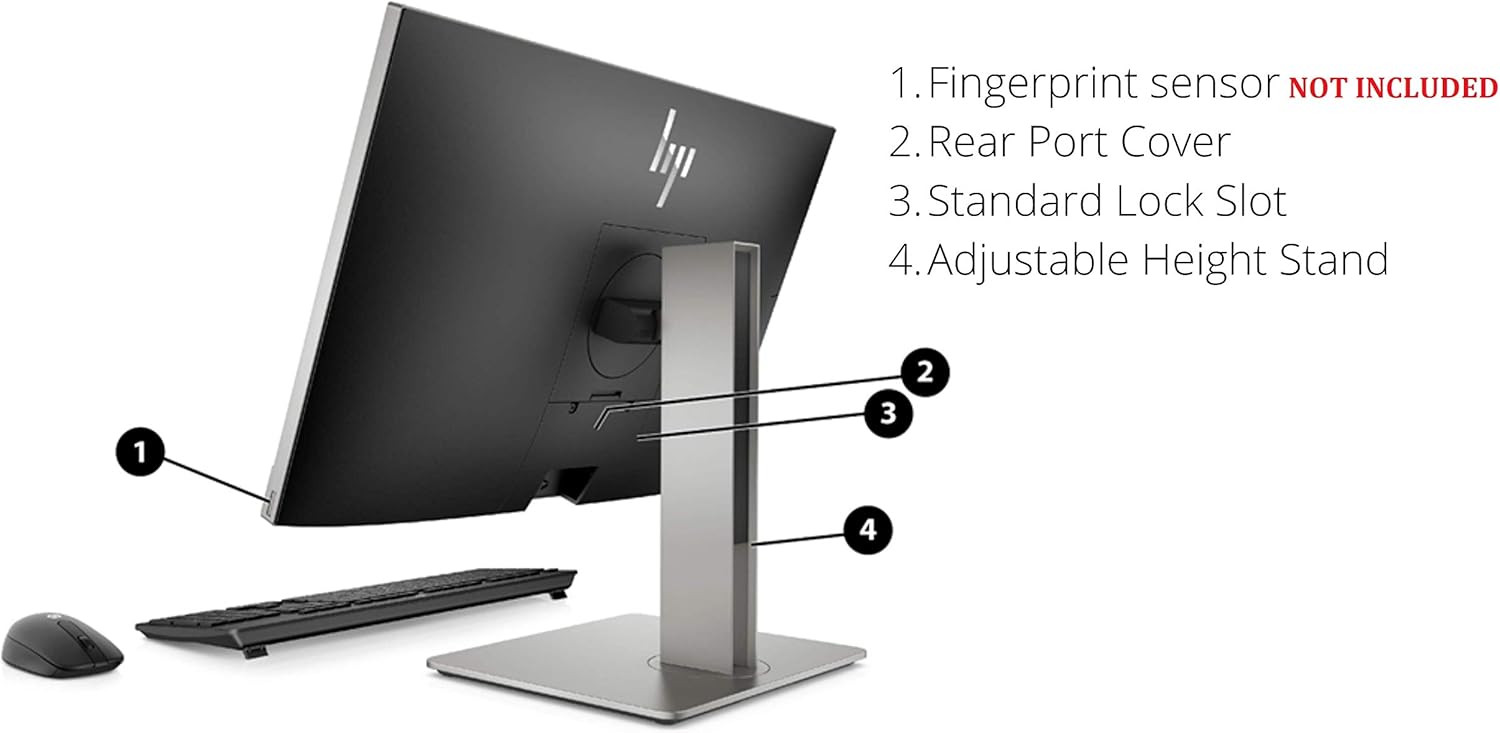
شڪل 5: پوئتي view highlighting the adjustable height stand and other features.
- Fingerprint sensor (NOT INCLUDED on all models): For biometric authentication.
- Rear Port Cover: Conceals and protects rear ports.
- Standard Lock Slot: For security cables.
- Adjustable اوچائي اسٽينڊ: Allows for ergonomic positioning of the display.
4. سيٽ اپ
Follow these steps to set up your HP EliteOne 800 G5 PC:
- پي سي کوليو: احتياط سان پيڪنگنگ مان سڀني اجزاء کي هٽايو.
- پي سي کي پوزيشن ڏيو: Place the All-in-One PC on a stable, flat surface. Ensure adequate ventilation around the device.
- ڪي بورڊ ۽ مائوس ڳنڍيو: Plug the USB keyboard and mouse into any available USB Type-A ports on the rear of the PC.
- پاور Connectنيو: Connect the power cord to the power connector on the rear of the PC, then plug the other end into a grounded electrical outlet.
- نيٽ ورڪ سان ڳنڍيو (اختياري): For a wired internet connection, connect an Ethernet cable from your router or modem to the RJ-45 (network) jack on the rear of the PC.
- پاور آن: Press the dual-state power button, located on the rear of the PC, to turn on the system.
- شروعاتي سيٽ اپ: ونڊوز 10 پرو سيٽ اپ مڪمل ڪرڻ لاءِ اسڪرين تي ڏنل هدايتن تي عمل ڪريو، جنهن ۾ ٻولي، علائقو، نيٽ ورڪ ڪنيڪشن (جيڪڏهن وائرڊ نه هجي)، ۽ يوزر اڪائونٽ ٺاهڻ شامل آهن.
5. آپريٽنگ هدايتون
5.1 پاور مئنيجمينٽ
- پاور آن: Press the power button on the rear of the PC.
- سمهڻ جو طريقو: Briefly press the power button or select 'Sleep' from the Windows Start menu.
- بند ڪريو: ونڊوز اسٽارٽ مينيو مان 'شٽ ڊائون' چونڊيو.
- ٻيهر شروع ڪريو: ونڊوز اسٽارٽ مينيو مان 'ريسٽارٽ' چونڊيو.
5.2 ٽچ اسڪرين استعمال ڪندي
The 24-inch display supports multi-touch gestures. Common gestures include:
- ٽيپ ڪريو: هڪ مائوس ڪلڪ جي برابر.
- ڊبل ٽيپ ڪريو: ڊبل ڪلڪ ڪرڻ جي برابر.
- دٻايو ۽ رکو: ساڄي ڪلڪ ڪرڻ جي برابر.
- چُنٽي/ ڇڪڻ: زوم ان يا آئوٽ ڪريو.
- سوائپ Scroll through content or navigate.
5.3 Webڪيم ۽ آڊيو
- Webڪيمرا: The 2 MP FHD pop-up webcam automatically extends when an application requires it (e.g., video calls). Gently push it down to retract when not in use for privacy.
- مائڪروفون: The integrated dual array digital microphone is active when the webcam is in use or when voice input is required.
- ڳالهائيندڙ: The Bang & Olufsen speakers provide audio output. Volume can be adjusted via Windows settings or keyboard shortcuts.
5.4 Optical Disk Drive
To use the DVD+/-RW SM DL 9.5mm slim tray:
- Press the eject button on the right side of the PC.
- Place a CD or DVD onto the tray, ensuring it is seated correctly.
- Gently push the tray back into the PC until it clicks shut.
6. سار سنڀال
6.1 صفائي
- اسڪرين: نرم، لِنٽ کان خالي ڪپڙو استعمال ڪريو ٿورڙو ڊيampپاڻي يا اسڪرين صاف ڪرڻ واري محلول سان ٻوڙيو وڃي. اسڪرين تي سڌو سنئون مائع نه اسپري ڪريو.
- چاسس: نرم، سڪل ڪپڙي سان صاف ڪريو. گھڙڻ وارا صاف ڪندڙ استعمال ڪرڻ کان پاسو ڪريو.
- وينٽيليشن: پڪ ڪريو ته وينٽيليشن جا دروازا مٽي ۽ رڪاوٽن کان پاڪ آهن ته جيئن وڌيڪ گرم ٿيڻ کان بچي سگهجي.
6.2 سافٽ ويئر اپڊيٽ
بهترين ڪارڪردگي ۽ سيڪيورٽي کي يقيني بڻائڻ لاءِ پنهنجي آپريٽنگ سسٽم ۽ ڊرائيورن کي باقاعدي طور تي اپڊيٽ ڪريو:
- ونڊوز اپڊيٽس: ڏانهن وڃو سيٽنگون> اپڊيٽ ۽ سيڪيورٽي> ونڊوز اپڊيٽ اپڊيٽس جي جانچ ۽ انسٽال ڪرڻ لاءِ.
- ايڇ پي سپورٽ اسسٽنٽ: Use the pre-installed HP Support Assistant software to check for driver and firmware updates specific to your HP EliteOne PC.
7. مسئلا حل ڪرڻ
| مسئلو | ممڪن سبب | حل |
|---|---|---|
| پي سي آن نٿو ٿئي | بجلي ناهي، ڪنيڪشن خالي آهي | Check power cord connection to PC and outlet. Ensure outlet is functional. |
| اسڪرين تي ڪابه ڊسپلي ناهي | PC in sleep mode, display settings issue | Press any key or move mouse to wake. If connected to external display, check display input source. |
| ٽچ اسڪرين غير جوابي | Software glitch, dirty screen | Restart the PC. Clean the screen with a soft, lint-free cloth. |
| اسپيڪرن مان ڪو به آڊيو ناهي | Volume muted, incorrect audio output device | Check volume levels in Windows. Ensure 'Speakers (Bang & Olufsen)' is selected as the default playback device. |
| Webڪيمرا ڪم نٿو ڪري. | Webcam retracted, privacy settings, driver issue | يقين ڏياريو webcam is extended. Check Windows privacy settings for camera access. Update webcam drivers via HP Support Assistant. |
8. وضاحتون
Key technical specifications for the HP EliteOne 800 G5 24-inch All-in-One PC:
| خاصيت | تفصيل |
|---|---|
| ماڊل نمبر | 2D9S5UW#ABA |
| ڏيکاريو | 23.8" diagonal FHD IPS widescreen WLED-backlit touch screen (1920 x 1080) |
| پروسيسر | Intel Core i5-9500 (9M Cache, up to 4.40 GHz) |
| گرافڪس | انٽيل يو ايڇ ڊي گرافڪس 630 (انٽيگريٽڊ) |
| رام | 8 GB DDR4-2666 SDRAM |
| ذخيرو | 256 GB M.2 2280 PCIe NVMe TLC SSD |
| آپريٽنگ سسٽم | ونڊوز 10 پرو |
| Webڪئميرا | 2 MP FHD pop-up webڪئميرا |
| آڊيو | Bang & Olufsen Speakers, Integrated Dual Array Digital Microphone |
| آپٽيڪل ڊرائيو | DVD+/-RW SM DL 9.5mm slim tray |
| بندرگاھون (پوئتي) | USB 3.1 Gen 2 Type-A (x3), USB 3.1 Gen 1 Type-A (x2), USB 3.1 Type-C Gen 2 (x1), DisplayPort 1.2 (x1), HDMI 2.0a (x1), RJ-45 (x1), Audio line-out (x1), Power connector (x1) |
| Ports (Side) | Universal Audio Jack (x1), Headphone connector (x1) |
| طول و عرض (LxWxH) | 18.4 x 7.1 x 21.2 انچ |
| وزن | 19.24 پائونڊ |
9. وارنٽي ۽ سپورٽ
Your HP EliteOne 800 G5 PC comes with a standard manufacturer's warranty. Please refer to the warranty card included in your package for specific terms and conditions, including coverage duration and service options.
For technical support, driver downloads, and additional product information, please visit the official HP support webسائيٽ:
When contacting support, have your product model number (2D9S5UW#ABA) and serial number ready.