تعارف
This manual provides detailed instructions for the safe and efficient operation, maintenance, and troubleshooting of your BE COOL Air Cooler, Model BCP5AC2101F. Please read this manual thoroughly before using the appliance and keep it for future reference.
اهم حفاظتي هدايتون
- هميشه پڪ ڪريو ته اوزار هڪ مستحڪم، سطحي سطح تي رکيل آهي.
- اوزار، تار، يا پلگ کي پاڻي يا ٻين مائع ۾ نه وجھو.
- Unplug the appliance from the power outlet before cleaning, filling, or performing any maintenance.
- اوزار کي ٻارن ۽ پالتو جانورن جي پهچ کان پري رکو.
- هوا جي اندرين يا آئوٽليٽس کي بلاڪ نه ڪريو. يونٽ جي چوڌاري مناسب وينٽيليشن کي يقيني بڻايو.
- پاڻي جي ٽانڪي ۾ صرف صاف نل جو پاڻي استعمال ڪريو. ڪو به ڪيميڪل يا اضافي شيون شامل نه ڪريو.
- جيڪڏهن پاور هارڊ خراب ٿئي ٿي، ان کي ٺاهيندڙ، ان جي سروس ايجنٽ، يا ساڳئي طرح قابل ماڻهن طرفان تبديل ڪيو وڃي ته جيئن خطري کان بچڻ لاء.
- هي اوزار صرف اندروني گهريلو استعمال لاء آهي.
پيداوار ختمview
Familiarize yourself with the components of your BE COOL Air Cooler.

شڪل 1: سامهون view of the BE COOL Air Cooler, showing the main fan grille, water level indicator, and "BE COOL" logo.

Figure 2: Top control panel with buttons for Timer, Cool, Speed, and On/Off, along with indicator lights.

Figure 3: Diagram illustrating key features: integrated dust filter, timer function, and remote control operation.
سيٽ اپ ڪريو
1. Unpacking
ايئر ڪولر کي احتياط سان ان جي پيڪنگ مان هٽايو. مستقبل جي اسٽوريج يا ٽرانسپورٽ لاءِ پيڪنگ کي برقرار رکو.
2. ڦيٿن کي ڳنڍڻ
The appliance comes with 4 castor wheels for easy mobility. Insert each wheel into the designated slots at the bottom of the unit until they click securely into place.
3. پاڻي جي ٽانڪي ڀرڻ
The BE COOL Air Cooler features a 5-liter water tank. For cooling and humidifying functions, the tank must be filled with water.
- پڪ ڪريو ته ڊوائيس پاور آئوٽ مان انپلگ ٿيل آهي.
- Locate the water tank opening, typically at the bottom rear or side of the unit.
- Carefully pour clean tap water into the tank. Do not exceed the "MAX" fill line indicated on the water level indicator.
- For enhanced cooling, you may add ice packs (not included) to the water tank if available.
- Close the water tank opening securely.
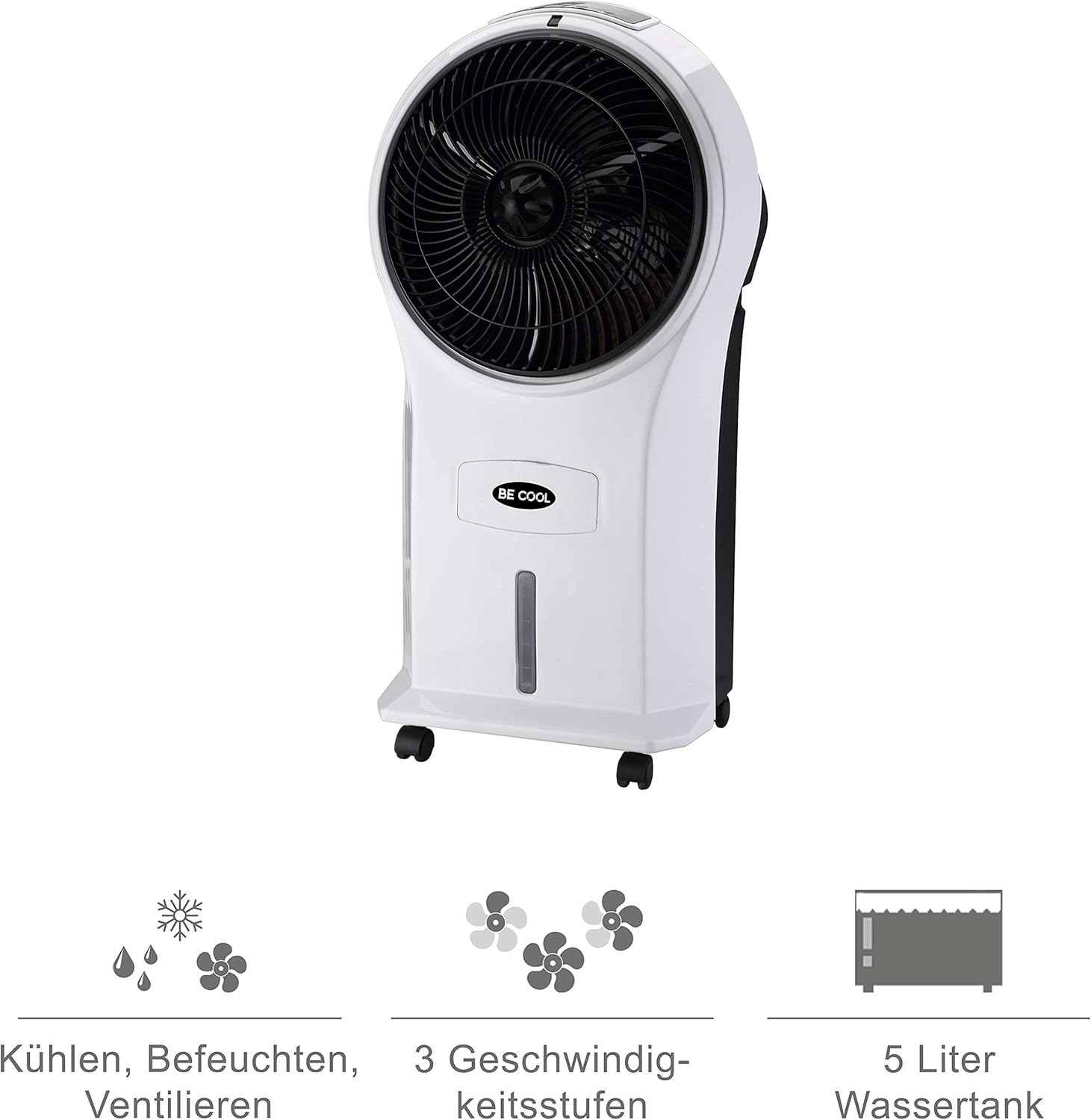
Figure 4: Visual representation of the 3-in-1 functions (cooling, humidifying, ventilating), 3 speed levels, and the 5-liter water tank capacity.
آپريٽنگ هدايتون
1. پاور آن/آف
Plug the power cord into a suitable electrical outlet. Press the آن/بند يونٽ کي آن يا آف ڪرڻ لاءِ ڪنٽرول پينل يا ريموٽ ڪنٽرول تي بٽڻ.
2. فين جي رفتار کي ترتيب ڏيڻ
کي دٻايو رفتار button repeatedly to cycle through the three available fan speeds: Low, Medium, and High. The corresponding indicator light will illuminate.
3. Cooling and Humidifying Function
To activate the cooling and humidifying function, ensure the water tank is filled. Press the عمده button. The unit will begin to draw water from the tank to cool and humidify the air. This function can reduce room temperature by up to 8°C.
4. ٽائمر فنڪشن
The air cooler features a 7-hour timer. Press the ٽائمر button repeatedly to set the desired operating time in increments (e.g., 1 hour, 2 hours, 4 hours, up to 7 hours). The unit will automatically turn off once the set time has elapsed.
5. ريموٽ ڪنٽرول استعمال
The included remote control allows for convenient operation from a distance. Ensure the remote control has batteries installed (batteries not included). Point the remote control towards the front of the air cooler when operating.
6. Air Purification
The integrated filter helps to purify the air by trapping dust, pollen, mites, bacteria, and unpleasant odors, contributing to a cleaner indoor environment.

Figure 5: The BE COOL Air Cooler positioned in a bedroom, demonstrating its compact size and portability.

Figure 6: The BE COOL Air Cooler in an office environment, highlighting its suitability for various indoor spaces.
سار سنڀال
باقاعده سار سنڀال توهان جي ايئر ڪولر جي بهترين ڪارڪردگي ۽ ڊگهي عمر کي يقيني بڻائي ٿي.
1. ايئر فلٽر کي صاف ڪرڻ
The air filter should be cleaned regularly, especially if the unit is used frequently or in dusty environments.
- پاور آئوٽليٽ مان اوزار کي ڌار ڪريو.
- Locate and remove the air filter, usually found at the back of the unit.
- Gently clean the filter with a soft brush or vacuum cleaner to remove dust. For deeper cleaning, rinse with lukewarm water and mild detergent.
- فلٽر کي يونٽ ۾ ٻيهر داخل ڪرڻ کان اڳ مڪمل طور تي هوا ۾ سڪي وڃڻ ڏيو.
2. پاڻي جي ٽانڪي کي صاف ڪرڻ
To prevent mold and mildew growth, clean the water tank weekly or as needed.
- Unplug the appliance and empty any remaining water from the tank.
- ٽينڪ جي اندر کي نرم ڪپڙي سان ڌوءampهڪ نرم صابن جي حل سان ختم.
- Rinse the tank thoroughly with clean water to remove any detergent residue.
- يونٽ کي ٻيهر ڀرڻ يا ذخيرو ڪرڻ کان اڳ ٽينڪ کي مڪمل طور تي سڪي وڃڻ ڏيو.
3. خارجي صفائي
يونٽ جي ٻاهرئين حصي کي نرم سان صاف ڪريو، ڊيamp ڪپڙو. استعمال نه ڪريو abrasive cleaners يا solvents.
4. اسٽوريج
If storing the air cooler for an extended period, ensure the water tank is empty and clean, and the unit is dry. Store it in a cool, dry place, preferably in its original packaging.
مشڪلاتون
عام مسئلن ۽ انهن جي حل لاءِ هن حصي جو حوالو ڏيو.
| مسئلو | ممڪن سبب | حل |
|---|---|---|
| يونٽ چالو نه آهي. | بجلي جي فراهمي ناهي؛ پاور بٽڻ نه دٻايو ويو آهي. | Check if the power cord is securely plugged in. Press the On/Off button. |
| ڪو به ٿڌو اثر نه. | Water tank empty; Cool function not activated. | Fill the water tank. Press the Cool button. |
| ڪمزور هوا جو وهڪرو. | Air filter clogged; Fan speed set too low. | Clean the air filter. Increase the fan speed. |
| اڻ وڻندڙ بوء. | Stagnant water in tank; Dirty filter. | Empty and clean the water tank. Clean or replace the air filter. |
| ريموٽ ڪنٽرول ڪم نه ڪري رهيو آهي. | بيٽريون ختم ٿي ويون آهن يا غلط طور تي لڳايون ويون آهن؛ ريموٽ ۽ يونٽ جي وچ ۾ رڪاوٽ. | Replace batteries. Ensure no obstructions and point directly at the unit. |
وضاحتون
- ماڊل: BCP5AC2101F
- قسم: 3-in-1 Evaporative Air Cooler (Cooler, Humidifier, Fan)
- بجلي جو استعمال: 45 واٽ
- هوا جي وهڪري جي گنجائش: 17.5 cubic meters per minute (1050 m³/h)
- پاڻي جي ٽانڪي گنجائش: 5 ليٽر
- فين جي رفتار: 3 (گهٽ، وچولي، اعلي)
- ٽائمر: 7 ڪلاڪ تائين
- ڪنٽرول قسم: Remote Control, Manual Buttons
- طول و عرض (L x W x H): 31.5 x 27 x 61 سينٽي (12.4 x 10.6 x 24 انچ)
- وزن: 2.9 ڪلوگرام (6.4 پائونڊ)
- رنگ: اڇو/ڪارو
- شامل اجزاء: Main unit, Remote control, 4 Castor wheels
وارنٽي ۽ سپورٽ
For warranty information or technical support, please refer to the warranty card included with your purchase or contact Be Cool customer service. Keep your proof of purchase for warranty claims.
For further assistance, you may visit the official Be Cool store on Amazon: Be Cool Store


