1. تعارف
This manual provides instructions for the Easytry123 Replacement Remote Control, model N2QAYB000752. This remote is designed to function as a replacement for various Panasonic Viera LCD HDTV models, including TX-L42E5E, TX-L42E5Y, TX-L42EW5, TX-L47E5B, TX-L47E5E, TX-L47E5Y, TX-L47EW5, TX-LR32E5, TX-LR42E5, TX-L42ETW5, TX-L47ET5, and TX-P42UT50. Please note that as a replacement unit, some advanced or specific functions of your original remote may not be fully supported.
For optimal performance, ensure your TV model is listed as compatible. This remote does not require programming and is ready for use once batteries are installed.
2. سيٽ اپ
2.1 بيٽري لڳائڻ
- ريموٽ ڪنٽرول جي پٺي تي بيٽري جي خاني کي ڳوليو.
- بيٽري جي ڪمپارٽمينٽ جي ڍڪ کي هيٺئين طرف يا تير سان ڏيکاريل طرف سلائڊ ڪريو ته جيئن ان کي کوليو وڃي.
- Insert two (2) AA-size batteries, ensuring the positive (+) and negative (-) terminals align correctly with the markings inside the compartment.
- بيٽري جي ڪمپارٽمينٽ جي ڍڪ کي واپس پوزيشن ۾ سلائڊ ڪندي تبديل ڪريو جيستائين اهو محفوظ طور تي ڪلڪ نه ڪري.

Figure 1: Back of the remote control with the battery compartment open, illustrating the correct orientation for inserting two AA batteries.

Figure 2: Back of the remote control with the battery compartment securely closed after battery installation.
2.2 شروعاتي استعمال
Once batteries are installed, the remote control is ready for immediate use with compatible Panasonic Viera TVs. Point the remote directly at the TV's infrared receiver.
3. ريموٽ ڪنٽرول کي هلائڻ
This section details the primary functions of the buttons on your replacement remote control. Refer to the image below for button layout.
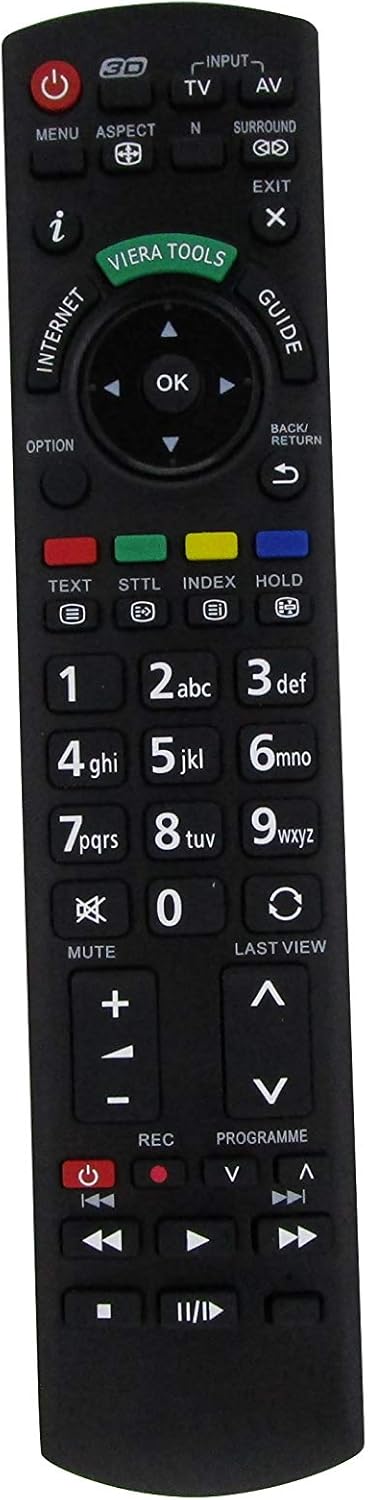
شڪل 3: سامهون view of the Easytry123 Replacement Remote Control, highlighting the various function buttons.
3.1 اهم ڪم
- طاقت (●): ٽي وي آن يا آف ڪري ٿو.
- Input/AV: Selects the video input source (e.g., HDMI 1, AV, Component).
- TV: Switches to TV broadcast mode.
- مينيو: Opens the TV's main menu for settings and adjustments.
- پاسو: Changes the screen aspect ratio (e.g., 16:9, 4:3).
- N: (Function may vary) Often used for picture modes or specific TV features.
- چوڌاري: Activates or deactivates surround sound modes.
- نڪرڻ: Closes menus or returns to the previous screen.
- آءِ (معلومات): Displays program information or current status.
- ويرا اوزار: Accesses Panasonic's Viera Tools menu for smart features.
- انٽرنيٽ: Direct access to internet features (if supported by TV).
- ھدايت: اليڪٽرانڪ پروگرام گائيڊ (EPG) کوليندو آهي.
- نيويگيشن پيڊ (مٿي، هيٺ، کاٻي، ساڄي، ٺيڪ): مينيو کي نيويگيٽ ڪرڻ ۽ چونڊن جي تصديق ڪرڻ لاءِ استعمال ڪيو ويندو آهي.
- اختيار: Accesses context-sensitive options within menus.
- واپس / واپسي: Returns to the previous menu or channel.
- متن: Activates teletext (if available).
- STTL (Subtitle): Toggles subtitles on/off.
- انڊيڪس: Accesses index pages in teletext or other features.
- رکو: Holds teletext page.
- Numeric Pad (0-9): Enters channel numbers or numerical data.
- گونگا: ٽي وي آڊيو کي خاموش ڪري ٿو.
- آخري View: اڳئين ڏانهن واپسي viewed channel or input.
- حجم (+/-): ٽي وي جي مقدار کي ترتيب ڏئي ٿو.
- Channel (▲/▼): Changes TV channels up or down.
- آر اي سي (ريڪارڊ): Initiates recording (if TV supports PVR function).
- Programme (▲/▼): Similar to Channel Up/Down, for program selection.
- Playback Controls (Play, Pause, Stop, Rewind, Fast Forward, Skip): Controls media playback for connected devices or TV's internal media player.
Note: The functionality of certain buttons may depend on your specific Panasonic TV model and its features.
4. سار سنڀال
4.1 بيٽري مٽائڻ
Replace batteries when the remote's response becomes sluggish or it stops functioning. Always replace both batteries simultaneously with new AA-size batteries. Do not mix old and new batteries, or different types of batteries.
4.2 صفائي
ريموٽ ڪنٽرول کي صاف ڪرڻ لاءِ، نرم، سڪل ڪپڙو استعمال ڪريو. ضدي مٽيءَ لاءِ، ٿورو ڊيampڪپڙي کي پاڻي سان ڍڪيو. سخت ڪيميڪل، رگڙيندڙ صاف ڪندڙ، يا محلول استعمال ڪرڻ کان پاسو ڪريو، ڇاڪاڻ ته اهي ريموٽ جي مٿاڇري يا اندروني حصن کي نقصان پهچائي سگهن ٿا.
4.3 اسٽوريج
When storing the remote for extended periods, remove the batteries to prevent leakage, which can cause damage. Store in a cool, dry place away from direct sunlight and extreme temperatures.
5. مسئلا حل ڪرڻ
- ريموٽ جواب نه ڏئي رهيو آهي:
- چيڪ ڪريو ته بيٽريون صحيح پولارٽي سان صحيح طرح سان داخل ڪيون ويون آهن.
- نئين سان پراڻي بيٽرين کي تبديل ڪريو.
- پڪ ڪريو ته ريموٽ ۽ ٽي وي جي انفراريڊ سينسر جي وچ ۾ ڪا به رڪاوٽ نه آهي.
- پڪ ڪريو ته ريموٽ سڌو سنئون ٽي وي ڏانهن اشارو ڪيو ويو آهي.
- ڪجھ بٽڻ ڪم نه ٿا ڪن:
- As a replacement remote, some specific functions might not be supported by this unit or your TV model.
- Ensure the TV is in the correct mode (e.g., TV mode for channel buttons, AV mode for playback controls).
- وقتي آپريشن:
- ڪمزور بيٽريون وقفي وقفي سان ڪم ڪرڻ جو سبب بڻجي سگهن ٿيون. انهن کي تبديل ڪريو.
- پڪ ڪريو ته ڪو به مضبوط روشني جا ذريعا (جهڙوڪ سڌي سج جي روشني يا روشن فلوروسينٽ لائيٽون) IR سگنل ۾ مداخلت نه ڪري رهيا آهن.
6. وضاحتون
| ماڊل نمبر | N2QAYB000752 |
| برانڊ | ايزيٽري 123 |
| مطابقت | Panasonic Viera LCD HDTVs (e.g., TX-L42E5E, TX-L47E5B, TX-P42UT50) |
| طاقت جو ذريعو | 2 x AA بيٽريون |
| رابطي | انفراريڊ (IR) |
7. وارنٽي ۽ سپورٽ
For information regarding warranty coverage or technical support, please refer to the purchase documentation or contact the seller, Easytry123, directly. As this is a replacement product, warranty terms may vary from original manufacturer warranties.
For further assistance, please visit the seller's support page or contact their customer service.