پيداوار ختمview
This document provides essential information for the Easytry123 replacement infrared (IR) remote control, designed for specific Onkyo AV receivers. This remote is an aftermarket replacement and may not offer all functions of your original remote. It is crucial to verify that your original remote matches the appearance of this replacement for proper compatibility.
- This is an infrared replacement remote control.
- Ensure your current remote is identical to the one pictured for full compatibility.
- No detailed instruction manual is included with the product itself; this document serves as a general guide.
- Compatibility is primarily based on visual match and listed models.
- Functionality may vary slightly compared to the original equipment manufacturer (OEM) remote.
سيٽ اپ ۽ شروعاتي استعمال
1. بيٽري لڳائڻ
ريموٽ ڪنٽرول کي ٻه (2) AAA بيٽريون گهرجن (شامل نه آهن). انهن کي انسٽال ڪرڻ لاءِ انهن قدمن تي عمل ڪريو:
- ريموٽ ڪنٽرول جي پٺي تي بيٽري جي خاني کي ڳوليو.
- بيٽري جي ڪمپارٽمينٽ جي ڍڪ کي هيٺئين طرف يا تير سان ڏيکاريل طرف سلائڊ ڪريو ته جيئن ان کي کوليو وڃي.
- ٻہ AAA بيٽريون داخل ڪريو، پڪ ڪريو ته مثبت (+) ۽ منفي (-) ٽرمينل ڪمري اندر نشانن سان صحيح طرح سان ترتيب ڏين.
- بيٽري جي ڪمپارٽمينٽ جي ڍڪ کي واپس جاءِ تي سلائڊ ڪندي تبديل ڪريو جيستائين اهو محفوظ طور تي ڪلڪ نه ڪري.
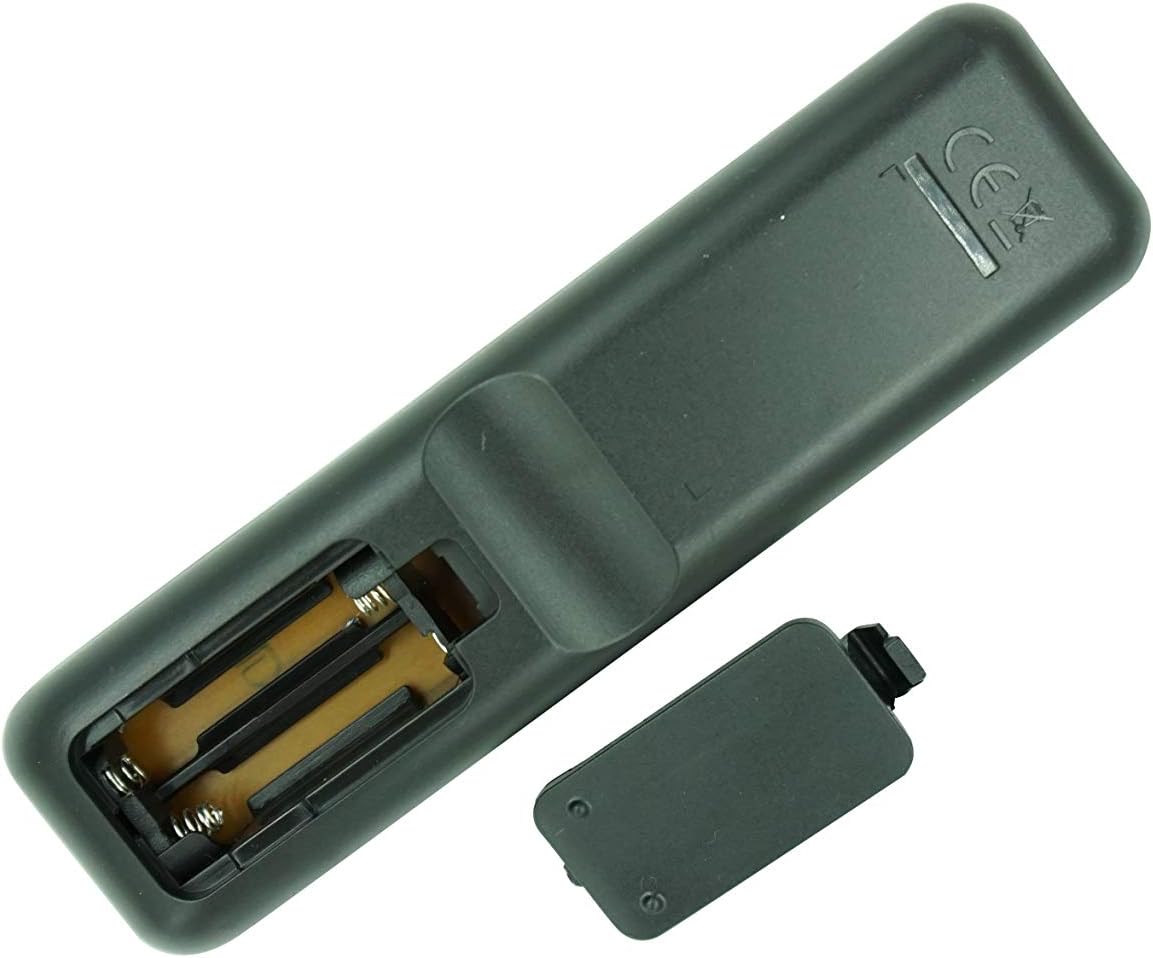
شڪل 1: پوئتي view of the remote control with the battery cover removed, illustrating the battery insertion process. Ensure correct polarity when inserting AAA batteries.
2. Initial Use and Compatibility Check
This remote is an infrared (IR) replacement. No pairing or complex setup is typically required. Simply point the remote at your Onkyo receiver and press a button to test its functionality.
- Ensure there is a clear line of sight between the remote's IR emitter and the receiver's IR sensor.
- Confirm that your Onkyo receiver model (RC-970R, HT-R398, HT-S3910, TX-SR494, TX-SR393) is listed as compatible. If your model is not listed or your original remote looks different, full functionality is not guaranteed.
آپريٽنگ هدايتون
هي سيڪشن هڪ عام اوور مهيا ڪري ٿوview of the remote control's buttons and their typical functions. For detailed operation of your Onkyo receiver, please refer to your receiver's original instruction manual.

شڪل 2: سامهون view of the Easytry123 replacement remote control, showing the layout of all buttons.

شڪل 3: زاويه view of the remote control, providing a different perspective of the button arrangement.
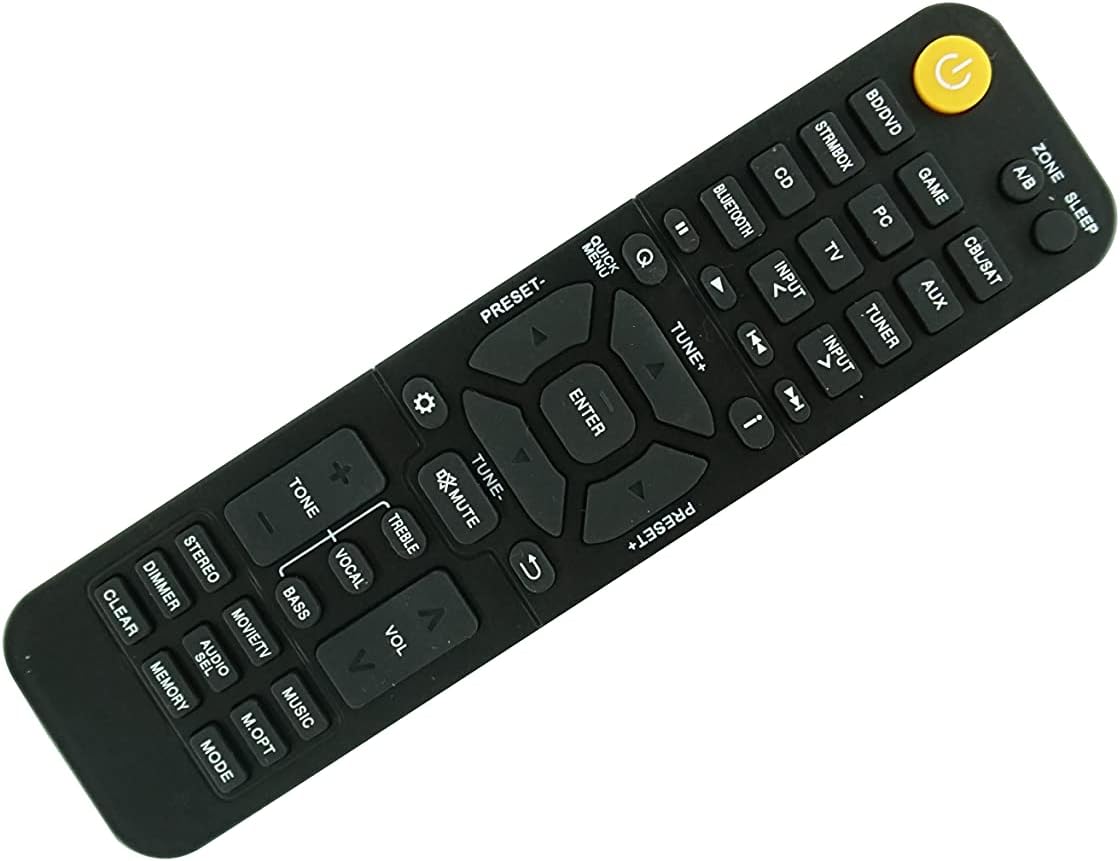
شڪل 4: ٻيو زاويه view of the remote control, further illustrating its design.
بٽڻ جو ڪم ختمview:
| بٽڻ جو نالو | عام فنڪشن |
|---|---|
| پاور (Yellow button) | Turns the receiver On/Off. |
| زون A/B | Selects audio output zone (if supported by receiver). |
| سمهڻ | Activates sleep timer function. |
| BD/DVD, GAME, STRMBOX, PC, CD, BLUETOOTH, CBL/SAT, AUX, TV, TUNER | Input source selection buttons. |
| INPUT < / > | دستياب ان پٽ ذريعن ذريعي چڪر. |
| پلے بیک ڪنٽرول (Play, Pause, Stop, Skip) | Controls playback of connected media devices. |
| QUICK MENU, TUNE+, TUNE-, ENTER, PRESET+, PRESET-, Navigation Arrows | Menu navigation and tuning controls. |
| خاموش | آڊيو آئوٽ کي خاموش يا خاموش ڪري ٿو. |
| ويل +/- | ماسٽر حجم جي سطح کي ترتيب ڏئي ٿو. |
| TONE, TREBLE, VOCAL, BASS | Audio tone and equalization adjustments. |
| STEREO, MOVIE/TV, MUSIC | آواز موڊ جي چونڊ. |
| DIMMER, AUDIO SEL, M.OPT, CLEAR, MEMORY, MODE | Various utility and setting buttons. |
نوٽ: The exact functionality of each button depends on your specific Onkyo receiver model and its features. Some buttons may not be active or may perform different functions than expected if your receiver does not support them or if this replacement remote has slight variations from the original.
سار سنڀال
بيٽري مٽائڻ:
When the remote control's range decreases or it becomes unresponsive, it is likely time to replace the batteries. Follow the battery installation steps outlined in the "Setup and Initial Use" section.
- هميشه هڪ ئي وقت ٻئي AAA بيٽريون تبديل ڪريو.
- پراڻي ۽ نئين بيٽرين، يا بيٽرين جي مختلف قسمن کي گڏ نه ڪريو.
- جيڪڏهن ريموٽ ڊگهي عرصي تائين استعمال نه ٿيندو ته جيئن رسي کي روڪي سگهجي ته بيٽريون هٽايو.
- مقامي ضابطن جي مطابق استعمال ٿيل بيٽرين کي ختم ڪريو.
صفائي:
ريموٽ ڪنٽرول کي صاف ڪرڻ لاءِ، نرم، سڪل ڪپڙو استعمال ڪريو. ضدي مٽيءَ لاءِ، ٿورو ڊيampڪپڙي کي پاڻي يا نرم، غير رگڙيندڙ ڪلينر سان ڍڪيو. سخت ڪيميڪل استعمال نه ڪريو يا ريموٽ کي پاڻي ۾ نه ٻوڙيو.
مشڪلاتون
| مسئلو | ممڪن سبب | حل |
|---|---|---|
| Remote is not working or unresponsive. | مئل يا غلط طور تي نصب ٿيل بيٽريون. | بيٽرين کي نئين AAA بيٽرين سان تبديل ڪريو، صحيح پولارٽي کي يقيني بڻائي. |
| ريموٽ ۾ محدود رينج يا وقفي وقفي سان جواب هوندو آهي. | Weak batteries; Obstruction between remote and receiver; Remote's IR emitter or receiver's IR sensor is dirty. | Replace batteries; Ensure clear line of sight; Clean the IR emitter on the remote and the IR sensor on the receiver. |
| Certain buttons do not function. | Button not supported by your specific receiver model; Remote is not fully compatible with your receiver's original functions. | Refer to your receiver's original manual; Accept that some advanced or specific functions may not be replicated by a replacement remote. Ensure your original remote looked identical to this replacement. |
| Remote does not control the receiver at all. | Incorrect remote for your receiver model; Receiver's IR sensor is faulty. | Double-check the compatibility list and compare the remote's appearance to your original. If the remote is correct, consult your receiver's manual for troubleshooting its IR sensor. |
پيداوار جي وضاحت
- برانڊ: ايزيٽري 123
- ماڊل مطابقت: Onkyo RC-970R, HT-R398, HT-S3910, TX-SR494, TX-SR393 4K Network AV A/V Receiver
- رابطي ٽيڪنالاجي: انفراريڊ (IR)
- ڪنٽرولر جو قسم: بٽڻ ڪنٽرول
- مطابقت رکندڙ ڊوائيسز: Home Theater (Onkyo AV Receivers)
- طاقت جو ذريعو: 2 x AAA بيٽريون (شامل نه آهن)
- خاص خصوصيت: Replacement remote, ergonomic design.
- ٺاهيندڙ: ايزيٽري 123
- اصليت جو ملڪ: چين
- ASIN: B095GVQL6Q
- تاريخ پهرين دستياب: مئي 20، 2021
وارنٽي ڄاڻ
As a replacement product, specific warranty details are typically handled by the seller or the platform where the purchase was made. Please refer to the return and refund policies of the retailer (e.g., Amazon.com) for information regarding product defects or returns. The product description indicates a replacement policy is available.
For this specific product, the buybox winner indicates a return policy with a duration of 30 days for refund/replacement.
ڪسٽمر سپورٽ
For any questions, concerns, or issues not covered in this manual, please contact the seller directly through the platform where you purchased the remote control. The manufacturer and seller for this product is ايزيٽري 123.
When contacting support, please provide your order number and a clear description of the issue.


