1. تعارف
Welcome to the user manual for your Genelec 8020D 2-Way Active Powered Nearfield Studio Monitor. The 8020D is engineered to provide accurate and transparent audio reproduction, making it an ideal choice for professional audio environments where space is limited. This monitor incorporates Genelec's Minimum Diffraction Enclosure (MDE) and Directivity Control Waveguide (DCW) technologies for superior imaging and frequency response, alongside Intelligent Signal Sensing (ISS) for energy efficiency.
This manual provides essential information for the safe and effective setup, operation, and maintenance of your Genelec 8020D monitor.
2. اهم حفاظتي ڄاڻ
Please read these instructions carefully before operating your Genelec 8020D monitor. Retain this manual for future reference.
- طاقت جو ذريعو: Connect the monitor only to a power supply of the type indicated on the unit. Ensure the mains voltage توهان جي علائقي لاءِ صحيح آهي.
- وينٽيليشن: Do not block any ventilation openings. Install in accordance with the manufacturer's instructions to ensure proper airflow.
- پاڻي ۽ نمي: Do not expose this apparatus to rain or moisture. Do not use near water or in excessively humid environments.
- گرمي: ڪنهن به گرمي جي ذريعن جي ويجهو نصب نه ڪريو جهڙوڪ ريڊيٽرز، گرمي رجسٽر، اسٽو، يا ٻيو سامان (بشمول ampلائفائرز) جيڪي گرمي پيدا ڪن ٿا.
- پاور ڪنڊ تحفظ: بجليءَ جي تار کي هلڻ يا پنچ ٿيڻ کان بچايو، خاص طور تي پلگ، سهولتن جي رسيپٽيڪل ۽ ان نقطي تي جتي اهي سامان مان نڪرندا آهن.
- خدمت ڪرڻ: هن پراڊڪٽ جي پاڻ خدمت ڪرڻ جي ڪوشش نه ڪريو. سڀني خدمت کي قابل خدمت اهلڪارن ڏانهن رجوع ڪريو. خدمت جي ضرورت تڏهن پوندي آهي جڏهن سامان ڪنهن به طريقي سان خراب ٿي ويو هجي، جهڙوڪ پاور سپلائي ڪنڊ يا پلگ خراب ٿي ويو هجي، مائع ڦُٽي ويو هجي يا شيون سامان ۾ ڪري پيون هجن، سامان مينهن يا نمي جي سامهون آيو هجي، عام طور تي ڪم نٿو ڪري، يا ڪري ڇڏيو ويو هجي.
- صفائي: Unplug this apparatus before cleaning. Use only a dry cloth.
3. پيڪيج مواد
Upon unpacking your Genelec 8020D monitor, please verify that all the following items are included:
- Genelec 8020D Active Powered Nearfield Studio Monitor
- 1.8 Meter Mains Cable
- Iso-Pod (Isolation Positioner/Decoupler) Stand
4. پراڊڪٽ ختمview
The Genelec 8020D is a compact yet powerful studio monitor designed for critical listening. It features a 4-inch woofer and a 3/4-inch metal-dome tweeter, each driven by dedicated Class D ampجان بچائيندڙ.
سامهون پينل
The front of the monitor houses the woofer and tweeter, protected by grilles. A small LED indicator is located at the bottom right, indicating power status and ISS activity.
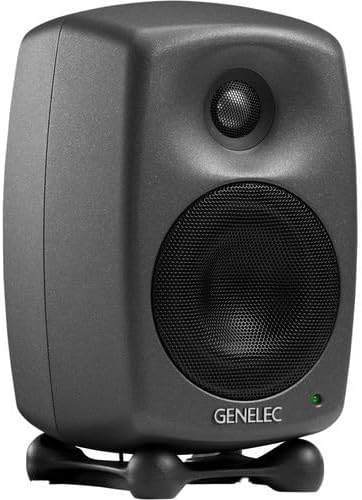
شڪل 1: سامهون وارو زاويه view of the Genelec 8020D monitor, showing the woofer, tweeter, and power indicator LED.
پوئتي پينل
The rear panel provides all the necessary connections and controls for the monitor, including the audio input, power input, power switch, and acoustic adjustment DIP switches.

Figure 2: Rear panel of the Genelec 8020D, displaying the XLR input, power connection, power switch, and DIP switches for acoustic control.
5. سيٽ اپ
5.1 لڳائڻ
Optimal placement is crucial for accurate monitoring. Position the 8020D monitors to form an equilateral triangle with your listening position. The tweeters should ideally be at ear level. Ensure there is adequate space around the monitors for proper ventilation and to minimize reflections from nearby surfaces.
5.2 Iso-Pod Stand
The included Iso-Pod stand helps decouple the monitor from the surface it rests on, reducing unwanted vibrations and improving sonic clarity. It also allows for precise angling of the monitor towards the listening position, both vertically and horizontally, by adjusting its rubber feet.
5.3 چڙهڻ جا اختيار
The 8020D offers versatile mounting options. It features integrated rear support points for compatibility with various wall and floor stands. Additionally, a 3/8" threaded insert is located on the cabinet base for direct mounting to microphone stands or other compatible fixtures.
5.4 ڪنيڪشن
- آڊيو ان پٽ: Connect your audio source (e.g., audio interface, mixer) to the 8020D's XLR analog input using a balanced XLR cable.
- پاور ڪنيڪشن: Connect the supplied 1.8M mains cable to the power input on the rear panel of the monitor, and then plug it into a suitable AC power outlet.
5.5 پاور آن/آف
Locate the main power switch on the rear panel of the monitor. Flip the switch to the 'ON' position to power on the monitor. The front LED indicator will illuminate. To power off, flip the switch to the 'OFF' position.
6. توهان جي مانيٽر کي هلائڻ
6.1 Room Response Controls (DIP Switches)
The 8020D features a set of DIP switches on the rear panel (refer to Figure 2) that allow you to compensate for the acoustic characteristics of your listening environment. These controls help to achieve a flat frequency response at the listening position.
- BASS TILT: Adjusts the bass response. Useful for compensating for room modes or placement near walls/corners.
- TREBLE TILT: Adjusts the treble response. Can be used to fine-tune the high-frequency balance based on room acoustics or personal preference.
- بيس رول آف: Provides a low-frequency cut-off, useful when integrating with a subwoofer or in rooms with excessive bass build-up.
- ڊيسڪ ٽاپ: Specifically designed to compensate for reflections from a desktop surface when the monitors are placed on a desk.
Experiment with these settings to find the optimal sound for your specific room and setup. It is recommended to start with all switches in the 'OFF' position and make adjustments incrementally.
6.2 Intelligent Signal Sensing (ISS)
The Genelec 8020D is equipped with Intelligent Signal Sensing (ISS) circuitry. This feature automatically detects when the monitor is no longer receiving an audio input signal. After a period of inactivity, ISS will switch the monitor into a low-power standby mode, conserving energy. When an audio signal is detected again, the monitor will automatically power back on. This ensures your monitors are always ready when you need them, while also being environmentally friendly.
7. سار سنڀال
To ensure the longevity and optimal performance of your Genelec 8020D monitors, follow these simple maintenance guidelines:
- صفائي: Regularly clean the exterior of the monitor with a soft, dry, lint-free cloth. Do not use abrasive cleaners, waxes, or solvents, as these can damage the finish.
- وينٽيليشن: Ensure that the ventilation openings on the monitor are not obstructed by dust or debris.
- ماحول: Avoid exposing the monitors to extreme temperatures, direct sunlight, or high humidity.
8. مسئلا حل ڪرڻ
If you encounter any issues with your Genelec 8020D monitor, refer to the following common problems and solutions:
- آواز ناهي:
- Check if the monitor is powered on (front LED illuminated).
- تصديق ڪريو ته آڊيو ذريعو فعال آهي ۽ سگنل موڪلي رهيو آهي.
- پڪ ڪريو ته سڀئي آڊيو ڪيبل محفوظ طور تي ڳنڍيل آهن.
- پنهنجي آڊيو سورس جي واليوم ليول چيڪ ڪريو.
- مسخ ٿيل آواز:
- Reduce the output level from your audio source to prevent input clipping.
- Check the audio cables for damage or poor connections.
- Ensure the room response DIP switches are not set to extreme positions that might cause distortion.
- گونج يا گونج:
- پڪ ڪريو ته سڀئي سامان صحيح طور تي گرائونڊ آهن.
- Try connecting the monitor to a different power outlet.
- Keep audio cables away from power cables to avoid interference.
- Use balanced XLR cables for audio connections.
- ISS Not Activating/Deactivating:
- Ensure the audio signal level is sufficient for ISS to detect activity.
- If the monitor remains in standby, check for very low-level background noise from the source that might be keeping it active.
If the problem persists after trying these solutions, please contact Genelec customer support.
9. ٽيڪنيڪل وضاحتون
Below are the detailed technical specifications for the Genelec 8020D monitor:
| خاصيت | تفصيل |
|---|---|
| اسپيڪر جو قسم | 2-Way Active Powered Nearfield Studio Monitor |
| ووفر قطر | 4 انچ (105 ملي ميٽر) |
| ٽوئيٽر جو قطر | 3/4 Inches (19 mm) Metal Dome |
| Amplifier Power (Bass) | 50 Watts Class D |
| Amplifier Power (Treble) | 50 Watts Class D |
| تعدد جواب | 56 Hz - 25 kHz (-6 dB) |
| وڌ ۾ وڌ SPL | 100 ڊي بي |
| آڊيو ان پٽ | 1 x XLR Analog Input |
| رابطي ٽيڪنالاجي | Wired (XLR) |
| طاقت جو ذريعو | Corded Electric (100-240V, 50/60 Hz) |
| مواد | Plastic (MDE Enclosure) |
| طول و عرض (H x W x D) | 20.8 cm x 19.3 cm x 37.3 cm (with Iso-Pod) |
| وزن | 3.2 ڪلوگرام / 7.1 پائونڊ |
| شامل اجزاء | Monitor, 1.8M Mains Cable |
| خاص خاصيتون | Intelligent Signal Sensing (ISS), Directivity Control Waveguide (DCW), Minimum Diffraction Enclosure (MDE) |

Figure 3: Dimensions of the Genelec 8020D monitor, illustrating its height, width, and depth.
10. وارنٽي ۽ سپورٽ
10.1 وارنٽي ڄاڻ
The Genelec 8020D monitor comes with a 2 سال وارنٽي from the date of purchase. This warranty covers manufacturing defects and ensures the product meets its specified performance. Please retain your proof of purchase for warranty claims.
10.2 ڪسٽمر سپورٽ
For technical assistance, warranty service, or any questions regarding your Genelec 8020D monitor, please visit the official Genelec website or contact your authorized Genelec dealer. Detailed support resources, FAQs, and contact information can typically be found on the manufacturer's webسائيٽ.


