1. تعارف
This manual provides comprehensive instructions for the safe and effective use of the C-LOGIC 580 Smart Digital Multimeter. Please read this manual thoroughly before operation and retain it for future reference.
The C-LOGIC 580 is a smart digital multimeter designed for accurate and efficient electrical measurements. Its smart technology allows for automatic recognition of measurement parameters, reducing potential errors for amateur users and saving time for professionals.
2. حفاظت جي ڄاڻ
Always observe safety precautions when using electrical testing equipment. Failure to do so may result in injury or damage to the device.
- هر فنڪشن لاءِ بيان ڪيل وڌ ۾ وڌ ان پٽ ويلز کان وڌيڪ نه ڪريو.
- Ensure the test leads are properly connected and the function switch is in the correct position before making any measurements.
- Exercise extreme caution when working with live circuits.
- Do not use the multimeter if it appears damaged or if the test leads are compromised.
- Refer to the CAT III 600V and MAX 600V markings on the device for voltage حدون.
3. مصنوعات جون خاصيتون
- سمارٽ ٽيڪنالاجي: Automatic recognition of measurement parameters.
- Error Reduction: Designed to minimize errors for amateur users.
- وقت بچائڻ: Streamlines measurement processes for professional users.
- ڊجيٽل ڊسپلي Clear and easy-to-read digital readout.
- گھڻن افعال: Capable of measuring various electrical parameters.
4. پيڪيج مواد
Verify that all items are present and undamaged upon opening the package.
- C-LOGIC 580 Smart Digital Multimeter
- ٽيسٽ ليڊز (ڳاڙهو ۽ ڪارو)
- استعمال ڪندڙ دستي
5. سيٽ اپ
5.1 بيٽري لڳائڻ
The C-LOGIC 580 is battery powered. Ensure batteries are correctly installed before first use.
- ملٽي ميٽر جي پوئين پاسي بيٽري جي ڪمپارٽمينٽ ڪَوَر کي ڳوليو.
- بيٽري جي ڪمري کي کولڻ لاء اسڪرو ڊرايور استعمال ڪريو.
- Insert the required batteries, observing the correct polarity (+ and -).
- بيٽري جي ڪمري واري ڍڪ کي تبديل ڪريو ۽ ان کي محفوظ ڪريو.
5.2 ٽيسٽ ليڊز کي ڳنڍڻ
Proper connection of test leads is crucial for accurate and safe measurements.
- ڪارو ٽيسٽ ليڊ "COM" (عام) ان پٽ جيڪ ۾ داخل ڪريو.
- Insert the red test lead into the "VHz%" input jack for voltage, frequency, and duty cycle measurements.
- Ensure connections are firm and secure.
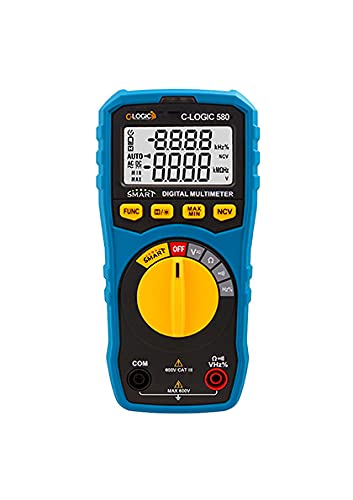
شڪل 1: سامهون view of the C-LOGIC 580 Smart Digital Multimeter, showing the display, rotary switch, function buttons, and input jacks (COM and VHz%). The display shows "-8.8.8.8" and "0.0.0.0" with indicators for AUTO, AC/DC, kHz%, NCV, MAX, MIN, and V. The rotary switch is set to OFF. The input jacks are labeled "COM" and "VHz%".
6. آپريٽنگ هدايتون
6.1 پاور آن/آف
To power on the multimeter, rotate the central yellow dial from the "OFF" position to any desired measurement function. To power off, rotate the dial back to "OFF".
6.2 Smart Measurement Mode
The C-LOGIC 580 features a smart mode that automatically identifies the type of measurement (e.g., AC voltage ، DC جلدtage, resistance) when the leads are connected to a circuit. This simplifies operation by eliminating the need to manually select the measurement type.
6.3 فنڪشن بٽڻ
The multimeter includes several function buttons below the display:
- فنڪشن: Used to cycle through different measurement modes within a single rotary switch setting (e.g., AC/DC voltage, resistance/continuity).
- (Diode/Continuity): Activates diode test or continuity check.
- وڌ / منٽ: Toggles between maximum and minimum value hold during a measurement.
- NCV: غير رابطي واري جلد کي چالو ڪري ٿوtage سectionاڻڻ.
6.4 Basic Measurements
جلدtage Measurement (AC/DC):
- Set the rotary switch to the 'V' position.
- Connect the black test lead to the 'COM' jack and the red test lead to the 'VHz%' jack.
- Connect the test leads in parallel to the circuit or component to be measured.
- The multimeter will automatically detect AC or DC voltage. Use the FUNC button if manual selection is needed.
مزاحمت جي ماپ:
- Set the rotary switch to the 'Ω' position.
- Connect the black test lead to the 'COM' jack and the red test lead to the 'VHz%' jack.
- مزاحمت کي ماپڻ کان اڳ پڪ ڪريو ته سرڪٽ ڊي-انرجائيز ٿيل آهي.
- ماپڻ لاءِ جزو جي پار ٽيسٽ ليڊز کي ڳنڍيو.
تسلسل ٽيسٽ:
- Set the rotary switch to the 'Ω' position.
- کي دٻايو (Diode/Continuity) button to select continuity mode.
- Connect the test leads across the circuit or component. A beep indicates continuity.
غير رابطي وارو جلدtage (NCV) جي چڪاس:
- Set the rotary switch to the 'NCV' position.
- Move the top part of the multimeter near a live conductor. The device will indicate the presence of AC voltage بغير سڌو رابطو.
7. سار سنڀال
7.1 صفائي
ملٽي ميٽر کي صاف ڪريو casinاشتهار سان گڏ جيamp cloth and mild detergent. Do not use abrasives or solvents. Ensure the device is dry before storage or use.
7.2 بيٽري مٽائڻ
When the low battery indicator appears on the display, replace the batteries promptly to ensure accurate readings. Follow the battery installation steps in Section 5.1.
7.3 اسٽوريج
ملٽي ميٽر کي سڌي سج جي روشني ۽ انتهائي گرمي پد کان پري ٿڌي، سڪل جاءِ تي رکو. جيڪڏهن گهڻي وقت تائين ذخيرو ڪري رهيا آهيو، ته پوءِ ليڪيج کي روڪڻ لاءِ بيٽريون هٽايو.
8. مسئلا حل ڪرڻ
| مسئلو | ممڪن سبب | حل |
|---|---|---|
| ملٽي ميٽر آن نٿو ٿئي. | مئل يا غلط طور تي نصب ٿيل بيٽريون. | بيٽري جي پولارٽي چيڪ ڪريو يا بيٽريون تبديل ڪريو. |
| غلط پڙھڻ. | Incorrect function selected; poor test lead connection; low battery. | Ensure correct function is selected (if not in smart mode); check test lead connections; replace batteries. |
| ڪابه تسلسل بيپ ناهي. | Circuit is open; continuity mode not selected. | Verify circuit integrity; press FUNC button to select continuity mode. |
9. وضاحتون
| پيرا ميٽر | تفصيل |
|---|---|
| برانڊ | سي- لاجڪ |
| ماڊل | 580 |
| طاقت جو ذريعو | بيٽري سان هلندڙ |
| ماپ جو قسم | ملٽي ميٽر |
| ٺاهيندڙ | سي- لاجڪ |
| ASIN | B0967VMK1W |
| يو پي سي | 810053671603 |
| تاريخ پهرين دستياب | مئي 31، 2021 |
10. وارنٽي ۽ سپورٽ
For warranty information or technical support regarding your C-LOGIC 580 Smart Digital Multimeter, please contact C-LOGIC customer service. Refer to the product packaging or the official C-LOGIC webرابطي جي تفصيل لاءِ سائيٽ.
Note: Specific warranty terms may vary by region and retailer. Please retain your proof of purchase.


