1. تعارف
This user manual provides essential information for the safe and efficient operation of your Qoltec 51758 Mains & Inverter Adapter. This power adapter is designed to provide reliable power to compatible HP notebooks, featuring advanced protection mechanisms against overvoltage, overload, short circuit, and overheating. Please read this manual thoroughly before using the product to ensure proper functionality and longevity.
2. حفاظتي هدايتون
To prevent injury or damage to your device, always follow these safety precautions:
- اڊاپٽر کي پاڻي، نمي، يا وڌيڪ نمي جي سامهون نه آڻيو.
- اڊاپٽر کي ڌار نه ڪريو، تبديل نه ڪريو، يا مرمت ڪرڻ جي ڪوشش نه ڪريو. سڀني سروسنگ کي قابل اهلڪارن جي حوالي ڪريو.
- پاور آئوٽليٽ وول کي يقيني بڻايوtage is compatible with the adapter's specifications.
- Avoid placing the adapter in direct sunlight or near heat sources.
- Do not use the adapter if the cable or connector is damaged.
- ٻارن جي پهچ کان پري رکو.
- جڏهن گهڻي عرصي تائين استعمال ۾ نه هجي ته اڊاپٽر کي پاور آئوٽليٽ مان ان پلگ ڪريو.
3. پراڊڪٽ ختمview
The Qoltec 51758 adapter is a compact and efficient power solution. It includes the main adapter unit and various interchangeable tips to ensure compatibility with a range of HP notebooks.
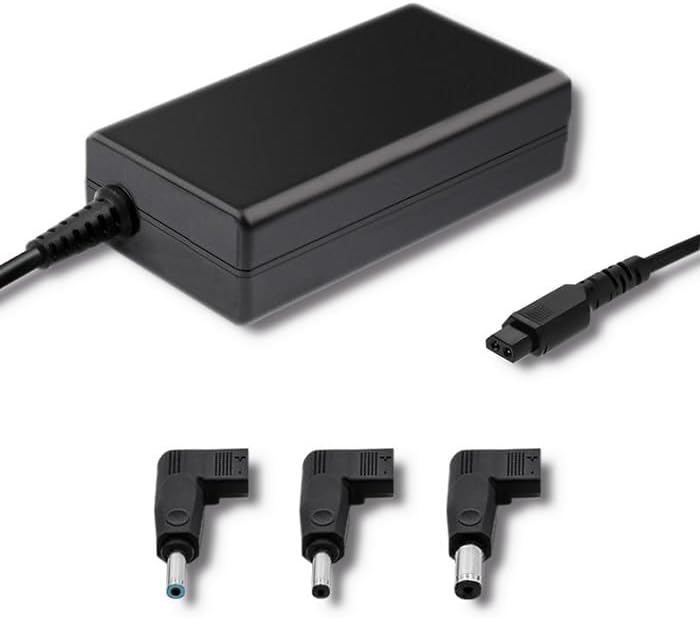
شڪل 3.1: سامهون view of the Qoltec 51758 power adapter showing the main unit and three common interchangeable tips.

شڪل 3.2: پوئتي view of the Qoltec 51758 power adapter, highlighting the AC input port and the three interchangeable tips.
The adapter features a robust design with a standard AC input port and a DC output cable that connects to the interchangeable tips. These tips ensure a secure and correct fit for various HP notebook models.
4. سيٽ اپ
- Identify the Correct Tip: Select the interchangeable tip that matches the power input port of your HP notebook. Ensure it fits snugly and securely.
- Connect the Tip: Attach the selected tip to the DC output cable of the Qoltec 51758 adapter.
- نوٽ بڪ سان ڳنڍيو: Insert the connected tip into the power input port of your HP notebook.
- پاور آئوٽليٽ سان ڳنڍيو: Plug the AC input cable of the adapter into a standard wall power outlet.
- ڪنيڪشن جي تصديق ڪريو: Confirm that the power indicator light (if present on your notebook or adapter) illuminates, indicating a successful power connection.
5. آپريٽنگ
Once properly set up, the Qoltec 51758 adapter operates automatically to provide power to your connected HP notebook. It will charge the notebook's battery and/or power the notebook directly.
- چارج ڪرڻ: When connected, the adapter will charge your notebook's battery until it reaches full capacity.
- سڌي طاقت: The adapter can also power your notebook directly, even if the battery is fully charged or removed (if supported by the notebook).
- حفاظتي خاصيتون: The adapter is equipped with built-in protections against overvoltage, overload, short circuit, and overheating. In case of an anomaly, the adapter may temporarily cease operation to protect itself and the connected device. Disconnect and reconnect to reset if this occurs.
6. سار سنڀال
Proper maintenance ensures the longevity and optimal performance of your adapter.
- صفائي: صفائي ڪرڻ کان اڳ اڊاپٽر کي سڀني بجلي ذريعن ۽ ڊوائيسز کان ڌار ڪريو. مٿاڇري کي صاف ڪرڻ لاءِ نرم، سڪل ڪپڙو استعمال ڪريو. مائع صاف ڪندڙ يا ايروسول استعمال نه ڪريو.
- اسٽوريج: جڏهن استعمال ۾ نه هجي، ته اڊاپٽر کي سڌي سج جي روشني ۽ انتهائي گرمي پد کان پري ٿڌي، سڪل جاءِ تي رکو. نقصان کان بچڻ لاءِ ڪيبلن کي مضبوطيءَ سان وڄائڻ کان پاسو ڪريو.
- ڪيبل جي سنڀال: Regularly inspect the power cables and connectors for any signs of wear, cuts, or damage. Replace if necessary.
7. مسئلا حل ڪرڻ
| مسئلو | ممڪن سبب | حل |
|---|---|---|
| Adapter not providing power. | No power from outlet; loose connection; damaged cable/adapter. | Check outlet with another device. Ensure all connections are secure. Inspect cables for damage. |
| Notebook not charging. | Incorrect tip used; notebook power port issue; adapter fault. | Verify the correct tip is used and fully inserted. Test with another compatible adapter if possible. |
| اڊاپٽر گرم محسوس ٿئي ٿو. | Normal operation under load; poor ventilation; overload. | Ensure adequate ventilation around the adapter. If excessively hot, disconnect and allow to cool. Reduce load if possible. |
If the problem persists after attempting these solutions, please contact Qoltec customer support.
8. وضاحتون
| خاصيت | تفصيل |
|---|---|
| برانڊ | ڪولٽيڪ |
| ماڊل | 51758 |
| واتtage | 65 واٽ |
| پيداوار جي ماپ | 2.79 x 24.64 x 16.51 سينٽي |
| شيءِ جو وزن | 214 گرام |
| مطابقت رکندڙ ڊوائيسز | HP Notebooks |
| حفاظتي خاصيتون | اوور وولtage, Overload, Short Circuit, Overheat Protection |
| ڪنيڪٽر جو قسم | Interchangeable DC Power Tips |
| رابطي ٽيڪنالاجي | Wired Power Adapter |
| تاريخ پهرين دستياب | 29 اپريل 2022 |
نوٽ: وضاحت بغير اطلاع جي تبديلي سان ٿي سگھي ٿي.
9. وارنٽي ۽ سپورٽ
Qoltec products are manufactured to high quality standards. For information regarding warranty coverage, terms, and conditions, please refer to the warranty card included with your product or visit the official Qoltec webسائيٽ.
For technical support, troubleshooting assistance, or inquiries about replacement parts, please contact Qoltec customer service through their official channels. Have your product model number (51758) and purchase details ready when contacting support.
Qoltec Official Webسائيٽ: www.qoltec.com (نوٽ: هي هڪ جڳهه وارو آهي URL, please refer to actual Qoltec webحمايت لاء سائيٽ.)


