1. تعارف
This manual provides comprehensive instructions for the setup, operation, and maintenance of your DIGITUS 2D Barcode Scanner (Model: DA-81002). This device is designed for efficient and accurate scanning of 1D and 2D barcodes, including QR codes, supporting bi-directional scanning at 200 scans/sec. Please read this manual thoroughly before using the scanner to ensure proper functionality and longevity.
2. دٻي ۾ ڇا آهي
پيڪيج کولڻ تي، مھرباني ڪري تصديق ڪريو ته سڀئي جزا موجود آھن ۽ نقصان کان بچيل آھن:
- 1 x 2D barcode hand scanner, QR code compatible
- 1 x scanner holder
- 1 x cable, USB - RJ45, 2 m
- 1 x تڪڙي انسٽاليشن گائيڊ (QIG)
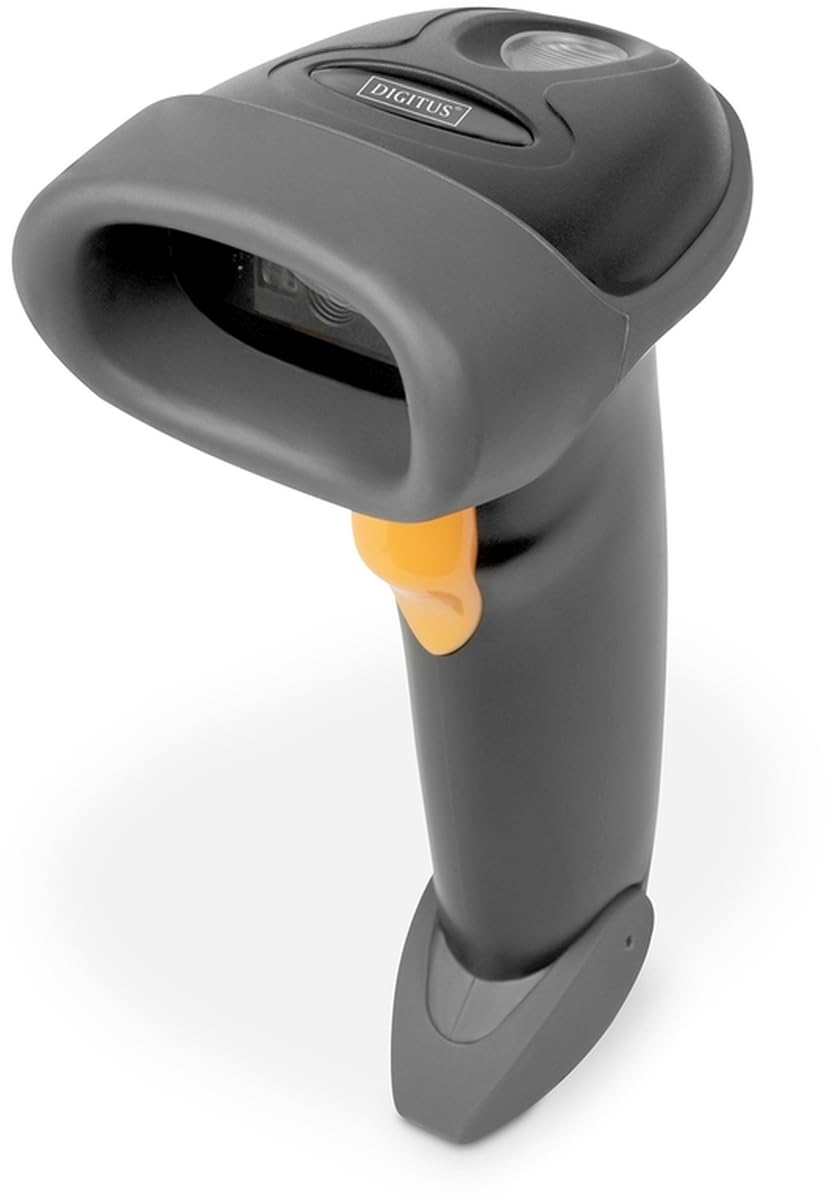
Image: The DIGITUS 2D Barcode Scanner, shown with its included stand and USB-RJ45 cable. The scanner is dark grey with an orange trigger button.
3. سيٽ اپ
- ڪيبل ڳنڍيو: Insert the RJ45 end of the provided cable into the port at the base of the barcode scanner. Ensure it clicks securely into place.
- هوسٽ ڊيوائس سان ڳنڍيو: Plug the USB end of the cable into an available USB port on your computer or point-of-sale (POS) system.
- ڊرائيور جي انسٽاليشن (پلگ ۽ پلي): The scanner is typically plug-and-play and should be recognized automatically by most operating systems (Windows, macOS, Linux). No specific driver installation is usually required. If prompted, allow the system to install necessary drivers.
- اسڪينر کي جاءِ ڏيو: Place the scanner in its holder for hands-free operation, or hold it comfortably for handheld scanning.
- ٽيسٽ اسڪين: Open a text editor (e.g., Notepad, Word) or a compatible application. Scan a known barcode. The data should appear in the open application.
4. آپريٽنگ هدايتون
The DIGITUS 2D Barcode Scanner is designed for ease of use. Follow these steps for effective scanning:
- پاور آن: The scanner powers on automatically when connected to a powered USB port. A successful power-on is usually indicated by a short beep and/or a light indicator.
- مقصد: Point the scanning window towards the barcode you wish to scan. Ensure the entire barcode is within the scanner's field of view.
- اسڪيننگ: Press and hold the trigger button (orange button on the handle). A red aiming beam or illumination light will appear. Position the scanner so the aiming beam crosses the center of the barcode.
- ڪامياب اسڪين: Upon a successful scan, the scanner will emit a short beep and/or the indicator light will flash. The scanned data will be transmitted to your connected device as if typed via a keyboard.
- Bi-Directional Scanning: The scanner supports bi-directional scanning, meaning it can read barcodes regardless of their orientation, improving scanning efficiency.
- QR Code Compatibility: This scanner is fully compatible with QR codes, allowing for versatile data capture.
5. سار سنڀال
مناسب سار سنڀال توهان جي بارڪوڊ اسڪينر جي ڊگهي عمر ۽ بهترين ڪارڪردگي کي يقيني بڻائي ٿي:
- اسڪيننگ ونڊو صاف ڪرڻ: اسڪيننگ ونڊو کي باقاعدي طور تي نرم، لِنٽ فري ڪپڙي سان صاف ڪريو. ضدي داغن لاءِ، ٿورو ڊيampen the cloth with water or a mild, non-abrasive cleaner. Avoid harsh chemicals or abrasive materials that could scratch the window.
- عام صفائي: Wipe the exterior of the scanner with a soft, dry cloth to remove dust and dirt.
- ڪيبل جي سنڀال: USB ڪيبل کي گهڻو موڙڻ يا مروڙڻ کان پاسو ڪريو، ڇاڪاڻ ته اهو اندروني تارن کي نقصان پهچائي سگهي ٿو.
- اسٽوريج: جڏهن استعمال ۾ نه هجي، ته اسڪينر کي صاف، سڪل ماحول ۾، انتهائي گرمي پد ۽ سڌي سج جي روشني کان پري رکو.
- قطرن کان پاسو ڪريو: While designed for durability, avoid dropping the scanner, as impact can damage internal components.
6. مسئلا حل ڪرڻ
If you encounter issues with your DIGITUS 2D Barcode Scanner, refer to the following common problems and solutions:
| مسئلو | ممڪن سبب | حل |
|---|---|---|
| اسڪينر آن نٿو ٿئي. | No power from USB port; loose cable connection. | Ensure USB cable is securely connected to both scanner and host device. Try a different USB port or host device. |
| اسڪينر بارڪوڊ نه ٿو پڙهي. | Barcode damaged/unreadable; incorrect aiming; scanner not configured for barcode type. | Ensure barcode is clear and undamaged. Aim the scanner correctly. Refer to the QIG for advanced configuration options if specific barcode types are not recognized. |
| اسڪين ٿيل ڊيٽا غلط يا نامڪمل آهي. | Partial scan; software/application issue. | Ensure the entire barcode is within the scanning area. Test with a simple text editor to rule out application-specific issues. |
| Scanner beeps but no data appears. | Host device not receiving data; application not in focus. | Ensure the cursor is active in the target input field. Restart the application or host device. |
7. وضاحتون
Key technical specifications for the DIGITUS 2D Barcode Scanner (Model: DA-81002):
- پيداوار جي ماپ: 1.1 x 9.7 x 6.5 انچ
- شيء جو وزن: 3.88 اونس
- شئي ماڊل نمبر: ڊي اي-81002
- ٺاهيندڙ: DIGIT
- مطابقت رکندڙ ڊوائيسز: Scanner (general purpose)
- طاقت جو ذريعو: ڪنڊڊ اليڪٽرڪ (يو ايس بي ذريعي)
- رابطي ٽيڪنالاجي: USB ڪيبل
- اسڪين جي شرح: 200 fps (فريم في سيڪنڊ)
- بار ڪوڊ مطابقت: 1D and 2D barcodes, including QR Code
- ڪيبل ڊگھائي: 2 meters (USB - RJ45)
8. وارنٽي ۽ سپورٽ
For warranty information and technical support, please refer to the Quick Installation Guide (QIG) included in your product package or visit the official Digitus webسائيٽ. وارنٽي دعوائن لاءِ خريداري جي ثبوت طور پنهنجي خريداري جي رسيد رکو.
For further assistance, you may contact Digitus customer support through their official channels. Details are typically provided in the product documentation or on the manufacturer's webسائيٽ.


