1. پراڊڪٽ ختمview
The Browning Spec Ops Elite HP4 is an advanced trail camera designed for capturing high-quality images and videos of wildlife, particularly in low-light conditions. It features an invisible infrared flash for discreet nighttime recording and a high-resolution sensor for detailed captures. This manual provides essential information for setting up, operating, and maintaining your trail camera.
This bundle includes two Browning BTC-8E-HP4 Spec Ops Elite HP4 Trail Cameras, Blucoil 32GB SDHC Memory Cards, Blucoil AA Batteries, a Blucoil 6.5-FT Combination Cable Lock, and a VidPro USB 2.0 Card Reader.
2. دٻي ۾ ڇا آهي
- 2 x Browning BTC-8E-HP4 Spec Ops Elite HP4 Trail Cameras
- 2 x 6-FT Tree Mount Straps
- 1 x Blucoil 6.5-Foot Multi-Functional Combination Cable Lock with 4-Digit Password Code
- 6 x Blucoil AA Batteries
- 2 x Blucoil 32GB Class 10 SDHC SD Cards
- 1 x VidPro USB 2.0 Card Reader
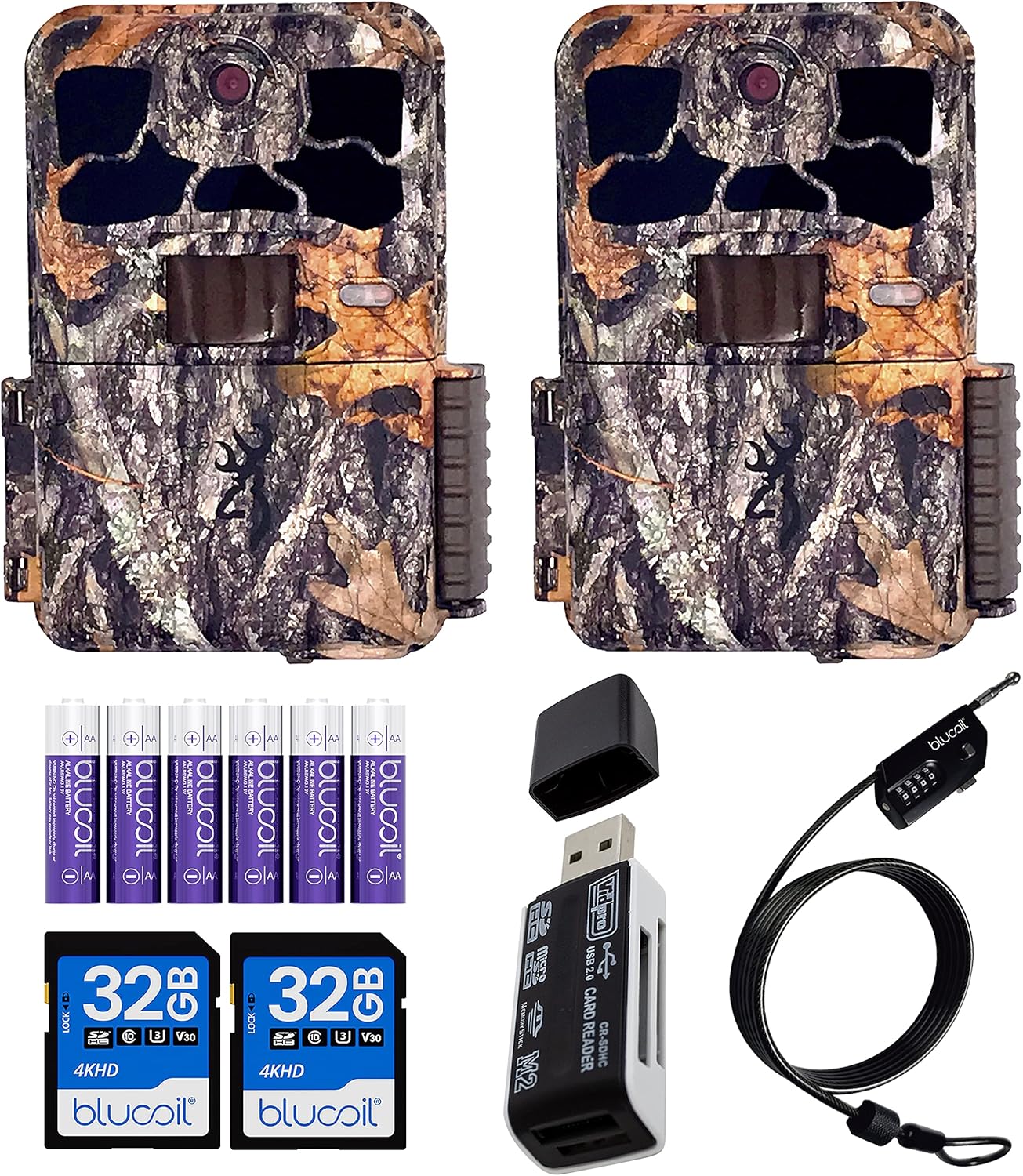
Image: Contents of the Browning Spec Ops Elite HP4 Trail Camera bundle.
3. سيٽ اپ گائيڊ
3.1. بيٽري لڳائڻ
The Spec Ops Elite HP4 camera requires 8 AA batteries for operation. Ensure you use fresh, high-quality alkaline or lithium batteries for optimal performance and battery life.
- Open the camera's housing latch.
- بيٽري جي ڪمري کي ڳولھيو.
- Insert 8 AA batteries, paying close attention to the polarity indicators (+/-) inside the compartment.
- بيٽري جي ڪمري کي محفوظ طور تي بند ڪريو.

Image: Proper battery installation in the trail camera.

Image: Blucoil AA Alkaline Batteries included in the bundle.
3.2. ايس ڊي ڪارڊ داخل ڪرڻ
The camera supports SDXC cards up to 512GB. For best results, use Class 10 or higher SDHC/SDXC cards.
- ڪئميرا هائوسنگ کليل هجڻ سان، ايس ڊي ڪارڊ سلاٽ ڳوليو.
- Insert the Blucoil 32GB SDHC card into the slot until it clicks into place. Ensure the card is inserted in the correct orientation.
- ڪارڊ ڪڍڻ لاءِ، ان کي نرميءَ سان اندر دٻايو جيستائين اهو ٻاهر نه اچي.

Image: SD card slot visible on the camera's internal panel.
3.3. ڪئميرا لڳائڻ
Use the provided tree mount strap to secure the camera to a tree or post. Position the camera at an appropriate height and angle to capture the desired area.
- Thread the strap through the mounting slots on the back of the camera.
- Wrap the strap around the tree and secure it tightly.
- ضرورت مطابق ڪئميرا جي زاويه کي ترتيب ڏيو.

تصوير: پاسي view of the camera showing the mounting strap attachment point.
3.4. Securing with Cable Lock
The Blucoil 6.5-FT Multi-Functional Combination Cable Lock can be used to deter theft. The preset password is 0000, and it can be reset using the included Key Pin.
- Locate the security cable slot on the camera.
- Thread the cable lock through the slot and around the mounting surface (e.g., tree).
- Set your desired 4-digit combination.
- Secure the lock.

Image: Trail camera secured with the Blucoil combination cable lock.
4. آپريٽنگ هدايتون
4.1. پاور آن/آف
To power on the camera, slide the ON/OFF switch to the "ON" position. To power off, slide it to "OFF".
4.2. مينيو ڏانھن وڃو
The camera features a 2-inch colored LCD screen for menu navigation and previewفو فوtage. Use the directional buttons and "E" (Enter) button to navigate through settings.
Image: Camera's internal LCD screen and control layout.
4.3. رڪارڊنگ موڊس
The Spec Ops Elite HP4 offers various recording modes:
- فوٽو موڊ Captures still images up to 22MP resolution.
- وڊيو موڊ: Records Full HD (1920 x 1080p) videos at 30 or 60 frames per second.
- Timelapse Plus Mode: Captures images at set intervals, allowing you to create timelapse videos. These can be viewed on your computer using the Buck Watch Timelapse Viewer (downloadable from Browning's webسائيٽ). Note: The Timelapse Viewer is not compatible with Mac. You may need to change the file extension from TLS to AVI for compatibility.
4.4. Capture Timer
The built-in Capture Timer allows you to control when the camera is active. You can set it to record only during specific hours, such as daytime or nighttime, to conserve battery life and focus on relevant activity.
4.5. Viewing فوtage
توهان اڳ ڪري سگهو ٿاview captured photos and videos directly on the camera's 2-inch color LCD screen. The screen displays information such as time, date, temperature, barometric pressure, and moon phase.
تفصيل لاءِ viewing and management, remove the SD card and insert it into the VidPro USB 2.0 Card Reader. Connect the card reader to your computer to access the files.

Image: VidPro USB 2.0 Card Reader for accessing footage ڪمپيوٽر تي.
5. سار سنڀال
- صفائي: Regularly wipe the camera lens and IR flash window with a soft, lint-free cloth to ensure clear images. Keep the housing free of dirt and debris.
- بيٽري جي سنڀال: Replace batteries when the low battery indicator appears. Remove batteries if the camera will not be used for an extended period to prevent leakage.
- ايس ڊي ڪارڊ انتظام: Format your SD card periodically to maintain optimal performance and prevent data corruption. Back up important footagفارميٽنگ کان اڳ.
- اسٽوريج: جڏهن استعمال ۾ نه هجي، ڪئميرا کي سڌي سج جي روشني ۽ انتهائي گرمي پد کان پري ٿڌي، سڪل جاءِ تي رکو.
6. مسئلا حل ڪرڻ
| مسئلو | ممڪن سبب / حل |
|---|---|
| ڪئميرا پاور نه آهي |
|
| Poor image/video quality at night |
|
| Camera not detecting motion |
|
| SD card error / Cannot save files |
|
| Timelapse videos not playing on Mac |
|
7. وضاحتون
| خاصيت | تفصيل |
|---|---|
| ماڊل | BTC-8E-HP4 |
| تصويري قرارداد | 22MP تائين |
| وڊيو قرارداد | 1920 x 1080p FHD at 30/60FPS |
| ڳولڻ جي حد | 80-فٽ |
| IR فليش رينج | 90-FT (Invisible "Night Vision") |
| ٽرگر جي رفتار | 0.1s-0.7s |
| بحالي وقت | 0.5s |
| LCD اسڪرين | 2" Colored |
| طاقت جو ذريعو | 8 AA بيٽريون |
| SD ڪارڊ جي حمايت | Up to 512GB SDXC card (Class 10 or higher recommended) |
| مطابقت رکندڙ OS | Windows (Buck Watch Timelapse Viewer not compatible with Mac) |
| مواد | زنڪ |
| طول و عرض | 1 x 1 x 1 انچ |
| وزن | 1 پائونڊ |
| پاڻي جي مزاحمت | پنروڪ (IP54) |
8. وارنٽي ۽ سپورٽ
For detailed warranty information and technical support, please refer to the official Browning Trail Cameras webسائيٽ تي وڃو يا سڌو سنئون انهن جي ڪسٽمر سروس سان رابطو ڪريو. ڪنهن به وارنٽي دعوائن لاءِ خريداري جي ثبوت طور پنهنجي خريداري جي رسيد رکو.
توھان جو دورو ڪري سگھو ٿا Browning Store on Amazon وڌيڪ پيداوار جي معلومات لاء.


