1. تعارف
Thank you for choosing OhO Smart Glasses, Model A8 PRO. These innovative sunglasses combine polarized UV400 protection lenses with an open-ear Bluetooth speaker system, allowing you to enjoy audio and manage calls while remaining aware of your surroundings. This manual provides essential information for setup, operation, maintenance, and troubleshooting to ensure optimal performance and longevity of your device.

Figure 1: OhO Smart Glasses Model A8 PRO, featuring a brown frame and black polarized lenses.
2. پيڪيج مواد
مھرباني ڪري تصديق ڪريو ته سڀ شيون توھان جي پيڪيج ۾ موجود آھن:
- OhO Smart Glasses (Model A8 PRO)
- چارجنگ ڪيبل (USB ٽائپ-سي)
- ڪپڙي جي صفائي
- حفاظتي ڪيس
- استعمال ڪندڙ دستي
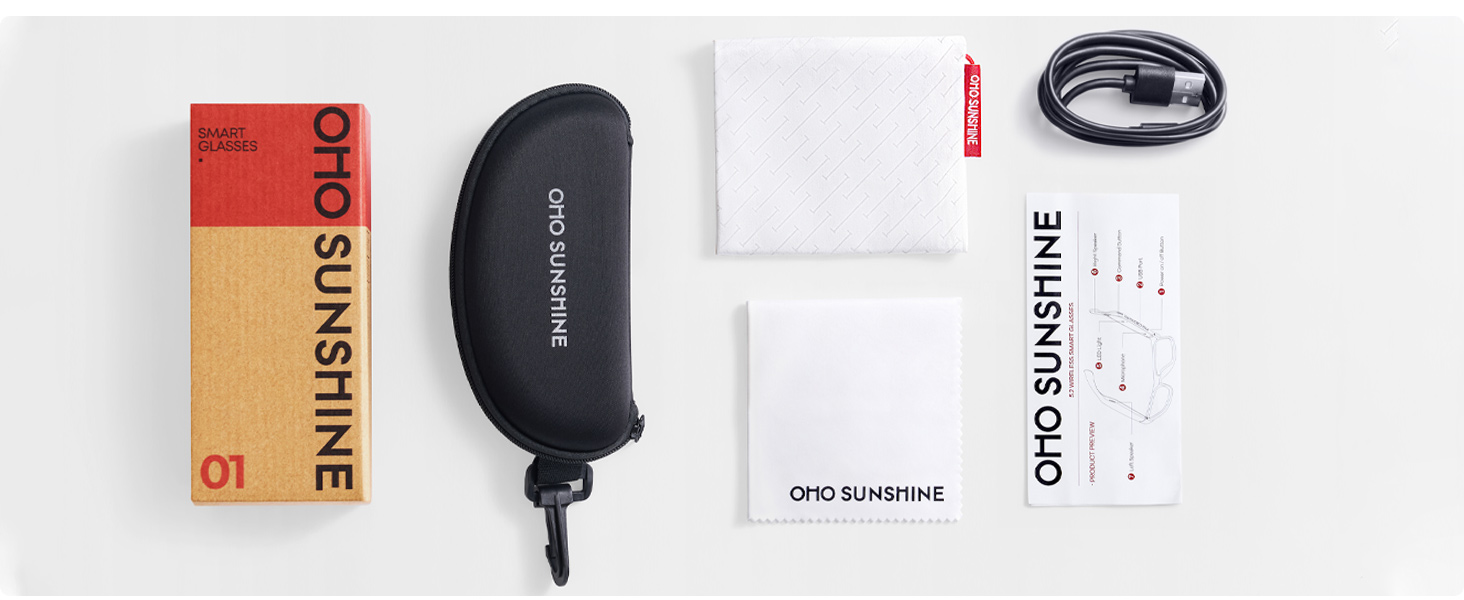
Figure 2: Included accessories with your OhO Smart Glasses.
3. سيٽ اپ
3.1 شيشي کي چارج ڪرڻ
Before first use, fully charge your OhO Smart Glasses. The glasses are equipped with a rechargeable Lithium Metal battery.
- Locate the USB Type-C charging port on the glasses frame.
- Connect the provided USB Type-C cable to the charging port.
- ڪيبل جي ٻئي ڇيڙي کي معياري USB پاور اڊاپٽر (شامل نه آهي) يا ڪمپيوٽر جي USB پورٽ سان ڳنڍيو.
- The indicator light will show charging status (refer to LED indicator section for details). A full charge typically takes approximately 2 hours.

Figure 3: USB Type-C charging cable for your device.
3.2 بلوٽوٽ جوڙي
To connect your OhO Smart Glasses to your smartphone or other Bluetooth-enabled device:
- Ensure the glasses are charged and powered off.
- Press and hold the power button on the glasses until the LED indicator flashes rapidly (usually blue and red), indicating pairing mode.
- On your smartphone, navigate to the Bluetooth settings and turn Bluetooth on.
- ڳولھيو available devices. The glasses will appear as 'OhO Smart Glasses' or a similar name.
- Select the glasses from the list to pair. Once connected, the LED indicator will typically show a slow blue flash or turn off, and you may hear an audible confirmation.
Figure 4: OhO Smart Glasses utilize Bluetooth 5.2 for stable connectivity.
4. آپريٽنگ هدايتون
4.1 پاور آن/آف
- پاور آن: Press and hold the power button for approximately 3 seconds until the LED indicator lights up and you hear a power-on prompt.
- بجلي بند: Press and hold the power button for approximately 5 seconds until the LED indicator turns off and you hear a power-off prompt.
4.2 آڊيو پلے بیک
Once paired with your device, you can stream audio directly to your glasses' open-ear speakers.
- راند/روڪ: Short press the multi-function button (often the same as the power button or a dedicated play/pause button).
- اڳيون ٽريڪ: ملٽي فنڪشن بٽڻ کي ٻٽي دٻايو.
- پويون ٽريڪ: ملٽي فنڪشن بٽڻ کي ٽي ڀيرا دٻايو.
- حجم مٿي حجم اپ بٽڻ کي دٻايو.
- حجم ھيٺ حجم ھيٺ بٽڻ کي دٻايو.

Figure 5: Open-ear speaker system integrated into the glasses frame.
4.3 ڪال مئنيجمينٽ
The integrated microphone allows for hands-free phone calls.
- جواب ڏيو ڪال: جڏهن ڪال اچي ته ملٽي فنڪشن بٽڻ کي مختصر دٻايو.
- ڪال ختم ڪريو: ڪال دوران ملٽي فنڪشن بٽڻ کي مختصر دٻايو.
- ڪال رد ڪريو: جڏهن ڪال اچي ته ملٽي فنڪشن بٽڻ کي 2 سيڪنڊن لاءِ دٻايو ۽ رکو.
4.4 وائس ڪنٽرول
Activate your device's voice assistant (Siri, Google Assistant, Cortana) for hands-free commands.
- وائس اسسٽنٽ کي فعال ڪريو. Double-press the multi-function button (or refer to specific model instructions if different).

Figure 6: Hands-free voice control for convenient interaction.
5. سار سنڀال
5.1 صفائي
- Use the provided cleaning cloth to gently wipe the lenses and frame.
- For stubborn smudges, use a lens cleaning spray specifically designed for eyewear. Avoid harsh chemicals or abrasive materials.
- Do not submerge the glasses in water. While they offer some water resistance (IP44), direct submersion can cause damage.
5.2 اسٽوريج
- جڏهن استعمال ۾ نه هجي، ته چشمن کي انهن جي حفاظتي ڪيس ۾ محفوظ ڪريو ته جيئن ڇڪڻ ۽ نقصان کان بچي سگهجي.
- Avoid exposing the glasses to extreme temperatures (hot or cold) or direct sunlight for extended periods, as this can affect battery life and frame integrity.
5.3 بيٽري جي سنڀال
- بيٽري جي زندگي کي وڌائڻ لاءِ، بيٽري کي بار بار مڪمل طور تي چارج ڪرڻ کان پاسو ڪريو.
- Charge the glasses regularly, even if not used for a long time, to maintain battery health.
6. مسئلا حل ڪرڻ
| مسئلو | ممڪن سبب | حل |
|---|---|---|
| پاور نه ٿو ڪري سگھجي | گھٽ بيٽري | چشمي کي مڪمل طور تي چارج ڪريو. |
| بلوٽوٿ ذريعي جوڙو نه ٿو ٺاهي سگهجي | Glasses not in pairing mode; Bluetooth off on device; already paired to another device | Ensure glasses are in pairing mode. Turn Bluetooth on your device. Disconnect from other devices. |
| آواز ڪونهي | Volume too low; not connected; audio source issue | Increase volume on glasses and connected device. Verify Bluetooth connection. Check audio source. |
| وائس اسسٽنٽ جواب نه ڏئي رهيو آهي | Incorrect activation; device settings | Ensure correct button press for activation. Check voice assistant settings on your connected device. |
7. وضاحتون
- ماڊل: A8 پرو
- برانڊ: اوهه سج
- پيداوار جي ماپ: 6.3 x 5.71 x 1.85 انچ
- شيء جو وزن: 1.28 اونس
- بلوٽوت ورزن: 5.2
- بيٽري: 1 ليتيم ڌاتو جي بيٽري (شامل)
- بيٽري جي زندگي: Up to 10 hours of audio playback (approximate)
- لينس جو قسم: Polarized, 100% UV400 Protection, Impact Resistant (ANSI/ISEA Z87.1-2015 standard)
- آڊيو: Open-ear speaker system, HD Microphone
- ڪنٽرول: Voice control compatible with Siri, Cortana, Google Now
- چارج پورٽ: USB قسم-سي
- پاڻي جي مزاحمت: IP44 (سپلاش مزاحمتي)

Figure 7: Key features including UV400 protection and glare blocking.
8. وارنٽي ۽ سپورٽ
For warranty information or technical support, please refer to the documentation included with your purchase or contact OhO sunshine customer service directly. Details for contacting support can typically be found on the manufacturer's webسائيٽ تي يا پنهنجي پرچون ڪندڙ ذريعي.


