1. تعارف
Thank you for choosing the EDIS 40W Speakers, Model EA014. This manual provides essential information for the safe and efficient use of your new speaker system. Please read this manual thoroughly before installation and operation, and retain it for future reference.
2. حفاظت جي ڄاڻ
محفوظ آپريشن کي يقيني بڻائڻ ۽ نقصان کي روڪڻ لاءِ، مھرباني ڪري ھيٺ ڏنل احتياطي تدبيرن تي عمل ڪريو:
- اسپيڪرن کي پاڻي يا نمي جي سامهون نه آڻيو.
- وينٽيليشن جي افتتاح کي نه روڪيو.
- Place the speakers on a stable surface to prevent falling.
- يونٽ سان فراهم ڪيل صرف پاور اڊاپٽر استعمال ڪريو.
- ٻارن جي پهچ کان پري رکو.
- بجلي جي طوفان دوران يا ڊگهي عرصي تائين استعمال نه ٿيڻ تي بجلي بند ڪريو.
3. پيڪيج مواد
مھرباني ڪري چيڪ ڪريو ته سڀ شيون توھان جي پيڪيج ۾ موجود آھن:
- EDIS 40W Speakers (2 units)
- انفراريڊ ريموٽ ڪنٽرول
- پاور ڪيبل
- آڊيو ڪنيڪشن ڪيبل
- استعمال ڪندڙ جو دستياب (ھي دستاويز)
4. پراڊڪٽ ختمview
The EDIS 40W Speakers are designed to deliver clear audio. They feature a robust design with a steel grille for protection and offer multiple input options.
4.1 Speaker Units

شڪل 1: سامهون view of the EDIS 40W Speakers. Each speaker unit features two drivers and a protective steel grille.
4.2 ريموٽ ڪنٽرول
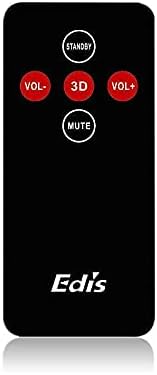
Figure 2: The infrared remote control for the EDIS 40W Speakers. It includes buttons for power, volume adjustment, 3D audio mode, and mute.
4.3 Media Player Panel

Figure 3: The integrated USB and SD Card Media Player panel. This panel allows direct playback from USB drives and SD/MMC memory cards.
5. سيٽ اپ
Follow these steps to set up your EDIS 40W Speakers:
- لڳائڻ: Position the speakers on a flat, stable surface or mount them securely to a wall. Ensure adequate space for ventilation.
- آڊيو ذريعو ڳنڍيو: Connect your audio source (e.g., computer, TV, interactive whiteboard) to the speaker system using the appropriate audio cables.
- پاور ڪنيڪشن: Connect the power cable to the main speaker unit and then plug it into a standard electrical outlet.
- پاور آن: Press the power button on the main speaker unit or the 'STANDBY' button on the remote control to turn on the speakers.
6. آپريٽنگ هدايتون
Your EDIS 40W Speakers can be operated using the integrated controls or the infrared remote control.
6.1 ريموٽ ڪنٽرول استعمال ڪندي
- تيار رهو: Press to turn the speakers on or off (standby mode).
- VOL+: حجم وڌايو.
- Vol-: حجم گھٽايو.
- مٽي: آڊيو آئوٽ کي خاموش يا خاموش ڪريو.
- 3D: Activate or deactivate the 3D audio effect.
6.2 Using the Media Player Panel
Insert a USB drive or SD/MMC card into the respective slot on the media player panel.
- طرفن: Press to switch between input sources (e.g., AUX, USB, SD Card).
- PREVIOUS (◀◀): پوئين ٽريڪ ڏانھن وڃو.
- PLAY/PAUSE (►▌▌): موجوده ٽريڪ کي کيڏيو يا روڪيو.
- NEXT (►►): ايندڙ ٽريڪ ڏانھن وڃو.
- LED: Indicates power status or playback activity.
7. سار سنڀال
Proper maintenance ensures the longevity of your speakers:
- صفائي: Use a soft, dry cloth to clean the speaker surfaces. Do not use liquid cleaners or abrasive materials.
- اسٽوريج: جيڪڏهن اسپيڪرن کي گهڻي عرصي تائين ذخيرو ڪري رهيا آهيو، ته انهن کي بجلي کان ڌار ڪريو ۽ انهن کي ٿڌي، سڪل جاءِ تي محفوظ ڪريو.
- وينٽيليشن: Ensure that the speaker's ventilation openings are not obstructed to prevent overheating.
8. مسئلا حل ڪرڻ
If you encounter issues with your EDIS 40W Speakers, refer to the following common problems and solutions:
| مسئلو | ممڪن سبب | حل |
|---|---|---|
| طاقت نه آهي | Power cable not connected; power outlet not working | پاور ڪيبل ڪنيڪشن چيڪ ڪريو؛ ٻيو آئوٽ ليٽ آزمايو. |
| آواز ڪونهي | Volume too low; incorrect input source; audio cable loose/faulty | Increase volume; press MODE to select correct input; check audio cable connections. |
| ريموٽ ڪنٽرول ڪم نه ڪري رهيو آهي | Batteries depleted; obstruction between remote and speaker; remote not pointed correctly | Replace remote batteries; remove obstructions; point remote directly at the speaker's IR receiver. |
| USB/SD ڪارڊ نه پيو هلي | غلط file format; card/drive not inserted correctly; corrupted media | يقين ڏياريو files are compatible (e.g., MP3); reinsert media; try a different USB drive/SD card. |
9. وضاحتون
| خاصيت | تفصيل |
|---|---|
| برانڊ | EDIS |
| ماڊل نمبر | EA014 |
| وڌ ۾ وڌ اسپيڪر آئوٽ پُٽ پاور | 40 واٽ |
| رنگ | ڀورو |
| شيءِ جو وزن | 8 ڪلو |
| ڪنٽرول جو طريقو | ريموٽ |
| رابطي ٽيڪنالاجي | وائرڊ |
| طاقت جو ذريعو | تار ٿيل برقي |
| آڊيو آئوٽ پٽ موڊ | چوڌاري |
| چڙهڻ جو قسم | فرش جي اسٽوري |
| مواد | ڪاٺ |
| اسپيڪر جو قسم | ٻاھران |
| خاص خاصيتون | Ampزندگي گذاريندڙ |
| مطابقت رکندڙ ڊوائيسز | سڀ ڊوائيسز |
| چوڌاري آواز چينل جي جوڙجڪ | 2 |
10. وارنٽي ۽ سپورٽ
وارنٽي جي معلومات ۽ ڪسٽمر سپورٽ لاءِ، مھرباني ڪري خريداري وقت مهيا ڪيل دستاويزن جو حوالو ڏيو يا پنھنجي پرچون ڪندڙ سان رابطو ڪريو. ڪنھن به وارنٽي دعوائن لاءِ خريداري جو ثبوت رکو.


