1. تعارف
Thank you for choosing the WORX MakerX 20V Mini Grinder WX741.9. This compact and versatile tool is designed for precise cutting, grinding, and sanding tasks. Featuring a brushless motor for extended life and efficiency, and compatible with the WORX PowerShare system, it offers portability and convenience for various projects. Please read this manual thoroughly before operating the tool to ensure safe and effective use.
2. حفاظتي هدايتون
بجلي جا اوزار استعمال ڪرڻ وقت باهه، بجليءَ جي جھٽڪي، ۽ ذاتي زخمن جي خطري کي گهٽائڻ لاءِ هميشه بنيادي حفاظتي احتياطن تي عمل ڪريو.
- اکين جي حفاظت جو لباس: Always wear appropriate eye protection, such as safety goggles, to shield against flying debris.
- ٻڌڻ جي حفاظت پائڻ: Use ear protection during extended operation to prevent hearing damage.
- محفوظ ورڪ پيس: هميشه clamp يا ٻي صورت ۾ ڪم جي ٽڪري کي محفوظ ڪريو ته جيئن آپريشن دوران حرڪت کي روڪيو وڃي.
- مضبوط گرفت برقرار رکو: Hold the tool firmly with both hands if possible, or with one hand if designed for single-hand operation, ensuring stable control.
- ڪم واري علائقي کي صاف رکو: Cluttered areas invite accidents. Ensure your workspace is well-lit and free of obstructions.
- حادثاتي شروعات کان بچو: Ensure the switch is in the off position before connecting to a power source or battery pack, picking up or carrying the tool.
- صحيح لوازمات استعمال ڪريو: Only use accessories specifically designed and rated for this tool. Incorrect accessories can be hazardous.
- استعمال کان اڳ اوزار جو معائنو ڪريو: Check for damaged parts, misalignment, binding of moving parts, breakage of parts, and any other condition that may affect the tool's operation.
- بجلي بند ڪريو: Always disconnect the tool from the PowerShare hub or remove the battery pack before making any adjustments, changing accessories, or storing the tool.
3. پيڪيج مواد
پڪ ڪريو ته هيٺ ڏنل سڀئي شيون توهان جي پيڪيج ۾ شامل آهن. جيڪڏهن ڪا به شيءِ غائب يا خراب آهي، مهرباني ڪري ڪسٽمر سپورٽ سان رابطو ڪريو.
- WORX MakerX 20V Mini Grinder WX741.9 (Bare Unit)
- (1) Cutting wheel 50 mm x 10 mm
- (1) Flap wheel sander 50mm x 10mm
- (1) Grinding wheel 50 mm x 10 mm
- (1) Hex Key
- (1) M4*10 سکرو
- (1) سکرو ڪلamp M4*10
- (2) ST2.0*10 Screws

Image 3.1: The WORX MakerX Mini Grinder WX741.9 shown with its various included accessories, including cutting, grinding, and sanding wheels, a hex key, and mounting hardware.
4. سيٽ اپ
4.1 Connecting to PowerShare Hub
The MakerX Mini Grinder WX741.9 is a bare unit and requires a WORX PowerShare 20V battery and MakerX hub (sold separately) for operation. Connect the grinder's cable to the output port on the MakerX hub.

Image 4.1: A user connecting the power cable of the MakerX Mini Grinder to the MakerX PowerShare hub, which provides power from a 20V battery.
4.2 Attaching Accessories (Wheels)
To attach a cutting, grinding, or sanding wheel:
- Ensure the tool is disconnected from the PowerShare hub.
- Press and hold the spindle lock button (if present) or use the hex key to loosen the retaining screw/nut.
- Place the desired wheel onto the spindle, ensuring it is seated correctly.
- Secure the wheel with the retaining screw/nut, tightening it firmly with the hex key. Do not overtighten.
- Verify the wheel is securely attached and spins freely without wobble before use.
5. آپريٽنگ هدايتون
Before operating, ensure you have read and understood all safety instructions. Always wear appropriate personal protective equipment (PPE).
5.1 پاور آن/آف ۽ اسپيڊ ڪنٽرول
Once connected to the PowerShare hub, turn on the hub. The grinder itself may have an on/off switch. The PowerShare hub typically features a variable speed dial to adjust the rotational speed of the grinder. Start at a lower speed and increase as needed for the material and task.
5.2 ڪٽڻ جا آپريشن
For cutting, use the appropriate cutting wheel. Position the wheel perpendicular to the material. Apply light, consistent pressure, allowing the tool to do the work. Avoid forcing the tool, which can lead to kickback or damage to the wheel.

Image 5.1: The MakerX Mini Grinder being used to precisely cut ceramic tiles, showcasing its suitability for detailed tasks.

Image 5.2: The MakerX Mini Grinder in action, cutting a metal pipe, illustrating its capability for metalwork.
5.3 پيسڻ جا آپريشن
When grinding, use the appropriate grinding wheel. Hold the tool at a slight angle to the workpiece. Move the tool smoothly across the surface to achieve an even finish. Be mindful of sparks and debris, especially when working with metal.

Image 5.3: A user performing a grinding operation with the MakerX Mini Grinder, demonstrating proper handling and safety gear.

Image 5.4: The MakerX Mini Grinder being used to remove rust from a metal garden tool, highlighting its utility for restoration and surface preparation.
5.4 Sanding Operations
For sanding, attach the flap wheel sander. Use gentle, even pressure and move the tool in a consistent pattern to avoid uneven sanding marks. This tool is ideal for fine detail sanding or preparing surfaces.
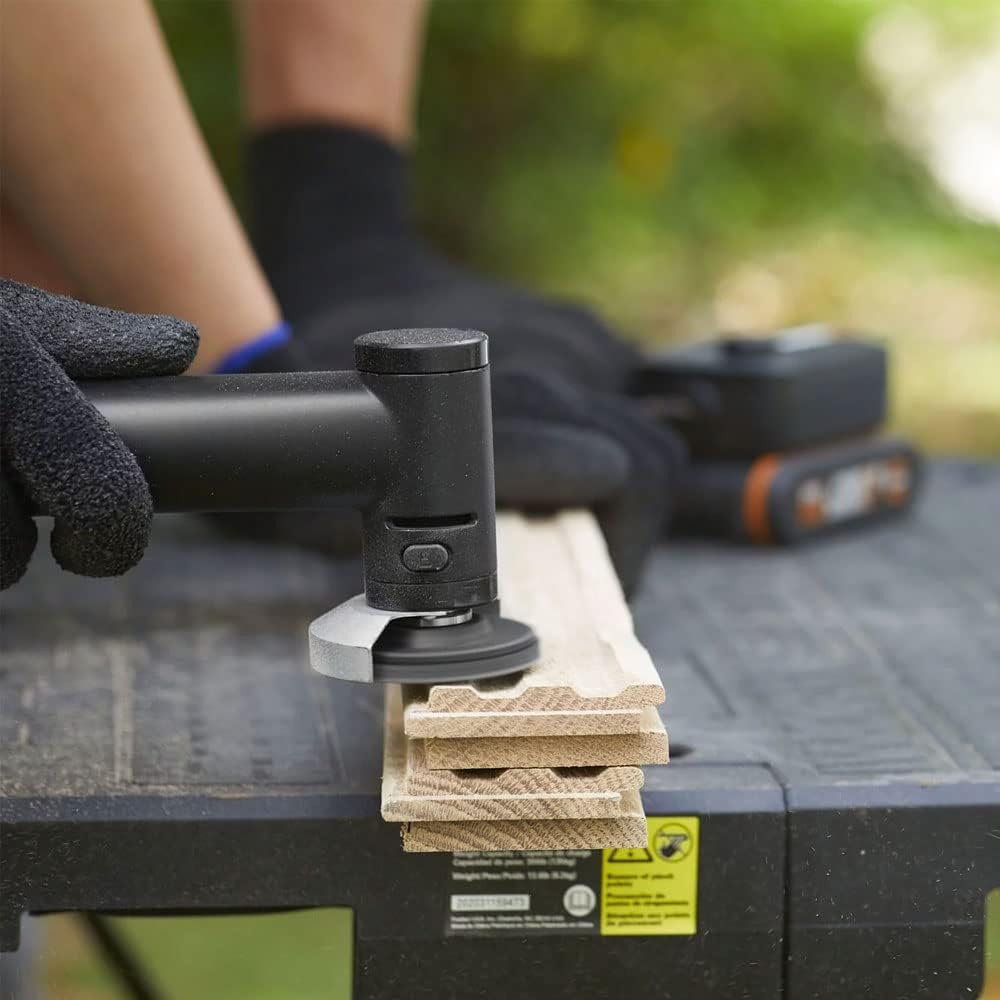
Image 5.5: The MakerX Mini Grinder equipped with a sanding attachment, being used to smooth a wooden surface.
6. سار سنڀال
باقاعده سار سنڀال بهترين ڪارڪردگي کي يقيني بڻائي ٿي ۽ توهان جي اوزار جي زندگي وڌائي ٿي.
- صفائي: After each use, disconnect the tool from the power source and clean the exterior with a soft, damp cloth. Use compressed air to clear dust from ventilation openings. Do not use harsh chemicals or abrasive cleaners.
- سامان جي چڪاس: Regularly inspect cutting, grinding, and sanding wheels for wear, cracks, or damage. Replace worn or damaged accessories immediately.
- اسٽوريج: Store the tool and its accessories in a dry, secure place, out of reach of children.
7. مسئلا حل ڪرڻ
If you encounter issues with your MakerX Mini Grinder, refer to the following common problems and solutions:
| مسئلو | ممڪن سبب | حل |
|---|---|---|
| اوزار شروع نٿو ٿئي | Not connected to PowerShare hub; PowerShare hub not turned on; Battery discharged; Faulty connection. | Ensure grinder is securely connected to the hub. Turn on the PowerShare hub. Check battery charge level and recharge if necessary. Inspect cable and connections for damage. |
| Poor cutting/grinding/sanding performance | Worn or incorrect accessory; Insufficient speed setting; Excessive pressure. | Replace worn accessory. Ensure the correct accessory is used for the task. Adjust speed setting on the PowerShare hub. Apply lighter, consistent pressure. |
| گھڻي واڪ يا شور | Accessory not properly seated or damaged; Loose components. | Disconnect power and re-seat the accessory. Inspect accessory for damage and replace if necessary. Check for any loose screws or parts. |
8. وضاحتون
Technical specifications for the WORX MakerX 20V Mini Grinder WX741.9:
- برانڊ: WORX
- ماڊل نمبر: WX741.9
- جلدtage: 20 Volts (via PowerShare hub)
- طاقت جو ذريعو: Battery Powered (via WORX PowerShare 20V battery and MakerX hub)
- تجويز ڪيل استعمال: Cutting, grinding, sanding
- رنگ: ڪارو/اڇو
- خاص خصوصيت: Compact design, Brushless Motor
- شيء جو وزن: تقريبن 0.4 ڪلوگرام (14.1 آونس)
- وڌ ۾ وڌ گھمڻ واري رفتار: 24,000 RPM
- گھٽ ۾ گھٽ گردش جي رفتار: 14,000 RPM
- پيداوار جي ماپ (L x W x H): 2.83 x 1.26 x 7.4 انچ
- مواد: پلاسٽڪ
9. وارنٽي ۽ سپورٽ
For warranty information, technical support, or to purchase replacement parts and accessories, please visit the official WORX webسائيٽ تي وڃو يا انهن جي ڪسٽمر سروس ڊپارٽمينٽ سان رابطو ڪريو. وارنٽي دعوائن لاءِ خريداري جي ثبوت طور پنهنجي خريداري جي رسيد رکو.
WORX Customer Support: Please refer to the contact information provided with your PowerShare hub or on the official WORX webسائيٽ.


