تعارف
This manual provides instructions for the Easytry123 replacement remote control designed for various Sanyo Room Air Conditioner models. This remote offers essential functions for controlling your air conditioning unit. Please note that as a replacement unit, some advanced or specific functions of your original remote may not be supported. Refer to the compatible model list to ensure this remote is suitable for your air conditioner.
اهم نوٽ: This remote control requires 2 AAA batteries (not included) for operation. No programming is typically required; simply insert batteries and point towards your air conditioner unit.
سيٽ اپ ڪريو
1. بيٽري لڳائڻ
ريموٽ ڪنٽرول کي هلائڻ لاءِ ٻه (2) AAA بيٽريون گهربل آهن. بيٽريون داخل ڪرڻ وقت صحيح پولارٽي کي يقيني بڻايو.
- ريموٽ ڪنٽرول جي پٺي تي بيٽري جي خاني کي ڳوليو.
- ان کي کولڻ لاءِ بيٽري جي ڪمپارٽمينٽ جي ڍڪ کي هيٺئين طرف سلائڊ ڪريو.
- Insert two AAA batteries, matching the positive (+) and negative (-) terminals as indicated inside the compartment.
- بيٽري جي ڪمپارٽمينٽ جي ڍڪ کي واپس جاءِ تي سلائڊ ڪندي تبديل ڪريو جيستائين اهو محفوظ طور تي ڪلڪ نه ڪري.

شڪل 1: ريموٽ ڪنٽرول جي پوئين پاسي بيٽري جو ڪمپارٽمينٽ.
2. شروعاتي استعمال
Once batteries are installed, the remote control is ready for use. Point the remote control directly at the infrared receiver on your Sanyo air conditioner unit. There is typically no pairing or programming required for this replacement remote.
آپريٽنگ هدايتون
هي سيڪشن توهان جي ريموٽ ڪنٽرول تي بٽڻن جي ڪمن جي تفصيل ڏئي ٿو.
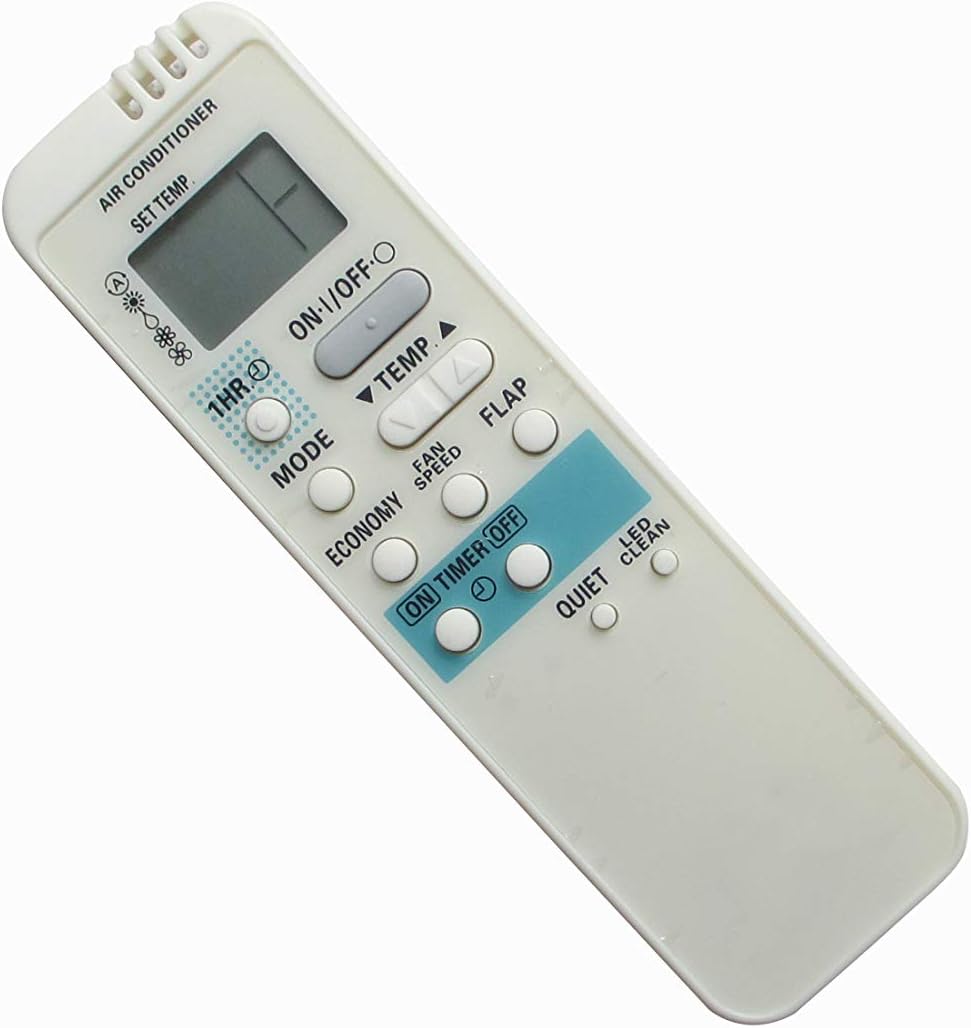
شڪل 2: سامهون view ريموٽ ڪنٽرول جي.
| بٽڻ | فنڪشن |
|---|---|
| آن/بند | ايئر ڪنڊيشنر يونٽ کي آن يا آف ڪري ٿو. |
| ٽيمپ ▲ / ▼ | گهربل درجه حرارت جي سيٽنگ کي مٿي يا هيٺ ترتيب ڏئي ٿو. |
| موڊ | Cycles through operating modes (e.g., Cool, Dry, Fan, Heat - if supported by AC unit). |
| پکي جي رفتار | فين جي رفتار کي ترتيب ڏئي ٿو (مثال طور، گهٽ، وچولي، تيز، آٽو). |
| فلاپ | Controls the swing function of the air conditioner's louver/flap. |
| اقتصاديات | توانائي بچائڻ واري موڊ کي چالو يا غير فعال ڪري ٿو. |
| ON TIMER / OFF TIMER | Sets a timer for the air conditioner to turn on or off automatically. (Specific timer setting instructions may vary by AC unit and are not directly controlled by this remote's simple buttons). |
| 1 ايڇ | Likely a quick timer setting, possibly for 1 hour operation or delay. |
| خاموش | Activates a quiet operation mode, reducing fan noise. |
| LED CLEAN | May activate a self-cleaning function or control an indicator light on the AC unit. |
سار سنڀال
بيٽري مٽائڻ
Replace batteries when the remote control's range decreases or if the display becomes dim or unresponsive. Always replace both batteries at the same time with new AAA batteries.
صفائي
ريموٽ ڪنٽرول کي نرم، سڪل ڪپڙي سان صاف ڪريو. مائع صاف ڪندڙ يا رگڙيندڙ مواد استعمال نه ڪريو، ڇاڪاڻ ته اهي ريموٽ جي مٿاڇري يا اندروني حصن کي نقصان پهچائي سگهن ٿا.
ذخيرو
جيڪڏهن ريموٽ ڪنٽرول گهڻي عرصي تائين استعمال نه ٿيندو، ته پوءِ بيٽريون هٽايو ته جيئن ريموٽ کي رسڻ ۽ امڪاني نقصان کان بچائي سگهجي.
مشڪلاتون
- ريموٽ جواب نه ڏئي رهيو آهي:
- پڪ ڪريو ته ريموٽ سڌو سنئون ايئر ڪنڊيشنر جي رسيور ڏانهن اشارو ڪيو ويو آهي.
- چيڪ ڪريو ته بيٽريون صحيح پولارٽي سان صحيح طرح سان داخل ڪيون ويون آهن.
- نئين سان پراڻي بيٽرين کي تبديل ڪريو.
- Ensure there are no obstructions between the remote and the air conditioner.
- ڪجھ ڪم ڪم نه ڪري رهيا آهن:
- This is a replacement remote; some advanced or specific functions of your original Sanyo remote may not be supported.
- تصديق ڪريو ته توهان جو ايئر ڪنڊيشنر ماڊل مطابقت رکندڙ طور تي درج ٿيل آهي.
- ڊسپلي مدھم يا خالي آهي:
- بيٽرين کي تبديل ڪريو.
وضاحتون
| خاصيت | تفصيل |
|---|---|
| برانڊ | ايزيٽري 123 |
| مطابقت رکندڙ ڊوائيسز | Sanyo Room Air Conditioners (Models: RCS-3PSS4E, RCS-4PIS4E, RCS-BH80UA-WL, RCS-6MHVPUS4E, C2462R, SAP-KR74E, SAP-KR94EH, SAP-KR94E, SAP-XRV96EH) |
| رابطي ٽيڪنالاجي | انفراريڊ |
| ڪنٽرولر جو قسم | بٽڻ ڪنٽرول |
| خاص خصوصيت | Ergonomic ڊيزائن |
| بيٽرين جي ضرورت آهي | 2 x AAA (شامل نه آهي) |
وارنٽي ۽ سپورٽ
As a replacement product, specific warranty details may vary. Please refer to the seller's return policy or contact the seller directly for warranty information and support regarding this product.
For general inquiries or issues, you may contact the manufacturer, Easytry123, through the platform where the product was purchased.


