تعارف
خريد ڪرڻ لاءِ مهربانيasing the Hoco BS40 Sports Wireless Bluetooth Speaker. This manual provides detailed instructions for the proper setup, operation, and maintenance of your device. Please read this manual thoroughly before use to ensure optimal performance and longevity of your speaker.
حفاظت جي ڄاڻ
- اسپيڪر کي انتهائي گرمي پد، سڌي سج جي روشني، يا وڌيڪ نمي جي سامهون نه رکو.
- ڊپ کان پاسو ڪريو يا اسپيڪر کي مضبوط اثرن جي تابع ڪرڻ.
- Keep the speaker away from water and liquids, despite its water-resistant rating, to prevent damage.
- اسپيڪر کي پاڻ ڌار ڪرڻ يا مرمت ڪرڻ جي ڪوشش نه ڪريو. مدد لاءِ قابل سروس اهلڪارن سان رابطو ڪريو.
- صرف مهيا ڪيل چارجنگ ڪيبل يا تصديق ٿيل برابر استعمال ڪريو.
- ٻارن جي پهچ کان پري رکو.
پيڪيج مواد
مھرباني ڪري ھيٺ ڏنل شين لاءِ پيڪيج چيڪ ڪريو:
- Hoco BS40 Wireless Speaker
- چارج ڪيبل
- استعمال ڪندڙ دستي
پيداوار ختمview
اسپيڪر جي حصن ۽ ڪنٽرولن سان پاڻ کي واقف ڪريو.

Image: Hoco BS40 speaker, top-down view, highlighting the control panel and overall design.

Image: Hoco BS40 speaker in an upright position, displaying the side control buttons and the Hoco branding.
ڪنٽرول بٽڻ ۽ بندرگاهن:
- پاور بٽڻ: دٻايو ۽ رکو اسپيڪر کي بند ڪرڻ / بند ڪرڻ لاء.
- موڊ بٽڻ (M): Press to switch between Bluetooth, FM Radio, TF Card, USB, and AUX modes.
- راند/روڪ بٽڻ: Press to play or pause audio. In call mode, press to answer/end calls.
- آواز وڌايو (+)/اڳيون ٽريڪ: حجم وڌائڻ لاءِ مختصر پريس، ايندڙ ٽريڪ لاءِ ڊگهو پريس.
- آواز گهٽ (-) / پوئين ٽريڪ: حجم گهٽائڻ لاءِ مختصر پريس، پوئين ٽريڪ لاءِ ڊگهو پريس.
- TF ڪارڊ سلاٽ: Insert a TF (MicroSD) card for music playback.
- USB پورٽ: موسيقي هلائڻ لاءِ USB فليش ڊرائيو داخل ڪريو.
- ويڪس پورٽ: 3.5 ايم ايم آڊيو ڪيبل ذريعي ٻاهرين آڊيو ڊوائيسز کي ڳنڍيو.
- چارج پورٽ: Connect the charging cable to power the speaker.
سيٽ اپ ڪريو
اسپيڪر کي چارج ڏيڻ
- چارجنگ ڪيبل کي اسپيڪر جي چارجنگ پورٽ سان ڳنڍيو.
- ڪيبل جي ٻئي ڇيڙي کي USB پاور اڊاپٽر (شامل نه آهي) يا ڪمپيوٽر جي USB پورٽ سان ڳنڍيو.
- چارجنگ انڊيڪيٽر لائيٽ چارجنگ دوران روشن ٿيندي.
- Charging typically takes approximately 1.5 hours. The indicator light will change or turn off once fully charged.
پاور آن / آف
- پاور آن ڪرڻ: Press and hold the Power Button for a few seconds until you hear an audible prompt or see the indicator light.
- پاور آف ڪرڻ: Press and hold the Power Button again for a few seconds until you hear an audible prompt or the indicator light turns off.
آپريٽنگ هدايتون
بلوٽوٽ جوئر
- Ensure the speaker is powered on and in Bluetooth mode (indicated by a flashing blue light or an audible prompt). If not, press the 'M' (Mode) button to switch to Bluetooth mode.
- پنهنجي موبائل ڊوائس (اسمارٽ فون، ٽيبليٽ، وغيره) تي بلوٽوٿ کي فعال ڪريو.
- ڳولھيو available Bluetooth devices. You should find "Hoco BS40" in the list.
- Select "Hoco BS40" to connect. Once paired, the speaker will emit an audible confirmation, and the indicator light will stop flashing.
- هاڻي توهان اسپيڪر ذريعي پنهنجي ڊوائيس مان آڊيو هلائي سگهو ٿا.
ايف ايم ريڊيو موڊ
- 'ايم' (موڊ) بٽڻ کي بار بار دٻايو جيستائين توهان ايف ايم ريڊيو موڊ ۾ داخل نه ٿيو.
- To auto-scan for stations, press the Play/Pause button once. The speaker will scan and save available FM stations.
- Use the Volume Up (+) and Volume Down (-) buttons to navigate between saved stations.
TF Card / USB Playback
- Insert a TF (MicroSD) card or a USB flash drive containing MP3 audio files into the respective slot/port.
- The speaker should automatically switch to TF Card or USB mode and begin playback. If not, press the 'M' (Mode) button to select the correct mode.
- Use the Play/Pause, Volume Up (+), and Volume Down (-) buttons to control playback.
ويڪس موڊ
- 3.5 ايم ايم آڊيو ڪيبل جي هڪ پڇاڙي (شامل نه آهي) کي اسپيڪر تي AUX پورٽ سان ڳنڍيو.
- Connect the other end of the audio cable to the audio output jack of your external device.
- Press the 'M' (Mode) button to switch to AUX mode.
- Audio will now play from your external device through the speaker. Control playback from your external device.
Volume Control and Track Navigation
- حجم مٿي '+' بٽڻ کي مختصر دٻايو.
- حجم ھيٺ '-' بٽڻ کي مختصر دٻايو.
- اڳيون ٽريڪ: '+' بٽڻ کي ڊگھو دٻايو.
- پويون ٽريڪ: '-' بٽڻ کي ڊگھو دٻايو.

Image: Hoco BS40 speaker highlighting its versatile connectivity options including Bluetooth, FM, TF card, USB, and AUX.
سار سنڀال
- صفائي: اسپيڪر جي مٿاڇري کي صاف ڪرڻ لاءِ نرم، سڪل ڪپڙو استعمال ڪريو. رگڙيندڙ صاف ڪندڙ يا محلول استعمال نه ڪريو.
- اسٽوريج: اسپيڪر کي ٿڌي، سڪل جاءِ تي رکو جڏهن گهڻي عرصي تائين استعمال ۾ نه هجي.
- بيٽري جي سنڀال: بيٽري جي زندگي کي وڌائڻ لاءِ، پهرين استعمال کان اڳ اسپيڪر کي مڪمل طور تي چارج ڪريو ۽ جيڪڏهن باقاعده استعمال نه ڪيو وڃي ته گهٽ ۾ گهٽ هر ٽن مهينن ۾ هڪ ڀيرو ان کي ري چارج ڪريو.
مشڪلاتون
| مسئلو | ممڪن سبب | حل |
|---|---|---|
| اسپيڪر آن نٿو ٿئي. | بيٽري ختم ٿي وئي آهي. | اسپيڪر کي گهٽ ۾ گهٽ 30 منٽن لاءِ چارج ڪريو. |
| بلوٽوٿ ذريعي جوڙي نه ٿو سگهجي. | اسپيڪر پيئرنگ موڊ ۾ ناهي يا ڊوائيس کان تمام پري آهي. | Ensure speaker is in Bluetooth mode and within 10 meters of your device. Restart both devices. |
| آواز ڪونهي. | Volume is too low or incorrect mode selected. | Increase volume on both speaker and connected device. Press 'M' to ensure correct input mode (Bluetooth, AUX, etc.). |
| ايف ايم ريڊيو جي وصولي خراب آهي. | ڪمزور سگنل. | Move the speaker to an open area or adjust its position for better reception. |
وضاحتون
| خاصيت | تفصيل |
|---|---|
| ماڊل نالو | بي ايس 40 |
| بلوٽوت ورزن | 5.0 |
| اسپيڪر جو قسم | ٻاھران |
| رابطي ٽيڪنالاجي | Bluetooth, FM, TF, USB, AUX |
| وڌ ۾ وڌ اسپيڪر آئوٽ پُٽ پاور | 14 واٽ |
| ٻاھر ٿيل آئوٽ پاور | 7 واٽ |
| بيٽري جي گنجائش | 2400 mAh |
| Music Playback/Call Time | 4 ڪلاڪ يا وڌيڪ |
| چارج ڪرڻ وقت | لڳ ڀڳ 1.5 ڪلاڪ |
| طول و عرض (L x W x H) | 230 x 98 x 94 ملي ايم (9.06 x 3.86 x 3.7 انچ) |
| شيءِ جو وزن | 775 گرام (1.71 پائونڊ) |
| پاڻي مزاحمتي | Yes (IPX5 rating implied by image) |
| مواد | ٿرموپلاسٽڪ پولي يوريٿين |
| رنگ | نيرو |
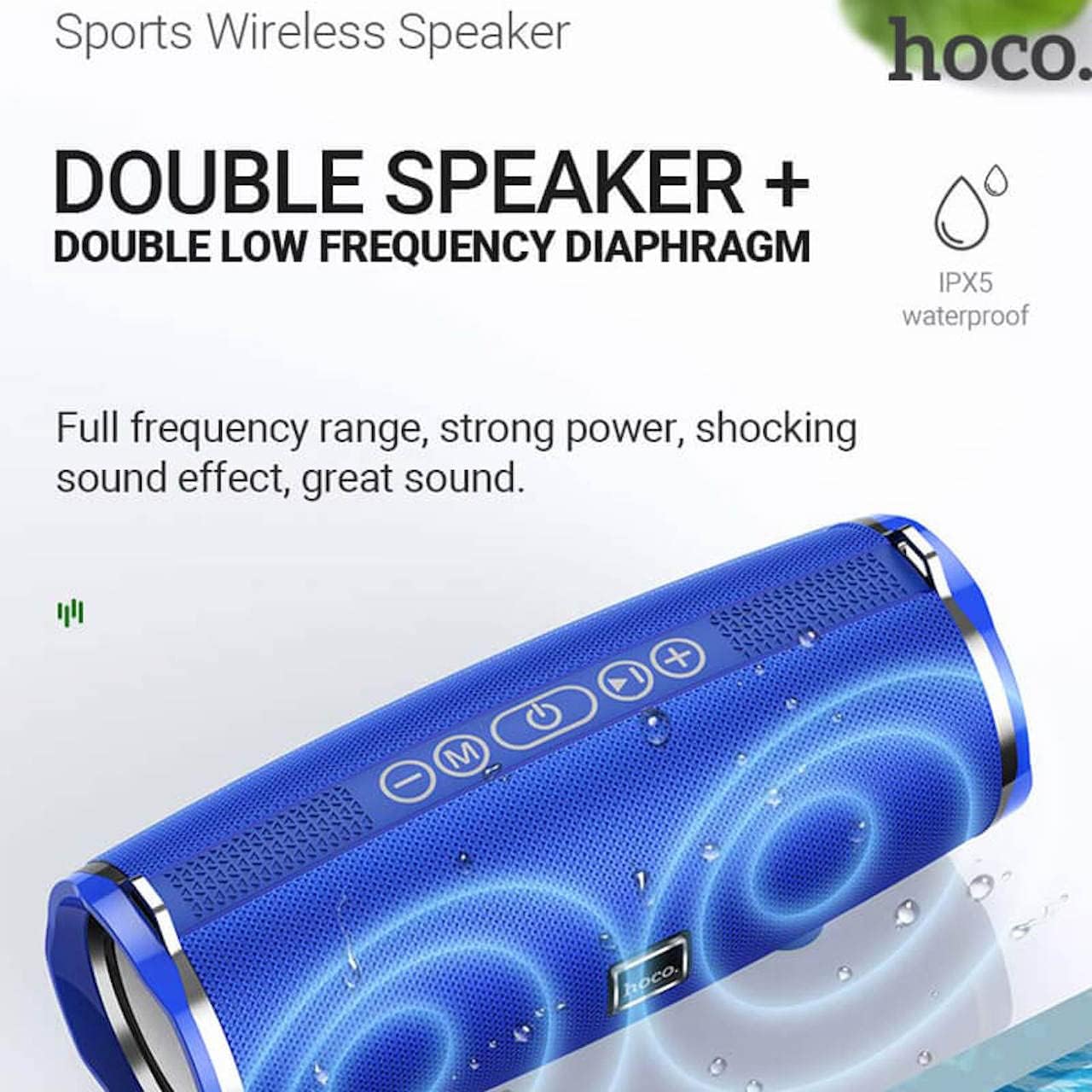
Image: Hoco BS40 speaker highlighting its IPX5 waterproof rating and dual speaker design for enhanced sound.
وارنٽي ۽ سپورٽ
Hoco products are designed and manufactured to the highest quality standards. For warranty information and customer support, please refer to the warranty card included with your product or visit the official Hoco webسائيٽ.
Official Hoco Webسائيٽ: http://www.hocotech.com
مھرباني ڪري وارنٽي دعوائن لاءِ خريد ڪرڻ جو پنھنجو ثبوت رکو.


