تعارف
This manual provides comprehensive instructions for the FANTECH GP12 Revolver USB Gaming Controller. Please read this manual carefully before using the product to ensure proper operation and to maximize your gaming experience.
پيداوار ختمview
The FANTECH GP12 Revolver is a wired gaming controller designed for an immersive gaming experience on PC and PS3. It features a familiar console-like layout and dual vibration feedback motors.
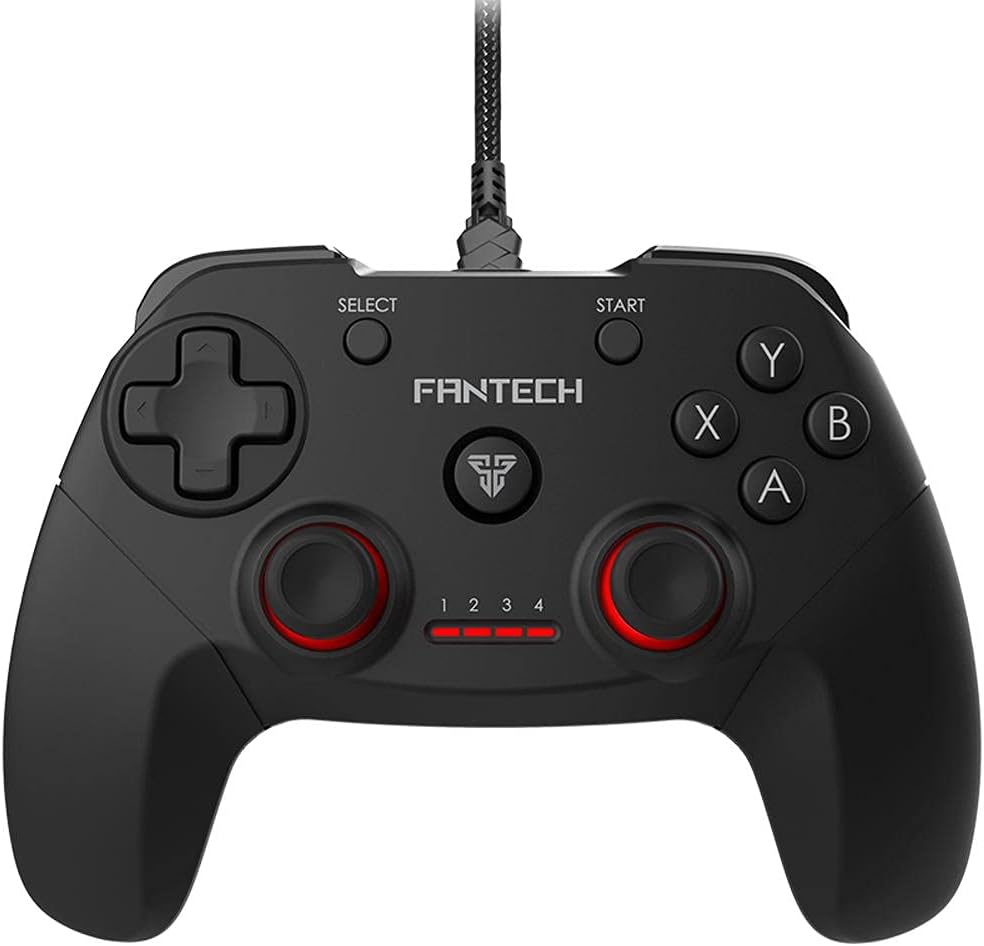
تصوير: سامهون view of the FANTECH GP12 Revolver USB Gaming Controller, showcasinان جي ergonomic ڊيزائن ۽ بٽڻ جي ترتيب جي ڪري.
اهم خاصيتون:
- Familiar Console-Like Layout: Designed for intuitive control, allowing users to pick up and play without a steep learning curve. The controller's shape and button placement mimic traditional console gamepads.
- Dual Vibration Feedback Motors: Provides tactile feedback for in-game actions, enhancing immersion with every hit, crash, and explosion. The motors are strategically placed to deliver realistic sensations.
- Wide Game Compatibility: Compatible with thousands of games on PC and PS3, offering full control across various genres. Simply plug and play to enjoy your favorite titles.
- Ergonomic گرفت: Crafted for comfortable long-term gaming sessions, reducing hand fatigue.
- 17 بٽڻ: Comprehensive button layout for versatile control, including action buttons, directional pad, analog sticks, and shoulder buttons.
- وائرڊ ڪنيڪشن: Reliable USB connection with a 1.8-meter cable, ensuring stable and lag-free gameplay.

Image: A user's hands comfortably gripping the FANTECH GP12 Revolver controller, demonstrating its ergonomic design for extended gameplay.

Image: The FANTECH GP12 Revolver controller with visual representations of vibration waves emanating from its sides, illustrating the dual vibration feedback feature.

Image: A person using the FANTECH GP12 Revolver controller while gaming on a PC setup, highlighting its compatibility with various gaming platforms.
سيٽ اپ ڪريو
ڪنٽرولر کي ڳنڍڻ:
- Locate an available USB port on your PC or PlayStation 3 console.
- Insert the USB connector of the FANTECH GP12 Revolver controller firmly into the USB port.
- The system will automatically detect and install the necessary drivers. This process may take a few moments.
- Once installed, the controller's indicator lights will illuminate, signifying it is ready for use.
Note: For optimal performance, ensure your operating system (Windows 7, Windows 10, or PS3) is up to date.
آپريٽنگ هدايتون
بنيادي ڪنٽرول:
The GP12 Revolver features a standard gamepad layout. Familiarize yourself with the button assignments for your specific game.
- هدايتي پيڊ (ڊي-پيڊ): صحيح هدايت واري ان پٽ لاءِ استعمال ڪيو ويندو آهي، عام طور تي حرڪت يا مينيو نيويگيشن لاءِ.
- اينالاگ اسٽڪس: Provide 360-degree movement and camera control. Pressing them down often activates additional functions (L3/R3).
- ايڪشن بٽڻ (A، B، X، Y): Primary interaction buttons for in-game actions such as jumping, attacking, or confirming selections.
- ڪلهي جا بٽڻ (L1، R1) ۽ ٽرگرز (L2، R2): Located on the top of the controller, used for various actions like aiming, firing, or special abilities.
- START بٽڻ: Typically used to pause games or access in-game menus.
- چونڊيو بٽڻ: Often used for map access, inventory, or other secondary functions.
وائبريشن راءِ:
The dual vibration motors provide immersive feedback during gameplay. This feature is automatically activated in games that support vibration. You will feel vibrations during impacts, explosions, and other significant in-game events.
سار سنڀال
- ڪنٽرولر کي نرم، سڪل ڪپڙي سان صاف ڪري صاف رکو.
- ڪنٽرولر کي انتهائي گرمي پد، نمي، يا سڌي سج جي روشنيءَ ۾ بي نقاب ڪرڻ کان پاسو ڪريو.
- Do not use abrasive cleaners or solvents on the controller.
- Store the controller in a safe place when not in use to prevent damage to the cable or buttons.
مشڪلاتون
ڪنٽرولر جواب نه ڏنو:
- Ensure the USB cable is securely connected to both the controller and the device (PC/PS3).
- Try connecting the controller to a different USB port.
- پنهنجو پي سي يا پي ايس 3 ٻيهر شروع ڪريو.
- Verify that the game you are playing supports gamepad input.
وائبريشن ڪم نه ڪري رهيو آهي:
- پڪ ڪريو ته جيڪا راند توهان کيڏي رهيا آهيو اها وائبريشن فيڊبڪ کي سپورٽ ڪري ٿي.
- راند ۾ سيٽنگون چيڪ ڪريو ته جيئن وائبريشن فعال هجي.
- پڪ ڪريو ته ڪنٽرولر صحيح طرح سان ڳنڍيل آهي.
بٽڻ صحيح ڪم نه ڪري رهيا آهن:
- پڪ ڪريو ته بٽڻن هيٺان ڪو به ملبو نه هجي.
- Test the controller with another game or on a different device to isolate the issue.
وضاحتون
Detailed technical specifications for the FANTECH GP12 Revolver USB Gaming Controller:

Image: Diagram showing the dimensions (154mm x 113mm x 58mm) and key technical specifications of the FANTECH GP12 Revolver controller.
| خاصيت | تفصيل |
|---|---|
| برانڊ | Fantech |
| ماڊل | GP12 Revolver |
| قسم | وائرڊ گيم پيڊ |
| رابطي | USB |
| بٽڻ | 17 پي سي |
| وائبريشن موٽ | Yes (Dual Motors) |
| ڪيبل ڊگھائي | 1.8 ميٽر |
| طول و عرض (L x W x H) | 154 x 113 x 58 ملي ميٽر (تقريبن) |
| وزن | 170 گرام (تقريبن) |
| رنگ | ڪارو / گرين |
| مطابقت رکندڙ پليٽ فارم | PC, PlayStation 3 (PS3) |
| آپريٽنگ سسٽم | Windows 7, Windows 10, PS3 |
وارنٽي ۽ سپورٽ
For warranty information and technical support, please refer to the warranty card included with your product or visit the official Fantech webسائيٽ. وارنٽي دعوائن لاءِ خريداري جو ثبوت رکو.
If you encounter any issues not covered in this manual, please contact Fantech customer support for assistance.


