1. تعارف
Thank you for choosing the PROZOR 4-Way Bi-Directional RCA Stereo Audio Switch. This device allows you to connect multiple audio sources to a single output device, or a single audio source to multiple output devices, using RCA L/R stereo connections. It features a volume control and requires no external power supply, offering a convenient solution for managing your audio setup.
پيڪيج مواد
- 1 x PROZOR 4-Way Bi-Directional RCA Stereo Audio Switch (Model PRR030)
- 1 x RCA Cable (1.5m L/R Stereo Cable)
- 1 x استعمال ڪندڙ دستياب
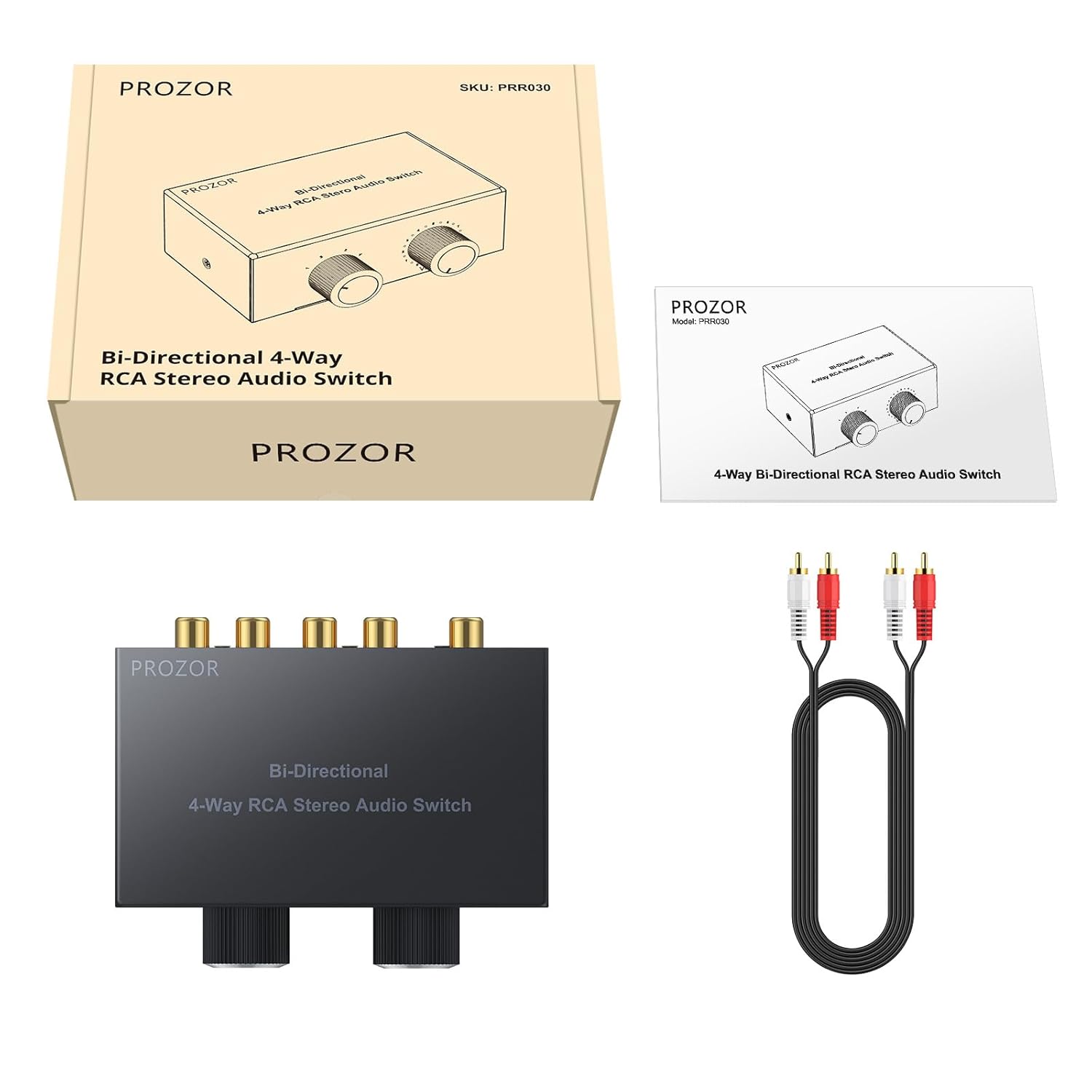
Image: Package contents of the PROZOR RCA Audio Switch, showing the main unit, an RCA cable, and the instruction manual.
2. مصنوعات جون خاصيتون
- Bi-Directional Functionality: Operates as 4 inputs to 1 output, or 1 input to 4 outputs.
- حجم ڪنٽرول: Integrated 0-10 volume adjustment knob to manage audio levels.
- ذريعو چونڊ: Rotary knob for easy switching between connected audio channels.
- اعلي معيار جي تعمير: Features gold-plated RCA interfaces for enhanced signal transmission and anti-interference. Sturdy all-metal casing استحڪام کي يقيني بڻائي ٿو.
- غير فعال ڊيزائن: No external power supply required, ensuring energy efficiency and simple plug-and-play operation.
- ڪمپيڪٽ ڊيزائن: Output and input connectors are located on the same side for convenient wiring and a tidy setup.

تصوير: مٿي view of the PROZOR RCA Audio Switch, highlighting its compact design and control knobs.

Image: Detail of the gold-plated RCA connectors, designed for improved durability and signal quality.
3. سيٽ اپ ۽ تنصيب
The PROZOR RCA Audio Switch is designed for simple plug-and-play operation. No drivers or external power are needed.
اجزاء جي سڃاڻپ
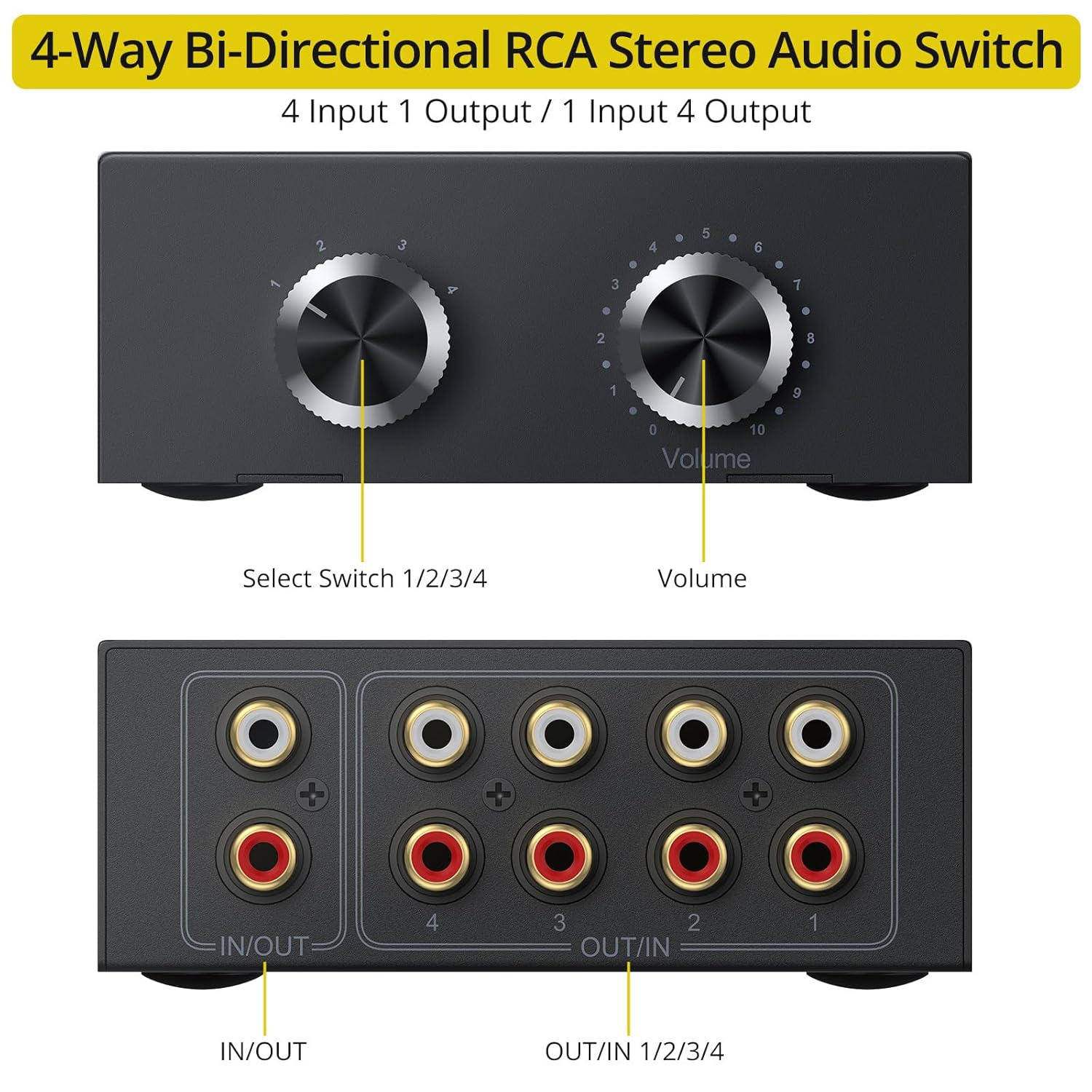
Image: Front and rear panel diagram of the PROZOR RCA Audio Switch, indicating the Select Switch, Volume knob, and RCA input/output ports.
- سوئچ چونڊيو: Rotary knob to choose between channels 1, 2, 3, or 4.
- حجم نوب: Adjusts the output volume from 0 to 10.
- IN/OUT Port: Bi-directional RCA L/R stereo port.
- OUT/IN Ports (1-4): Four bi-directional RCA L/R stereo ports.
ڪنيڪشن موڊس
The switch supports two primary connection configurations:
Mode 1: 4 Inputs to 1 Output
In this mode, you can connect up to four audio source devices (e.g., DVD player, laptop, smartphone, CD player) to the four "OUT/IN" ports (1-4). The single "IN/OUT" port then connects to your audio output device (e.g., active speakers, amplifier). Use the Select Switch to choose which of the four input sources is sent to the output.
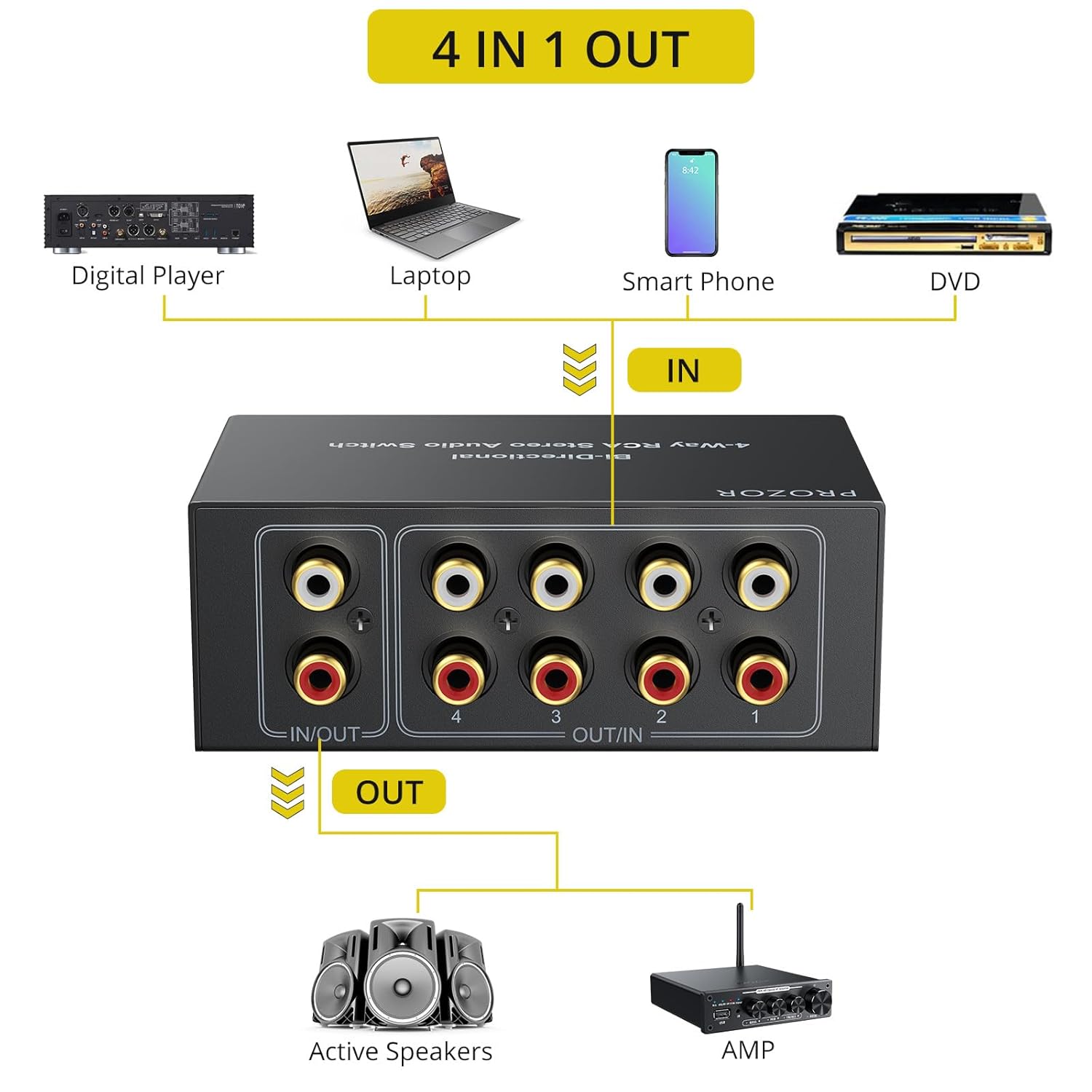
Image: Connection diagram for 4 input devices to 1 output device.
Mode 2: 1 Input to 4 Outputs
In this mode, a single audio source device (e.g., DVD player, laptop) is connected to the "IN/OUT" port. The four "OUT/IN" ports (1-4) are then connected to up to four different audio output devices (e.g., active speakers, amplifier, tube ampهيڊ فون amp). Use the Select Switch to choose which of the four output devices receives the audio signal from the single input.

Image: Connection diagram for 1 input device to 4 output devices.
General Connection Tips
- ڪنيڪشن ٺاهڻ کان اڳ پڪ ڪريو ته سڀئي ڊوائيس بند آهن.
- Use high-quality RCA cables for optimal audio performance. The included 1.5m RCA cable can be used for initial setup.
- Connect the red RCA plug to the right audio channel and the white (or black) RCA plug to the left audio channel on all devices.
- The input and output connectors are conveniently located on the same side of the device to simplify cable management.

Image: The PROZOR switch with cables connected, illustrating the convenient side-mounted input/output ports for organized wiring.

Image: A hand connecting an RCA cable to the switch, demonstrating the use of gold-plated cables for improved audio quality.
4. آپريشن
Once all audio devices are connected, follow these steps to operate your PROZOR RCA Audio Switch:
- پاور آن ڊوائيسز: Turn on all connected audio source and output devices.
- چينل چونڊيو: گھمايو سوئچ کي منتخب ڪريو knob to choose the desired input source (in 4-in-1-out mode) or output destination (in 1-in-4-out mode). The selected channel will be indicated by the knob's position (1, 2, 3, or 4).
- حجم کي ترتيب ڏيو: استعمال ڪريو حجم knob to adjust the audio output level. The volume can be adjusted from 0 (mute) to 10 (maximum). It is recommended to reduce the volume to 0 before switching channels to prevent sudden loud sounds or pops.

Image: A hand adjusting the volume knob on the PROZOR switch, illustrating the volume control feature and the recommendation to adjust volume before switching channels.
5. مسئلا حل ڪرڻ
If you encounter issues with your PROZOR RCA Audio Switch, please refer to the following common troubleshooting steps:
- آواز ناهي:
- Ensure all RCA cables are securely connected to both the switch and your audio devices.
- Verify that the correct input/output channel is selected on the PROZOR switch.
- Check the volume level on the PROZOR switch and all connected audio devices (source and output).
- Confirm that the audio source device is playing audio and the output device is functioning correctly.
- Try bypassing the switch to connect devices directly to isolate the problem.
- Static or Noise:
- پڪ ڪريو ته سڀئي ڪيبل ڪنيڪشن مضبوط آهن ۽ ڍلا نه آهن.
- Check for any damaged RCA cables and replace them if necessary.
- Verify that the audio source itself is not producing static or noise.
- Ensure the switch is not placed too close to devices that emit strong electromagnetic interference.
- Some users report slight noise when switching channels; this is generally momentary. Reducing volume before switching can mitigate this.
- تحريف ٿيل آڊيو:
- Check the volume levels on all devices. Overdriving the input or output can cause distortion.
- پڪ ڪريو ته آڊيو ذريعو صاف سگنل فراهم ڪري رهيو آهي.
- Inspect RCA cables for damage.
- Difficulty Switching Channels:
- Ensure the rotary knob is turned firmly to each detent position.
6. وضاحتون
| برانڊ | پيشاب |
| ماڊل نمبر | PRR030 |
| ڪنيڪٽر جو قسم | RCA L/R Stereo |
| چينل | 4-Way Bi-Directional (4 In 1 Out / 1 In 4 Out) |
| حجم ڪنٽرول | Yes (0-10 adjustment) |
| بجلي جي فراهمي | No external power needed (Passive) |
| مطابقت رکندڙ ڊوائيسز | Ampجاندار (AMP), DVD Players, Laptops, Smartphones, Speakers, CD Players, Tube Amps، هيڊ فون Amps |
| پيداوار جي ماپ | 3.27 x 3.86 x 1.57 انچ (8.3 x 9.8 x 4.0 سينٽي) |
| شيءِ جو وزن | 12.7 آونس (360 گرام) |
| رنگ | ڪارو |
7. سار سنڀال
To ensure the longevity and optimal performance of your PROZOR RCA Audio Switch, follow these maintenance guidelines:
- صفائي: ڊوائيس جي ٻاهرين حصي کي صاف ڪرڻ لاءِ نرم، سڪل ڪپڙو استعمال ڪريو. مائع صاف ڪندڙ يا رگڙيندڙ مواد استعمال ڪرڻ کان پاسو ڪريو.
- اسٽوريج: جڏهن ڊگهي عرصي تائين استعمال ۾ نه هجي ته ڊوائيس کي سڌي سج جي روشني ۽ انتهائي گرمي پد کان پري ٿڌي، سڪل جاءِ تي رکو.
- سنڀالڻ: ڊوائيس کي احتياط سان هلايو. ان کي ڇڏڻ يا ان کي مضبوط ڌڪن جي تابع ڪرڻ کان پاسو ڪريو.
- ڪيبل جو انتظام: Ensure cables are not excessively bent or strained, which can lead to damage over time.
8. وارنٽي ۽ سپورٽ
PROZOR products are designed for reliability and performance. For warranty information or technical support, please refer to the contact details provided with your purchase documentation or visit the official PROZOR webسائيٽ.
Manufacturer: PROZOR


