1. تعارف
This manual provides essential information for the safe and effective use of your Amazon Echo Dot (5th Gen) smart speaker. Please read these instructions thoroughly before operating the device and retain them for future reference.

Image: Amazon Echo Dot (5th Gen) in Glacier White on a wooden surface, highlighting its compact size and capabilities.
2. دٻي ۾ ڇا آهي
پڪ ڪريو ته سڀئي شيون پيڪنگ ۾ موجود آهن:
- Echo Dot (5th Gen) Device
- گليشيئر وائيٽ پاور اڊاپٽر (15W)
- تڪڙو شروع ھدايت
3. پراڊڪٽ ختمview
The Amazon Echo Dot (5th Gen) is a compact smart speaker designed to deliver an enhanced audio experience and integrate seamlessly with your smart home ecosystem. It features a spherical design with a fabric finish and an LED light ring at the base.

Image: Amazon Echo Dot (5th Gen) in Glacier White, front view with glowing light ring.
اهم خاصيتون:
- Improved Audio: Features a 1.73” (44 mm) front-firing speaker for clearer vocals, deeper bass, and vibrant sound.
- Alexa Voice Assistant: Provides hands-free control for music, information, timers, and smart home devices.
- رازداري ڪنٽرول: Includes a microphone off button and the ability to view ۽ وائس رڪارڊنگ ختم ڪريو.
- سمارٽ هوم هب: Supports WiFi, Bluetooth Low Energy Mesh, and Matter for compatible smart home device control.
- درجه حرارت سينسر: Built-in sensor for triggering smart home routines.
- ڪنٽرولز تي ٽيپ ڪريو: Tap the top of the device to snooze alarms or pause music.
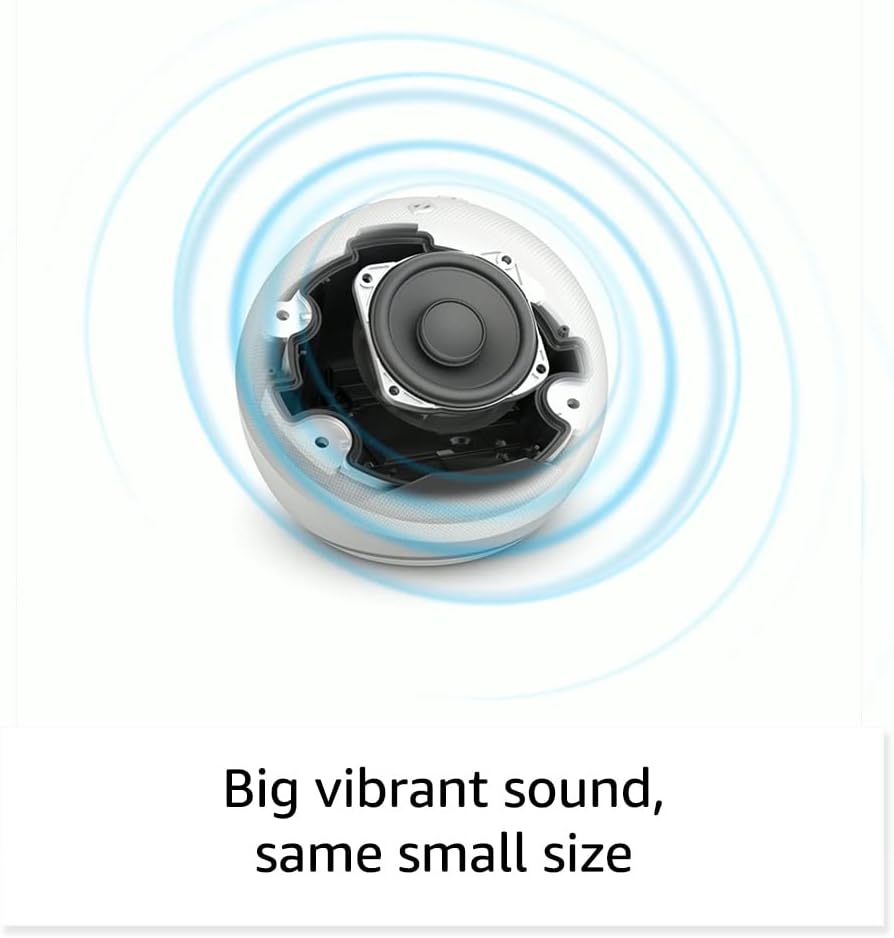
تصوير: اندروني view of the Amazon Echo Dot (5th Gen) speaker components, illustrating its audio design.
4. سيٽ اپ
پنهنجي ايڪو ڊاٽ (چوٿين نسل) کي سيٽ اپ ڪرڻ لاءِ انهن قدمن تي عمل ڪريو:
- پنهنجي ايڪو ڊاٽ کي پلگ ان ڪريو: Connect the included power adapter to your Echo Dot and then to a power outlet. The light ring will turn blue, then orange, indicating it's ready for setup.
- Alexa ايپ ڊائون لوڊ ڪريو: On your mobile device, download and install the Amazon Alexa app from your device's app store (compatible with Fire OS, Android, and iOS devices).
- پنھنجي ڊوائيس شامل ڪريو: Open the Alexa app. If prompted, sign in with your Amazon account. Tap the 'Devices' icon at the bottom, then the '+' icon in the top right corner. Select 'Add Device', then 'Amazon Echo', and choose 'Echo Dot'.
- اسڪرين تي ڏنل هدايتن تي عمل ڪريو: The app will guide you through connecting your Echo Dot to your Wi-Fi network. Ensure your Wi-Fi network supports 802.11a/b/g/n/ac (2.4 and 5 GHz). Ad-hoc networks are not supported.
- لڳائڻ: Place your Echo Dot in a central location within your room, away from walls or other objects that might obstruct sound.
5. توهان جي ايڪو ڊاٽ کي هلائڻ
Voice Commands with Alexa:
To interact with your Echo Dot, simply say the wake word "Alexa," followed by your command or question. The light ring will turn blue to indicate Alexa is listening.
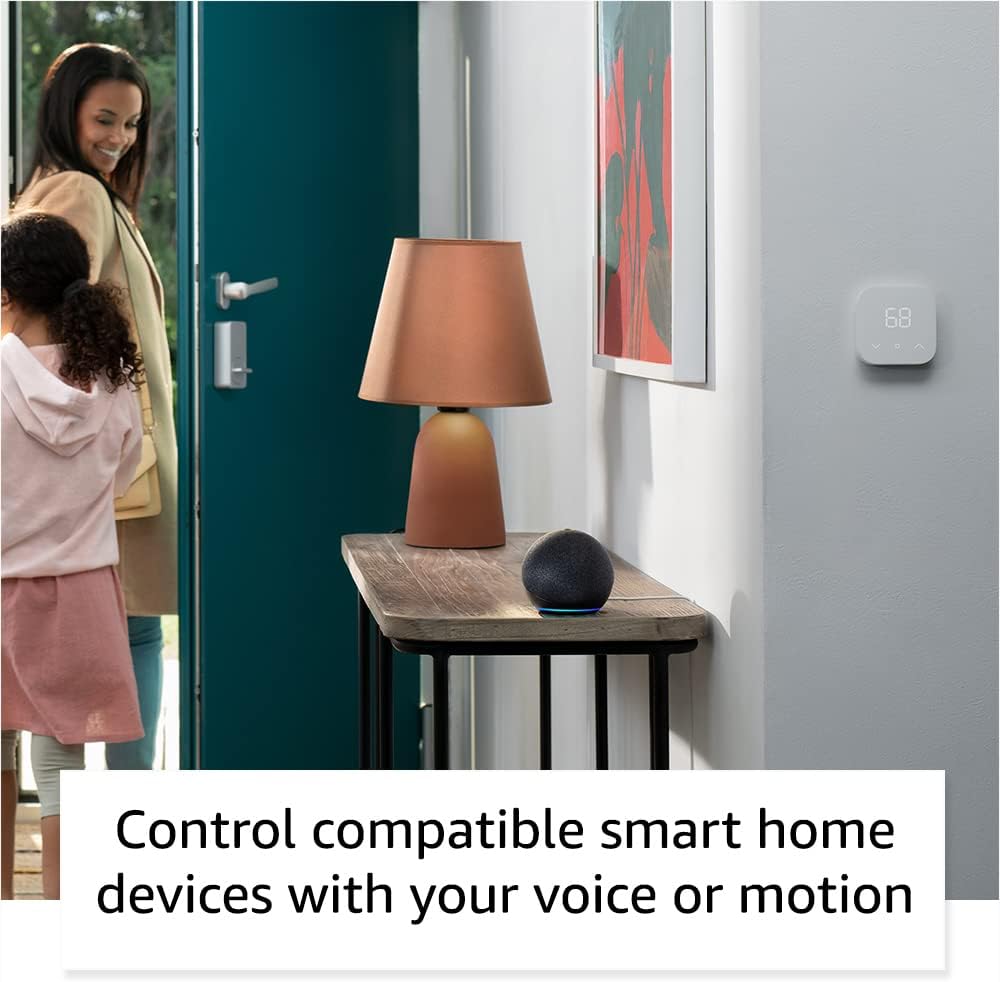
Image: Amazon Echo Dot (5th Gen) in Deep Sea Blue on a kitchen counter, demonstrating a user asking Alexa for the weather.
عام حڪم:
- "اليڪسا، موسيقي وڄاءِ."
- "اليڪسا، موسم ڪيئن آهي؟"
- "Alexa, set a timer for 10 minutes."
- "Alexa, tell me a joke."
- "Alexa, turn up the volume."
ڪنٽرولز تي ٽيپ ڪريو:
The top surface of your Echo Dot is touch-sensitive for quick actions:
- Tap to Snooze: When an alarm sounds, tap the top of the device to snooze it.
- Tap to Pause/Resume: Tap to pause or resume music playback.

Image: A hand tapping the top of the Amazon Echo Dot (5th Gen) in Glacier White, demonstrating the tap-to-snooze or pause music function.
6. سمارٽ هوم انٽيگريشن
Your Echo Dot can control compatible smart home devices using voice commands or routines. It supports WiFi, Bluetooth Low Energy Mesh, and Matter protocols.
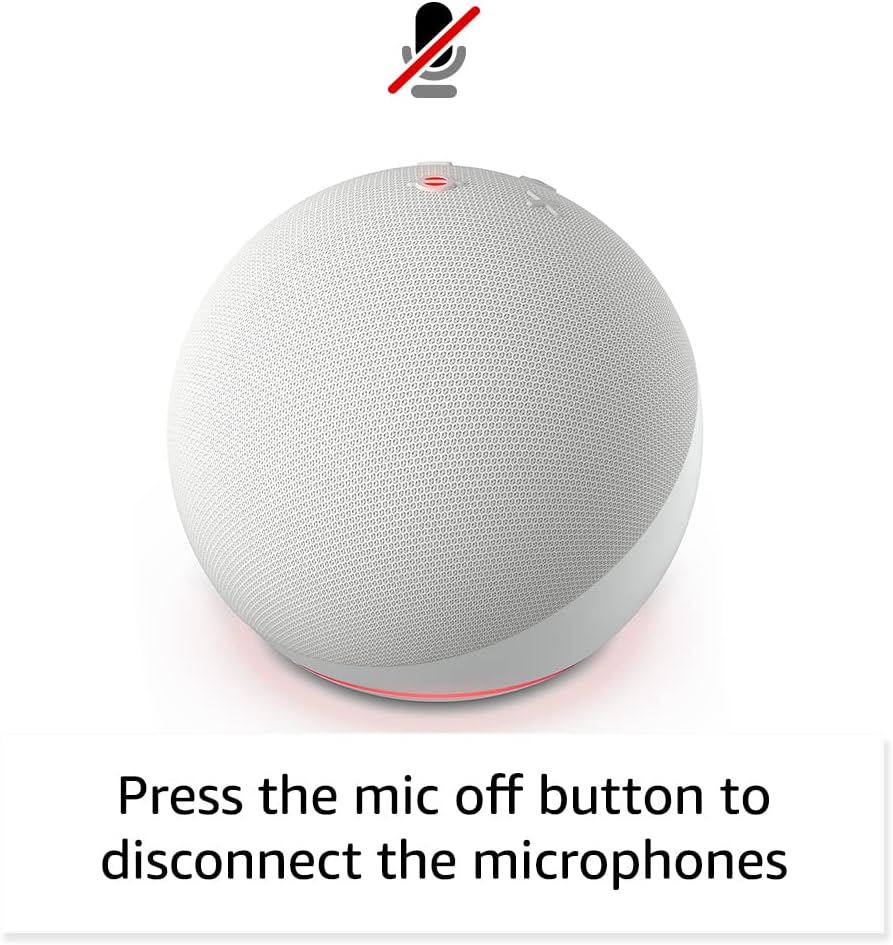
Image: Amazon Echo Dot (5th Gen) in a living space, illustrating its use for controlling compatible smart home devices.
Using the Temperature Sensor:
The built-in temperature sensor allows you to create routines in the Alexa app. For example, you can set a routine to automatically turn on a fan if the room temperature exceeds a specified comfort zone.
ايميزون فٽ پاٿ:
Amazon Sidewalk uses Echo and Ring devices to securely keep other devices connected and help find lost items. It can enable supported devices to remain connected even when Wi-Fi is lost or they are outside the range of their home Wi-Fi. Sidewalk uses a small portion of your internet bandwidth. You can manage Sidewalk settings in the Alexa app.
eero Built-in:
If you have a compatible eero router, your Echo Dot can extend Wi-Fi coverage. This feature requires linking your eero and Amazon accounts and managing it through the eero mobile application. eero Built-in compatible Echo devices support up to 1,000 sq. ft. of additional coverage, speeds up to 100 Mbps, and 10 or fewer connected devices in the 5 GHz band.
7. رازداري جون خاصيتون
Amazon Echo devices are designed with multiple layers of privacy controls:
- مائڪروفون آف بٽڻ: Press the microphone off button on the top of your Echo Dot to electronically disconnect the microphones. The light ring will turn red to indicate the microphones are off.
- وائس رڪارڊنگ: توهان وٽ صلاحيت آهي ته view, listen to, and delete your voice recordings through the Alexa app or your Amazon account settings.
- ويڪ ورڊ ٽيڪنالاجي: The device only begins recording and sending audio to the cloud after it detects the wake word (e.g., "Alexa").
Image: Amazon Echo Dot (5th Gen) with a red light indicating the microphone is off, showing the privacy control feature.
8. رسائي جون خاصيتون
The Alexa app provides various accessibility features to personalize your experience. Access these settings by navigating to 'Settings' → 'Accessibility' in the Alexa App.
- موافق ٻڌڻ: Alexa جي جواب ڏيڻ کان اڳ ڳالهائڻ ختم ڪرڻ لاءِ وڌيڪ وقت فراهم ڪري ٿو.
- ترجيحي ڳالهائڻ جي شرح: Control how fast or slow Alexa speaks by saying "Alexa, speak slower" or "Alexa, speak faster."
- Request Sound: Plays an audible tone in addition to the visual indicator when you speak to Alexa. Enable by saying "Alexa, turn on Start of Request Sound."
- ڪِنڊل زور سان پڙهو: اليڪسا توهان جون ڪِنڊل ڪتابون زور سان پڙهي سگهي ٿي.
- ويجهو هجڻ تي اطلاع ڏيو: جڏهن توهان کي توهان جي ايڪو ڊوائيس جي ويجهو ڏٺو وڃي ٿو ته نوٽيفڪيشن آواز وڄائي ٿو.
9. سار سنڀال
To ensure the longevity and optimal performance of your Echo Dot:
- صفائي: Use a soft, dry, lint-free cloth to clean the device. Do not use abrasive cleaners or sprays.
- لڳائڻ: ڊوائيس کي سڌي سج جي روشني ۾، گرمي جي ذريعن جي ويجهو، يا تمام گهڻي نمي واري ماحول ۾ رکڻ کان پاسو ڪريو.
- سافٽ ويئر اپڊيٽ: Your Echo Dot automatically receives software security updates. Ensure it remains connected to Wi-Fi for these updates.
10. مسئلا حل ڪرڻ
عام مسئلا ۽ حل:
- ڊوائيس جواب نه ڏئي رهيو آهي:
- پڪ ڪريو ته مائڪروفون خاموش نه آهي (ڳاڙهي روشني جي انگوزي خاموشي کي ظاهر ڪري ٿي).
- Check if the device is plugged in and powered on.
- Restart the device by unplugging it from the power outlet for 30 seconds and then plugging it back in.
- وائي فائي سان ڳنڍي نٿو سگهي:
- پڪ ڪريو ته توهان جو وائي فائي پاسورڊ صحيح آهي.
- Ensure your router is working and other devices can connect.
- Move the Echo Dot closer to your Wi-Fi router.
- پنهنجو روٽر ۽ موڊيم ٻيهر شروع ڪريو.
- خراب آڊيو معيار:
- Adjust the volume using voice commands or the Alexa app.
- Ensure the device is not placed in an enclosed space that might muffle sound.
- اسپيڪر جي چوڌاري ڪنهن به جسماني رڪاوٽن جي جانچ ڪريو.
- Alexa Not Understanding Commands:
- Speak clearly and at a normal pace.
- Reduce background noise.
- Ensure you are within hearing range of the device.
11. وضاحتون
| خاصيت | تفصيل |
|---|---|
| ماپ | 3.9" x 3.9" x 3.5" (100 ملي ميٽر x 100 ملي ميٽر x 89 ملي ميٽر) |
| وزن | 10.7 اوز (304 گرام) |
| آڊيو | 1.73” (44 ملي ميٽر) فرنٽ فائر اسپيڪر، نقصان کان سواءِ هاءِ ڊيفينيشن |
| وائي فائي ڪنيڪشن | Dual-band Wi-Fi supports 802.11a/b/g/n/ac (2.4 and 5 GHz) networks. Does not support ad-hoc networks. |
| بلوٽوت ڪنيڪشن | A2DP support for audio streaming, AVRCP for voice control of connected mobile devices. Bluetooth speakers requiring PIN codes are not supported. |
| سمارٽ هوم ڊيوائس مطابقت | WiFi, Bluetooth Low Energy Mesh, and Matter |
| سسٽم گهرجون | Alexa app compatible with Fire OS, Android, and iOS devices. Web browser access also available. |
| نسل | ايڪو ڊاٽ (پنجين نسل) - 2022 رليز |
| ٻولي | اليڪسا انگريزي ۽ اسپيني ڳالهائي ٿي. |
12. وارنٽي ۽ سپورٽ
وارنٽي ڄاڻ:
Your Echo Dot (5th Gen) comes with a 90-day limited warranty and service. Optional 1-year, 2-year, and 3-year extended warranties are available for U.S. customers and are sold separately. Use of the Echo Dot is subject to specific terms and conditions.
سافٽ ويئر سيڪيورٽي اپڊيٽس:
This device is guaranteed to receive software security updates for at least four years after it is last available for purchase as a new unit on Amazon websites. For more information on software security updates or to manage your device, visit the Amazon webسائيٽ.
ڪسٽمر سپورٽ:
For further assistance, please refer to the Amazon Alexa app or visit the Amazon support website. You can also find information specific to your device by visiting 'Manage Your Content and Devices' on Amazon.


