DrayTek Vigor 2865ax ايٿرنيٽ روٽر يوزر مينوئل
ماڊل: V2865AX-K
تعارف
Welcome to the user manual for your DrayTek Vigor 2865ax Ethernet Router. This document provides detailed instructions for setting up, operating, maintaining, and troubleshooting your device to ensure optimal performance and connectivity. The Vigor 2865ax is a high-performance router designed for Small to Medium Businesses (SMBs) and advanced home users, offering robust features like VDSL2/ADSL2+ and Ethernet WAN load balancing, Wi-Fi 6 (AX3000), VPN capabilities, and extensive LAN port options.
حفاظت جي ڄاڻ
Please read these safety instructions carefully before using the device.
- Place the router on a stable, flat surface away from direct sunlight, heat sources, and moisture.
- ڊوائيس جي چوڌاري مناسب وينٽيليشن کي يقيني بڻايو وڃي ته جيئن وڌيڪ گرم ٿيڻ کان بچي سگهجي.
- Use only the power adapter supplied with the router.
- Do not open the router casing؛ سڀني خدمتن کي قابل اهلڪارن جي حوالي ڪريو.
- ڊوائيس ٻارن ۽ پالتو جانور کان پري رکو.
- بجلي جي طوفانن دوران يا ڊگهي عرصي تائين استعمال نه ٿيڻ تي بجلي بند ڪريو.
پيڪيج مواد
پڪ ڪريو ته هيٺ ڏنل سڀئي شيون توهان جي پيڪيج ۾ شامل آهن:
- Vigor 2865 Series Router
- DC 12V Power Supply with UK Plug
- تڪڙو شروع ھدايت
- Screws & wall plugs for wall mounting
- 2m Cat-5e RJ-45 Network Cable
- 2x Detachable Wireless LAN Antennas
پيداوار ختمview
Familiarize yourself with the physical components and ports of your DrayTek Vigor 2865ax router.
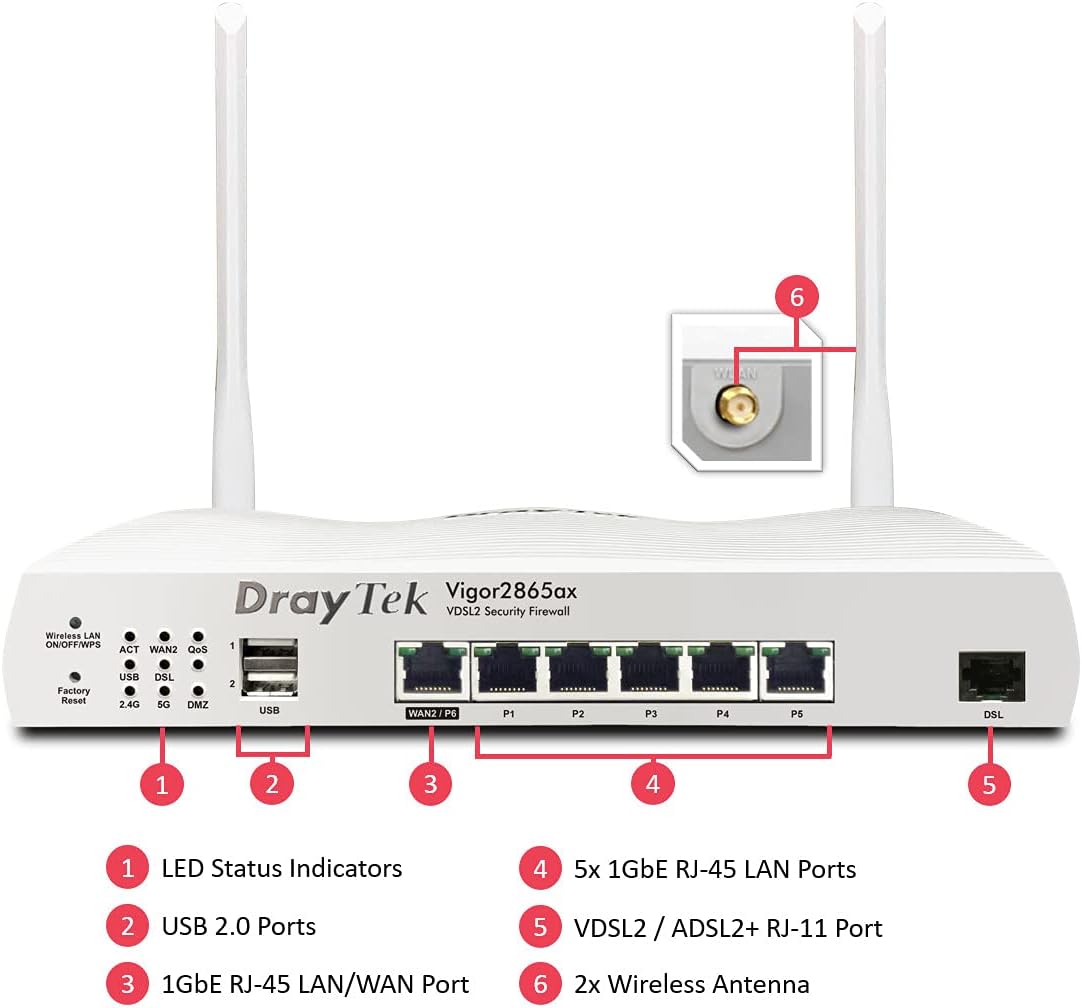
This image displays the front panel of the DrayTek Vigor 2865ax router, highlighting key components. Label 1 points to the LED Status Indicators, Label 2 to the USB 2.0 Ports, Label 3 to the 1GbE RJ-45 LAN/WAN Port (WAN2/P6), Label 4 to the 5x 1GbE RJ-45 LAN Ports (P1-P5), Label 5 to the VDSL2 / ADSL2+ RJ-11 Port (DSL), and Label 6 to the 2x Wireless Antenna connectors.
سامهون پينل
- LED اسٽيٽس اشارو: Provide visual feedback on the router's operational status, including power, internet connectivity, Wi-Fi activity, and LAN port status.
- USB 2.0 بندرگاهن: For connecting external devices such as 3G/4G USB modems for backup WAN or USB storage for network-attached storage (NAS) functionality.
- WAN2/P6 (1GbE RJ-45 LAN/WAN Port): Configurable as either a Gigabit Ethernet WAN port for connecting to a fiber modem or another internet source, or as an additional LAN port.
- P1-P5 (5x 1GbE RJ-45 LAN Ports): Gigabit Ethernet ports for connecting wired devices such as computers, servers, and network switches.
- DSL (VDSL2 / ADSL2+ RJ-11 Port): For connecting directly to your VDSL or ADSL broadband line.
پوئتي پينل
- پاور ان پٽ: Connects to the supplied DC 12V power adapter.
- پاور بٽڻ: روٽر کي آن يا آف ڪرڻ لاءِ.
- Antenna Connectors: For attaching the two detachable wireless LAN antennas.
سيٽ اپ ڪريو
قدم 1: هارڊويئر کي ڳنڍيو
- اينٽينا ڳنڍيو: Screw the two detachable wireless LAN antennas onto the connectors at the rear of the router.
- انٽرنيٽ سان ڳنڍيو (WAN):
- For VDSL/ADSL: Connect an RJ-11 cable from your telephone line's DSL filter/socket to the DSL port on the router.
- For Ethernet WAN (e.g., Fibre/Cable Modem): Connect an Ethernet cable from your fiber/cable modem to the WAN2/P6 port on the router.
- مقامي نيٽ ورڪ (LAN) سان ڳنڍيو: روٽر تي موجود LAN پورٽن (P1-P5) مان هڪ ايٿرنيٽ ڪيبل کي پنهنجي ڪمپيوٽر يا نيٽ ورڪ سوئچ سان ڳنڍيو.
- پاور Connectنيو: Connect the supplied DC 12V power adapter to the router's power input and then plug it into a power outlet. Press the power button to turn on the router.
قدم 2: شروعاتي ترتيب
- پهچ Web انٽرفيس: کوليو a web browser on a connected computer and enter the default IP address: 192.168.1.1.
- لاگ ان: ڊفالٽ يوزر نالو داخل ڪريو (منتظم) ۽ پاسورڊمنتظم). It is highly recommended to change the default password immediately after logging in for the first time.
- Run Quick Start Wizard: Follow the on-screen instructions of the Quick Start Wizard to configure your internet connection (WAN settings), Wi-Fi network name (SSID), and password.
- ھلندڙ خبر جي تازه ڪاري: After initial setup, navigate to سسٽم جي سار سنڀال > فرم ويئر اپ گريڊ to check for and install the latest firmware. This ensures optimal performance and security.
آپريٽنگ هدايتون
Multi-WAN Load Balancing and Failover
The Vigor 2865ax supports multiple WAN connections, allowing for load balancing to increase bandwidth or failover for connection redundancy.

This diagram shows the DrayTek Vigor 2865ax router connected to various internet sources: WiFi WAN, 1Gb Ethernet & FTTP, ADSL2+ & VDSL2 FTTC, and G.Fast FTTC. This illustrates the router's capability to utilize multiple WAN connections simultaneously for load balancing or failover.
Configure WAN settings under WAN > جنرل سيٽ اپ. You can enable load balancing policies or set up failover rules to ensure continuous internet access.
Wi-Fi 6 (AX3000) Configuration
The router provides high-speed Wi-Fi 6 connectivity across dual bands (2.4GHz and 5GHz).

This image depicts the Wi-Fi coverage provided by the DrayTek Vigor 2865ax router, showing distinct coverage areas for the 2.4GHz (AX600) and 5GHz (AX2400) bands, with various devices connected within these zones.
وائي فائي سيٽنگن تائين رسائي حاصل ڪريو ذريعي وائرليس LAN menu. Here you can:
- Change SSID (Wi-Fi network name) and password.
- Configure security settings (WPA2/WPA3).
- Set up multiple SSIDs for different networks (e.g., guest network).
- Adjust channel and bandwidth settings for optimal performance.
وي پي اين (ورچوئل پرائيويٽ نيٽ ورڪ)
The Vigor 2865ax supports up to 32 VPN tunnels, including SSL VPN and OpenVPN, for secure remote access and site-to-site connectivity.
ڏانهن وڃو وي پي اين ۽ ريموٽ رسائي to configure VPN profiles. Detailed guides for various VPN types are available on the DrayTek support webسائيٽ.
LAN Management and VLANs
The router features 5+1 Gigabit LAN ports and supports VLANs for network segmentation.
Manage LAN settings under LAN > General Setup. توهان ڪري سگهو ٿا:
- Configure IP addresses and DHCP server settings.
- Create VLANs (Virtual LANs) to isolate network segments for enhanced security and management (e.g., separating guest Wi-Fi from internal network).
- Set up port mirroring or link aggregation if supported.
سار سنڀال
فرم ویئر تازه ڪاري
Regularly check for and install firmware updates to ensure your router has the latest features, security patches, and performance improvements.
- سرڪاري DrayTek جو دورو ڪريو website and navigate to the support section for the Vigor 2865ax.
- جديد firmware ڊائون لوڊ ڪريو file.
- روٽر تائين رسائي حاصل ڪريو web interface and go to سسٽم جي سار سنڀال > فرم ويئر اپ گريڊ.
- Follow the on-screen instructions to upload and install the firmware. Do not power off the router during this process.
بيڪ اپ ٺاھ جوڙ
وڏيون تبديليون يا فرم ويئر اپڊيٽ ڪرڻ کان اڳ پنهنجي روٽر جي ڪنفگريشن سيٽنگن جو بيڪ اپ وٺڻ جي صلاح ڏني وئي آهي.
ڏانهن وڃو سسٽم جي سار سنڀال > ڪنفيگريشن بيڪ اپ to save your settings to a file.
فيڪٽري ري سيٽ
If you encounter persistent issues or wish to revert all settings to default, you can perform a factory reset.
خبردار: A factory reset will erase all your custom configurations.
فيڪٽري ري سيٽ ڪرڻ لاء:
- روٽر آن ٿيڻ سان، پيپر ڪلپ يا پتلي شيءِ کي دٻائڻ ۽ رکڻ لاءِ استعمال ڪريو فيڪٽري ري سيٽ button (located on the front panel, often recessed) for about 5-10 seconds until the LEDs flash.
- Release the button and wait for the router to restart with default settings.
مشڪلاتون
انٽرنيٽ ڪنيڪشن ناهي
- ڪيبل چيڪ ڪريو: Ensure all Ethernet and DSL cables are securely connected to the correct ports.
- WAN LED چيڪ ڪريو: Verify that the WAN LED (DSL or WAN2) is lit and stable, indicating a connection to your ISP.
- ISP سيٽنگون: Confirm that your WAN settings (e.g., PPPoE username/password, static IP, DHCP) are correctly configured in the router's web interface, matching your ISP's requirements.
- موڊيم جي حيثيت: If using an external modem, check its status lights to ensure it's online.
- ريبوٽ: Power cycle both your modem (if applicable) and the DrayTek router.
Wi-Fi Not Working or Slow
- Check Wireless LAN LED: Ensure the Wireless LAN LED is active.
- SSID براڊڪاسٽ: Verify that your Wi-Fi network (SSID) is being broadcast.
- پاسورڊ: پنهنجي وائي فائي پاسورڊ کي ٻه ڀيرا چيڪ ڪريو.
- چينل مداخلت: پاڙيسري نيٽ ورڪن جي مداخلت کان بچڻ لاءِ روٽر جي سيٽنگز ۾ وائي فائي چينل تبديل ڪرڻ جي ڪوشش ڪريو.
- سگنل جي طاقت: پڪ ڪريو ته روٽر مرڪزي طور تي رکيل آهي ۽ رڪاوٽن کان پري آهي.
رسائي نه ٿي سگهي Web انٽرفيس
- IP پتو: Confirm your computer's IP address is in the same subnet as the router (e.g., 192.168.1.x).
- ڪيبل ڪنيڪشن: Ensure your computer is directly connected to a LAN port on the router.
- برائوزر ڪيش: پنهنجي برائوزر جي ڪيش صاف ڪريو يا ڪو ٻيو برائوزر آزمايو.
- فائر وال/اينٽي وائرس: توهان جي ڪمپيوٽر تي ڪنهن به سافٽ ويئر فائر وال يا اينٽي وائرس پروگرام کي عارضي طور تي غير فعال ڪريو جيڪي رسائي کي روڪي رهيا هجن.
- فيڪٽري ريسٽ: As a last resort, perform a factory reset (see Maintenance section).
وضاحتون
| خاصيت | تفصيل |
|---|---|
| پيداوار جي ماپ | 34.5 x 28.6 x 7.5 سينٽي ميٽر؛ 1.6 ڪلوگرام |
| شيون ماڊل نمبر | V2865AX-K جي وضاحت |
| برانڊ | DrayTek |
| ماڊل نالو | Vigor 2865ax |
| خاص خصوصيت | ريموٽ رسائي |
| فريڪوئنسي بينڊ ڪلاس | ڊبل بينڊ |
| وائرليس ڪميونيڪيشن معياري | 802.11a (Wi-Fi 6 AX3000) |
| مطابقت رکندڙ ڊوائيسز | ليپ ٽاپ، پرسنل ڪمپيوٽر، ٽيبليٽ، اسمارٽ فون |
| تعدد | 2.4 GHz، 5 GHz |
| تجويز ڪيل استعمال | گيمنگ ، گهر ، ڌنڌو |
| رابطي ٽيڪنالاجي | Wi-Fi, Ethernet, VDSL2/ADSL2+ |
وارنٽي ۽ سپورٽ
DrayTek products typically come with a standard manufacturer's warranty. Please refer to the warranty card included in your product packaging or visit the official DrayTek webتوهان جي علائقي لاءِ مخصوص تفصيلي وارنٽي شرطن ۽ ضابطن لاءِ سائيٽ.
For technical support, firmware downloads, and additional documentation, please visit the official DrayTek support webسائيٽ: www.draytek.co.uk/support. You may also contact DrayTek customer service directly for assistance.
When contacting support, please have your router's model number (Vigor 2865ax) and serial number ready.


