1. تعارف
This manual provides essential instructions for the safe and efficient operation of your beFree Sound 12 Inch Bluetooth Rechargeable Portable PA Party Speaker. Please read this manual thoroughly before using the product and retain it for future reference.
The beFree Sound portable PA speaker is designed for versatile audio playback and public address applications, featuring Bluetooth connectivity, various input options, and reactive LED lighting.
2. حفاظت جي ڄاڻ
- Do not expose the speaker to water or excessive moisture. The product is not waterproof.
- Avoid placing the speaker near heat sources or in direct sunlight for extended periods.
- مناسب وينٽيليشن کي يقيني بڻايو؛ ڪنهن به وينٽيليشن جي سوراخن کي نه روڪيو.
- Use only the power adapter supplied by the manufacturer.
- يونٽ کي پاڻ کولڻ يا مرمت ڪرڻ جي ڪوشش نه ڪريو. سڀني سروسنگ کي قابل اهلڪارن جي حوالي ڪريو.
- ٻارن جي پهچ کان پري رکو.
- بجلي جي طوفان دوران يا ڊگهي عرصي تائين استعمال نه ٿيڻ تي بجلي جي تار کي ڪٽي ڇڏيو.
3. پيڪيج مواد
پڪ ڪريو ته سڀئي شيون پيڪيج ۾ موجود آهن:
- One beFree Sound 12 Inch Portable PA Speaker
- هڪ مائڪرو فون
- هڪ ريموٽ ڪنٽرول
- هڪ استعمال ڪندڙ دستورالعمل (هي دستاويز)

4. پراڊڪٽ ختمview
4.1 فرنٽ پينل

- اسپيڪر گرل: Protects the speaker components.
- Reactive LED Lights: Illuminates in various colors, reacting to audio playback.
4.2 ريئر پينل ڪنٽرول ۽ پورٽس

- AUX آئوٽ پٽ: 3.5mm jack for connecting to external audio devices.
- USB سلاٽ: USB فليش ڊرائيو لاءِ.
- TF ڪارڊ سلاٽ: TF (مائڪرو ايس ڊي) ڪارڊن لاءِ.
- چارج ليول انڊيڪيٽر: بيٽري جي حالت ڏيکاري ٿو.
- Lights Switch: Toggles the reactive LED lights on/off.
- مائڪروفون ان پٽ: 6.35mm jack for connecting the included microphone.
- اينٽينا: ايف ايم ريڊيو جي استقبال لاءِ.
- حجم ڪنٽرول: Adjusts overall speaker volume.
- Mic Volume Control: مائڪروفون جي مقدار کي ترتيب ڏئي ٿو.
- گونج ڪنٽرول: Adjusts echo effect for the microphone.
- ٽريبل ڪنٽرول: Adjusts high-frequency audio.
- بيس ڪنٽرول: Adjusts low-frequency audio.
- پاور سوئچ: اسپيڪر کي آن/آف ڪري ٿو.
- ڊي سي 12V IN: Power input for charging and operation.
4.3 يون خاصيتون
- وسعت وارو هٿ: آسان portability لاء.
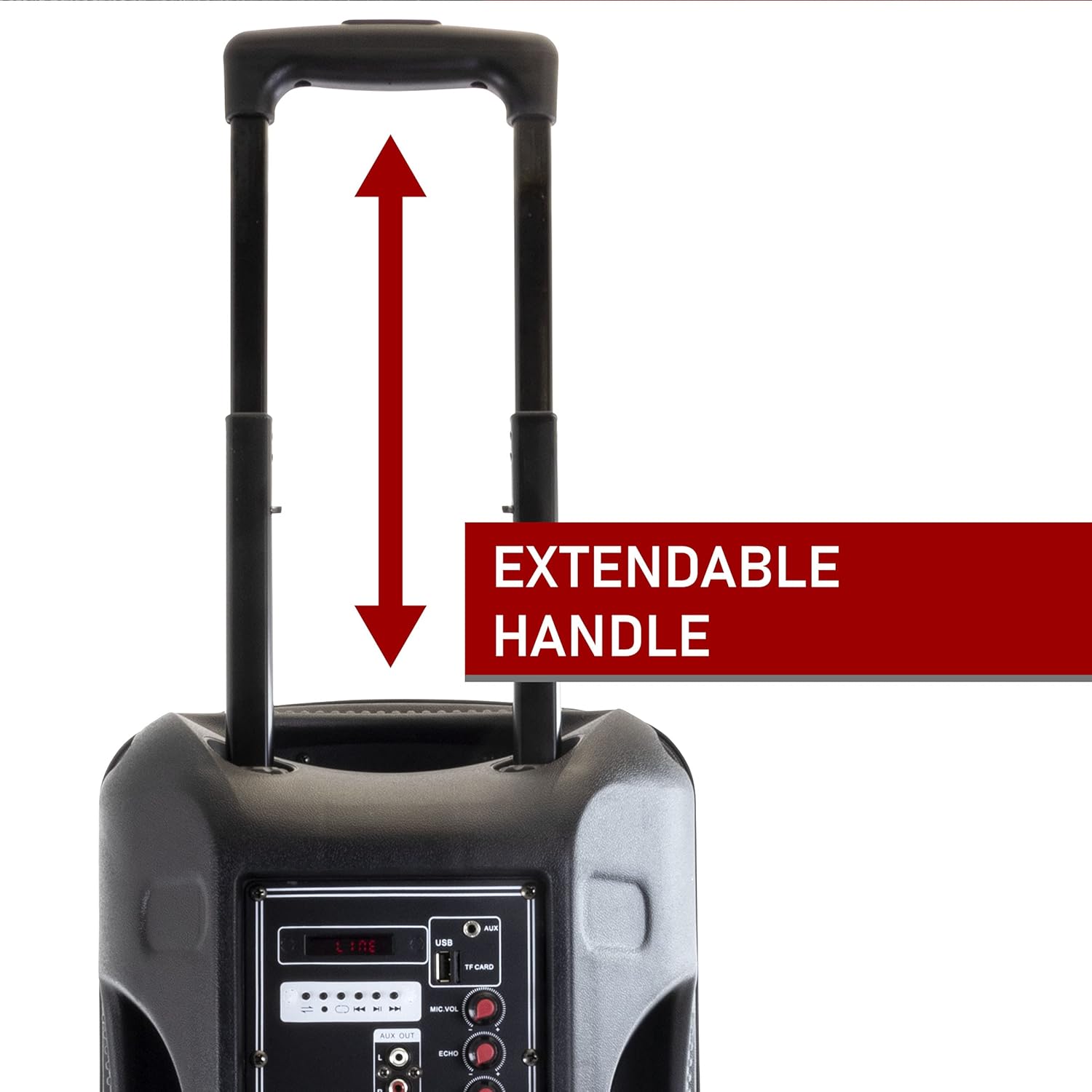
Figure 4.3: Extendable Handle. This image shows the speaker's extendable handle in its extended position, indicating its function for easy transport. - Sturdy Caster Wheels: آسان حرڪت لاءِ.

Figure 4.4: Caster Wheels. A close-up view of one of the durable caster wheels located at the bottom of the speaker, designed for smooth mobility. - Molded Side Handle: For additional carrying options.

Figure 4.5: Molded Side Handle. This image provides a detailed look at the ergonomic molded handle on the side of the speaker, offering an alternative grip for lifting or carrying. - ريموٽ ڪنٽرول: پري کان آسان آپريشن لاءِ.

Figure 4.6: Remote Control. An image of the compact black remote control, featuring buttons for power, mute, mode selection, volume adjustment, track navigation, and equalizer settings. - مائڪروفون: For public address or karaoke.

Figure 4.7: Included Microphone. A close-up of the black wired microphone, showing its on/off switch and standard design for vocal input.
5. سيٽ اپ
- پيڪنگ کولڻ: احتياط سان پيڪنگنگ مان سڀني اجزاء کي هٽايو.
- چارج ڪرڻ: Before first use, fully charge the speaker. Connect the power adapter to the "DC 12V IN" port on the rear panel and plug it into a power outlet. The charge level indicator will show charging status. A full charge can last up to 3 hours of operation.
- لڳائڻ: Place the speaker on a stable, flat surface. Utilize the extendable handle and caster wheels for easy positioning.
- پاور آن: Flip the Power Switch on the rear panel to the "ON" position.
6. آپريٽنگ هدايتون
6.1 بلوٽوٽ موڊ
- Turn on the speaker. The default mode is usually Bluetooth. If not, press the "Mode" button on the speaker or remote until "Bluetooth" is announced or displayed.
- پنهنجي موبائل ڊوائس (اسمارٽ فون، ٽيبليٽ، ليپ ٽاپ) تي بلوٽوٿ کي فعال ڪريو.
- ڳولھيو available devices and select "beFree Sound Speaker" (or similar name) from the list.
- Once paired, you will hear a confirmation sound. You can now play audio wirelessly from your device.
- Control playback (play/pause, next/previous track) and volume using your device or the speaker/remote controls.
6.2 USB/TF Card Mode
- Insert a USB flash drive or TF (MicroSD) card into the respective slot on the rear panel.
- The speaker should automatically switch to USB/TF mode and begin playing audio. If not, press the "Mode" button.
- Use the playback controls (play/pause, next/previous track) on the speaker or remote to manage your music.
6.3 AUX ان پٽ موڊ
- Connect an external audio device (e.g., MP3 player, CD player) to the "AUX" input port on the rear panel using a 3.5mm audio cable.
- Press the "Mode" button until "AUX" is selected.
- Control playback from your connected device. Adjust volume using both the speaker's volume control and your device's volume.
6.4 FM ريڊيو موڊ
- Extend the antenna on the rear panel for better reception.
- Press the "Mode" button until "FM" is selected.
- Press the "Scan" button (often the Play/Pause button) to automatically scan and save available FM stations.
- Use the "Previous/Next Track" buttons to navigate through the saved stations.
6.5 مائڪروفون استعمال ڪرڻ
- Connect the microphone to the "MIC INPUT" port on the rear panel.
- Ensure the microphone's power switch is in the "ON" position.
- Adjust the "MIC VOL" knob to control the microphone's volume.
- Use the "ECHO" knob to add an echo effect to your voice.
6.6 LED لائيٽون

The speaker features reactive LED lights that illuminate during audio playback. To turn the lights on or off, use the "LIGHTS SWITCH" on the rear panel.
6.7 برابري واري ترتيب
Use the "TREBLE" and "BASS" knobs on the rear panel to fine-tune the audio output to your preference.
7. سار سنڀال
- صفائي: اسپيڪر کي نرم، سڪل ڪپڙي سان صاف ڪريو. گھڙڻ وارا صاف ڪندڙ يا محلول استعمال نه ڪريو.
- اسٽوريج: جڏهن استعمال ۾ نه هجي، اسپيڪر کي ٿڌي، سڪل جاءِ تي، سڌي سج جي روشني ۽ انتهائي گرمي پد کان پري رکو.
- بيٽري جي سنڀال: To prolong battery life, avoid fully discharging the battery frequently. Recharge the speaker regularly, even if not in use for extended periods.
8. مسئلا حل ڪرڻ
| مسئلو | ممڪن سبب | حل |
|---|---|---|
| طاقت نه آهي | Battery is discharged; Power cable not connected. | اسپيڪر کي چارج ڪريو؛ پڪ ڪريو ته پاور ڪيبل محفوظ طور تي ڳنڍيل آهي. |
| آواز ڪونهي | آواز تمام گهٽ آهي؛ غلط ان پٽ موڊ؛ ڊوائيس صحيح طرح سان ڳنڍيل نه آهي. | Increase volume; Select correct input mode (Bluetooth, AUX, USB/TF, FM); Reconnect device. |
| بلوٽوت جوڙڻ جي ناڪامي | اسپيڪر پيئرنگ موڊ ۾ نه آهي؛ ڊوائيس تمام پري آهي؛ مداخلت. | Ensure speaker is in Bluetooth mode; Move device closer (within 10 meters); Restart both devices. |
| مائڪرو فون ڪم نه ڪري رهيو آهي | Microphone switch off; MIC VOL too low; Microphone not connected. | Turn on microphone switch; Increase MIC VOL; Ensure microphone is securely plugged in. |
| ناقص ايف ايم استقبال | اينٽينا نه وڌايو ويو آهي؛ ڪمزور سگنل. | Fully extend the antenna; Try repositioning the speaker. |
9. وضاحتون
| خاصيت | تفصيل |
|---|---|
| ماڊل نمبر | 6910759 |
| برانڊ | آزاد آواز |
| اسپيڪر جو قسم | ووفر |
| ووفر قطر | 12 انچ |
| رابطي ٽيڪنالاجي | Bluetooth, Auxiliary, RCA, USB |
| وائرليس ڪميونيڪيشن | بلوٽوٿ |
| بلوٽوٿ رينج | 10 ميٽر تائين |
| طاقت جو ذريعو | Corded Electric (Rechargeable Battery) |
| بيٽري جو قسم | 1 ليتيم آئن (شامل) |
| بيٽري جي زندگي (تقريبن) | مڪمل چارج تي 3 ڪلاڪ تائين |
| خاص خاصيتون | Portable, Reactive LED Lights, Equalizer (Treble, Bass) |
| شامل اجزاء | Speaker, Microphone, Remote Control, User Manual |
| طول و عرض (L x W x H) | 20.5 x 13 x 13 انچ |
| شيءِ جو وزن | 16.3 پائونڊ |
| مواد | Metal (Grille), Plastic (Casing) |
| رنگ | ڪارو |
| يو پي سي | 840191203640 |
10. وارنٽي ۽ سپورٽ
This beFree Sound product comes with a محدود وارنٽي. For specific details regarding warranty coverage, duration, and how to obtain service, please refer to the warranty card included with your purchase or contact beFree Sound customer support.
For technical assistance or customer service inquiries, please visit the official beFree Sound website or contact their support channels. Keep your purchase receipt as proof of purchase for warranty claims.


