1. پراڊڪٽ ختمview
The Anderic OEM NSRCFNA21 Smart Remote is an original equipment manufacturer (OEM) replacement remote control specifically designed for various Insignia TV models. This remote provides seamless functionality and user-friendly operation, ensuring reliable control over your television.
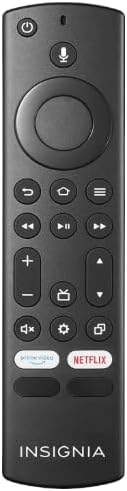
تصوير 1.1: The Anderic OEM NSRCFNA21 Smart Remote. This image displays the front view of the black remote control, featuring various buttons for power, voice control, navigation, volume, channel, and dedicated streaming service buttons.
اهم خاصيتون شامل آهن:
- Original Quality: An authentic OEM product, ensuring performance and reliability comparable to the remote originally supplied with your TV.
- استعمال ڪندڙ-دوست ڊيزائن: Intuitive buttons and controls for easy navigation, volume adjustment, channel changes, and access to various TV functions.
- قابل اعتماد ڪارڪردگي: Provides a stable and responsive connection for accurate command execution.
2. سيٽ اپ ۽ جوڙڻ جون هدايتون
To ensure proper functionality, the remote control must be paired with your Insignia TV. Follow these steps carefully:
- ٽي وي ري سيٽ ڪريو: Unplug your Insignia TV from its power source. Wait for approximately 30 seconds.
- Power On TV: Plug the TV back into the power source and turn it on. Allow the TV to fully boot up.
- جوڙڻ شروع ڪريو: Once the TV has completely booted up and is displaying content, press and hold the گهر button on the Anderic NSRCFNA21 remote control for up to 30 seconds.
- Remote Update (if prompted): Your TV may display a message indicating that the remote needs an update. If prompted, allow the TV to proceed with the update. This process may take 1 to 3 minutes to complete.
- تصديق: After the update (if any) and pairing process, test the remote's functions (e.g., volume, channel, navigation) to confirm successful pairing.
If the remote does not pair after following these steps, repeat the process or refer to the troubleshooting section.
3. ريموٽ ڪنٽرول کي هلائڻ
The Anderic NSRCFNA21 remote control features an intuitive layout for easy operation of your Insignia TV. Below are the general functions of the primary buttons:
- پاور بٽڻ: ٽي وي کي آن يا بند ڪري ٿو.
- وائس ڪنٽرول بٽڻ: Activates voice commands for searching content or controlling the TV.
- Navigation Pad (Directional Buttons and Select): مينيو ذريعي منتقل ڪرڻ ۽ شيون چونڊڻ لاءِ استعمال ڪيو ويندو هو.
- هوم بٽڻ: ٽي وي جي مکيه هوم اسڪرين ڏانهن واپس اچي ٿو.
- پوئتي بٽڻ: پوئين اسڪرين يا مينيو ڏانھن واپسي.
- Menu/Options Button: Accesses additional menu options or settings.
- حجم مٿي / ھيٺ: Adjusts the TV's audio volume.
- چينل مٿي / هيٺ: ٽي وي چينلز بدلائي ٿو.
- گونگا بٽڻ: ٽي وي جي آڊيو کي ميوٽ يا ان ميوٽ ڪري ٿو.
- سيٽنگون بٽڻ: ٽي وي جو سيٽنگون مينيو کوليندو آهي.
- ان پٽ/ذريعو بٽڻ: Changes the TV's input source (e.g., HDMI 1, HDMI 2).
- Dedicated Streaming Service Buttons: Provides quick access to popular streaming applications (e.g., Amazon Prime Video, Netflix).
4. مطابقت
The Anderic OEM NSRCFNA21 Smart Remote is compatible with the following Insignia TV models:
- NS24DF310NA21
- NS39DF310NA21
- NS50DF710NA21
- NS55DF710NA21
This remote also replaces the following models:
- NSRCFNA19 Rev B Fire
- NSRCFNA19revB
- NSRCFNA21 Fire
- NSRCFNA21 Rev E
- NSRCFNA21-Rev-E
Ensure your TV model is listed above for optimal performance.
5. سار سنڀال
Proper maintenance can extend the life and functionality of your remote control.
- بيٽري مٽائڻ: The remote requires two AAA batteries. Replace batteries when the remote's responsiveness decreases or it stops functioning. Ensure correct polarity when inserting new batteries.
- صفائي: Use a soft, dry cloth to clean the remote's surface. Avoid using liquid cleaners or abrasive materials, as these can damage the remote.
- اسٽوريج: ريموٽ کي خشڪ جاءِ تي رکو، انتهائي گرمي پد ۽ سڌي سج جي روشني کان پري.
6. مسئلا حل ڪرڻ
If you encounter issues with your Anderic NSRCFNA21 Smart Remote, try the following troubleshooting steps:
- ريموٽ جواب نه ڏيڻ:
- Check the batteries. Replace them with fresh AAA batteries, ensuring correct polarity.
- پڪ ڪريو ته ريموٽ ۽ ٽي وي جي سينسر جي وچ ۾ ڪا به رڪاوٽ نه آهي.
- سيڪشن 2 ۾ بيان ڪيل جوڙڻ جي عمل کي ٻيهر ڪوشش ڪريو.
- وقفي واري ڪارڪردگي:
- هي گهٽ بيٽري پاور جي نشاندهي ڪري سگهي ٿو. بيٽريون تبديل ڪريو.
- پڪ ڪريو ته توهان ٽي وي سينسر جي اثرائتي حد اندر آهيو.
- Pairing Fails:
- Confirm your TV model is listed in the compatibility section (Section 4).
- Ensure the TV is fully booted up before attempting to hold the Home button.
- Try unplugging the TV for a longer period (e.g., 1-2 minutes) before plugging it back in and re-attempting pairing.
If problems persist after attempting these steps, contact customer support for further assistance.
7. وضاحتون
| برانڊ | اينڊرڪ |
| ماڊل نمبر | NSRCFNA21 Rev B |
| مطابقت رکندڙ ڊوائيسز | Insignia Televisions |
| طاقت جو ذريعو | 2 AAA بيٽريون (ضروري) |
| شيءِ جو وزن | 1.76 اونس |
| پيڪيج جي ماپ | 6.3 x 2.95 x 0.67 انچ |
| رنگ | ڪارو |
| ٺاهيندڙ | Dan's Electronics Etc., Inc. |
8. وارنٽي ۽ سپورٽ
For warranty information or technical support, please contact the manufacturer, Anderic (Dan's Electronics Etc., Inc.). Refer to the product packaging or the official Anderic webمخصوص رابطي جي تفصيل ۽ وارنٽي جي شرطن لاءِ سائيٽ.
توھان جو دورو ڪري سگھو ٿا Anderic Store on Amazon وڌيڪ معلومات لاءِ.


