تعارف
Thank you for choosing the HTC True Wireless Bluetooth Earbuds 2. This manual provides detailed instructions on how to set up, operate, and maintain your earbuds to ensure optimal performance and longevity. Please read this manual carefully before using the product.
دٻي ۾ ڇا آهي
- 1x چارجنگ ڪيس
- 1x USB قسم-سي ڪيبل
- 1x تڪڙو شروع گائيٽ
- 2x True Wireless Earbuds (Left and Right)
- 2x pairs of rubber tips (large and small) - Note: A medium pair is likely pre-installed.
پيداوار ختمview
Familiarize yourself with the components of your HTC True Wireless Bluetooth Earbuds 2 and their charging case.

Image: The HTC True Wireless Earbuds 2, with one earbud outside the open charging case, showing the charging contacts and indicator light.
The charging case features a USB-C port for charging and an LED indicator to show charging status. Each earbud has touch-sensitive surfaces for control and charging contacts at the bottom.
سيٽ اپ ڪريو
1. ائربڊس ۽ ڪيس کي چارج ڪرڻ
پهرين استعمال کان اڳ، پڪ ڪريو ته ائربڊس ۽ چارجنگ ڪيس ٻئي مڪمل طور تي چارج ٿيل آهن.
- Place the earbuds into the charging case. Ensure they are correctly seated; the indicator lights on the earbuds should illuminate, indicating charging.
- Connect the USB Type-C cable to the charging port on the case and the other end to a USB power source (e.g., computer, wall adapter).
- The charging case's indicator light will show charging status. A full charge for the case provides up to 3 additional charges for the earbuds, extending total playtime to 32 hours.

Image: The HTC True Wireless Earbuds 2 in their charging case, illustrating the long battery life performance with up to 8 hours listening time per charge and 32 hours total with the 500mAh charging case.
2. هڪ ڊوائيس سان جوڙڻ
ائربڊس تيز ۽ مستحڪم ڪنيڪشن لاءِ بلوٽوٿ 5.1 استعمال ڪن ٿا.
- چارجنگ ڪيس کوليو. ائربڊس پاڻمرادو پيئرنگ موڊ ۾ داخل ٿي ويندا.
- پنهنجي ڊوائيس (اسمارٽ فون، ٽيبليٽ، ليپ ٽاپ) تي، بلوٽوٿ کي فعال ڪريو.
- ڳولھيو "HTC TWS3" or "HTC True Wireless Earbuds 2" in the list of available Bluetooth devices.
- Select the earbuds to connect. Once connected, you will hear a confirmation tone.

Image: The HTC True Wireless Earbuds 2 and their charging case positioned near a smartphone, demonstrating the quick and easy pairing process facilitated by the latest Bluetooth 5.1 chipset.
The earbuds can be used individually or together. For optimal stereo sound, use both earbuds. They maintain a stable connection up to 10 meters (32 feet) from your device.
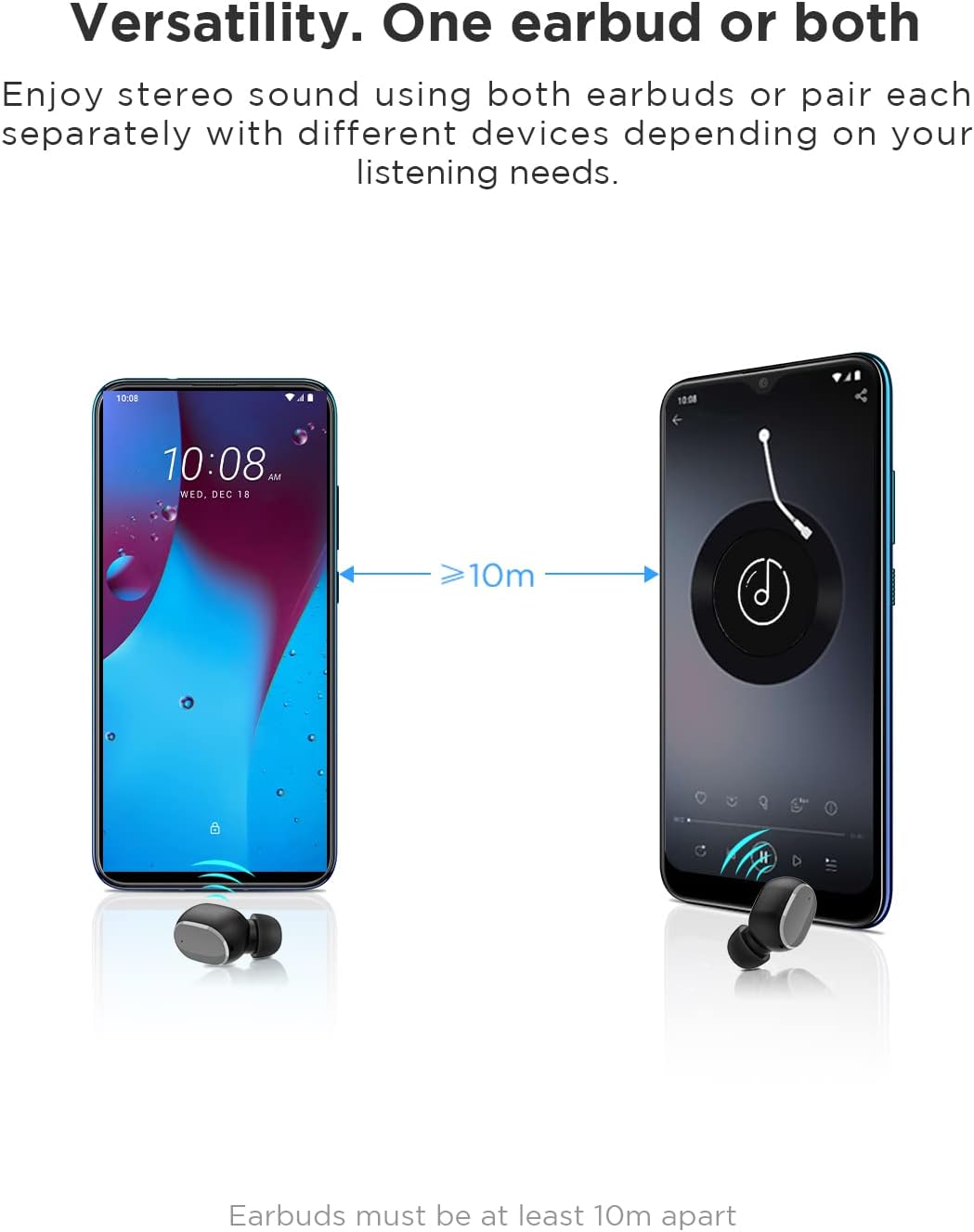
Image: An illustration showing two smartphones and earbuds, emphasizing the versatility of using one or both earbuds and the effective operating range of at least 10 meters.
آپريٽنگ هدايتون
The HTC True Wireless Bluetooth Earbuds 2 feature intuitive touch controls for various functions.

Image: A detailed diagram illustrating the simple touch controls for the HTC True Wireless Earbuds 2, including commands for play/pause, track navigation, call management, voice assistant, and volume control.
| عمل | فنڪشن |
|---|---|
| ڪنهن به ائربڊ کي هڪ ڀيرو ٽيپ ڪريو | Play / Pause music, Answer / End call |
| کاٻي ڪنڊ کي ٻه ڀيرا ٽيپ ڪريو | حجم وڌايو |
| ساڄي ڪنڊ کي ٻه ڀيرا ٽيپ ڪريو | حجم گھٽائڻ |
| ڪنهن به ائربڊ کي ٽي ڀيرا ٽيپ ڪريو | وائيس اسسٽنٽ کي فعال ڪريو |
| ٽي سيڪنڊن لاءِ کا earي ڪنڊ کي ٽيپ ڪريو ۽ رکو | پويون گانا هلايو |
| 2 سيڪنڊن لاءِ سا earي ڪنڊ کي ٽيپ ڪريو ۽ رکو | اڳيون گانو ادا ڪيو |
| Tap and hold either earbud for 2 seconds (during incoming call) | ڪال رد |
| Tap either earbud 5 times | Clear pairing / Restore factory settings |
The earbuds are designed for comfortable, long-term wear, weighing only 4.4g per earbud. They come with three different sizes of ear tips to ensure a secure and comfortable fit.

Image: A person comfortably wearing an HTC earbud, accompanied by illustrations highlighting the ergonomic design, skin-friendly material, and the inclusion of three different earplug sizes for optimal fit and comfort.
سار سنڀال
صفائي
باقاعده صفائي آواز جي معيار ۽ صفائي کي برقرار رکڻ ۾ مدد ڪري ٿي.
- ائربڊس ۽ چارجنگ ڪيس کي صاف ڪرڻ لاءِ نرم، سڪل، لِنٽ فري ڪپڙو استعمال ڪريو.
- ڪن جي موم يا ڪن جي چوٽين يا اسپيڪر ميش ۾ ملبي لاءِ، هڪ ننڍڙو، نرم برش يا ڪپهه جي سواب استعمال ڪريو. تيز شيون استعمال نه ڪريو.
- گھڙڻ وارا صاف ڪندڙ، الڪوحل، يا ڪيميائي محلول استعمال ڪرڻ کان پاسو ڪريو.
ذخيرو
جڏهن استعمال ۾ نه هجي، ته ائربڊس کي انهن جي چارجنگ ڪيس ۾ محفوظ ڪريو ته جيئن انهن جي حفاظت ٿئي ۽ انهن کي چارج رکيو وڃي.
- ٿڌي، سڪل جاءِ تي، انتهائي گرمي پد ۽ سڌي سج جي روشني کان پري رکو.
- مٽيءَ يا گندي ماحول ۾ ذخيرو ڪرڻ کان پاسو ڪريو.
پاڻي جي مزاحمت (IPX5)
The HTC True Wireless Bluetooth Earbuds 2 are rated IPX5 water-resistant, meaning they can withstand a sustained, low-pressure water jet spray. This makes them suitable for workouts and light rain.
- ائربڊس کي پاڻيءَ ۾ نه ٻوڙيو.
- چارجنگ ڪيس پاڻي جي مزاحمتي ناهي. ان کي سڪي رکو.
- نقصان کان بچڻ لاءِ چارجنگ ڪيس ۾ واپس رکڻ کان اڳ پڪ ڪريو ته ائربڊس سڪي ويا آهن.
مشڪلاتون
جيڪڏهن توهان کي پنهنجي ائربڊس سان مسئلا درپيش اچن ٿا، ته هيٺ ڏنل عام حلن جو حوالو ڏيو:
| مسئلو | حل |
|---|---|
| ائربڊس ڊوائيس سان جوڙو نه پيا ٺاهين |
|
| Only one earbud has sound |
|
| ائربڊس چارج نه ٿي رهيا آهن |
|
| خراب آواز جي معيار يا ڪنيڪشن بند ٿيڻ |
|
وضاحتون
Detailed technical specifications for the HTC True Wireless Bluetooth Earbuds 2.
| خاصيت | تفصيل |
|---|---|
| ماڊل نالو | TWS 2 (HTC TWS3) |
| رابطي ٽيڪنالاجي | وائرليس (بلوٽوٿ 5.1) |
| هيڊ فون جيڪ | USB (چارجنگ ڪيس لاءِ) |
| ڪنٽرول قسم | Touch, Volume Control |
| پاڻي جي مزاحمت جي سطح | IPX5 (Earbuds) |
| مائڪروفون فارميٽ | بلٽ ان، اسٽيريو |
| راند جو وقت (ايئربڊس) | 8 ڪلاڪن تائين (هڪ چارج تي) |
| Talk Time (Earbuds) | 6 ڪلاڪن تائين (هڪ چارج تي) |
| چارجنگ ڪيس سان ڪل راند جو وقت | 32 ڪلاڪ تائين |
| چارج ڪيس جي بيٽري جي گنجائش | 500mAh |
| Earbud Weight (Single) | 4.4 جي |
| وڌ ۾ وڌ آپريٽنگ فاصلو | 32 فوٽ (تقريبن 10 ميٽر) |
| مطابقت رکندڙ ڊوائيسز | Android, Laptops, iPhone |
| مواد | پلاسٽڪ |
| پيداوار جي ماپ | 4.34 x 4.34 x 3.45 cm; 160 g (overall package) |
حفاظت جي ڄاڻ
Please observe the following safety guidelines for safe and effective use:
- پراڊڪٽ کي ڌار نه ڪريو، مرمت نه ڪريو، يا تبديل نه ڪريو. اهو باهه، بجلي جو جھٽڪو، يا پراڊڪٽ کي مڪمل نقصان پهچائي سگھي ٿو.
- Keep the product away from extreme temperatures, direct sunlight, and high humidity.
- پراڊڪٽ کي ڇڏڻ يا مضبوط اثرن جي تابع ڪرڻ کان پاسو ڪريو.
- ائربڊس کي گهڻي وقت تائين تمام گهڻي آواز ۾ استعمال نه ڪريو، ڇاڪاڻ ته ان سان ٻڌڻ کي نقصان پهچي سگهي ٿو.
- ٻارن ۽ پالتو جانورن جي پهچ کان پري رکو.
- پراڊڪٽ ۽ ان جي بيٽرين کي مقامي ضابطن جي مطابق ذميواري سان ختم ڪريو.
ڪسٽمر سپورٽ
For further assistance or inquiries, please contact HTC customer support through their official channels. Refer to the product packaging or the official HTC webرابطي جي معلومات لاء سائيٽ.
Note: Specific warranty details are not provided in this manual. Please refer to your purchase documentation or the manufacturer's webوارنٽي معلومات لاءِ سائيٽ.


