1. تعارف
This manual provides detailed instructions for the installation, operation, and maintenance of your ESLYYDS Double Din Car Stereo. This advanced multimedia system offers a wide range of features including Apple CarPlay, Android Auto, Bluetooth connectivity, a high-definition touchscreen, and support for a backup camera, enhancing your in-car entertainment and navigation experience.

Figure 1.1: ESLYYDS Double Din Car Stereo Overview
2. پيڪيج مواد
مھرباني ڪري تصديق ڪريو ته ھيٺ ڏنل سڀ شيون توھان جي پيڪيج ۾ شامل آھن:
- ESLYYDS Double Din Car Stereo Unit
- چڙهڻ واري بریکٹ سيٽ
- Camera Wire A
- Camera Wire B
- Steering Wheel Control Unit
- وائر هارنس اي
- وائر هارنس بي
- پearيان-view ڪئميرا
- ريموٽ ڪنٽرول
- استعمال ڪندڙ جو دستياب (ھي دستاويز)

Figure 2.1: Stereo Dimensions and Included Accessories
3. مصنوعات جون خاصيتون
The ESLYYDS Double Din Car Stereo is equipped with a variety of features designed for convenience and enhanced driving experience:
- Apple CarPlay & Android Auto Compatibility: Seamlessly integrate your smartphone for navigation, music, calls, and messages using voice control.
- 7-inch HD Capacitive Touch Screen: A responsive and accurate display supporting 1080P video playback.
- بلوٽوٽ 5.2: For stable and clear hands-free calling and audio streaming.
- Phone Mirror Link: Display your smartphone's screen directly on the stereo.
- ٻٽي USB انٽرفيس: One port for media playback and another with 2.1A fast charging capability.
- ريڙهه View ڪئميرا ان پٽ: Supports the included 12 HD LED light, night vision, 170° viewing angle waterproof backup camera for safer reversing.
- اسٽيئرنگ ويل ڪنٽرول (SWC): Compatible with existing steering wheel controls for convenient operation.
- AM/FM Audio Receiver: Access to radio stations with user-friendly digital control.
- AUX IN Connectivity: ٻاهرين آڊيو ڊوائيسز لاءِ.
- 7 Color LED Buttons: Customizable button illumination.
3.1 ايپل ڪار پلي ۽ اينڊرائيڊ آٽو
Connect your smartphone via USB to access navigation, phone contacts, email, notifications, and music directly on the stereo display. This feature utilizes voice control technology for safe operation while driving.
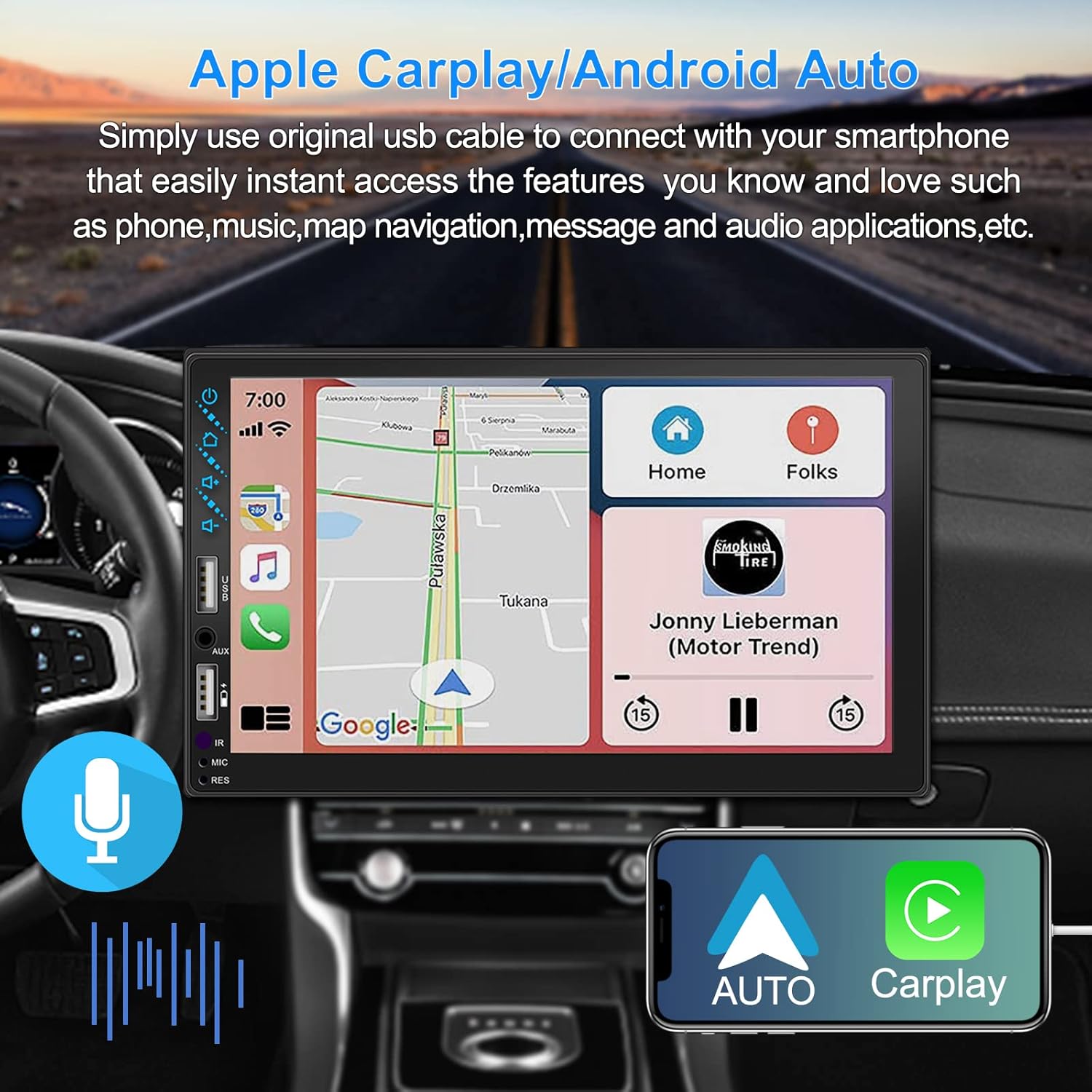
Figure 3.1: Apple CarPlay and Android Auto Interface
3.2 وائس ڪنٽرول
Utilize voice commands to control various functions such as making calls, playing music, and navigating, allowing you to keep your hands on the wheel and eyes on the road.

شڪل 3.2: وائيس ڪنٽرول ڪارڪردگي
3.3 فون آئيني لنڪ
The Mirror Link function allows you to display your smartphone's screen directly onto the stereo's touchscreen. This supports Android devices (version 10.1 and below) and iPhone devices (version 14.5 and below, including iPhone 12, 11, XR, and 8 series and below) with resolutions up to 1920x1080 pixels.
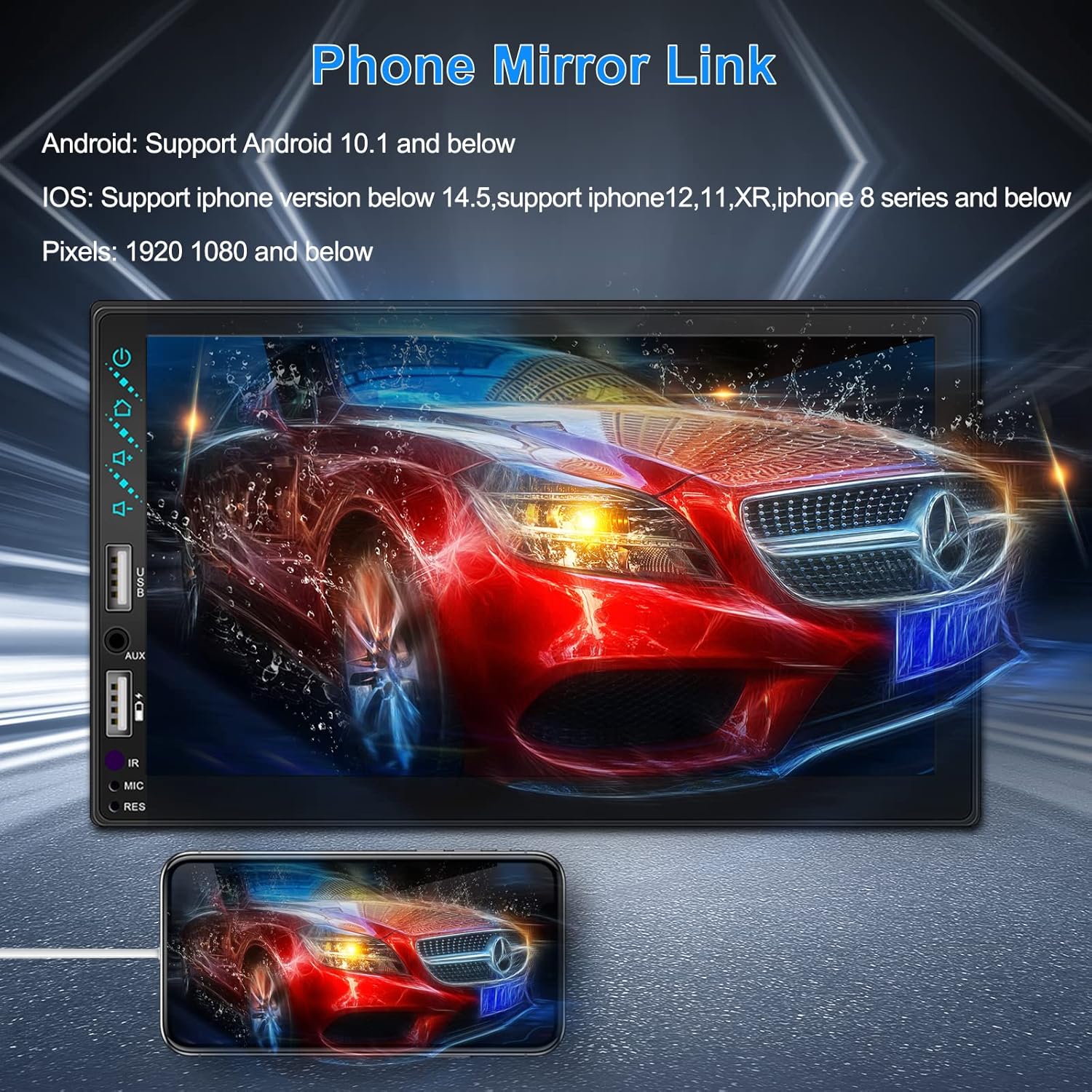
Figure 3.3: Phone Mirror Link
3.4 پوئتي View ڪئميرا
The included waterproof backup camera features 12 HD LED lights for night vision and a 170° viewing angle. When you shift into reverse, the system automatically displays the camera feed on the screen, providing optimal visibility in various weather conditions.
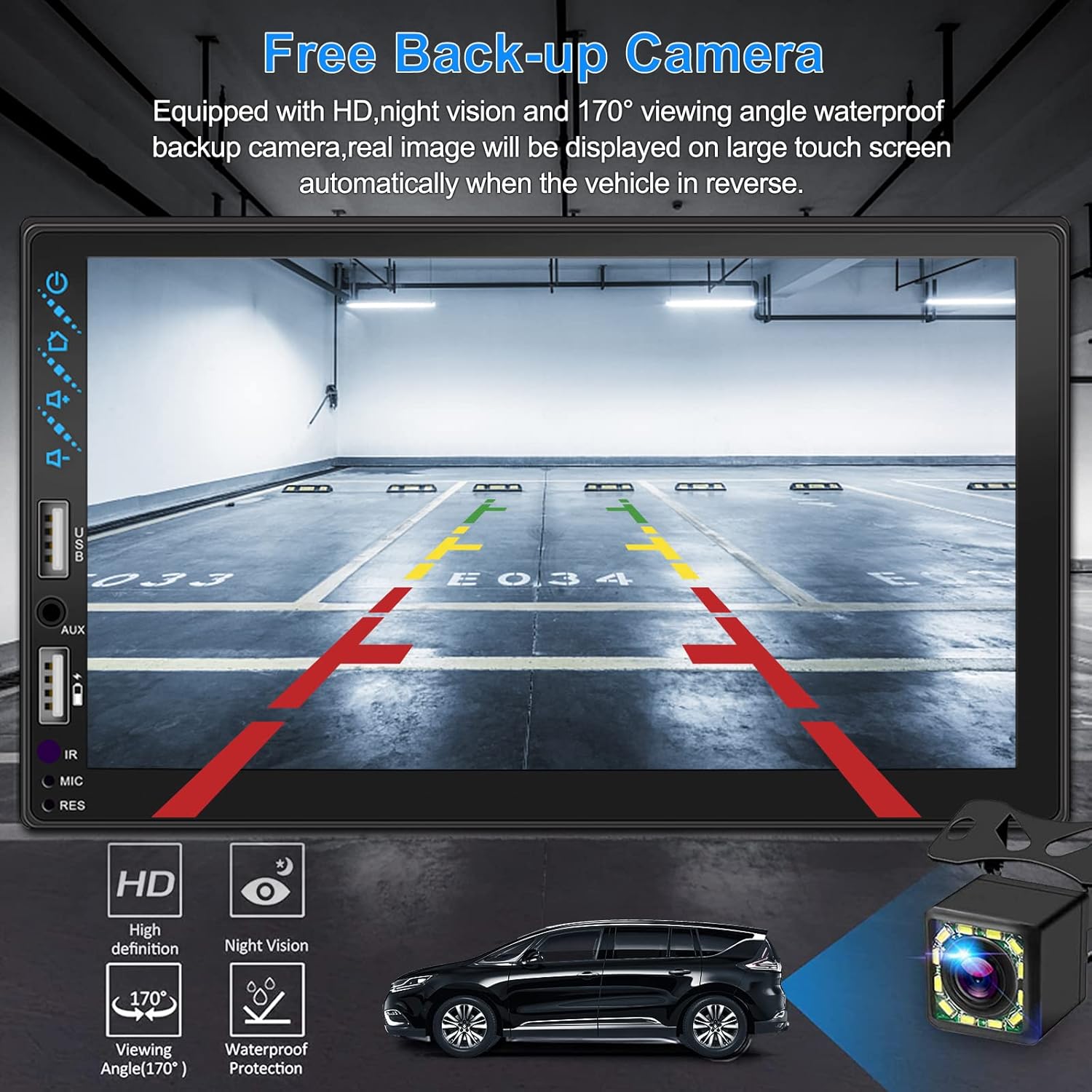
شڪل 3.4: پوئتي View ڪئميرا ڊسپلي
4. انسٽاليشن گائيڊ
Proper installation is crucial for optimal performance. It is recommended to have the unit installed by a professional if you are unfamiliar with car audio wiring.
4.1 طول و عرض
The stereo unit has a standard double din size. Refer to Figure 2.1 for detailed dimensions.
- چوٿون: 178mm (7 انچ)
- اوچائي: 102mm (4 انچ)
- گہرائي: 60mm (2.6 انچ)
4.2 وائرنگ ڊاگرام
Carefully follow the wiring diagram below to connect the stereo to your vehicle's electrical system. Ensure all connections are secure to prevent malfunctions.
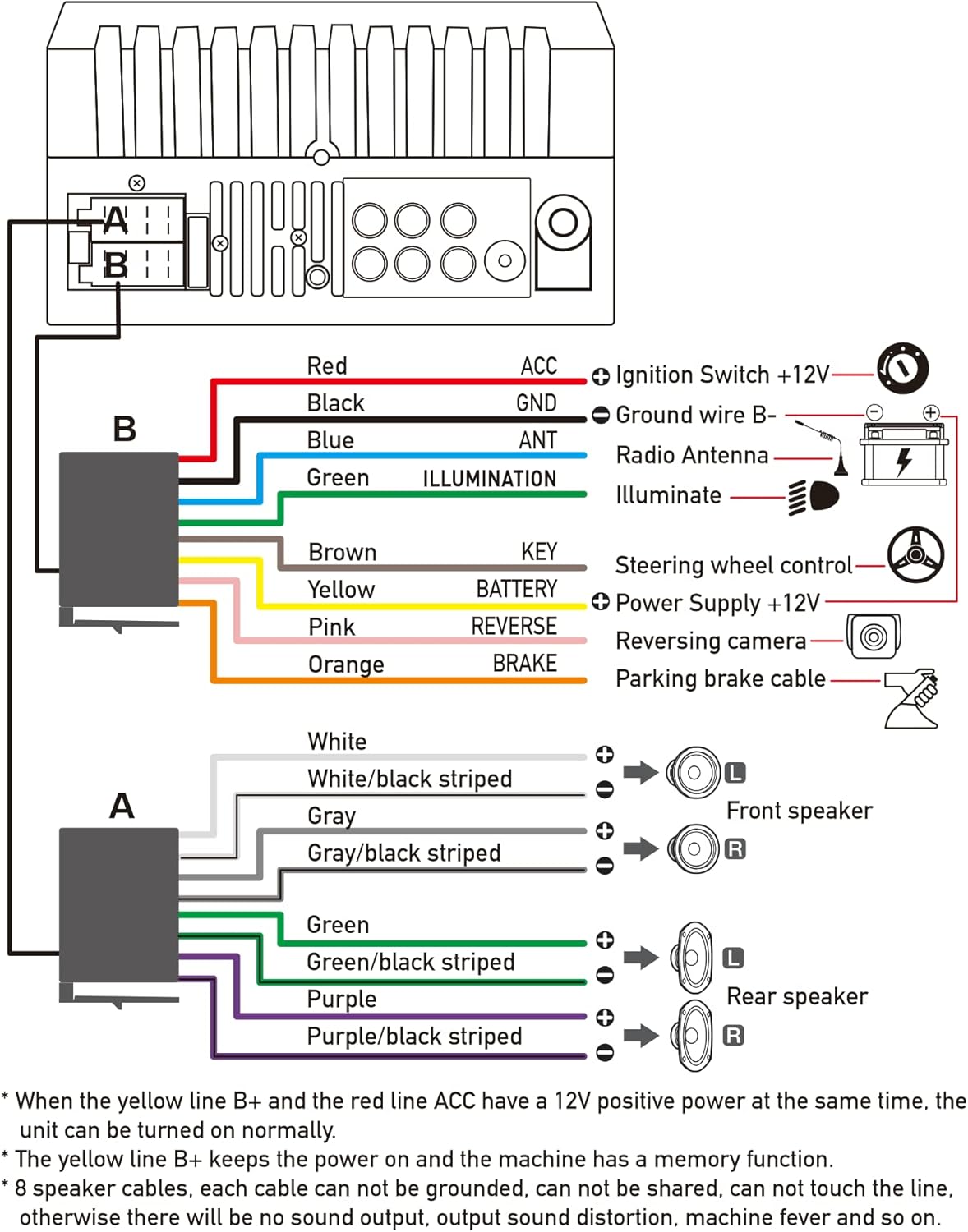
شڪل 4.1: مکيه وائرنگ ڊاگرام
- ڳاڙهو (اي سي سي): اگنيشن سوئچ +12V سان ڳنڍيو.
- ڪارو (GND): Connect to Ground wire B-.
- نيرو (ANT): Connect to Radio Antenna (if applicable).
- Green (ILLUMINATION): Connect to Illuminate wire.
- Brown (KEY): Connect to Steering wheel control.
- Yellow (BATTERY): Connect to Power Supply +12V.
- Pink (REVERSE): Connect to Reversing camera input.
- Orange (BRAKE): Connect to Parking brake cable.
Speaker Connections (8 speakers supported):
- White / White/black striped: سامهون کاٻي اسپيڪر
- Gray / Gray/black striped: سامهون ساڄي اسپيڪر
- Green / Green/black striped: پوئتي کاٻي اسپيڪر
- Purple / Purple/black striped: پوئتي ساڄي اسپيڪر
اهم نوٽس:
- The unit requires both the Yellow (BATTERY) and Red (ACC) wires to have a 12V positive power supply simultaneously for normal operation.
- The Yellow (BATTERY) wire keeps the power on and maintains memory functions.
- For speaker connections, each cable must not be grounded or shared with other cables. Incorrect wiring can lead to no sound output, sound distortion, or damage to the machine.
5. آپريٽنگ هدايتون
5.1 بنيادي آپريشن
- پاور آن / آف: فرنٽ پينل يا ريموٽ ڪنٽرول تي پاور بٽڻ کي دٻايو.
- حجم ڪنٽرول: Use the volume buttons on the front panel, steering wheel controls, or remote control.
- ذريعو چونڊ: Tap the 'Source' or 'Mode' icon on the touchscreen to switch between Radio, Bluetooth, USB, AUX, CarPlay, and Android Auto.
5.2 Apple CarPlay / Android Auto Usage
- Connect your compatible iPhone or Android smartphone to the stereo's USB port using a certified USB cable.
- The stereo will automatically detect the connection and prompt you to launch CarPlay or Android Auto.
- سيٽ اپ کي مڪمل ڪرڻ لاءِ اسڪرين تي ڏنل هدايتن تي عمل ڪريو.
- Once connected, you can access supported apps like Maps, Phone, Messages, and Music directly from the stereo's touchscreen or via voice commands.
5.3 بلوٽوٽ جوڙي
- پنھنجي اسمارٽ فون تي بلوٽوت کي چالو ڪريو.
- On the stereo, navigate to the Bluetooth menu.
- ڳولھيو available devices on your smartphone. The stereo's Bluetooth name will typically be 'ESLYYDS' or similar.
- Select the stereo from your smartphone's list and confirm the pairing code if prompted.
- هڪ ڀيرو جوڙيو ويو، توهان ڪال ڪري/ وصول ڪري سگهو ٿا ۽ وائرليس طور آڊيو اسٽريم ڪري سگهو ٿا.
5.4 Phone Mirror Link Usage
- Connect your smartphone to the stereo's USB port.
- Select the 'Mirror Link' option on the stereo's screen.
- Follow the specific instructions displayed on the stereo for your phone's operating system (Android or iOS) to enable screen mirroring. This may involve enabling USB debugging for Android or trusting the device for iOS.
5.5 ريڊيو آپريشن
- Select the 'Radio' source.
- Use the 'Scan' function to automatically search and save stations, or manually tune using the frequency controls.
- جلدي رسائي لاءِ پنھنجي پسنديده اسٽيشنن کي پري سيٽ بٽڻن ۾ محفوظ ڪريو.
5.6 USB پلے بیک
- آڊيو يا وڊيو تي مشتمل هڪ USB ڊرائيو داخل ڪريو files into the designated USB playback port.
- The stereo will automatically switch to USB mode or prompt you to select it.
- Browse and play your media files using the touchscreen controls.
6. سار سنڀال
توهان جي ڪار اسٽيريو جي ڊگهي عمر ۽ بهترين ڪارڪردگي کي يقيني بڻائڻ لاءِ، انهن سار سنڀال جي هدايتن تي عمل ڪريو:
- صفائي: Use a soft, dry cloth to clean the screen and exterior. For stubborn smudges on the screen, use a screen cleaner specifically designed for electronic displays. Avoid abrasive cleaners or solvents.
- گرمي پد: يونٽ کي گهڻي عرصي تائين گرم ۽ سرد ٻنهي سخت گرمي پدن ۾ بي نقاب ڪرڻ کان پاسو ڪريو.
- نمي: يونٽ کي سڪل رکو. ان کي پاڻي يا گهڻي نمي جي سامهون نه رکو.
- فرم ويئر اپڊيٽس: ٺاهيندڙ جي چيڪ ڪريو webڪارڪردگي بهتر ڪرڻ ۽ نوان فيچر شامل ڪرڻ لاءِ ڪنهن به دستياب فرم ويئر اپڊيٽ لاءِ وقتاً فوقتاً سائيٽ جو دورو ڪريو.
7. مسئلا حل ڪرڻ
If you encounter issues with your ESLYYDS car stereo, please refer to the following common problems and solutions. If the problem persists, contact customer support.
| مسئلو | ممڪن سبب | حل |
|---|---|---|
| طاقت نه آهي | غلط وائرنگ؛ ڦاٽل فيوز؛ گاڏي جي بيٽري جو مسئلو. | Check power (Yellow and Red) and ground (Black) wire connections. Inspect vehicle fuses. Ensure vehicle battery is charged. |
| آواز ڪونهي | Speaker wires incorrectly connected; Volume too low; Mute function active. | Verify all speaker wire connections (ensure no shorts or grounds). Increase volume. Check if mute is enabled. |
| بلوٽوٿ ڳنڍي نه ٿو | Bluetooth not enabled on phone/stereo; Incorrect pairing process. | Ensure Bluetooth is active on both devices. Delete previous pairings and re-attempt pairing process. |
| CarPlay/Android Auto not launching | Faulty USB cable; Phone not compatible; Software issue. | Use a high-quality, certified USB cable. Ensure your phone's OS version is compatible. Restart both phone and stereo. |
| Rear camera not displaying | Camera wire disconnected; Reverse trigger wire not connected. | Check the camera's video input and power connections. Ensure the Pink (REVERSE) wire is correctly connected to the vehicle's reverse light trigger. |
| USB not reading media | اڻ سڌريل file format; Corrupted USB drive; USB port issue. | ميڊيا کي يقيني بڻايو وي files are in supported formats (e.g., MP3, MP4, MKV). Try a different USB drive. |
8. وضاحتون
| خاصيت | تفصيل |
|---|---|
| پيداوار جي ماپ | 7 x 2.6 x 3.94 انچ |
| شيءِ جو وزن | 2.33 پائونڊ |
| ماڊل نمبر | L3 |
| ڊسپلي سائيز | 7 انچ (18 سينٽي) |
| ڊسپلي جو قسم | HD Capacitive Touchscreen |
| رابطي ٽيڪنالاجي | Carplay, Android Auto, Mirror-Link, Bluetooth 5.2, USB, AUX |
| ڪنٽرولر جو قسم | Google Assistant, iOS, Android |
| خاص خاصيتون | Touchscreen, RDS, Steering Wheel Control (SWC), Fast Charging USB (2.1A) |
| مطابقت رکندڙ ڊوائيسز | اسمارٽ فون |
| ڪنيڪٽر جو قسم | USB |
| آڊيو آئوٽ پٽ موڊ | چوڌاري |
| چوڌاري آواز چينل جي جوڙجڪ | 5.1 |
| وڊيو انڪوڊنگ سپورٽ | ايم ڪي وي |
| رنگ | ڪارو |
| تاريخ پهرين دستياب | سيپٽمبر 25، 2021 |
9. وارنٽي ۽ سپورٽ
ESLYYDS is committed to providing excellent customer service and technical support. For any inquiries or assistance, please contact our professional technical team.
- رقم جي واپسي جي ضمانت: 30-day period from purchase.
- متبادل وارنٽي: 12-month period for product replacement.
- ٽيڪنيڪل سپورٽ: Life-time technical support is provided.
Please refer to your purchase documentation for specific contact details or visit the official ESLYYDS webسپورٽ جي معلومات لاءِ سائيٽ.


