1. تعارف
Welcome to the TAOPON Smart Watch user manual. This guide provides essential information for setting up, operating, and maintaining your new smartwatch. The TAOPON Smart Watch is designed for both Android and iOS phones, featuring IP67 waterproofing, a full touch screen, and comprehensive fitness and health tracking capabilities.

Figure 1: TAOPON Smart Watch, showcasing ان جي سهڻي ڊيزائن ۽ متحرڪ ڊسپلي.
2. اهم خاصيتون
- فيشن ڊيزائن: Features a 1.28-inch full touch color screen with 240x240 pixel resolution, offering high-definition clarity. Customize your watch face with various pre-set dials or your own photos.
- Comprehensive Fitness Tracking: Supports 8 sports modes including walking, running, cycling, skipping rope, badminton, basketball, football, and swimming. Tracks calorie consumption, steps, distance, activity minutes, and heart rate. Connects to your mobile phone's GPS for detailed movement tracking.
- ترقي يافته صحت جي نگراني: Accurately monitors real-time health data such as heart rate, blood oxygen, and blood pressure. Includes a sleep monitor to track deep sleep, light sleep, and overall sleep quality trends.
- Convenient Smart Tools: Integrates practical tools like weather forecast, pedometer, sedentary reminder, remote camera control, music control, theater mode, timer, deep breathing guide, and adjustable brightness. Supports up to 3 alarms.
- سمارٽ اطلاعن: Receives message notifications from the 'Da Fit' APP, including call reminders, call rejection, SMS, Facebook, Twitter, LinkedIn, WhatsApp, Line, and Instagرام.
- Long Battery Life & Durability: Equipped with a 200mAh battery providing up to 7 days of typical use and 30 days of standby time on a single charge. Features an IP67 waterproof rating, suitable for hand washing and rainy conditions.
3. سيٽ اپ گائيڊ
3.1 انباڪسنگ ۽ شروعاتي چارج
Upon unboxing, ensure all components are present: the TAOPON Smart Watch, charging cable, and user manual. Before first use, fully charge the device.
- مقناطيسي چارجنگ ڪيبل کي واچ جي پوئين پاسي واري چارجنگ پوائنٽس سان ڳنڍيو.
- Plug the USB end of the cable into a standard USB power adapter (5V/1A recommended) or a computer USB port.
- The watch display will indicate charging status. A full charge typically takes about 2 hours.

Figure 2: Illustration of the smartwatch's ultra-thin dial and charging process, highlighting its long battery life.
3.2 ايپ جي انسٽاليشن ۽ جوڙو ٺاهڻ
To unlock the full potential of your TAOPON Smart Watch, download and install the 'Da Fit' application on your smartphone.
- Scan the QR code in the manual or search for 'Da Fit' in your smartphone's app store (Google Play Store for Android, Apple App Store for iOS).
- Install the 'Da Fit' app and open it.
- پڪ ڪريو ته توهان جي اسمارٽ فون تي بلوٽوت فعال آهي.
- In the 'Da Fit' app, navigate to the 'Device' section and select 'Add Device'.
- The app will search for available devices. Select 'smartwatch zl02g' from the list to pair.
- Follow any on-screen prompts to complete the pairing process. Once connected, the watch will synchronize time and data with your phone.
4. آپريٽنگ هدايتون
4.1 بنيادي نيويگيشن
- ٽچ اسڪرين: مينيو ۽ خاصيتن ذريعي نيويگيٽ ڪرڻ لاءِ کاٻي/ساڄي، مٿي/هيٺ سوائپ ڪريو. چونڊڻ لاءِ ٽيپ ڪريو.
- پاسي واري بٽڻ: Press the side button to return to the home screen or to turn the screen on/off.
- اٿي بيهڻ: The display automatically lights up when you raise your wrist.
4.2 واچ فيس کي ترتيب ڏيڻ
Personalize your smartwatch by changing the watch face.
- From the home screen, long-press the watch face to enter the watch face selection mode.
- Swipe left or right to browse pre-installed watch faces. Tap to select.
- For more options, open the 'Da Fit' app, go to 'Watch Faces' or 'Dial Settings' to download new designs or set a custom photo as your watch face.
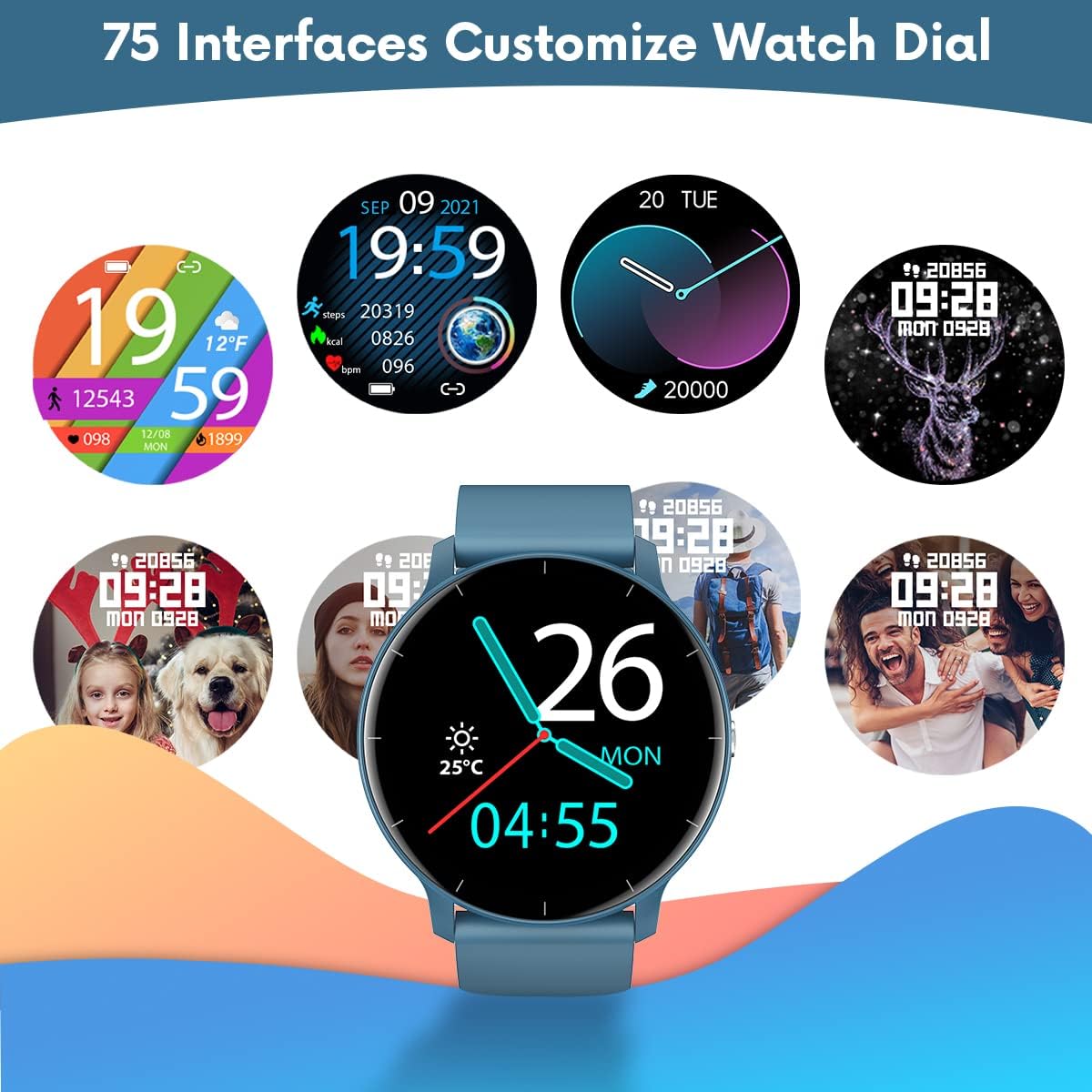
شڪل 3: مثالamples of customizable watch faces available on the TAOPON Smart Watch.
4.3 فٽنيس ٽريڪنگ
Utilize the various sports modes to track your workouts.
- Swipe on the watch to find the 'Exercise' or 'Sports Modes' icon.
- Select your desired activity (e.g., Walking, Running, Cycling).
- The watch will begin tracking your activity, including steps, distance, calories burned, and heart rate.
- Connect to your phone's GPS via the 'Da Fit' app for detailed route mapping during outdoor activities.

Figure 4: The smartwatch displaying fitness metrics like step count, distance, and calories during a workout.
4.4 صحت جي نگراني
Monitor your vital health metrics directly from your wrist.
- دل جي شرح: Navigate to the heart rate monitoring interface. The watch will automatically measure your heart rate. Continuous monitoring can be enabled via the 'Da Fit' app.
- Blood Pressure & Blood Oxygen (SpO2): Access these functions from the watch menu. Ensure the watch is worn snugly on your wrist for accurate readings.
- سمهڻ جي نگراني: Wear the watch to bed. It will automatically track your sleep patterns, including deep sleep, light sleep, and wake times. View detailed sleep reports in the 'Da Fit' app.

Figure 5: Visual representation of the smartwatch's health monitoring capabilities, including heart rate, blood pressure, blood oxygen, and sleep tracking.
4.5 سمارٽ خاصيتون
- نوٽيفڪيشن: Ensure the 'Da Fit' app has necessary permissions. You will receive call, SMS, and social media notifications directly on your watch. You can reject calls from the watch.
- ريموٽ ڪئميرا ڪنٽرول: Open the camera function in the 'Da Fit' app. Use the watch as a remote shutter button to take photos on your phone.
- موسيقي ڪنٽرول: Control music playback on your smartphone (play/pause, next/previous track) directly from the watch.
- موسمي اڳڪٿي: View current weather conditions and forecasts after syncing with the 'Da Fit' app.
- الارم ۽ ياد ڏياريندڙ: Set up to 3 alarms via the 'Da Fit' app. Enable sedentary reminders to prompt you to move after periods of inactivity.

Figure 6: Using the smartwatch to remotely control your phone's camera for group photos.

Figure 7: The smartwatch interface showing music playback controls.
5. سار سنڀال ۽ سنڀال
Proper maintenance ensures the longevity and optimal performance of your TAOPON Smart Watch.
- صفائي: Regularly wipe the watch screen and strap with a soft, dry cloth. For stubborn dirt, use a slightly damp ڪپڙو وجھو ۽ پوءِ چڱيءَ طرح سڪايو. سخت ڪيميڪلز يا رگڙيندڙ مواد کان پاسو ڪريو.
- پاڻي جي مزاحمت: The watch is IP67 waterproof, meaning it can withstand splashes, rain, and brief immersion in shallow water (e.g., hand washing). Do not use it for hot showers, diving, or prolonged submersion. Avoid contact with hot water, steam, or corrosive liquids.
- اسٽوريج: گھڙي کي سڌي سج جي روشني ۽ انتهائي گرمي پد کان پري ٿڌي، سڪل جاءِ تي رکو.
- چارج ڪرڻ: Use only the provided charging cable. Do not attempt to charge the watch if it or the cable is wet.
6. مسئلا حل ڪرڻ
If you encounter issues with your TAOPON Smart Watch, refer to the following common solutions:
| مسئلو | ممڪن حل |
|---|---|
| واچ نه آن | Ensure the watch is fully charged. Connect to the charger and wait a few minutes before attempting to power on. |
| فون سان جوڙڻ جي قابل نه | Ensure Bluetooth is enabled on your phone and the watch is within range. Restart both the watch and your phone. Check if the 'Da Fit' app has necessary permissions. |
| صحت جي ڊيٽا جي غلط معلومات | Ensure the watch is worn snugly on your wrist, not too loose or too tight. Avoid excessive movement during measurements. Clean the sensor on the back of the watch. |
| اطلاع نه مليا | Verify that the 'Da Fit' app is running in the background and has notification permissions enabled for the desired apps. Check phone's notification settings. |
| مختصر بيٽري جي زندگي | Reduce screen brightness, disable continuous heart rate monitoring, and limit frequent notifications. Ensure background app refresh is managed. |
7. وضاحتون
| خاصيت | تفصيل |
|---|---|
| ماڊل نمبر | smartwatch zl02g |
| طول و عرض | 1.77 x 1.77 x 0.39 انچ |
| وزن | 1.23 آونس (35 گرام) |
| اسڪرين جي ماپ | 1.28 انچ |
| ڊسپلي قرارداد | 240x240 پڪسل |
| بيٽري جي گنجائش | 200mAh ليتيم پوليمر |
| بيٽري جي زندگي (عام استعمال) | 7 ڏينهن تائين |
| اسٽينڊ بائي ٽائيم | 30 ڏينهن تائين |
| پاڻي جي مزاحمت | IP67 |
| مطابقت | iOS 9.0 & Android 5.0 or higher |
| رابطي | بلوٽوٿ |
| جي پي ايس | اسمارٽ فون ذريعي |
| ٺاهيندڙ | ٽاپون |
8. وارنٽي ۽ سپورٽ
For warranty information and customer support, please refer to the documentation included with your product or contact TAOPON customer service directly. Keep your purchase receipt as proof of purchase.


