1. اھم حفاظتي ھدايتون
مھرباني ڪري اوزار استعمال ڪرڻ کان پھريان ھي ھدايتون احتياط سان پڙھو ۽ مستقبل جي حوالي لاءِ رکو. انھن ھدايتن تي عمل ڪرڻ ۾ ناڪامي بجليءَ جو جھٽڪو، باهه، يا سنگين زخمي ٿي سگھي ٿي.
- حجم کي يقيني بڻايو وڃيtagريٽنگ ليبل تي ظاهر ڪيل اي توهان جي مکيه جلد سان ملندو آهيtage.
- وڌيڪ گرم ٿيڻ کان بچڻ لاءِ هيٽر کي ڍڪ نه ڏيو.
- هن هيٽر کي غسل، شاور، يا ترڻ جي تلاء جي فوري طور تي استعمال نه ڪريو.
- ٻرندڙ مواد جهڙوڪ فرنيچر، پردا، ۽ ٻيون ٻرندڙ شيون هيٽر جي اڳيان ۽ پاسن کان گهٽ ۾ گهٽ 1 ميٽر (3 فوٽ) جي مفاصلي تي رکو.
- جڏهن استعمال ۾ نه هجي ته هميشه هيٽر کي انپلگ ڪريو.
- هيٽر کي خراب ٿيل ڪنڊ يا پلگ سان نه هلايو، يا هيٽر جي خراب ٿيڻ کان پوءِ يا ڪنهن به طريقي سان ڪري ڇڏيو يا خراب ٿي ويو.
- هي اوزار استعمال ڪرڻ جو ارادو نه ڪيو ويو آهي ماڻهن (بشمول ٻارن سميت) گھٽ جسماني، حسي يا ذهني صلاحيتن سان، يا تجربو ۽ ڄاڻ جي کوٽ، جيستائين انهن جي حفاظت لاء ذميوار شخص طرفان اوزار جي استعمال بابت نگراني يا هدايت نه ڏني وئي آهي.
- ٻارن کي نگراني ڪرڻ گهرجي انهي کي يقيني بڻائڻ ته اهي اوزار سان راند نه ڪن.
2. پراڊڪٽ ختمview
The Tristar KA-5819 is a smart electric convector heater designed for efficient room heating. It offers multiple control options and safety features.
اهم خاصيتون:
- پاور آئوٽ: Up to 2000W with 3 adjustable heat settings (750W, 1250W, 2000W).
- ڪنٽرول جا اختيار: Manual via integrated digital LCD screen, remote control, or smartphone app (Tuya Smart).
- ٽائمر فنڪشن: Programmable timer from 1 to 24 hours.
- اينٽي فريز موڊ: Automatically activates 2000W heating when ambient temperature is too low.
- حفاظت: Overheating protection and stable integrated feet.
- رابطي: Compatible with 2.4 GHz WiFi networks for smart control.
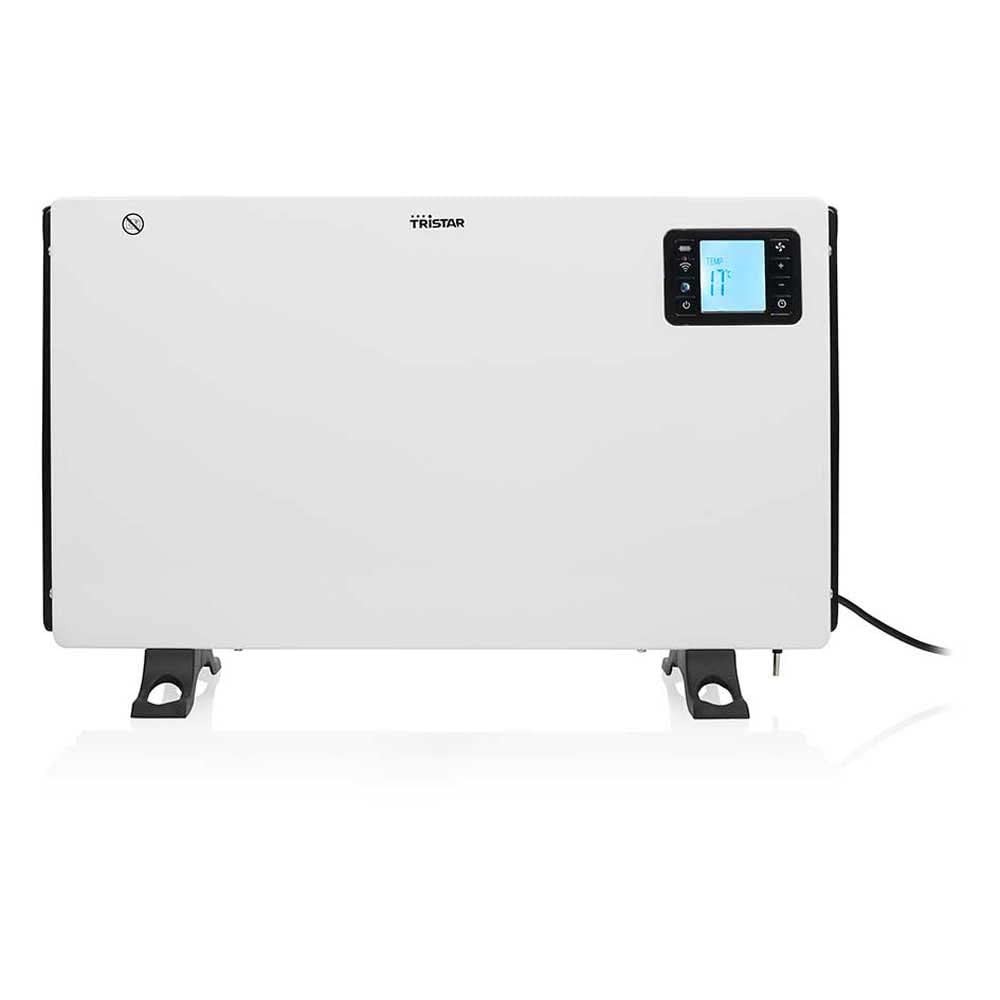
شڪل 1: پاسي view of the Tristar KA-5819 convector heater. This image highlights the main power switch, air vents, and the sturdy integrated feet that provide stability. The power cord is visible at the bottom right.
3. سيٽ اپ
3.1 کولڻ
Carefully remove the heater from its packaging. Retain the packaging for future storage or disposal. Check for any damage during transit. The package should include the convector heater, a remote control (with CR2032 battery), and this user manual.
3.2 لڳائڻ
- Place the heater on a firm, level surface. The integrated feet ensure stability.
- Ensure there is at least 1 meter (3 feet) of clear space around the heater from walls, furniture, and other objects to allow for proper air circulation and prevent fire hazards.
- Do not place the heater directly below a power socket.
- Avoid placing the heater in areas where it could be easily knocked over or where children or pets might come into contact with it.
3.3 پاور ڪنيڪشن
Plug the power cord into a suitable 240V electrical outlet. Ensure the outlet is properly grounded and can handle the heater's 2000W power consumption.
4. آپريٽنگ هدايتون
4.1 شروعاتي پاور آن
Flip the main power switch located on the side of the unit to the 'ON' position. The digital LCD screen will illuminate.
4.2 Manual Control (Digital LCD Screen)
Use the control buttons on the heater's digital LCD screen to adjust settings. The screen displays the current ambient temperature and selected settings.
- پاور سيٽنگون: Select between 750W, 1250W, or 2000W for desired heat output.
- ٿرم اسٽيٽ Set the desired room temperature. The heater will automatically regulate its operation to maintain this temperature.
- ٽائمر: Activate the timer function to set the heater to operate for a specific duration (1 to 24 hours).
4.3 ريموٽ ڪنٽرول آپريشن
The included remote control allows convenient adjustment of settings from a distance. Ensure the CR2032 battery is correctly installed. Point the remote control towards the heater's display panel.
- پاور بٽڻ: Turn the heater ON/OFF.
- Mode/Heat Setting Button: Cycle through 750W, 1250W, and 2000W power levels.
- گرمي پد مٿي/هيٺ بٽڻ: Adjust the desired thermostat temperature.
- ٽائمر بٽڻ: Set or adjust the operating timer.
4.4 Smart Control (Tuya Smart App)
For advanced control and remote operation, download the free Tuya Smart app from the Apple App Store or Google Play Store.
- ايپ ڊائون لوڊ ڪريو ڳولھيو "Tuya Smart" in your device's app store and install it.
- رجسٽر/لاگ ان: هڪ اڪائونٽ ٺاهيو يا پنهنجي موجوده ٽويا اسمارٽ اڪائونٽ ۾ لاگ ان ٿيو.
- ڊوائيس شامل ڪريو: Follow the in-app instructions to add the Tristar KA-5819 heater. Ensure your smartphone is connected to a 2.4 GHz WiFi network during the pairing process.
- ڪنٽرول: Once paired, you can control all heater functions (power, heat settings, thermostat, timer, anti-freeze mode) from your smartphone, even when away from home.
4.5 اينٽي فريز موڊ
The anti-freeze function automatically activates the 2000W heating mode if the ambient temperature drops below a certain threshold (typically around 5°C / 41°F) to prevent freezing. This mode can usually be enabled or disabled via the digital display or the Tuya Smart app.
5. سار سنڀال
5.1 صفائي
- هميشه هيٽر کي ان پلگ ڪريو ۽ صاف ڪرڻ کان اڳ ان کي مڪمل طور تي ٿڌو ٿيڻ ڏيو.
- ٻاھرين سطحن کي نرم سان صاف ڪريو، ڊيamp ڪپڙو. استعمال نه ڪريو abrasive cleaners يا solvents.
- هيٽر کي پاڻيءَ ۾ نه ٻوڙيو ۽ نه ئي پاڻي کي هيٽر جي اندرئين حصي ۾ ٽِپڻ ڏيو.
- Periodically clean the air intake and outlet grilles with a vacuum cleaner to remove dust and lint.
5.2 اسٽوريج
When not in use for extended periods, store the heater in a cool, dry place. It is recommended to store it in its original packaging to protect it from dust and damage.
6. مسئلا حل ڪرڻ
| مسئلو | ممڪن سبب | حل |
|---|---|---|
| هيٽر آن نٿو ٿئي. | No power supply; Main power switch OFF; Overheating protection activated. | Check power cord connection and wall outlet; Ensure main power switch is ON; Unplug, let cool for 30 minutes, then plug back in. |
| هيٽر گرمي پيدا نٿو ڪري يا ڪافي گرمي پيدا نٿو ڪري. | Low power setting selected; Thermostat set too low; Room size exceeds heater capacity. | Increase power setting (750W, 1250W, 2000W); Adjust thermostat to a higher temperature; Ensure room size is within 20 m² recommended. |
| ريموٽ ڪنٽرول ڪم نه ڪري رهيو آهي. | Battery depleted; Obstruction between remote and heater; Remote not pointed correctly. | Replace CR2032 battery; Remove any obstructions; Point remote directly at the heater's display panel. |
| App control not working / Cannot connect to WiFi. | Incorrect WiFi password; Not connected to 2.4 GHz WiFi; Heater not in pairing mode; Router issues. | Verify WiFi password; Ensure your phone is on a 2.4 GHz network during setup; Follow app instructions to put heater in pairing mode; Restart router and heater. |
| غير معمولي شور يا بوءِ. | مٽي جو جمع ٿيڻ؛ اندروني خرابي. | Unplug and clean the heater (see Maintenance); If problem persists, discontinue use and contact customer support. |
7. وضاحتون
| برانڊ | ٽرسٽار |
| ماڊل نمبر | KA-5819 |
| طول و عرض (L x W x H) | 60.5 x 21 x 37.5 سينٽي |
| وزن | 3.12 ڪلو |
| پاور آئوٽ | 750W / 1250W / 2000W |
| جلدtage | 240 وولٽ |
| گرمائش جو طريقو | سينٽر |
| شور جي سطح | 35 ڊيسيبل |
| مواد | ڌاتو |
| خاص خاصيتون | Remote Control, Digital LCD Display, Smart App Control (Tuya Smart), Timer, Anti-freeze Mode, Overheating Protection |
| تجويز ڪيل ڪمرو سائيز | 20 m² تائين |
| رابطي | 2.4 گيگاهپي وائي فائي |
8. وارنٽي ۽ سپورٽ
For warranty information, please refer to the warranty card included with your product or visit the official Tristar website. If you encounter any issues or require technical assistance, please contact Tristar customer support. Keep your purchase receipt as proof of purchase.
- ٺاهيندڙ: ٽرسٽار
- Webسائيٽ: www.tristar.eu


