1. تعارف
خريد ڪرڻ لاءِ مهربانيasing the eKids Cocomelon Karaoke Machine, Model CO-550. This portable Bluetooth party speaker is designed to provide hours of musical fun for children, featuring built-in Cocomelon songs, a real working microphone, and versatile connectivity options. This manual provides essential information for safe and optimal use of your new karaoke machine.
2. پراڊڪٽ ختمview
2.1 اهم خاصيتون
- بلوٽوت ڪنيڪشن: Wirelessly stream audio from any compatible Bluetooth device.
- تعمير ٿيل گيت: Includes 24 popular Cocomelon songs for immediate entertainment.
- USB Audio Player: Connect a USB drive to play your own MP3 music files.
- حقيقي ڪم ڪندڙ مائڪروفون: Sing along with the included wired microphone.
- ٻارن لاءِ مناسب ڊيزائن: Lightweight and portable with a built-in handle.
- Rechargeable بيٽري: Enjoy portable use with the integrated rechargeable battery (USB charging cable included).
- هيڊ فون جڪ ذاتي ٻڌڻ لاءِ.
2.2 اجزاء
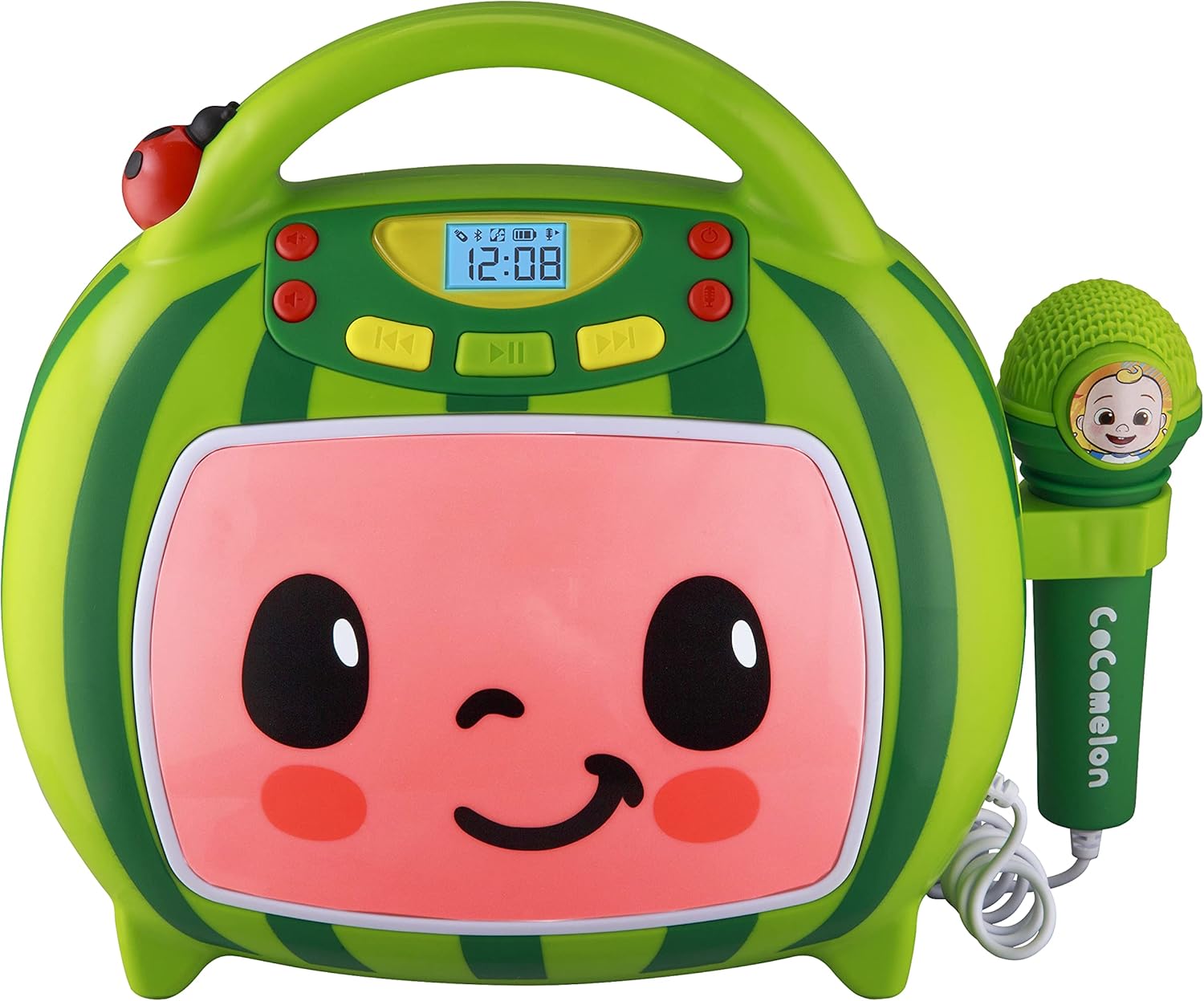
سامهون view of the eKids Cocomelon Karaoke Machine, featuring the watermelon-themed design and integrated microphone.

An annotated diagram detailing the dimensions, control buttons (volume, play/pause, power), microphone jack, USB port, and battery compartment of the karaoke machine.
پيڪيج ۾ شامل آهن:
- eKids Cocomelon Karaoke Machine
- وائرڊ مائڪروفون
- USB چارجنگ ڪيبل
3. سيٽ اپ
3.1 بيٽري لڳائڻ
The karaoke machine requires 1 Lithium Ion battery. Ensure the battery is correctly installed according to the polarity markings in the battery compartment, located on the back of the unit.
3.2 شروعاتي پاور آن
- Locate the Power ON/OFF button on the unit.
- Press and hold the Power ON/OFF button to turn on the device. The display will illuminate.
4. آپريٽنگ هدايتون
4.1 بلوٽوٽ جوڙي
- ڪاروائي مشين آن ڪريو. اهو خودڪار طريقي سان بلوٽوٿ پيئرنگ موڊ ۾ داخل ٿيندو.
- On your compatible device (e.g., smartphone, tablet), enable Bluetooth and search for available devices.
- Select 'eKids Cocomelon' from the list of devices to pair.
- Once paired, you can stream audio wirelessly from your device to the karaoke machine.

The karaoke machine is shown with icons indicating its compatibility with various Bluetooth-enabled devices such as PCs, smartwatches, tablets, and mobile phones.
This video demonstrates the Bluetooth pairing process for the eKids Cocomelon Karaoke Machine, showing how to connect a mobile device to stream music wirelessly.
4.2 USB آڊيو پلے بیک
- Insert a USB drive containing MP3 music files into the USB port located on the back of the unit.
- The machine will automatically detect the USB drive and begin playing music.
- Use the playback controls (Play/Pause, Forward, Reverse) to navigate your music.
4.3 تعمير ٿيل گيت
The karaoke machine comes pre-loaded with 24 Cocomelon songs. To play these songs, ensure no Bluetooth device is connected and no USB drive is inserted. Use the playback controls to select and play the desired song.

A visual representation of the 24 pre-loaded Cocomelon songs, including popular titles like 'Hello Song' and 'Wheels on the Bus'.
4.4 مائڪروفون استعمال
- Plug the wired microphone into the microphone jack on the side of the unit.
- Adjust the microphone volume using the dedicated controls.
- Sing along to your favorite tunes!

A young child engaging with the eKids Cocomelon Karaoke Machine, holding the microphone and singing along.
هڪ اوورview وڊيو شوasing the eKids Cocomelon Karaoke Machine in action, highlighting its portability, microphone, and various functions for children's entertainment.
4.5 ڪنٽرول
- پاور آن / آف: يونٽ کي آن يا بند ڪري ٿو.
- Volume UP/DOWN: مجموعي آواز جي مقدار کي ترتيب ڏئي ٿو.
- راند/روڪ: پلے بیک شروع ڪري ٿو يا کي روڪي ٿو.
- اڳتي / ريورس: ايندڙ يا پوئين ٽريڪ ڏانهن وڃي ٿو.
- مائڪروفون آن/آف: Activates or deactivates the microphone.
5. سار سنڀال
- صفائي: Wipe the unit with a soft, dry cloth. Do not use abrasive cleaners or immerse in water.
- اسٽوريج: Store the karaoke machine in a cool, dry place away from direct sunlight when not in use.
- بيٽري جي سنڀال: If the unit will not be used for an extended period, remove the battery to prevent leakage.
6. مسئلا حل ڪرڻ
| مسئلو | حل |
|---|---|
| يونٽ پاور نه آهي. | Check battery installation and ensure the battery is charged. |
| اسپيڪر مان ڪو به آواز نه ٿو اچي. | Increase volume. Ensure Bluetooth device is connected and playing, or USB is inserted correctly. |
| بلوٽوٿ ڪنيڪٽ نه ٿي رهيو آهي. | Ensure the unit is in pairing mode. Turn off and on Bluetooth on your device. Move closer to the unit. |
| مائڪروفون ڪم نه ڪري رهيو آهي. | Ensure the microphone is securely plugged in and the microphone ON/OFF switch is activated. |
7. وضاحتون
| خاصيت | تفصيل |
|---|---|
| ماڊل نمبر | ڪو 550 ـ |
| شيءِ جو وزن | 2.12 پائونڊ |
| پيداوار جي ماپ | 12 x 4 x 1 انچ |
| بيٽريون | 1 ليتيم آئن بيٽري گھربل |
| رابطي | بلوٽوٿ، يو ايس بي |
| اسپيڪر شمار | 1 |
| شامل اجزاء | USB ڪيبل |
8. وارنٽي ۽ سپورٽ
For warranty information or technical support, please refer to the contact details provided on the product packaging or visit the official eKids webسائيٽ. خريداري جي ثبوت طور پنهنجي خريداري جي رسيد رکو.
9. حفاظت جي ڄاڻ
- This product is intended for children aged 18 months and up.
- استعمال دوران بالغن جي نگراني جي سفارش ڪئي وئي آهي.
- يونٽ کي پاڻي يا گهڻي نمي جي سامهون نه آڻيو.
- يونٽ کي جدا ڪرڻ يا تبديل ڪرڻ جي ڪوشش نه ڪريو.
- Keep the USB cable and microphone cord away from young children to prevent choking hazards.
- مقامي ضابطن جي مطابق بيٽرين کي ذميواري سان ختم ڪريو.


