1. پراڊڪٽ ختمview
The Dioche Smart Lock Fingerprint Glass Door Lock offers multiple secure access methods for glass doors, including fingerprint, password, and access card. Designed for ease of use and security, it features an automatic locking mechanism and an integrated doorbell function. This manual provides comprehensive guidance for its installation, operation, and maintenance.

شڪل 1: سامهون view of the Dioche Smart Lock, showing the digital keypad, display screen, and fingerprint sensor.
اهم خاصيتون:
- گھڻن کي کولڻ جا طريقا: Supports fingerprint, password, and access card for flexible access.
- Semiconductor Fingerprint Sensor: Provides rapid and accurate fingerprint identification.
- خودڪار تالا: The lock engages automatically upon door closure, eliminating the need for manual locking.
- Integrated Doorbell Function: A dedicated doorbell button on the keypad activates an audible chime.
- Easy, Punch-Free Installation: Designed for clamp-based installation on glass doors, requiring no drilling.
- وسيع ايپليڪيشن: Suitable for various environments including offices, residences, villas, apartments, and warehouses.
2. پيڪيج مواد
انسٽاليشن شروع ڪرڻ کان اڳ پڪ ڪريو ته سڀئي جزا پيڪيج ۾ موجود آهن.
- 1 x لاڪ باڊي
- 1 x Lock
- 2 x Fixed Plate
- 2 x Double Sided Adhesive Sticker
- 7 x اسڪرو
- 5 x رٻڙ پلگ
- 2 x Entrance Card (13.56MHz Frequency)
- 1 x استعمال ڪندڙ دستياب

Figure 2: Contents of the Dioche Smart Lock package.
3. انسٽاليشن گائيڊ
The Dioche Smart Lock is designed for punch-free installation on glass doors with a thickness between 8-15mm (0.31-0.59in).
- دروازو تيار ڪريو: Ensure the glass door surface is clean and dry where the lock will be installed.
- Insert U-Type Lock Body: Carefully insert the U-type lock body onto the edge of the glass door. Ensure it is positioned correctly and securely.
- Secure with Fixed Plates and Screws: Place the fixed plates on both sides of the lock body. Use the provided screws and rubber plugs to tighten and secure the lock firmly to the glass door. Avoid over-tightening to prevent damage to the glass.
- بيٽرين کي انسٽال ڪريو. Open the battery compartment (typically on the inner unit) and insert 4 x 1.5V AA batteries (not included). Ensure correct polarity.
- ٽيسٽ ڪارڪردگي: After installation, perform an initial test to ensure the lock mechanism operates smoothly and the keypad responds.

شڪل 3: پاسي view illustrating the clamp installation method on a glass door.

شڪل 4: تفصيلي view of the lock's components, including the fingerprint sensor, manual knob, and USB port for emergency power.
4. آپريٽنگ هدايتون
4.1 Initial Setup and User Management
Refer to the included user manual for detailed instructions on setting up administrator accounts, adding fingerprints, passwords, and access cards. This typically involves entering a default administrator code and following on-screen prompts.
4.2 ان لاڪ ڪرڻ جا طريقا
- فنگر پرنٽ: Place a registered finger on the semiconductor fingerprint sensor. The lock will unlock upon successful recognition.
- پاسورڊ: Enter your registered password on the keypad, followed by the '#' key (or equivalent confirmation key).
- رسائي ڪارڊ: Present a registered access card to the card reader area on the lock. The lock will unlock upon successful reading.

Figure 5: Visual representation of the multiple door opening methods.

Figure 6: Demonstrating fingerprint unlock on a glass door.
4.3 خودڪار تالا لڳائڻ
The lock is equipped with an automatic locking feature. Once the door is closed and the lock tongue senses its position, the lock will automatically engage without manual intervention.
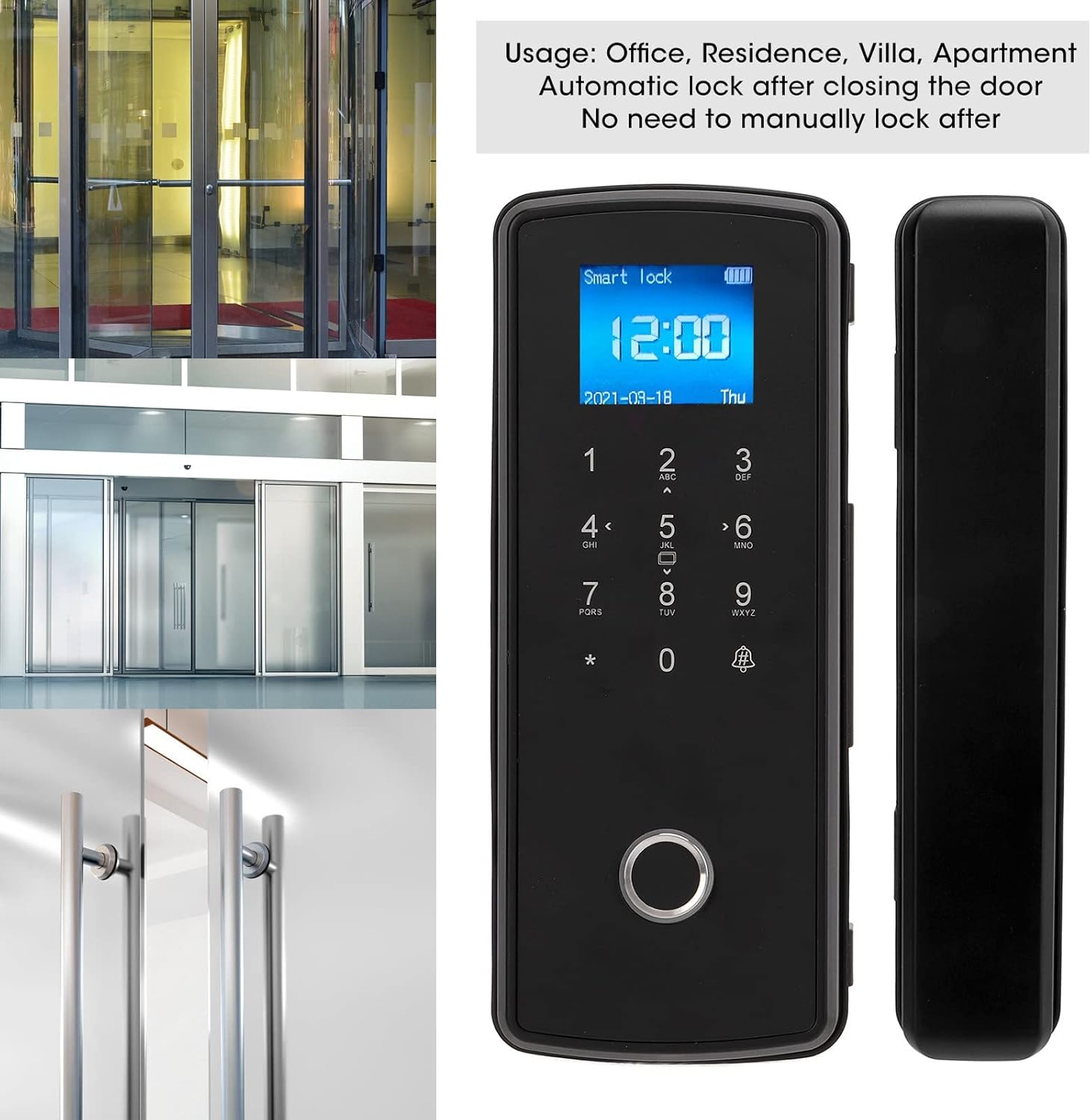
Figure 7: The smart lock in various settings, highlighting its automatic locking feature.
4.4 Doorbell Function
To use the doorbell function, simply touch the button marked with a doorbell icon on the keypad. This will activate an audible chime.

Figure 8: Activating the doorbell function on the smart lock.
4.5 ايمرجنسي پاور
In case of battery depletion, the lock can be temporarily powered via a 5V DC USB power supply connected to the emergency USB port (refer to Figure 4 for port location).

شڪل 9: ختمview of the lock's functions, including multiple unlock methods and doorbell.
5. سار سنڀال
- بيٽري مٽائڻ: Replace all four AA batteries when the low battery indicator appears on the display. Use high-quality alkaline batteries for optimal performance.
- صفائي: تالو جي مٿاڇري کي نرم، سڪل ڪپڙي سان صاف ڪريو. رگڙيندڙ ڪلينر يا سالوينٽس استعمال ڪرڻ کان پاسو ڪريو جيڪي ختم يا اليڪٽرانڪ حصن کي نقصان پهچائي سگهن ٿا.
- فنگر پرنٽ سينسر جي سنڀال: Keep the fingerprint sensor clean and free of dirt or moisture to ensure accurate readings.
- باقاعده چڪاس: Periodically check the tightness of the mounting screws and the smooth operation of the lock mechanism.
6. مسئلا حل ڪرڻ
- تالا جواب نه ڏئي رهيو آهي:
- بيٽري جي سطح چيڪ ڪريو ۽ تبديل ڪريو جيڪڏھن ضروري ھجي.
- Ensure the lock is receiving power via the emergency USB port if batteries are completely drained.
- آڱرين جي نشان جي سڃاڻپ نه ٿي:
- پڪ ڪريو ته توهان جي آڱر صاف ۽ سڪل آهي.
- پنهنجي آڱر کي سينسر تي ٻيهر رکڻ جي ڪوشش ڪريو.
- Re-register your fingerprint if issues persist.
- Password Entry Issues:
- Verify the correct password is being entered.
- Ensure the '#' key (or equivalent) is pressed after the password.
- Access Card Not Working:
- Ensure the card is correctly presented to the reader.
- Verify the card is registered with the lock.
- Automatic Lock Not Engaging:
- دروازي کي مڪمل طور تي بند ٿيڻ کان روڪڻ واري ڪنهن به رڪاوٽ جي جانچ ڪريو.
- Ensure the lock tongue is properly aligned with the strike plate.
7. وضاحتون
| خاصيت | تفصيل |
|---|---|
| برانڊ | ڊيوچ |
| ماڊل نمبر | Diochedbiwv97t5z1208 |
| مواد | ABS، اسٽينلیس سٹیل |
| تالا جو قسم | بايوميٽرڪ |
| کولڻ جا طريقا | Fingerprint, Password, Access Card |
| پاسورڊ جي گنجائش | 1000 گروپ |
| فنگر پرنٽ جي صلاحيت | 500 گروپ |
| ڪارڊ جي گنجائش | 1000 Cards (13.56MHz) |
| قرارداد | 500DPI |
| رد ڪرڻ جي شرح | ≤0.15% |
| سڃاڻپ جي رفتار | 0.3 سيڪنڊ |
| قبوليت جي شرح | ≤0.00004% |
| مناسب دروازي جي ٿلهي | Approx. 8-15mm (0.31-0.59in) |
| Power Supply (Lock) | 4 x 1.5V AA Batteries (not included) |
| USB پاور سپلائي | 5V ڊي سي |
| اسٽينڊ بائي ڪرنٽ | <55mA |
| ڪم ڪندڙ موجوده | <250mA |
| جامد موجوده | <50uA |
| آپريٽنگ جي درجه حرارت | -30-60℃ (-22-140℉) |
| نسبتي نمي | 20%-93% |
| شيءِ جو وزن | لڳ ڀڳ. 1334 گرام (2.94 پائونڊ) |
| پيڪيج جي ماپ | تقريبن 23 x 20 x 9 سينٽي ميٽر (9.06 x 7.87 x 3.54 انچ) |
8. پراڊڪٽ وڊيو
وڊيو 1: ختمview of the Dioche Smart Lock Fingerprint Glass Door Lock, demonstrating its features and operation.
9. وارنٽي ۽ سپورٽ
For warranty information and customer support, please refer to the documentation included with your purchase or contact the seller directly. Protection plans may be available for extended coverage.
- وڪرو ڪندڙ: Vertigo eu
- واپسي: Returnable until Jan 31, 2026 (as per Amazon policy at time of product data retrieval).
- حفاظتي منصوبا: Optional 3-Year and 4-Year protection plans may be available for purchase.