1. تعارف
This manual provides essential instructions for the safe and efficient operation of your Crosley CR6252A-YS Portfolio 3-Speed Bluetooth Turntable. Please read this manual thoroughly before using the product and retain it for future reference.
The Crosley Portfolio turntable is designed to play vinyl records at three speeds and features built-in speakers, Bluetooth connectivity for wireless audio streaming, and a moving magnetic cartridge for audio reproduction.

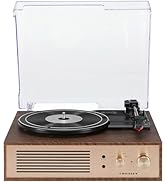
Figure 1.1: Crosley CR6252A-YS Portfolio Turntable (Open View)
2. حفاظتي هدايتون
- استعمال ڪرڻ کان اڳ سڀ هدايتون پڙهو.
- پيداوار کي پاڻي يا نمي کان پري رکو.
- Do not place near heat sources such as radiators, heat registers, stoves, or other apparatus that produce heat.
- صرف سڪل ڪپڙي سان صاف ڪريو.
- صرف ٺاھيندڙ طرفان بيان ڪيل منسلڪ / لوازمات استعمال ڪريو.
- بجليءَ جي طوفانن دوران يا ڊگھي عرصي لاءِ غير استعمال ٿيڻ دوران ھن ڊوائيس کي ان پلگ ڪريو.
- سڀني خدمتن جو حوالو ڏيو قابل خدمت اهلڪارن ڏانهن. خدمت ڪرڻ جي ضرورت پوندي آهي جڏهن سامان ڪنهن به طريقي سان خراب ٿي ويو آهي، جهڙوڪ پاور سپلائي ڪنڊ يا پلگ خراب ٿي ويو آهي، مائع ڦوڪيو ويو آهي يا شيون اپريٽس ۾ گر ٿي ويا آهن، سامان مينهن يا نمي جي سامهون آيو آهي، عام طور تي ڪم نٿو ڪري. ، يا ڇڏيو ويو آهي.
3. پيڪيج مواد
پڪ ڪريو ته هيٺ ڏنل سڀئي شيون توهان جي پيڪيج ۾ شامل آهن:
- Crosley CR6252A-YS Portfolio Turntable
- پاور اڊاپٽر
- استعمال ڪندڙ جو دستياب (ھي دستاويز)
4. پراڊڪٽ جون خاصيتون ۽ جزا
The Crosley CR6252A-YS Portfolio Turntable includes the following key features and components:
- 3-Speed Turntable: Supports 33 1/3, 45, and 78 RPM records.
- Built-in Bluetooth Receiver: Allows wireless streaming from compatible devices.
- Adjustable Pitch Control: Fine-tune record speed.
- Moving Magnetic Cartridge: Pre-mounted for optimal sound.
- معاون ان پٽ: ٻاهرين آڊيو ذريعن کي ڳنڍيو.
- USB Enabled: For PC connection.
- بلٽ ان اسپيڪرز: مربوط آڊيو آئوٽ پٽ.

Figure 4.1: Turntable Mechanism and Controls
شڪل 4.2: ڪنٽرول پينل جي تفصيل

شڪل 4.3: پوئين پينل ڪنيڪشن
5. سيٽ اپ
5.1 شروعاتي جڳهه
Place the turntable on a flat, stable surface away from direct sunlight, heat sources, and excessive dust or vibrations.
5.2 پاور ڪنيڪشن
- Connect the power adapter to the DC 12V input jack on the rear of the turntable.
- پاور اڊاپٽر کي مناسب وال آئوٽليٽ ۾ لڳايو.
5.3 Turntable Preparation
- Carefully remove any protective packaging materials from the turntable platter and tonearm.
- Ensure the tonearm is unlocked from its rest.
6. آپريٽنگ هدايتون
6.1 Playing Records
- ڦيرايو آن/بند knob clockwise to power on the unit.
- Select the desired speed (33 1/3, 45, or 78 RPM) using the speed selector switch. Note: A 78 RPM stylus (not included) is required for 78 RPM records.
- Place a record on the turntable platter. If playing a 45 RPM single, place the 45 RPM adapter (if included) over the spindle.
- Lift the tonearm using the cueing lever and position it over the desired track on the record.
- Lower the tonearm slowly onto the record using the cueing lever. The record will begin to play.
- حجم کي استعمال ڪندي ترتيب ڏيو حجم ڇڪ
- استعمال ڪريو پچ control knob to fine-tune the playback speed if necessary.
- To stop playing, lift the tonearm, return it to its rest, and turn the آن/بند گھڙي وانگر گھڙي وار وانگر.
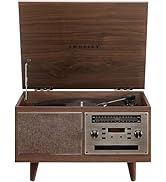
Figure 6.1: Stylus on Record
6.2 بلوٽوت آپريشن
- ڦيرايو آن/بند knob clockwise to power on the unit.
- Slide the function switch to the بلوٽوٿ position. The indicator light will flash, indicating pairing mode.
- Enable Bluetooth on your external device (e.g., smartphone, tablet) and search for "Crosley Portfolio".
- Select "Crosley Portfolio" from the list of available devices to pair. Once paired, the indicator light will stop flashing and remain solid.
- You can now stream audio wirelessly from your device to the turntable's built-in speakers.
- حجم کي استعمال ڪندي ترتيب ڏيو حجم knob on the turntable and/or your external device.
6.3 معاون ان پٽ (AUX IN)
- ڦيرايو آن/بند knob clockwise to power on the unit.
- Connect an external audio device (e.g., MP3 player, CD player) to the AUX اندر port using a 3.5mm audio cable (not included).
- ٽرن ٽيبل خودڪار طريقي سان AUX IN موڊ ۾ تبديل ٿي ويندو.
- حجم کي استعمال ڪندي ترتيب ڏيو حجم knob on the turntable and/or your external device.
6.4 USB ڪنيڪشن
The turntable features a PC-USB port for connecting to a computer. This allows for digital conversion of your vinyl records using appropriate software (not included). Refer to your chosen software's instructions for recording procedures.
7. سار سنڀال
7.1 ٽرنٽيبل کي صاف ڪرڻ
- Always unplug the turntable from the power outlet before cleaning.
- Use a soft, dry cloth to wipe the exterior surfaces. Do not use abrasive cleaners or solvents.
- Gently brush the stylus with a soft brush designed for stylus cleaning, moving from back to front.
7.2 اسٽائلس جي متبادل
The stylus (needle) is a consumable part and will wear out over time. A worn stylus can damage your records and degrade sound quality. Replace the stylus after approximately 200-300 hours of playback. Consult your retailer or Crosley support for compatible replacement styli.
8. مسئلا حل ڪرڻ
| مسئلو | ممڪن سبب | حل |
|---|---|---|
| طاقت نه آهي | پاور اڊاپٽر ڳنڍيل نه آهي يا آئوٽ ليٽ خراب آهي. | پڪ ڪريو ته پاور اڊاپٽر محفوظ طور تي ڳنڍيل آهي ۽ آئوٽ ليٽ ڪم ڪري رهيو آهي. |
| .الهائيندڙن مان آواز ڪونهي | Volume too low; function switch in wrong position; Bluetooth not paired. | Increase volume; ensure function switch is set to PHONO or Bluetooth is correctly paired. |
| رڪارڊ اسڪپنگ | Record is dirty or damaged; stylus is worn; turntable not level. | Clean record; replace stylus; ensure turntable is on a level surface. |
| بلوٽوٿ ڊوائيس جوڙو نه ٺهي سگهندو | Turntable not in pairing mode; device too far; device already paired to another unit. | Ensure turntable is in Bluetooth pairing mode; move device closer; disconnect from other Bluetooth devices. |
9. وضاحتون
- پيداوار جي ماپ: 12.4 x 15.28 x 6.5 انچ
- شيء جو وزن: 13 پائونڊ
- شئي ماڊل نمبر: CR6252A-YS
- برانڊ: ڪراسلي
- شامل اجزاء: CR6252A-YS Portfolio Turntable
- انداز: ونtage
- رنگ: Yellow Submarine
- سگنل فارميٽ: اينالاگ
- طاقت جو ذريعو: تار ٿيل برقي
- UPC: 710244246569
10. وارنٽي ۽ سپورٽ
For warranty information and technical support, please refer to the warranty card included with your product or visit the official Crosley webسائيٽ. ڪنهن به وارنٽي دعوائن لاءِ خريداري جي ثبوت طور پنهنجي خريداري جي رسيد رکو.
ٺاهيندڙ: ڪراسلي
تاريخ پهرين دستياب: نومبر 30، 2021


