تعارف
This manual provides comprehensive instructions for the assembly, operation, and maintenance of your InnoGear Microphone Stand (Model: RG250). Designed for versatility and stability, this stand is suitable for various applications, from studio recording to live performances.

Image: The InnoGear Microphone Stand (Model RG250) shown with its detachable gooseneck, mic clip, screw adapter, and cable clips, highlighting its main components.
پيداوار جون خاصيتون
- Height Adjustable & Stable: Adjustable from 32 inches to 70 inches, suitable for both standing and sitting use. Features a single height clutch and a separate extension pole for enhanced stability.
- لچڪدار Gooseneck: The 360° adjustable gooseneck allows for precise positioning of the microphone. The included mic clip can rotate 180°.
- Heavy-duty Round Base: A weighted 4.5 Lbs round base with a 9.8-inch diameter provides superior stability compared to tripod stands. Includes 6 non-slip pads and an upgraded fixing loop to prevent wobbling.
- Detachable & Portable Stand: Easily disassembles into four parts for convenient transport and quick setup, ideal for various activities like stage, studio, or outdoor performances.
- وسيع مطابقت: Compatible with most microphones, including popular models like HyperX QuadCast, Blue Yeti, Shure SM58, and Audio-Technica AT2020. (Note: Shock mount not included).
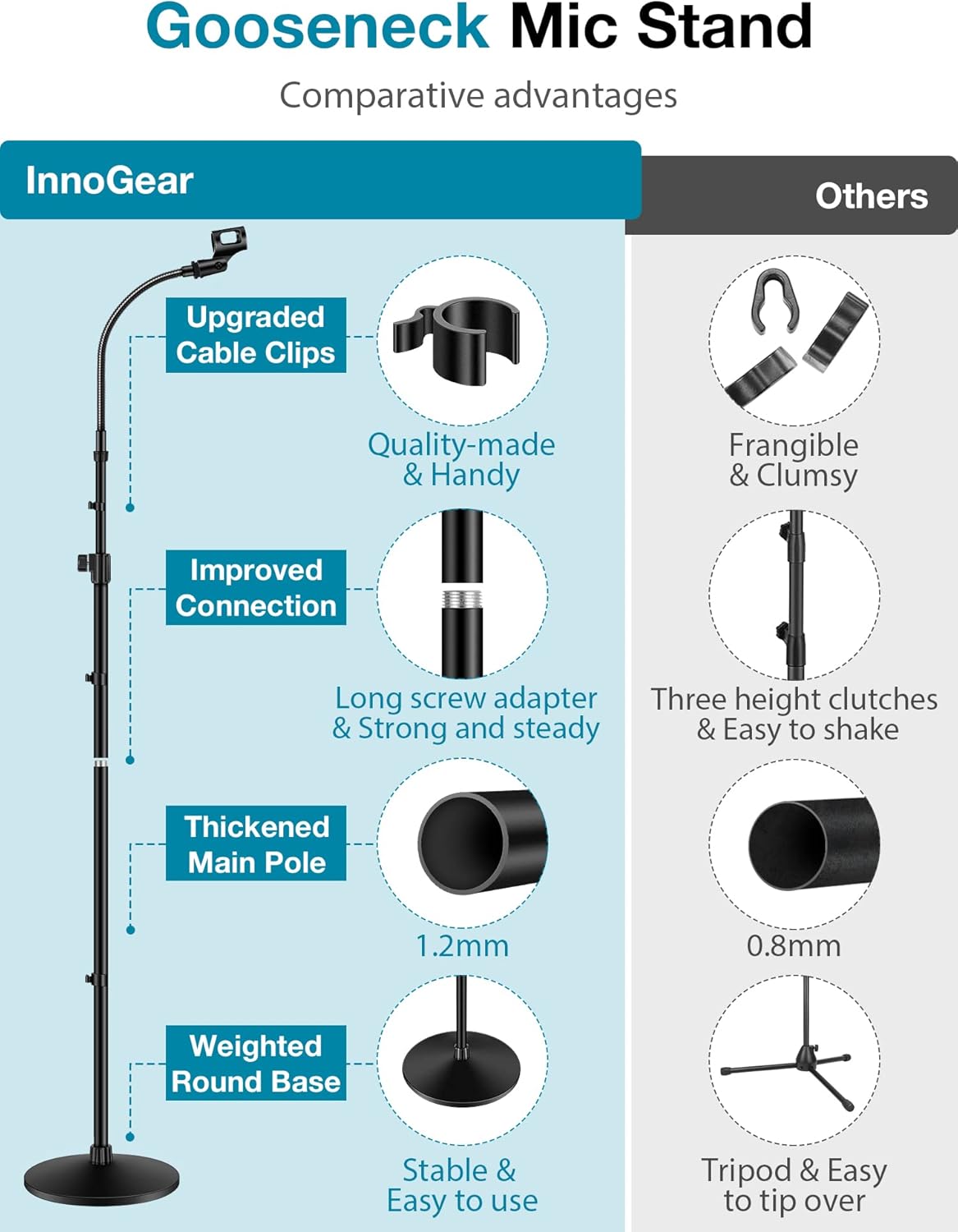
تصوير: هڪ بصري مقابلو جيڪو فائدي کي اجاگر ڪري ٿوtages of the InnoGear Gooseneck Mic Stand, including upgraded cable clips, improved connection, thickened main pole, and weighted round base.
پيڪيج مواد
مھرباني ڪري تصديق ڪريو ته اسيمبلي شروع ڪرڻ کان اڳ سڀئي جزا موجود آھن:
- Weighted Round Base
- Main Pole (with height adjustment clutch)
- واڌ جو قطب
- لچڪدار Gooseneck
- مائڪروفون ڪلپ
- 3/8" to 5/8" Screw Adapter
- Cable Clips (typically 3-4)
سيٽ اپ جون هدايتون
Follow these steps to assemble your InnoGear Microphone Stand:
- Attach the Main Pole to the Base: Screw the bottom end of the main pole into the threaded hole on the center of the weighted round base. Ensure it is tightened securely to prevent wobbling.
- Connect the Extension Pole (Optional): If additional height is required, connect the extension pole to the top of the main pole using the long screw adapter.
- Attach the Gooseneck: Screw the flexible gooseneck onto the top of the main pole or the extension pole.
- مائڪروفون ڪلپ انسٽال ڪريو: Screw the microphone clip onto the threaded end of the gooseneck. If your microphone requires a different thread size, use the provided 3/8" to 5/8" screw adapter.
- محفوظ ڪيبل: Use the included cable clips to neatly route your microphone cable along the stand, preventing tangles and ensuring a clean setup.

Image: The InnoGear mic stand shown disassembled into its main components (base, main pole, extension pole, gooseneck, mic clip), illustrating its portability and ease of setup.
آپريٽنگ هدايتون
Adjusting your microphone stand for optimal performance:
- اوچائي کي ترتيب ڏيڻ: Loosen the height adjustment clutch on the main pole. Extend or retract the pole to your desired height (between 32 and 70 inches) and then securely tighten the clutch.
- Positioning the Gooseneck: The flexible gooseneck can be bent and angled 360° to achieve the perfect microphone position for singing, speaking, or instrument miking.
- Adjusting Mic Clip Angle: The microphone clip can be rotated 180° to fine-tune the microphone's direction.

Image: A visual representation of the InnoGear mic stand's adjustable height, ranging from a minimum of 32 inches to a maximum of 70 inches, suitable for both sitting and standing users.
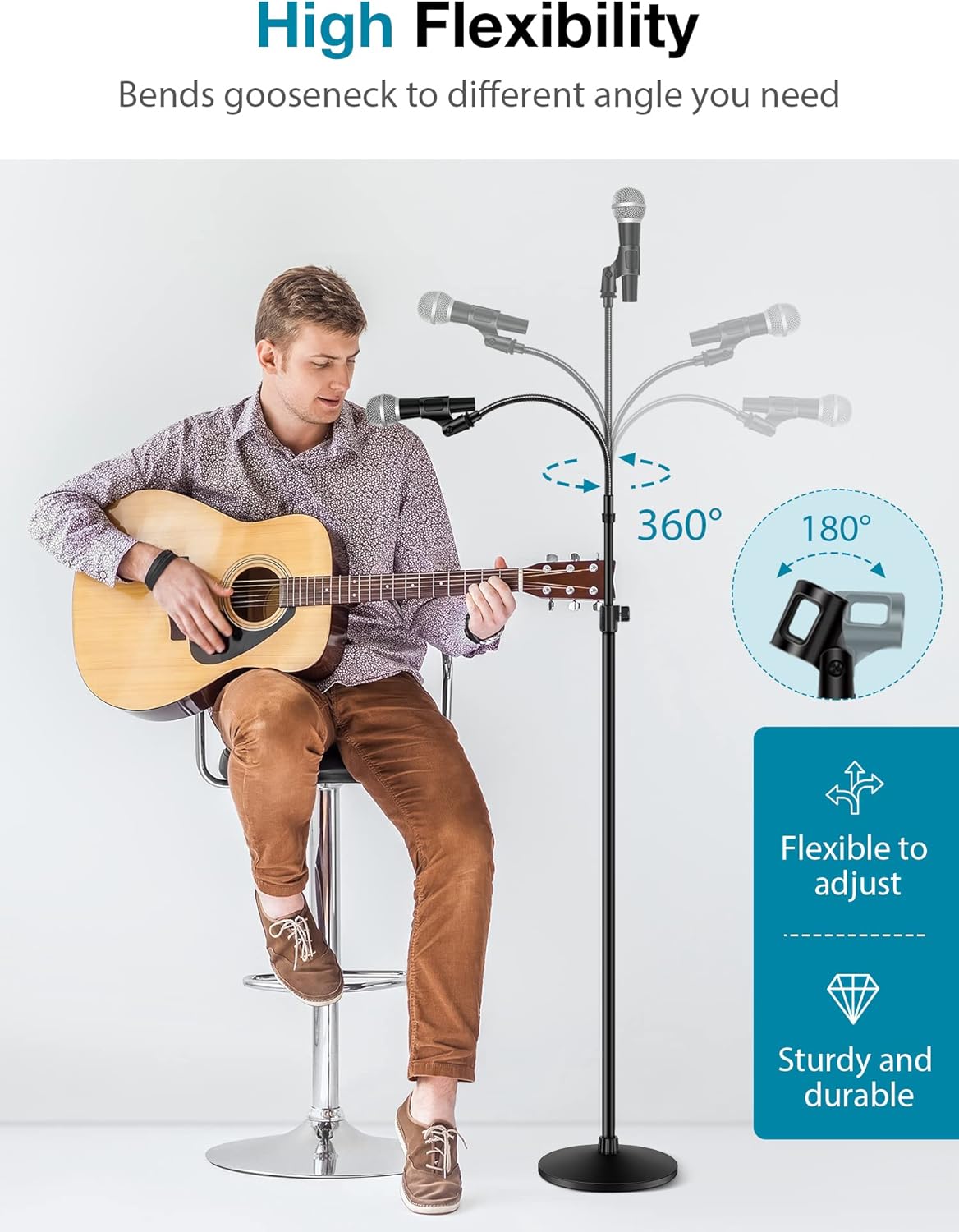
Image: A person playing a guitar with the InnoGear mic stand, demonstrating the 360-degree flexibility of the gooseneck and the 180-degree rotation of the mic clip for optimal microphone positioning.

Image: The InnoGear mic stand shown in various multi-functional scenarios, including stage performances, outdoor live events, speeches, and studio use, highlighting its versatility.
سار سنڀال
To ensure the longevity and optimal performance of your microphone stand:
- صفائي: Wipe down the stand regularly with a soft, dry cloth to remove dust and debris. For stubborn marks, a slightly damp ڪپڙو استعمال ڪري سگهجي ٿو، جنهن کان پوءِ فوري طور تي سڪايو وڃي.
- چڪاس ڪنيڪشن: Periodically check all screw connections and clutches to ensure they are tight. Loose connections can affect stability.
- اسٽوريج: When not in use, disassemble the stand and store it in a dry, cool place to prevent rust or damage.
- گهڻو تنگ ڪرڻ کان پاسو ڪريو: Do not overtighten the adjustment clutches or screw connections, as this can strip threads or damage components.
مشڪلاتون
| مسئلو | ممڪن سبب | حل |
|---|---|---|
| اسٽينڊ لڏپلاڻ وارو يا غير مستحڪم آهي. | Loose connections; uneven surface. | Ensure all pole connections and the base screw are tightened. Place the stand on a flat, stable surface. |
| Microphone does not fit the clip. | Incorrect mic size; missing adapter. | Verify your microphone's diameter is compatible with the clip (max 32mm). Use the 3/8" to 5/8" screw adapter if needed. Some microphones may require a separate shock mount (not included). |
| Gooseneck does not hold position. | Excessive weight; damaged gooseneck. | Ensure the microphone's weight is within the stand's capacity. If the gooseneck is damaged, contact customer support. |
وضاحتون
| خاصيت | تفصيل |
|---|---|
| ماڊل نمبر | آر جي 250 |
| برانڊ | InnoGear |
| Adjustable اوچائي | 32 انچ کان 70 انچ (81 سينٽي کان 178 سينٽي ميٽر) |
| بنيادي قسم | Weighted Round Base |
| بنيادي وزن | 4.5 پائونڊ (2.04 ڪلوگرام) |
| بنيادي قطر | 9.8 انچ (24.9 سينٽي) |
| مواد | پريميئم اسٽيل |
| رنگ | ڪارو |
| شيءِ جو وزن | 6.62 پائونڊ (3.0 ڪلوگرام) |
| پيڪيج جي ماپ | 14.96 x 10.35 x 3.23 انچ (38 x 26.3 x 8.2 سينٽي) |
| مطابقت رکندڙ ڊوائيسز | Microphones (various types) |
| ڪنيڪٽر جو قسم | Clip, Screw (3/8" to 5/8" adapter included) |

تصوير: هڪ تفصيلي view of the heavy-duty weighted round base, showing its 4.5 Lbs weight, 9.8-inch diameter, upgraded fixing loop, and non-slip pads for enhanced stability.
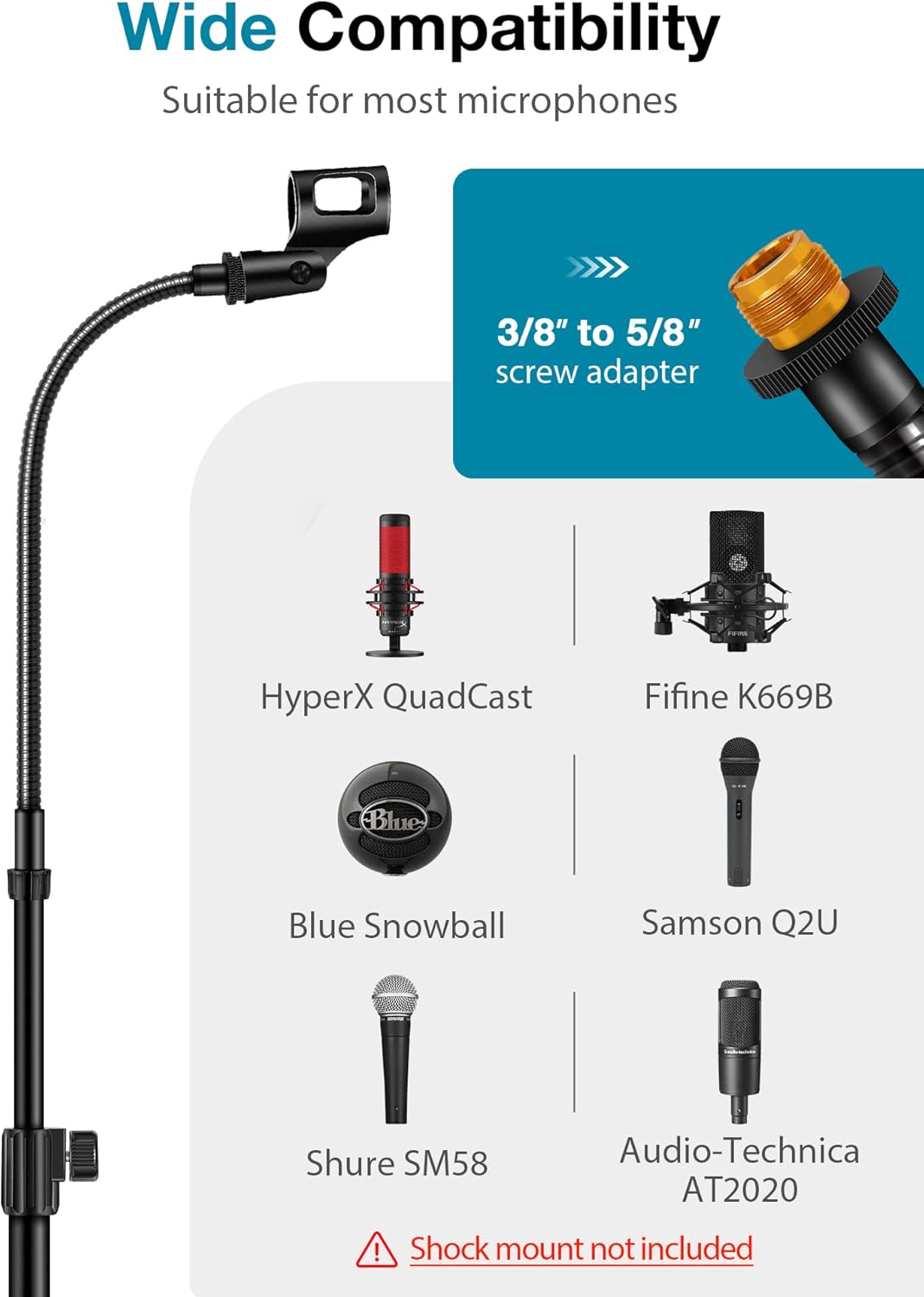
Image: The InnoGear mic stand illustrating its wide compatibility with different microphone models, along with the included 3/8" to 5/8" screw adapter.
وارنٽي ۽ سپورٽ
InnoGear products are designed for quality and performance. For warranty information, technical support, or any inquiries regarding your microphone stand, please refer to the official InnoGear webسائيٽ تي وڃو يا سڌو سنئون انهن جي ڪسٽمر سروس سان رابطو ڪريو. وارنٽي دعوائن لاءِ پنهنجي خريداري جي رسيد رکو.
وڌيڪ مدد لاءِ، توهان دورو ڪري سگهو ٿا InnoGear Store on Amazon.

